

 7 minutes read


Whenever people discuss music apps, two most popular names are Apple Music and Amazon Music. Both platforms stream thousands of tracks and offer easy-to-use streaming apps. Both make sure to provide a user experience of a cool way to listen to music all day. But one question that often comes up is, which option is better, Apple Music or Amazon Music?
In the end, this argument is simply about how you prefer listening. Some users value sound quality the most. While others want the cheapest option. And some people just want an app that is easy to use at first touch. By the year 2026, these two services will be more similar than ever, making the decision a bit puzzling. So let’s compare Apple Music vs Amazon Music in detail here and find out which one you should pick.

- Part 1. Pricing & Subscription Plan: Apple Music vs Amazon Music
- Part 2. Audio Quality & Library: Apple Music vs Amazon Music
- Part 3. User Experience & Algorithms: Apple Music vs Amazon Music
- Part 4. Ecosystem & Device Compatibility: Apple Music vs Amazon Music
- Part 5. Best Way to Get Apple Music and Amazon Music at Once
- Final Words
Content Table:
Part 1. Pricing & Subscription Plan: Apple Music vs Amazon Music
If you look at the pricing alone, both services seem alike at first. Differences emerge only after calculating Amazon Prime, annual discounts, and the additional plan options that each platform has. To help you understand better, here is a brief comparison of Apple Music vs Amazon Music:
| Plan Type | Apple Music | Amazon Music |
|---|---|---|
| Free Trial | 1–3 months | 1–3 months |
| Student Discount | $5.99/month | $5.99/month |
| Individual Plan | $0.99 for 3 months for new subscribers, then $10.99/month. | $10.99/month for individual Unlimited (Prime members pay $10.99, non-Prime $11.99) |
| Family Plan | $10.99/month | Prime: $8.99/month |
| Annual Plan | $109/year | $89/year (Prime members only) |
| Other Plans | Voice Plan: $4.99/month | Single Device Plan: $4.99/month |
Apple Music and Amazon Music both offer a free trial period, so you can check out their services without any payment. Their prices part when you see the long-term costs. Apple Music has a low-priced introductory period, so the first few months are quite nice for your wallet. Amazon Music has no introductory discount, but if you are a Prime member, it can be very cheap, particularly with the yearly plan. Their limited plans are pretty much the same but created for different users.
In simple terms, Apple Music is great if you want an easy setup and a small welcome deal, while Amazon Music is a better value if you’re already in the Prime ecosystem and want to save money over time.
Part 2. Audio Quality & Library: Apple Music vs Amazon Music

When comparing Amazon Music vs Apple Music audio quality and library, both services offer top-tier audio quality, but they take slightly different approaches. Apple Music provides high-quality, lossless, and hi-res lossless streams, with CD-quality at 256 kbps and hi-res up to 24-bit/192 kHz in ALAC. Amazon Music also reaches similar hi-res levels with its HD and Ultra HD tiers using FLAC, though Prime users are limited to standard 256 kbps until they upgrade. Spatial audio with Dolby Atmos is supported on both, but Apple’s implementation feels smoother on its own devices, while Amazon works well across headphones and Alexa-enabled devices.
Library size is massive on both platforms, but Apple edges ahead with more polished curation, exclusive album releases, and strong editorial playlists. Amazon’s library is equally vast but focuses its exclusives on live sessions, special tracks, and Prime-linked content rather than mainstream exclusives.
Which Is Better?
For Amazon Music vs Apple Music, Apple comes out on top if you want a highly curated experience and smooth integration across devices. Amazon holds its ground in audio quality and flexibility, making it an excellent choice for Prime members or users who want more device options.
Part 3. User Experience & Algorithms: Apple Music vs Amazon Music
When it comes to user experience, both Apple Music and Amazon Music are polished but shine in different ways. Apple Music feels smooth and consistent across devices, desktop, mobile, and web; all look and work similarly. Switching between devices is easy; this will give users a very smooth experience. Amazon Music works well too, especially on mobile and with Alexa devices, but the desktop and web versions can feel a bit cluttered.
Both services are strong at personalization. Apple Music creates playlists like “For You” and “Favorites Mix” based on your listening habits, helping you discover new tracks you’ll like. Amazon Music also offers curated playlists, stations, and mood-based mixes, but leans more toward genres or Prime-focused recommendations rather than highly personalized suggestions. Both have solid radio features, though Apple integrates them more naturally into the app.
Which Is Better?
For Amazon Music vs Apple Music, Apple clearly takes the lead in user experience. Its interface is smoother across all platforms, and its personalized playlists feel smarter and more intuitive. Amazon is still strong, especially if you’re in the Prime ecosystem or use Alexa devices, but Apple delivers a more consistent and enjoyable experience overall.
Part 4. Ecosystem & Device Compatibility: Apple Music vs Amazon Music

Let’s talk about the ecosystem and device compatibility of these two music apps. Apple Music and Amazon Music take different approaches. Apple Music works best if you’re already in the Apple world. iPhones, iPads, Macs, Apple Watch, and HomePod all sync smoothly. Features like spatial audio, live lyrics, and switching between devices just feel effortless if everything is Apple.
Amazon Music, on the other hand, plays well with almost anything. It works on Android, iOS, Windows, Macs, Fire TV, Echo devices, and even Sonos speakers. So if your devices are from different brands, Amazon gives you more flexibility. Some features are optimized for each platform Alexa controls, and spatial audio shines on Amazon devices, while Apple’s special features only fully work on Apple hardware.
Which Is Better?
For Amazon Music vs Apple Music, the choice depends on your devices. Apple wins if you’re fully invested in Apple products, offering flawless integration and exclusive features. Amazon wins on versatility, supporting a wider range of devices and letting you mix and match across brands.
Part 5. Best Way to Get Apple Music and Amazon Music at Once
No matter which you prefer, Apple Music or Amazon Music, everyone loves having their music offline without worrying about streaming limits. If you want to download your favorite songs from either platform, FliFlik UltConv Music Converter is a perfect choice. It’s easy to use, works with both services, and lets you save your music in formats you can play anywhere. UltConv Music Converter works with multiple music platforms, including Apple Music, Amazon Music, Spotify, Deezer, Tidal, and more. It allows you to download your favorite songs, albums, playlists, and podcasts so you can listen offline without being tied to any app or subscription.
The best part is how flexible it is. You can convert music into formats like MP3, AAC, WAV, FLAC, and M4A, while keeping all your ID3 tags and metadata intact. This means your tracks stay organized and high quality, no matter where you play them. UltConv Music Converter also supports batch downloads and high-speed conversion, making it a one-stop solution for building your personal music library from multiple streaming services.

- Compatible with over 10,000 streaming platforms, including Spotify, Apple Music, SoundCloud, and more.
- Batch download playlists, albums, or entire artist catalogs at a fast 10X speed.
- Download songs, albums, playlists, artists, podcasts, and audiobooks from Spotify, Apple Music, and Amazon Music.
- Convert music to multiple formats, including MP3, AAC, WAV, FLAC, M4A, AIFF, and MKA.
- Enjoy up to 320 Kbps lossless audio for high-quality listening.
- Preserve all ID3 tags and metadata like song title, artist, album, and artwork.
How to Download Apple Music to MP3 with UltConv Music Converter?
Follow these steps to save all your Apple Music songs to MP3 or other formats using UltConv Music Converter:
-
Go to UltConv’s official website, download the Music Converter for Windows or Mac, and install it on your computer.
FREE DOWNLOAD![secure download]() Secure Download
FREE DOWNLOAD
Secure Download
FREE DOWNLOAD![secure download]() Secure Download
Secure Download
-
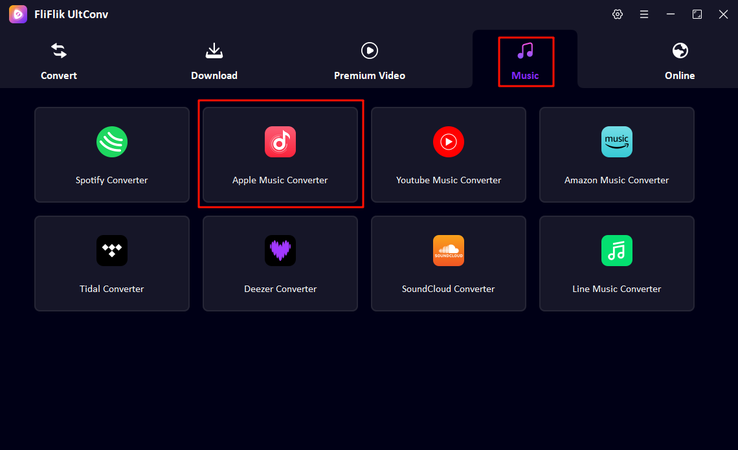
Open UltConv, click on Music on the home page, and then select Apple Music Converter from the list.
-
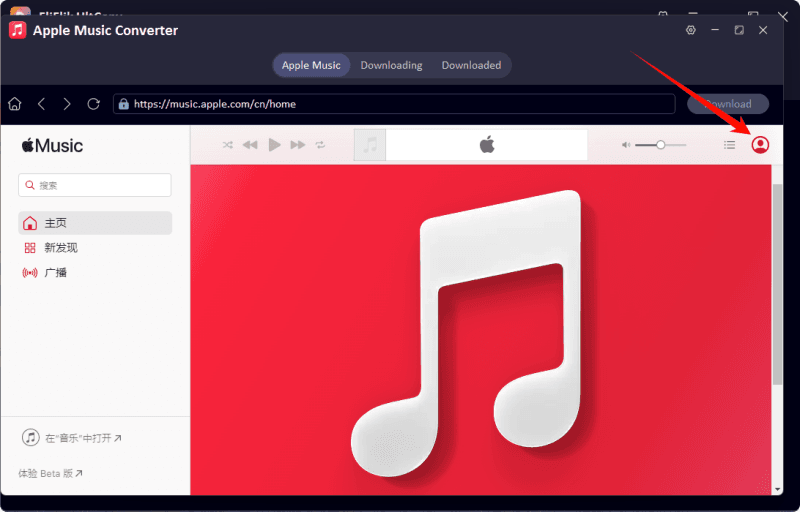
Next, sign in with your Apple ID. Once logged in, your Apple Music library will appear inside UltConv.
-
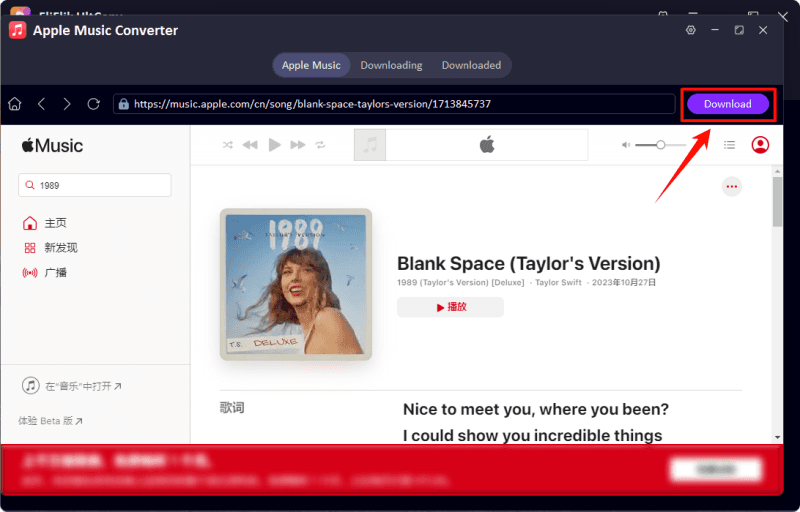
Browse your library, select the songs, albums, or playlists you want to download, and click the Download button.
-
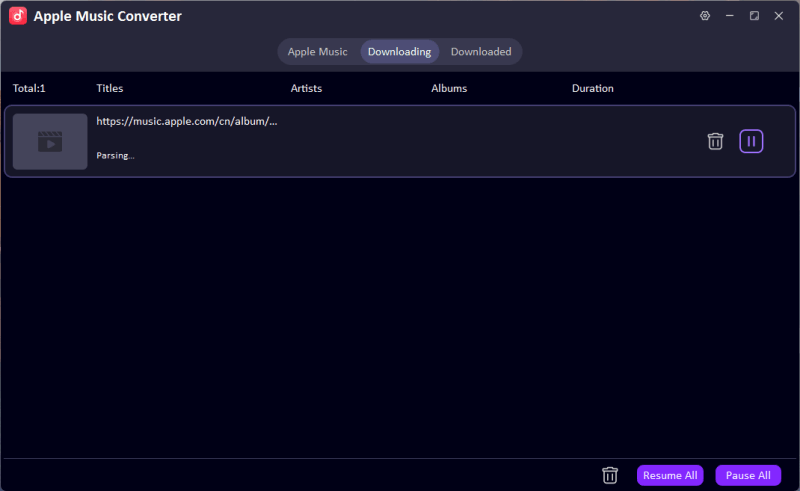
Your selected tracks will start downloading. You can track progress in the Downloading tab. Once finished, your songs will appear as DRM-free MP3 files.


How to Download Amazon Music to MP3 with UltConv Music Converter?
Follow these steps to save your Amazon Music tracks to MP3 or other formats:
-
Step 1: Go to UltConv’s official website, download the Music Converter for Windows or Mac, and install it on your computer.
FREE DOWNLOAD![secure download]() Secure Download
FREE DOWNLOAD
Secure Download
FREE DOWNLOAD![secure download]() Secure Download
Secure Download
-
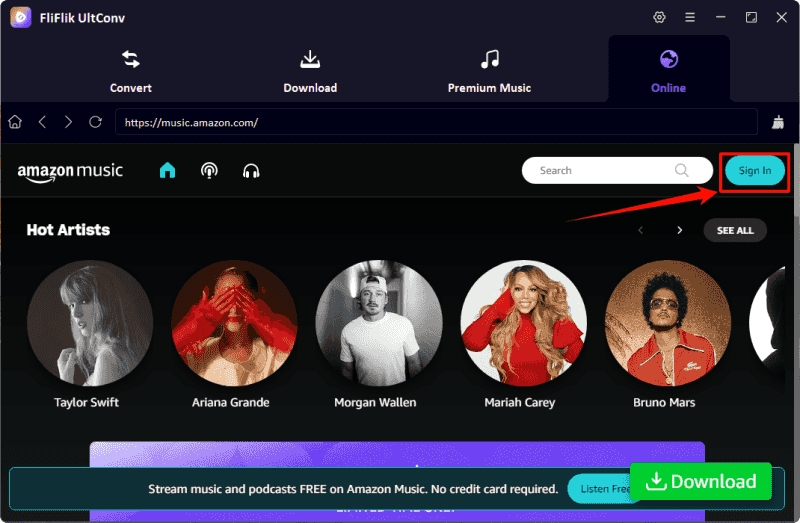
Step 2: Open UltConv, click the Music tab, and select Amazon Music Converter.

-
Step 3: Next, sign in with your Amazon account. Once logged in, your Amazon Music library or playlists will appear inside UltConv.
-
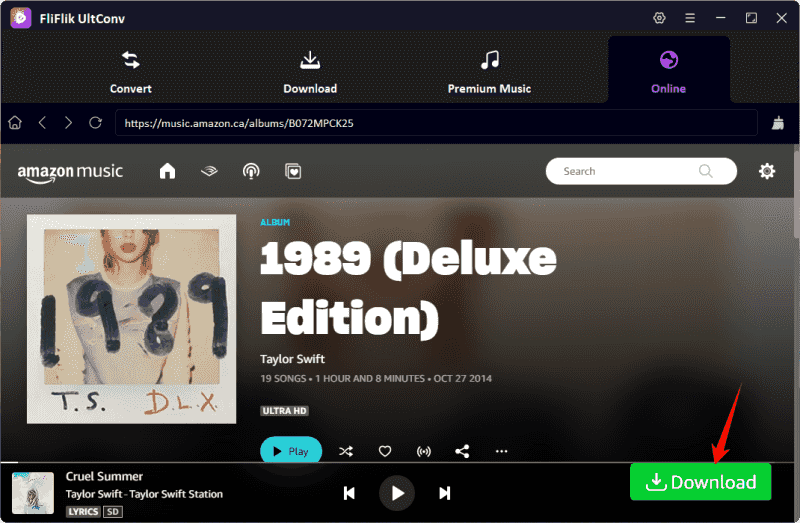
Step 4: Browse your library, select the songs, albums, or playlists you want to download, and click the Download button.
-
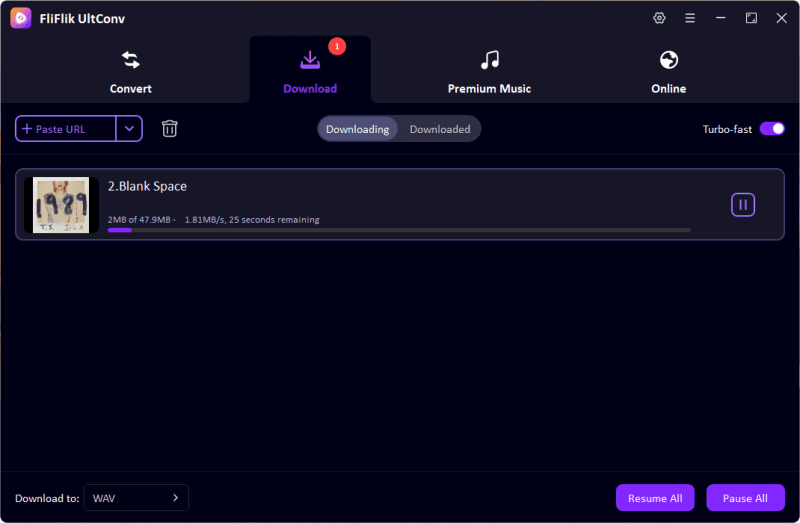
Step 5: The selected tracks will start downloading. You can track progress in the Downloading tab. Once finished, your Amazon Music songs will be saved as DRM-free MP3 files.


That’s all. Now you can enjoy your Amazon Music and Apple Music offline on any device, share tracks freely, and keep the original sound quality intact.
Final Words
After a full comparison of Apple Music vs Amazon Music, we can see that each platform has its strengths. Apple Music shines with seamless integration, curated playlists, and polished audio, while Amazon Music offers flexibility, great value for Prime members, and wide device compatibility. Choosing between them really comes down to your devices, listening habits, and which ecosystem fits you best.
If you want the best of both worlds or just want to enjoy your favorite tracks offline across any device, FliFlik UltConv Music Converter is your go-to solution. Download, convert, and organize music from Apple Music, Amazon Music, Spotify, and more, all in one place. Don’t let platform limits hold you back. Grab your music library today and enjoy it anywhere, anytime.
 Secure Download
Secure Download
Secure Download
Hey there! I am Maxwell Clark. I'm always looking for new tech tools that make a difference, from making visuals and audio better to making workflows better. I'm going to share tips and tricks for using AI tools for videos, audio, and images. I'm excited to help you navigate the digital world more efficiently and creatively!

