

 8 minutes read


Podcasts are everywhere these days. But what if you want to listen offline, or your device doesn’t play nice with streaming? That’s where an Apple Podcast downloader really helps. With the right tool, you can save episodes as MP3s or in other formats and take them wherever you go. Maybe you’re heading out on a long flight, hitting the gym, or just want to keep your favorite shows for later. A solid downloader makes grabbing and organizing episodes a breeze. So, here’s a rundown of the top six Apple Podcast downloaders. We will share what each one offers, how easy they are to use, and how reliable they feel, so you’ll know exactly which one fits your needs.

Part 1. Can I Download Apple Podcasts as MP3s?
Yes, you can download Apple Podcasts as MP3, but it’s not always straightforward. Apple’s Podcasts app doesn’t natively export episodes as MP3 files. To get around this, you’ll need a podcast downloader or converter that can save episodes in MP3 format. This is useful if you want to play them on devices that don’t support Apple Podcasts, like MP3 players or car stereos.
Another common reason to convert podcasts is for downloading podcasts to Apple Watch. While the Watch can sync episodes directly from the Apple Podcasts app, having MP3 files gives you more flexibility. You can store them locally, share them, or use third-party apps to manage your offline listening without relying on streaming. This way, you can enjoy your favorite shows anywhere, even without an internet connection.
Part 2. Top 6 Apple Podcast Downloader
If you want to save Apple Podcasts as MP3s or manage them offline more easily, using a dedicated Apple Podcast downloader is the way to go. Below, we’ve rounded up the six best options to help you get your favorite shows anywhere you go.
1. FliFlik UltConv Apple Podcast Downloader
Recommend Rate: ⭐⭐⭐⭐⭐
FliFlik UltConv Apple Podcast Downloader is a powerful tool designed for anyone who wants to save Apple Podcasts for offline listening. Unlike basic downloaders, it supports a wide range of podcasts, entire playlists, and even full series, making it easy to build a personal collection without relying on streaming. The software works on both Windows and macOS and preserves all metadata, including episode titles, artwork, and artist information.
One of the strongest points of UltConv is its flexibility in output formats. You can convert podcasts to MP3, AAC, WAV, or FLAC while keeping audio quality up to 320 Kbps. This makes it perfect for listening on multiple devices, from phones and tablets to computers and even the Apple Watch. Batch downloading is also supported, allowing users to save multiple episodes at once, saving time and keeping your library organized. With broad compatibility, high-quality audio support, and advanced features like metadata preservation, UltConv stands out as a reliable Apple Podcasts downloader for both casual listeners and podcast collectors.

- Download Apple Podcasts, playlists, and full series.
- Convert podcasts to MP3, AAC, WAV, or FLAC.
- Preserve all ID3 tags and metadata.
- Batch download multiple episodes at once.
- High-quality audio supports up to 320 Kbps.
- Compatible with Windows 10/11 and macOS.
- Support downloads from over 10,000 sites, including Spotify, Apple Music, SoundCloud, etc.
▼ How to Download Apple Podcast to MP3 with FliFlik UltConv?
-
Download and install FliFlik UltConv on your PC or Mac.
FREE DOWNLOAD![secure download]() Secure Download
FREE DOWNLOAD
Secure Download
FREE DOWNLOAD![secure download]() Secure Download
Secure Download
-
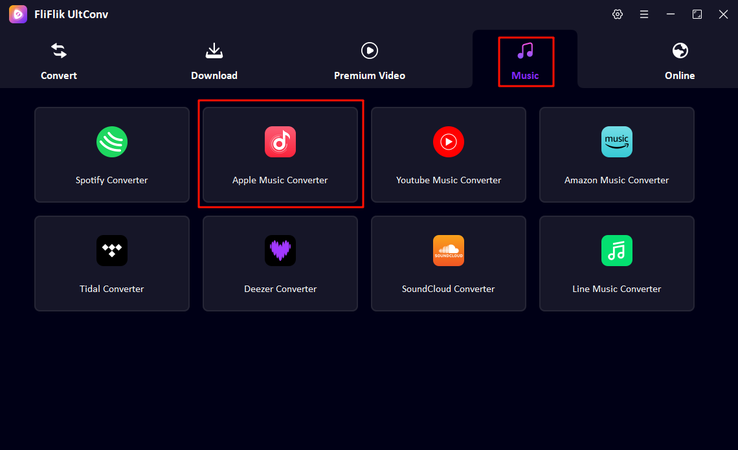
Open the app. Navigate to the Music section and select Apple Podcast Downloader .
-
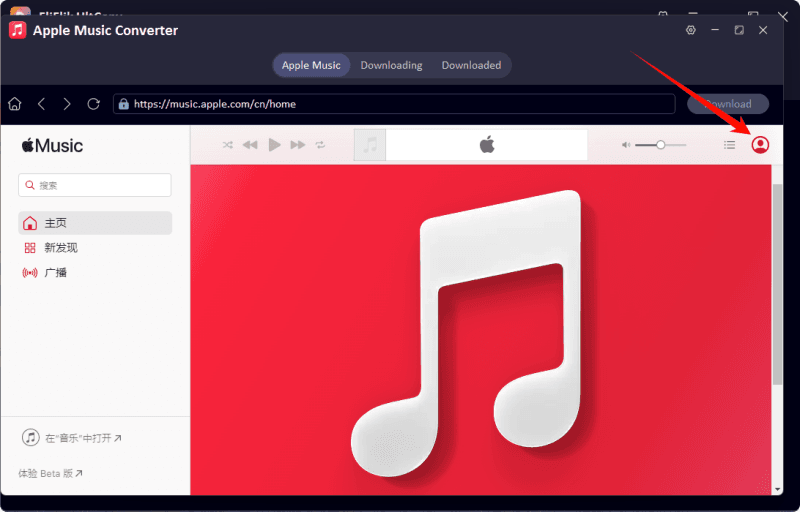
Log in to your Apple account, and your Apple Music library will appear inside UltConv.
-
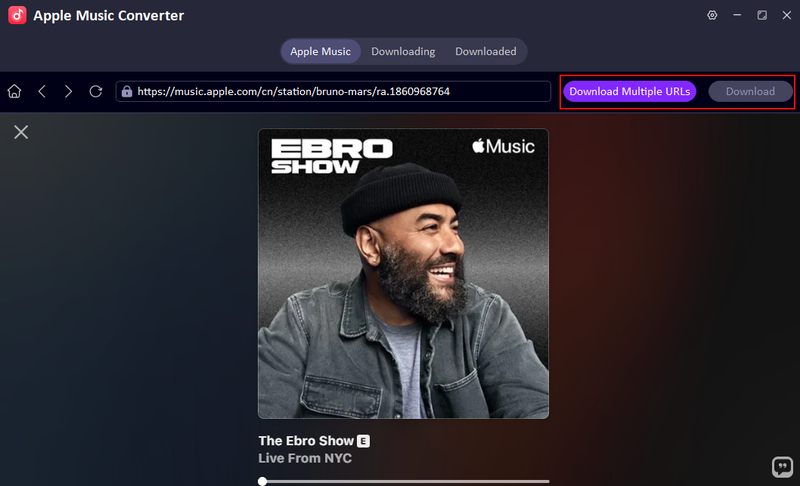
Browse or search for the podcast, episode, or playlist you want to download, then click Download.
-
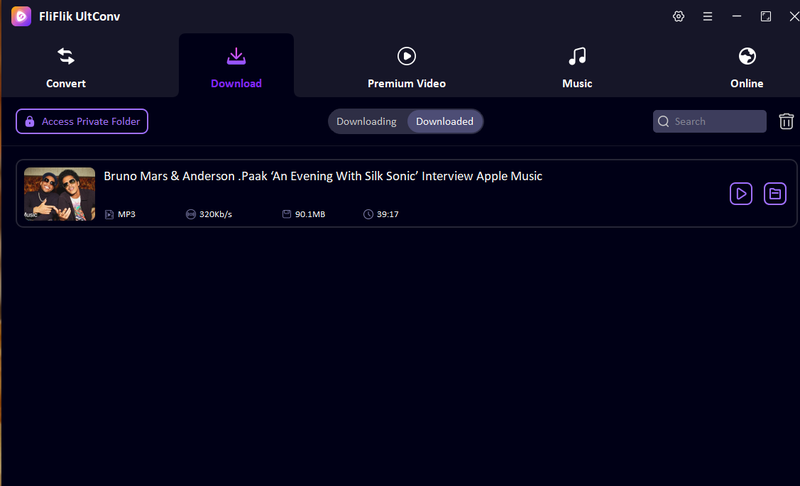
After the download completes, go to the Downloaded tab to find your MP3 files ready for offline listening.


2. XiaoyuzhouFM Pro
Recommend Rate: ⭐⭐⭐⭐

XiaoyuzhouFM Pro’s Apple Podcasts Downloader tool helps you get audio from Apple Podcasts episodes in high quality straight from the web. It’s built on a site that specializes in podcast media extraction, making it useful for users who want direct access to podcast files without complicated steps. Unlike simple browser tricks that sometimes fail, this tool aims to connect directly to audio sources so you can save your favorite shows. The interface is web‑based and doesn’t require signing in. However, success and format options can vary depending on the podcast source and region.
- No software installation needed
- High‑quality audio downloads available
- Works with many Apple Podcasts links
- Support and documentation are limited
- Not all podcasts may download successfully
- Few customization options
3. Beamly Apple Podcasts Downloader
Recommend Rate: ⭐⭐⭐⭐

Beamly’s Apple Podcasts Downloader is a simple online tool that lets you save episodes by pasting an Apple Podcasts URL. The tool resolves the show’s RSS feed and shows all available episodes you can download. This makes it handy for users who already have a podcast link and want direct access to the original audio files for offline listening. Episodes are delivered in their original format, typically MP3 or M4A, exactly as published by the creator. The web interface is clean and fast, though features like batch downloads aren’t offered.
- Works directly from a podcast link
- No software installation required
- Downloads original audio format
- No batch download support
- Requires an RSS link or Apple Podcasts URL
- A few advanced options
4. Swellai Apple Podcast Downloader
Recommend Rate: ⭐⭐⭐

Swellai’s Apple Podcast Downloader lets you extract and download episodes as MP3 files without signing in or providing an account. It’s a free web option that works by taking the podcast page link and generating a downloadable audio file. While the main Swellai platform focuses on creating transcripts and podcast content repurposing, this downloader feature is designed for quick audio extraction. It’s useful if you want an easy way to turn Apple Podcasts episodes into MP3s for offline listening. Support and additional features beyond basic downloads are limited, so it’s best for users who just want a simple MP3 export.
- Free and no login needed
- Converts episodes directly to MP3
- Simple to use
- Limited extra features
- Occasional link failures
- No batch downloads
5. PodcastToMP3
Recommend Rate: ⭐⭐⭐

PodcastToMP3 is a free online tool that lets you convert Apple Podcast episodes into MP3 files by pasting the podcast link. It’s designed to make Apple Podcast to MP3 conversions quick and straightforward without needing software or accounts. The site pulls the audio directly from the episode’s source and delivers a downloadable MP3 file in a few clicks. It’s especially helpful if you want to play episodes on devices that don’t support Apple Podcasts or build an offline collection. The interface is minimal and beginner‑friendly, though support and advanced options are limited.
- No install or sign‑in required
- Converts directly to MP3
- Works fast for single episodes
- No batch download support
- Limited control over quality settings
- Some podcasts may not convert successfully
6. GitHub Apple‑Podcast‑Downloader
Recommend Rate: ⭐⭐⭐⭐

GitHub Apple‑Podcast‑Downloader is an open‑source project that lets you download episodes by running a script on your machine. It’s ideal for tech‑savvy users who want more control over the download process and prefer a free, transparent solution. Because it’s on GitHub, you can inspect the code and modify it for your needs, which appeals to developers and hobbyists. This option doesn’t offer a polished web interface, but it gets the job done for users comfortable with command‑line tools.
- Free and open source
- No ads or third‑party tracking
- Flexible and customizable
- Requires technical know‑how to run
- No native support or updates guaranteed
- No built‑in batch UI for general users
Part 3. Quick Comparison of 6 Best Apple Podcast Downloader
Here’s a quick look at how the top Apple Podcast downloaders stack up. Each tool has its strengths, whether it’s speed, flexibility, or simplicity. By comparing them side by side, you can see which one fits your needs best for downloading podcasts offline.
| Tool | Type | Supported Platforms | Batch Download | Download Speed | DRM Removal | Success Rate |
|---|---|---|---|---|---|---|
| FliFlik UltConv | Desktop App | Windows, Mac | Yes | Very Fast (10X) | Yes | Very High |
| XiaoyuzhouFM Pro | Online | Browser | Limited | 1X | No | High |
| Beamly | Online | Browser | No | 1X | No | Medium |
| Swellai | Online | Browser | Limited | 1X | No | Medium |
| PodcastToMp3 | Online | Browser | No | 1X | No | Medium |
| GitHub Apple-Podcast-Downloader | Script | Windows, Mac, Linux | Yes (scripted) | 1X | No | High |
Final Words
Apple Podcasts downloader tools make offline listening easy, but not all options are reliable. For speed, format flexibility, batch downloads, and DRM-free storage, UltConv Apple Podcast Downloader stands out as the most complete solution. Whether you want to save entire playlists or single episodes, it keeps everything organized and playable on any device. For anyone serious about building an offline podcast library, UltConv is the go-to choice.
 Secure Download
Secure Download
Secure Download
Hey there! I am Maxwell Clark. I'm always looking for new tech tools that make a difference, from making visuals and audio better to making workflows better. I'm going to share tips and tricks for using AI tools for videos, audio, and images. I'm excited to help you navigate the digital world more efficiently and creatively!

