

 8 minutes read


If you’re into electronic music, you probably already spend plenty of time on Beatport. It’s where DJs and fans dig for the best tracks. Still, listening online isn’t always enough. Sometimes you just want your music offline, on your phone or laptop, ready to go whenever. That’s when a Beatport downloader really pays off. These tools let you grab songs as MP3s or whatever format you like, and the sound stays sharp. Whether you’re after just one song, a full album, or even whole playlists, the right downloader makes it easy. In this article, I’ll walk you through the top 6 Beatport downloaders, break down what makes each one stand out, and show you how to get your favorite tunes fast, no hassle, no fuss.

Part 1. Does Beatport Have Free Downloads?
Beatport is one of the largest online stores for electronic music, offering tracks, albums, and DJ-ready mixes from top artists around the world. While it’s mainly a paid platform, occasionally, Beatport does offer free downloads, usually as promotional tracks or limited-time releases. However, these are rare and don’t cover most of the catalog.
For most users, the easiest way to save music for offline listening is by using a Beatport music downloader. These tools let you legally download the tracks you purchase or free releases in high-quality formats like MP3 or WAV. With the right downloader, you can quickly grab individual tracks, full albums, or playlists, making your Beatport library accessible anywhere, even without an internet connection.
Part 2. 6 Best Beatport Downloader to Download Beatport Songs
Here are six of the best Beatport downloaders you can use to save your favorite tracks as MP3 or other formats. These tools vary in features, speed, and supported platforms, making it easy to find one that fits your needs.
1. FliFlik UltConv Beatport Downloader
FliFlik UltConv Beatport Downloader is a reliable desktop application that makes downloading music from Beatport fast and hassle-free. It supports both Windows and Mac and is designed for DJs, music lovers, and anyone who wants high-quality audio offline. You can download individual tracks, full albums, or entire playlists with just a few clicks. It preserves the original audio quality, supports multiple output formats like MP3, WAV, FLAC, and AAC, and keeps all metadata intact for easy organization.
Beyond Beatport, UltConv Beatport Downloader supports over 10,000 streaming music sites, making it a one-stop solution for music downloads. It lets you enjoy lossless audio at up to 320 Kbps, convert music to your preferred format, and save tracks with all ID3 tags and album info. Batch downloading and high-speed processing make it easy to grab multiple songs at once, giving you a library of music ready to play offline anytime.

- Download Beatport tracks, albums, and playlists in high quality
- Supports multiple audio formats like MP3, WAV, FLAC,, and 100+ formats
- Preserve lossless audio up to 320 Kbps
- Keep all ID3 tags and metadata for easy organization
- Batch download albums and playlists at once
- Supports 10,000+ streaming music sites beyond Beatport
- Fast download speeds with a built-in browser for direct access
▼ Steps to Download Beatport to MP3 with FliFlik UltConv Beatport Downloader
-
Install FliFlik UltConv Beatport Downloader on your PC or Mac.
FREE DOWNLOAD![secure download]() Secure Download
FREE DOWNLOAD
Secure Download
FREE DOWNLOAD![secure download]() Secure Download
Secure Download
-
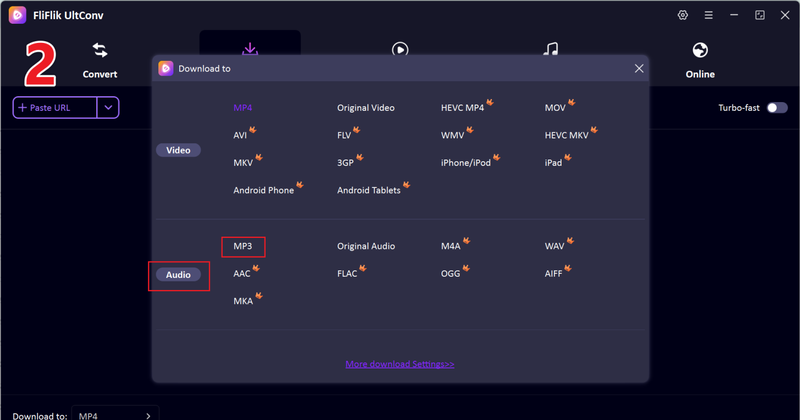
Open the program, go to the Download tab, and click the “Download to” button at the bottom to choose the format of your music.

-
Select your desired output format. For audio, choose MP3. You can also pick other formats if needed.
-
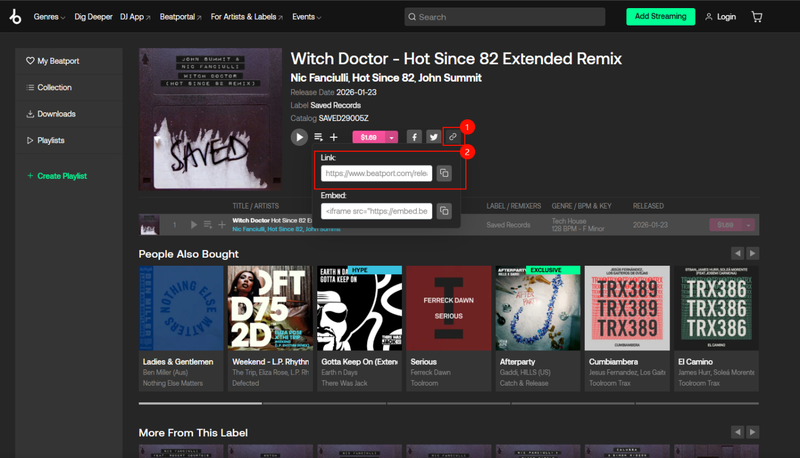
Open Beatport, copy the link of the song you want to download, and then return to UltConv.
-
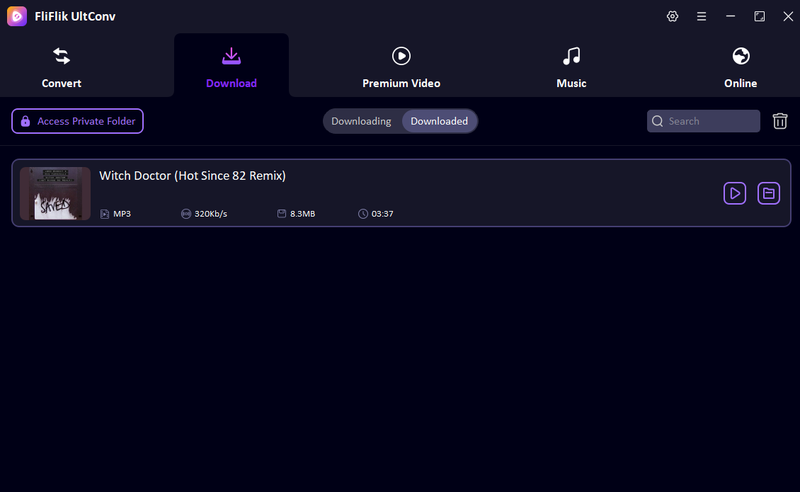
Paste the Beatport track link manually into the input box and click Download to complete the process. Just wait a few seconds, and your Beatport track will be downloaded as a 320 kbps MP3 file.


2. Telegram (@beatport_downloader_bot)

If you’re looking for a fast way to grab Beatport tracks without installing software, Telegram’s @beatport_downloader_bot is a handy option. You just open the bot in Telegram, send the link of the track you want, and it delivers the MP3 directly in chat. This works on desktops, mobiles, and even tablets. It’s the perfect Beatport downloader telegram for single-track downloads on the go. While it doesn’t support playlists or high-quality options like a desktop program, it’s convenient, safe, and easy for anyone who just wants a track quickly without extra hassle.
- No installation needed beyond Telegram
- Works on desktop and mobile
- Quick single-track downloads
- Safe and straightforward interface
- Limited to one track at a time
- No playlist or batch download support
- File quality options may be basic
3. TubeNinja

TubeNinja is a free online tool that lets you download Beatport music directly from your browser. No installations, no accounts, just paste the track URL, choose your format, and save it instantly. It supports MP3 and other common audio formats and works on both desktop and mobile devices. While it’s limited in quality options and can’t handle playlists, it’s quick, reliable, and perfect for occasional downloads. If you need a simple Beatport free downloader that works anywhere, TubeNinja is a solid choice.
- Free and online, no software installation
- Supports MP3 and other common formats
- Works on desktop and mobile browsers
- Easy to use
- No batch or playlist downloads
- Ads can be intrusive
- Quality options are limited
4. YT2Save

YT2Save is a simple online tool to download music from Beatport quickly. You just paste the track URL, choose the MP3 format, and the file is ready in seconds. It works on desktop and mobile; no account is needed. While it’s fast and easy, it doesn’t support playlists or high-quality audio settings, so it’s best for single-track downloads.
- No installation required
- Works on desktop and mobile
- Fast single-track downloads
- Limited to MP3 format
- No batch or playlist support
- Quality options are basic
5. House of Tracks

House of Tracks lets you download from Beatport using a straightforward web interface. Paste your track link, select the format, and save it instantly. It’s browser-based, so you don’t need extra software, making it convenient for quick downloads. The site focuses on individual tracks rather than playlists.
- Simple and fast
- No software installation needed
- Works on mobile and desktop
- Only supports single tracks
- Limited output formats
- Quality depends on the source track
6. YMate.cc

YMate.cc is a versatile online Beatport download tool that supports multiple audio formats. Paste the link, pick your preferred format, and save the file directly. It’s lightweight, works across devices, and doesn’t require an account. It’s reliable for occasional downloads but lacks advanced features like batch processing.
- Easy to use on any device
- Supports multiple formats
- No registration required
- Single-track only
- No playlist or batch download
- Limited quality control
Part 3. Quick Comparison of the 6 Best Beatport Downloader
Before choosing a Beatport downloader, it’s helpful to see how the top six options compare at a glance. Each tool has its own strengths and limitations, so looking at their support platforms, output formats, speed, and batch download capabilities can make your choice easier. Here’s a quick side-by-side comparison to give you a clear overview of the features and performance of each Beatport downloader:
| Tool | Type | Support Platforms | Output Formats | Batch Download | Download Speed | Success Rate |
|---|---|---|---|---|---|---|
| FliFlik UltConv | Desktop App | Support 10,000+ Streaming Music Sites | 100+ MP3, WAV, FLAC, AAC, M4A, AIFF | Yes | Fast (10X) | High |
| Telegram (@beatport_bot) | Bot | Beatport | MP3 | No | Fast | Medium |
| Tubeninja | Web Tool | Beatport | MP3 | No | Medium | Medium |
| YT2Save | Web Tool | Beatport | MP3 | No | Fast | Medium |
| House of Tracks | Web Tool | Beatport | MP3 | No | Medium | Medium |
| YMate.cc | Web Tool | Beatport | MP3, | No | Medium | Medium |
Final Words
If you’re looking for a reliable way to save your favorite tracks, a good Beatport downloader makes all the difference. While many online tools exist, they often come with ads, slow downloads, or limited formats. FliFlik UltConv Beatport Downloader stands out as a fast, versatile option that works on Windows and Mac, supports over 10,000 streaming platforms, and lets you save Beatport music in MP3, AAC, WAV, FLAC, and more. It keeps high-quality audio, preserves ID3 tags, and even allows batch downloads for playlists or albums. For anyone serious about building a music library, UltConv makes downloading seamless and efficient. Don’t waste time with slow or unreliable sites. Use FliFlik UltConv Beatport Downloader to get your music quickly and in the quality you want.
 Secure Download
Secure Download
Secure Download
FAQs
Q1. How to download tracks from Beatport to a USB?
First, download the tracks from Beatport to your computer using a Beatport downloader like FliFlik UltConv Beatport Downloader. Once the files are saved to your device, plug in your USB drive and copy the downloaded tracks into it.
Q2. What is the best format to download from Beatport?
It depends on your needs. MP3 320kbps is great for compatibility and good quality, while FLAC is the best choice if you want lossless, high-quality audio.
Hey there! I am Maxwell Clark. I'm always looking for new tech tools that make a difference, from making visuals and audio better to making workflows better. I'm going to share tips and tricks for using AI tools for videos, audio, and images. I'm excited to help you navigate the digital world more efficiently and creatively!

