

 8 minutes read


Music streaming is convenient, but sometimes you may want to keep your favorite songs forever or play them on different devices without restrictions. That’s why many people look for ways to convert Amazon Music to MP3. MP3 files are easy to store, share, and play on almost any device, from phones and laptops to car audio systems.
However, songs on Amazon Music are usually protected and designed mainly for streaming inside the app. This means you cannot simply download them as regular MP3 files. To solve this problem, special music converter tools are often used to change Amazon Music tracks into MP3 format for offline listening. In this article, we’ll share 6 useful tools that help convert Amazon Music to MP3, so you can keep your favorite songs and enjoy them anytime, even without an internet connection.

Part 1. Why Do We Need to Convert Amazon Music to MP3?
Many people enjoy listening to music on Amazon Music, but the songs you download in the app are usually protected and can only be played inside the platform. This often leads users to ask a common question: Can I convert Amazon Music to MP3? The answer is yes, but it usually requires a dedicated music converter tool.
Converting Amazon Music tracks to MP3 gives you more freedom to use your music the way you want. Instead of relying only on the streaming app, you can keep the songs as regular audio files and play them on almost any device. Here are a few common reasons why people choose to convert Amazon Music to MP3:
- Permanent listening : Keep your favorite songs even if your subscription ends.
- Offline playback anywhere : Play music without internet access.
- Better device compatibility : MP3 works on phones, MP3 players, car stereos, and many other devices.
- Personal music collection : Store and organize albums in your own music library.
- Easy transfer : Move songs to USB drives, external storage, or other devices easily.
Part 2. 3 Tools to Convert Amazon Music to MP3 [Paid but Worthwhile]
Below, we will look at the 3 options that you can use to convert Amazon Music to MP3 on your Windows or Mac.
1. FliFlik UltConv Amazon Music Converter
If you want a simple and reliable way to convert songs, albums, or playlists, FliFlik UltConv Amazon Music Converter is one of the most practical tools available. It is designed to download and convert music from Amazon Music into common audio formats like MP3, AAC, WAV, and FLAC. This means you can keep your favorite tracks on your computer and play them anytime without needing the streaming app. The software also focuses on keeping the original music quality. It supports MP3 output up to 320kbps, so the sound remains clear after conversion. Another useful feature is batch downloading. Instead of converting songs one by one, you can download entire playlists, albums, or artists at once. The UltConv Amazon Music Converter tool also keeps ID3 tags and metadata, such as song title, artist name, album cover, and track number, making it easy to organize your music library.

- Convert Amazon Music to MP3, AAC, WAV, FLAC, and more
- Supports download from 10,000+ platforms, like Amazon Music, Spotify, Apple Music
- Download songs, playlists, and full albums
- Support high‑quality audio up to 320kbps
- Batch convert multiple tracks at once
- Preserve ID3 tags like artist, album, and artwork
- Fast and stable music downloading speed
▼ How to Download Amazon Music to MP3 with UltConv Amazon Music Converter?
If you want an easy way of converting Amazon Music to MP3, you can use FliFlik UltConv Amazon Music Converter. The process is simple and only takes a few steps.
 Secure Download
Secure Download
Secure Download
-
Visit the official UltConv website, download the software, and install it on your computer.
-
Open the program, go to the Music section on the homepage, and select Amazon Music Converter.

-
Sign in to your Amazon Music account inside the built‑in player so you can access your music library.
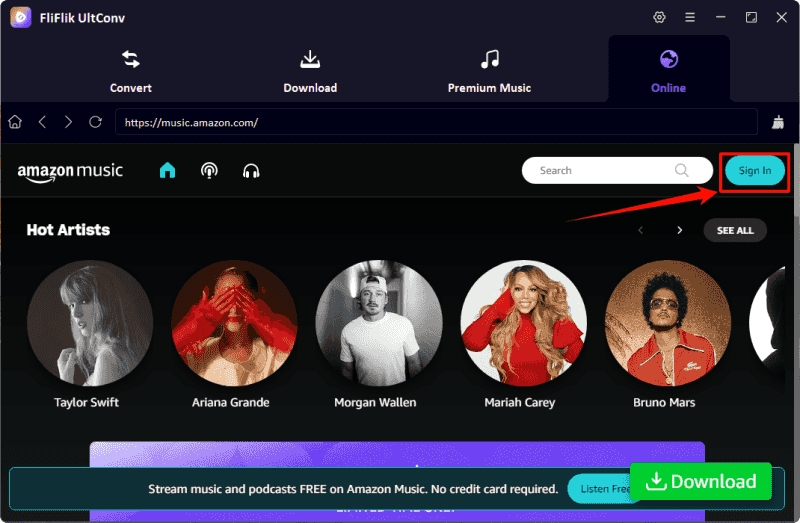
-
Browse your library and choose the songs, albums, or playlists you want to convert. Select MP3 as the output format and start the download.
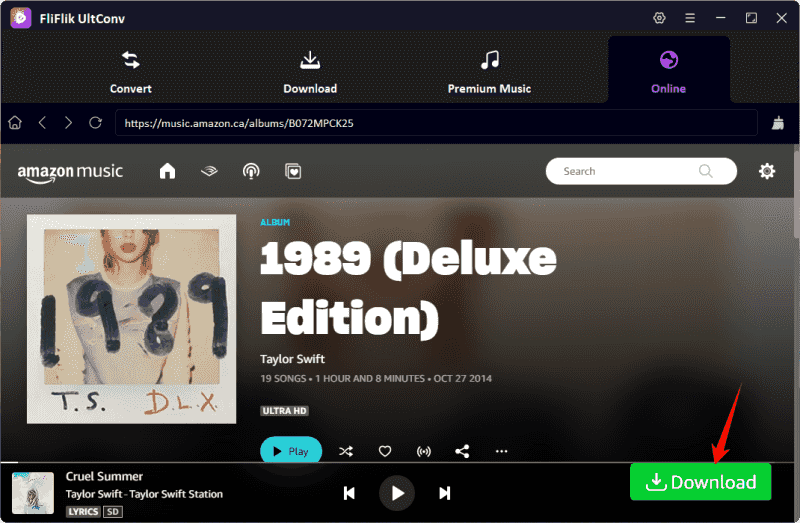
-
The software will begin downloading and converting the tracks. Once finished, the songs will be saved to your computer as MP3 files.
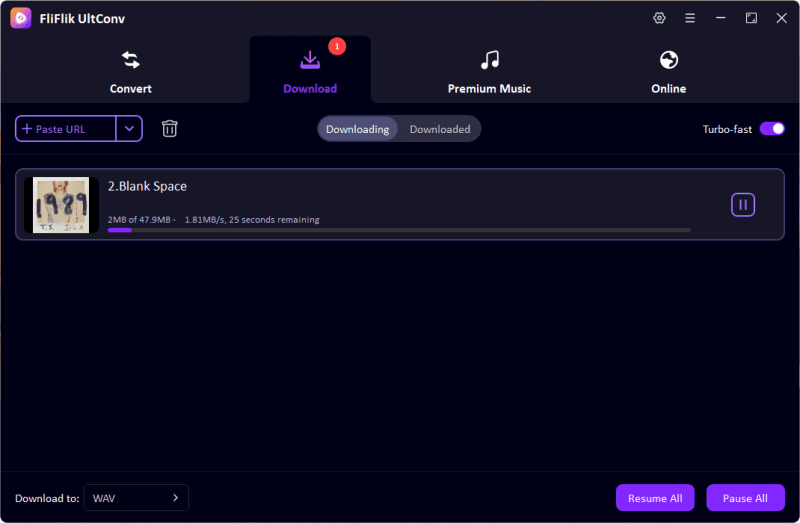


2. Sidify Music Converter
Sidify Music Converter is another popular tool used for converting Amazon Music to MP3 and other common audio formats. The software allows users to download songs, albums, and playlists from streaming platforms and save them as regular audio files on their computer. Once the music is converted, you can play it on any device without relying on the streaming app. The program is designed with a simple interface, so even beginners can use it without difficulty.
- Convert songs to MP3, AAC, WAV, and FLAC
- Supports batch conversion
- Keeps partial ID3 tags like artist and album
- Simple interface for beginners
- Some features are limited in the free version
- Subscription fee is a little expensive
- Conversion speed may vary depending on system performance
▼ Steps to Convert Amazon Music to MP3 with Sidify
- Step 1: Download and install Sidify Music Converter on your computer and launch the program.
- Step 2: Click the Settings icon, select the MP3 output format, and customize the output path.
- Step 3: Add songs by clicking “+”, dragging songs from Amazon Music, or pasting playlist links directly into Sidify.
- Step 4: Click the Convert button and wait while the software converts the selected tracks to MP3.
3. TunePat Music Converter
TunePat Amazon Music Converter is another reliable option for people looking for an Amazon Music converter to MP3. It is designed specifically for downloading music from Amazon Music and converting it into common audio formats. The tool supports downloading songs, albums, playlists, and even podcasts while keeping the original sound quality. It also preserves full ID3 tags, including song title, album name, artist, artwork, and track number. With fast conversion speeds and multiple output formats, it helps users build a personal music collection that can be played on any device.
- Convert Amazon Music to MP3, AAC, WAV, FLAC, and ALAC
- Keep HD and Ultra HD sound quality
- Preserve full ID3 tags and metadata
- Supports lyrics saving and CD burning
- Requires installation on computer
- Full features require the paid version
- The all-in-one version is much more expensive than other tools
▼ Steps to Convert Amazon Music with TunePat
- Step 1: Install and open TunePat Amazon Music Converter on your computer, then sign in to your Amazon Music account.
-
Step 2:
Click the
Settings
icon and choose the output format, such as
MP3, along with the audio quality and output folder.
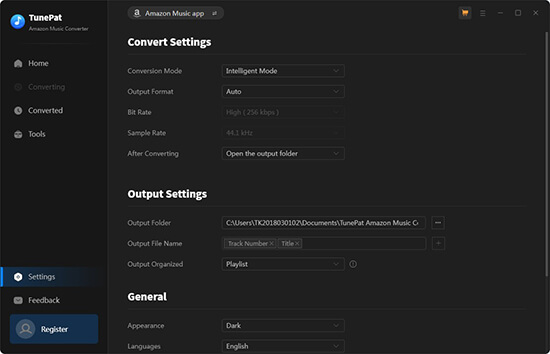
-
Step 3:
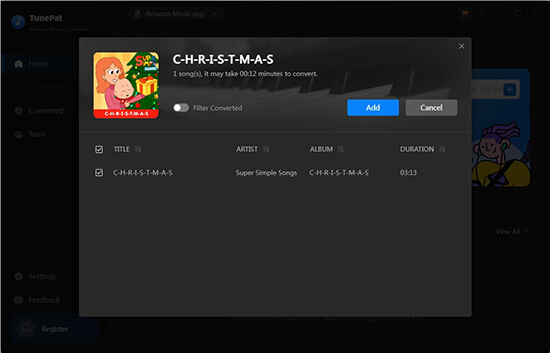
Open a playlist, album, or song in Amazon Music and add the tracks to the conversion list.
-
Step 4:
Click
Convert, and the software will download and convert the selected music to MP3 files on your computer.
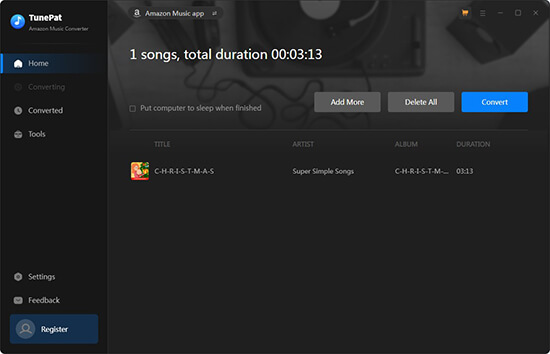


Once finished, you can open the History section to find and play your converted songs anytime.
Part 3. Tool to Convert Amazon Music to MP3 [Free but Unstable]
If you are looking for a free option, Amazon Music Downloader is one of the tools people try. It is a simple web‑based service that allows users to paste a song or playlist link and download the track as an MP3 file. Because it works in a browser, you don’t need to install any software on your computer. Many users search for solutions like this when asking how to convert Amazon Music to MP3 for free. The tool can sometimes extract audio from public Amazon Music links and provide a downloadable file. However, since it depends on web parsing, the service can be unreliable. Sometimes links may not be recognized, or downloads may fail if the site changes its system.
- Free to use
- No software installation required
- Simple copy‑and‑paste download method
- Works directly in a web browser
- Unstable and may stop working
- Limited audio quality options
- May not support playlists or full albums
- Download speed can be slow
▼ Steps to Convert Amazon Music with Amazon Music Downloader
- Step 1: Open Amazon Music in your browser and find the song or album you want to download. Copy the music link from the address bar.
-
Step 2:
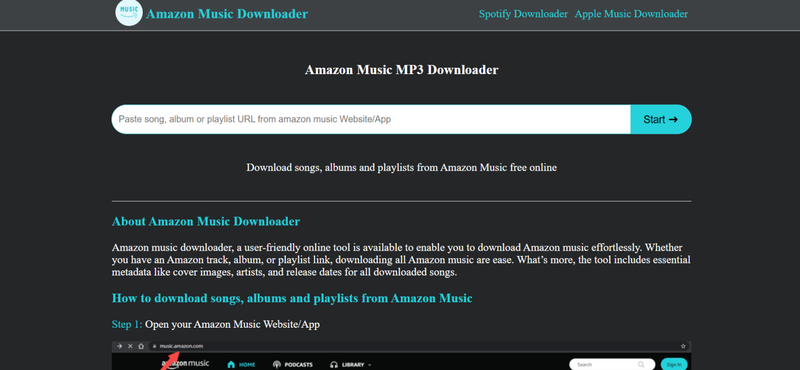
Go to the
Amazon Music Downloader
website and paste the copied link into the search box.
- Step 3: Click the Download button and wait while the website analyzes the link.
-
Step 4:
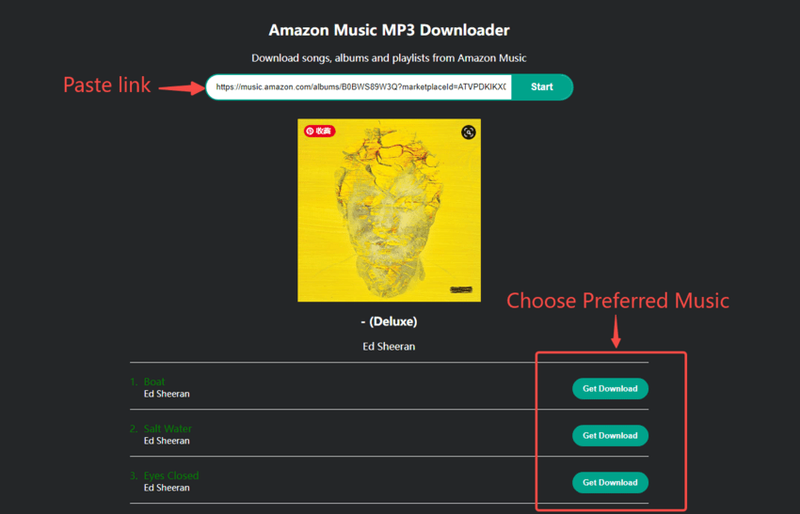
When the download option appears, click
Download MP3
to save the music file to your device.


Part 4. Comparison Table of 4 Amazon Music to MP3 Converters
Before choosing a tool, it helps to see how these converters compare in terms of speed, supported formats, and reliability.
| Tool | Convert Speed | Support Format | Batch Conversion | DRM Removal | Support Sites | Rate |
|---|---|---|---|---|---|---|
| FliFlik UltConv Music Converter | Very fast (up to 10×) | 100+ MP3, AAC, WAV, FLAC, M4A, etc. | ✅ | ✅ | 10,000+ music sites | ⭐⭐⭐⭐⭐ |
| Sidify Amazon Music Converter | Moderate | MP3, AAC, WAV, FLAC | ✅ | ✅ | Amazon Music only | ⭐⭐⭐⭐ |
| TunePat Amazon Music Converter | Moderate | MP3, AAC, WAV, FLAC, AIFF, ALAC | ✅ | ✅ | Mainly Amazon Music | ⭐⭐⭐⭐ |
| Amazon Music Downloader (Online) | Slow | MP3 only | ❌ | ❌ | Limited | ⭐⭐ |
Final Words
In this guide, we explored several ways to convert Amazon Music to MP3 so you can keep your favorite songs for offline listening. Free online tools may work for quick downloads, but they are often unstable and limited in quality or features. Desktop converters usually provide better speed, higher audio quality, and more reliable downloads. If you want the easiest and most stable solution, FliFlik UltConv Amazon Music Converter is a strong choice. It supports multiple streaming platforms, fast batch conversion, and high‑quality MP3 output. With just a few clicks, you can download your playlists and build a personal music library to enjoy anytime.
Secure Download
Secure Download
FAQs
Q1. Can I download an MP3 file from Amazon Music?
Normally, Amazon Music only allows downloads inside its own app, and the files are protected. This means they cannot be used as normal MP3 files. To get MP3 versions, users usually need a music converter tool like UltConv Music Converter that can change Amazon Music tracks into MP3 format.
Q2. Can I transfer music from Amazon Music to an MP3 player?
Direct transfers are usually not supported because Amazon Music downloads are protected. However, if you convert the songs to MP3 using a converter like FliFlik UltConv Music Converter, you can easily move the files to an MP3 player, USB drive, phone, or other devices for offline listening.
Hey there! I am Maxwell Clark. I'm always looking for new tech tools that make a difference, from making visuals and audio better to making workflows better. I'm going to share tips and tricks for using AI tools for videos, audio, and images. I'm excited to help you navigate the digital world more efficiently and creatively!

