

 7 minutes read


Deezer vs Spotify is a question people often ask when talking about music streaming. These two platforms offer millions of tracks, playlists, and podcasts, but they differ slightly in their approaches. Spotify is typically associated with user-friendly features and intelligent playlists, whereas Deezer is recognized for its top-notch audio quality and extensive music library.
It can be a decision-making challenge if you have a preference for offline listening, playlist sharing, or seamless device switching. In this article, we will compare Deezer and Spotify, stating them as two different options, referring to their features and prices. At the end, we will also share a tool that you can use to download songs from both Deezer and Spotify without a premium. Let’s begin.

Part 1. Deezer vs Spotify: Quick Overview
Deezer and Spotify are two of the best choices when it comes to a music streaming service. Both services offer access to over a million songs, but concentrate on different features and user experiences. Lets see what is the main difference between both Deezer vs Spotify.
What is Deezer?

Deezer is a music streaming app that allows you to access millions of songs, playlists, and podcasts globally. One major attraction is the various audio qualities it supports, such as the HiFi streaming. Deezer has also got personalized recommendations, curated playlists, and features like offline listening that make music listening really comfortable anywhere and anytime.
What is Spotify?

Spotify is one of the most popular music streaming platforms globally, known for its smart playlists, easy-to-use interface, and huge library of songs and podcasts. It offers features like personalized daily mixes, collaborative playlists, and offline listening. Spotify works smoothly across devices, from phones to smart speakers, making it convenient for almost any music lover.
Part 2. Deezer vs Spotify: Key Features Comparison
When comparing Deezer vs Spotify, it helps to look at their core features side by side. From library size to audio quality, music discovery tools, and device compatibility, each platform has its strengths. Here are the key differences between the two platform features that you should know.
| Feature | Deezer | Spotify |
|---|---|---|
| Library Size | 90+ million tracks | 100+ million tracks |
| Max Audio Quality | Up to lossless HiFi (FLAC) | Up to 320 kbps (premium) |
| Music Discovery | Flow, genre‑based playlists, editorial picks | Discover Weekly, Daily Mixes, algorithm + editorial playlists |
| UI & Compatibility | Clean interface; works on mobile, desktop, web, smart speakers | Simple interface; supports mobile, desktop, web, smart speakers, and game consoles |
| Podcast Content | Podcasts available (smaller variety) | Large podcast library, podcasts + music integration |
| Lyrics Feature | Available on many tracks | Available live syncing on many songs |
| Download Format (Offline) | FLAC (HiFi) or MP3, depending on plan | MP3 / 320 kbps for offline download via premium |
| DRM Protection | Yes, tracks are DRM‑protected but playable offline | Yes, protected, playable only via the Spotify app |
| Best For | Audiophiles, listeners who care about sound quality, or want offline FLAC | Users who want a broad library, podcasts, playlists, social sharing, and cross-device convenience |
Part 3: Deezer vs Spotify: Subscription Plan and Price
Now, below, let’s see in detail what both platforms have to offer in premium and free plans.
Deezer Free vs Spotify Free
Both Deezer and Spotify offer free versions, letting you explore millions of songs without paying. However, these free plans come with some limitations like ads, lower audio quality, and restricted controls, especially on mobile. Here’s a quick look at how the basic features compare:
| Feature | Deezer Free | Spotify Free |
|---|---|---|
| Audio Quality | 128 kbps | 160 kbps on mobile, 128 kbps on the web player |
| Ads | Yes | Yes |
| Mobile Playback | Shuffle-only, limited skips | Shuffle-only, limited skips |
| On-Demand Play | Limited, mostly shuffle | Limited on mobile; on-demand on desktop |
| Offline Mode | No | No |
Deezer Premium vs. Spotify Premium
Upgrading to a premium plan removes ads, unlocks higher audio quality, and lets you download music for offline listening. Both platforms offer similar core features, but Deezer shines with lossless HiFi audio, while Spotify provides extra options like Duo plans for multiple users. Here’s a side-by-side comparison of the main premium features:
| Feature | Deezer Premium | Spotify Premium |
|---|---|---|
| Monthly Price | $11.99 | $11.99 |
| Ad-Free Listening | Yes | Yes |
| Max Audio Quality | Up to 320 kbps; HiFi FLAC included | Up to 320 kbps |
| Lossless Audio Inclusion | Yes | Limited/optional |
| Offline Download | Yes | Yes |
| Unique Plan / Extras | No Duo plan; HiFi included | Duo plan, family plan, bundles |
Quick Conclusion:
Free versions of both services give you access to big music libraries, but it’s mostly shuffle play, ads, and limited skips. If you upgrade, Deezer stands out if you care about sound quality: its paid plan includes lossless audio and offline download. Spotify still wins in broad ecosystem support, additional plan types (like Duo), and widespread adoption.
So if you’re after the best audio quality and a simple plan, Deezer Premium makes sense. If you want flexibility, wide device support, and social/sharing features, Spotify Premium is a solid bet.
Part 4. How to Get Deezer and Spotify at Once? [No Premium Required]
After looking at Deezer and Spotify in the previous sections, it’s clear that both platforms have unique strengths but also limitations if you’re on a free plan. What if you want to enjoy music from both services offline, in high quality, without paying for premium accounts? That’s where FliFlik UltConv Music Converter comes in. Think of it as a one-stop tool bridging the gap between these two popular platforms. With UltConv, you can download songs, albums, playlists, podcasts, and even audiobooks from both Deezer and Spotify. You can download your songs in MP3, AAC, WAV, FLAC, and M4A formats and can play them on any device. You no longer need to juggle apps, subscriptions, or deal with online restrictions. The tool handles it all in one place.

- Download music and playlists from both Spotify and Deezer without needing a Premium account.
- Convert tracks to multiple formats like MP3, AAC, WAV, FLAC, M4A, ensuring compatibility with any device.
- Enjoy lossless audio quality up to 320 Kbps from both platforms.
- Automatically preserve ID3 tags and metadata, including song title, artist, and album artwork.
- Batch download entire playlists, albums, or artist catalogs at 10X speed, saving time and effort.
- Supports 10,000+ streaming platforms, letting you expand beyond just Deezer and Spotify.
Above all, the tool is very easy to use. Below, I will show you step by step how you can use UltConv Music Converter to download Songs from both Spotify and Deezer.
▼ Steps to Download Deezer Songs with UltConv Music Converter:
-
Download and install UltConv Spotify Music Converter on your Windows or Mac computer. Setup is quick and easy, taking just a few minutes.
FREE DOWNLOAD![secure download]() Secure Download
FREE DOWNLOAD
Secure Download
FREE DOWNLOAD![secure download]() Secure Download
Secure Download
-
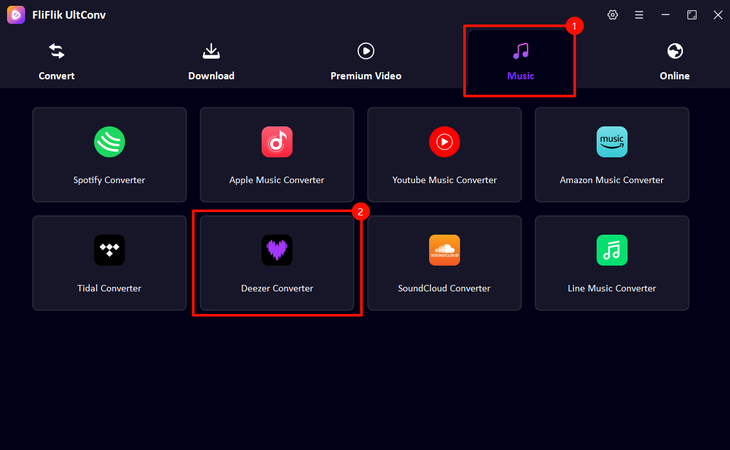
Launch to ‘Music’, choose ‘Deezer Converter’ in UltConv.
-
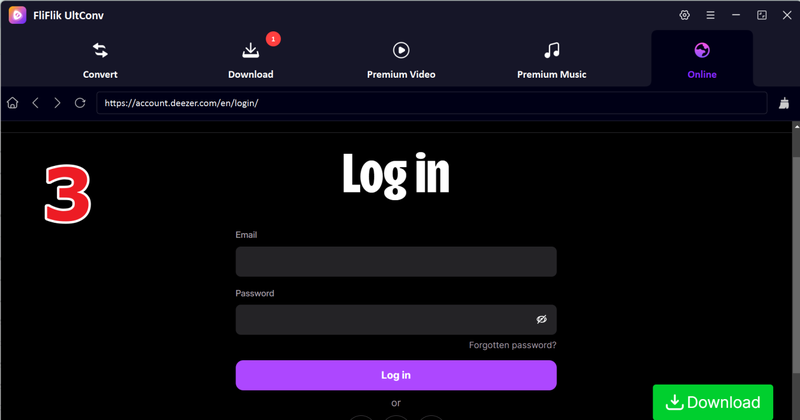
Go ahead and sign in to your Deezer account, it make sure you can find your favourite playlist easily.
-
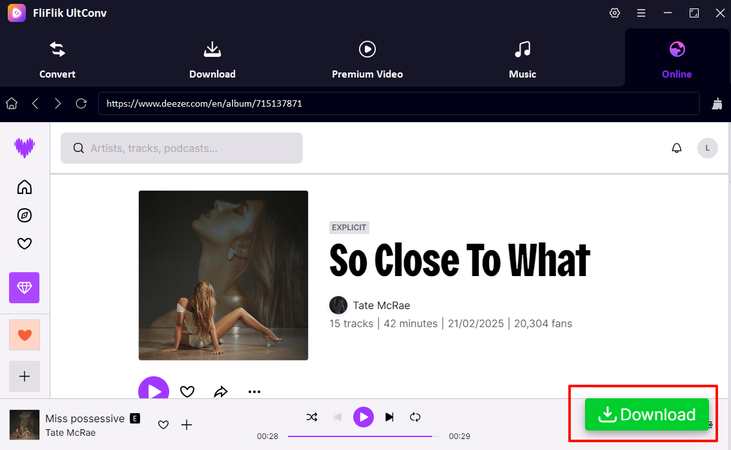
Find the tracks, playlist, or album you want to download. Click the Download button to start converting them to your chosen format (MP3, FLAC, etc.).
-
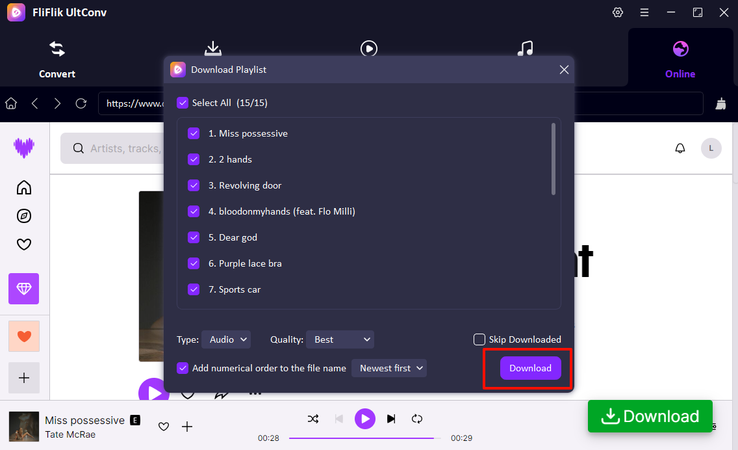
After you click the ‘Download’ button, it will pop up a window, and you can choose the songs you want to download from the album, then click the ‘Download’ button again.
-
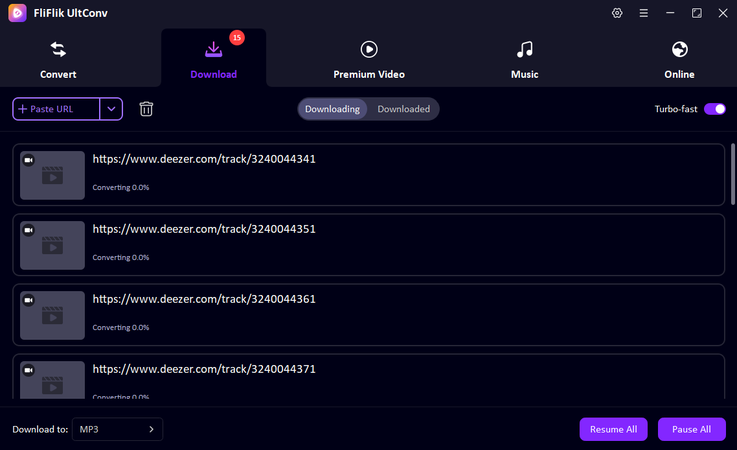
The download begins immediately. You can go to the Downloading tab to find your music. Then your Deezer songs are saved locally and ready to play offline on any device.


▼ Steps Download Spotify Songs with UltConv Spotify Music Converter:
-
Step 1:
Download and install UltConv Spotify Music Converter on your Windows or Mac computer. Once installed, open the program to start.
FREE DOWNLOAD
![secure download]() Secure Download
FREE DOWNLOAD
Secure Download
FREE DOWNLOAD![secure download]() Secure Download
Secure Download
-
Step 2:
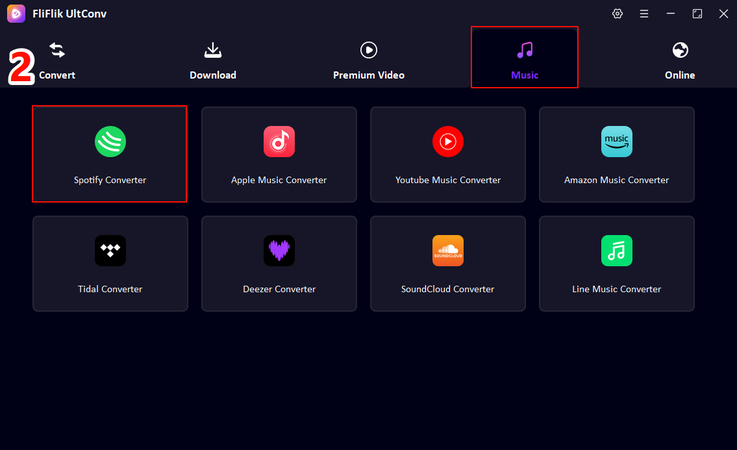
Go to the Music section in UltConv and select Spotify Music Converter.
-
Step 3:
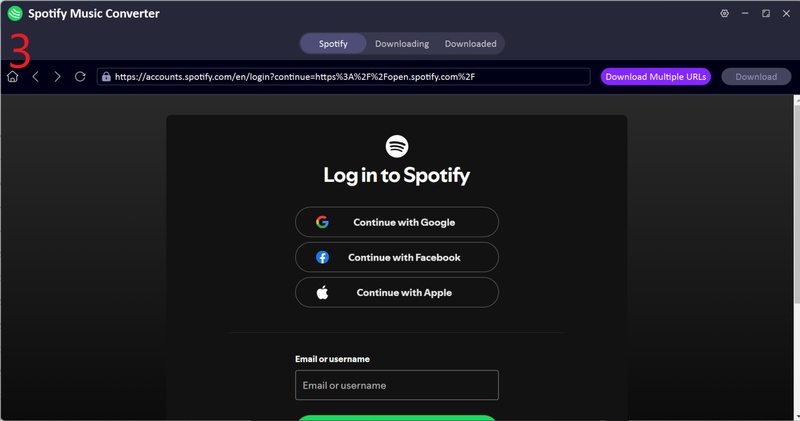
Sign in to your Spotify account directly within UltConv. No Premium subscription is required, free accounts work perfectly.
-
Step 4:
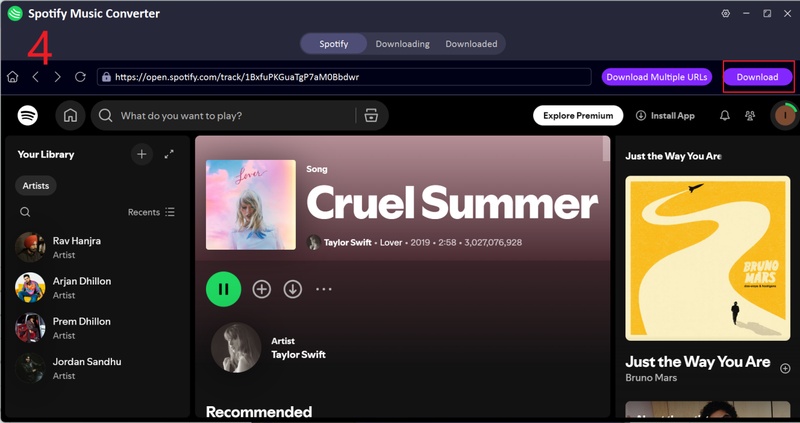
Choose the playlists, albums, or tracks you want to download. Click Download to convert them to MP3 format.
-
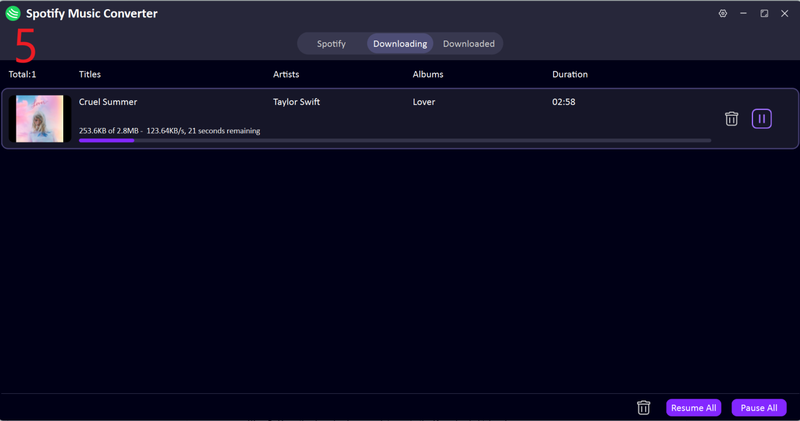
Step 5:
Once the conversion is complete, go to the Downloaded tab to find your MP3 files. Now you can play Spotify music offline on any device, anytime.


Conclusion
When it comes to deezer vs spotify, both have huge music libraries and great features, but they do have limits, especially if you’re using the free version or want to listen offline. That’s where FliFlik UltConv Music Converter comes in. This all-in-one tool lets you download songs, playlists, albums, and podcasts from both Deezer and Spotify in high quality. You can listen offline anytime, on any device, without worrying about subscriptions or restrictions. Whether you want to build your own music library or just enjoy your favorite tracks without any issues, UltConv Spotify Converter is your best option.
 Secure Download
Secure Download
Secure Download
Hey there! I am Maxwell Clark. I'm always looking for new tech tools that make a difference, from making visuals and audio better to making workflows better. I'm going to share tips and tricks for using AI tools for videos, audio, and images. I'm excited to help you navigate the digital world more efficiently and creatively!

