

 8 minutes read


Ever heard a song you loved but didn’t know the name? That’s exactly what Shazam is built for. You tap the button; it listens for a few seconds, and suddenly the mystery song has a name, artist, and album. It’s great for discovering music, but there’s one catch. Shazam helps you identify songs, not actually download them.
That’s why many users start looking for ways to download from Shazam to MP3 for free so they can listen offline anytime. The process isn’t always obvious, but there are a few simple methods that make it possible. In this guide, we’ll walk through five practical ways to save music you discover on Shazam as MP3 files in 2026.

- Part 1. How to Download MP3 Songs from Shazam on Desktop
- Part 2. How to Download from Shazam to MP3 Free on Android
- Part 3. How to Download from Shazam to MP3 Online Free
- Part 4. How to Download from Shazam to MP3 Free with Developer Tool
- Bonus Tips: Using UltConv to Download Shazam Song to MP3 from Your Music APP
- Conclusion
Content Table:
Part 1. How to Download MP3 Songs from Shazam on Desktop
If you discover a track on Shazam and want to keep it as an MP3 file, you’ll need a tool that can download and convert music from supported streaming platforms. FliFlik UltConv Shazam to MP3 Converter works as a music downloader and converter that helps you save songs in common formats for offline listening. After identifying a song on Shazam, you can search for the same track in the software and download it directly to your computer.
What makes the tool practical is its flexible downloading system. UltConv Shazam to MP3 Converter allows users to download individual songs as well as entire playlists, albums, artists, podcasts, and even audiobooks. The software converts music into formats like MP3, FLAC, WAV, AAC, and M4A while maintaining audio quality up to 320 kbps. It also supports batch downloading and keeps ID3 tags such as song title, artist name, and album artwork, which helps keep your music library organized.

- Convert music to MP3, AAC, WAV, FLAC, M4A, and other formats
- Download songs, playlists, albums, artists, and podcasts
- Support high‑quality audio up to 320 kbps
- Batch download multiple tracks or playlists at once
- Keep ID3 tags and metadata like artist, album, and artwork
- Support downloads from 10,000+ streaming music sites
▼ Steps to Download MP3 Music Identified on Shazam with FliFlik UltConv
If you want to save a song you discovered on Shazam as an MP3 file, the process with UltConv is simple and only takes a few steps.
-
Download and install FliFlik UltConv on your Windows or Mac computer. Once the installation is complete, open the program.
FREE DOWNLOAD![secure download]() Secure Download
FREE DOWNLOAD
Secure Download
FREE DOWNLOAD![secure download]() Secure Download
Secure Download
-
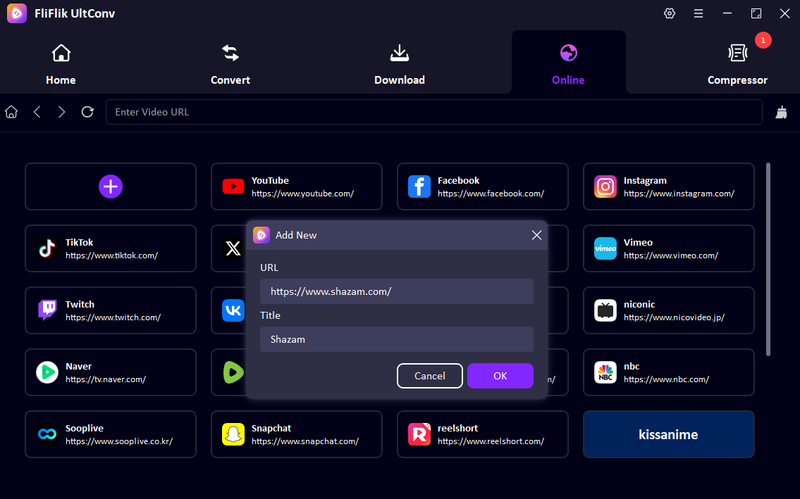
Open UltConv and switch to the Online section. Next click the + button and paste the Shazam website and Title in the pop-up, and click OK to apply.
-
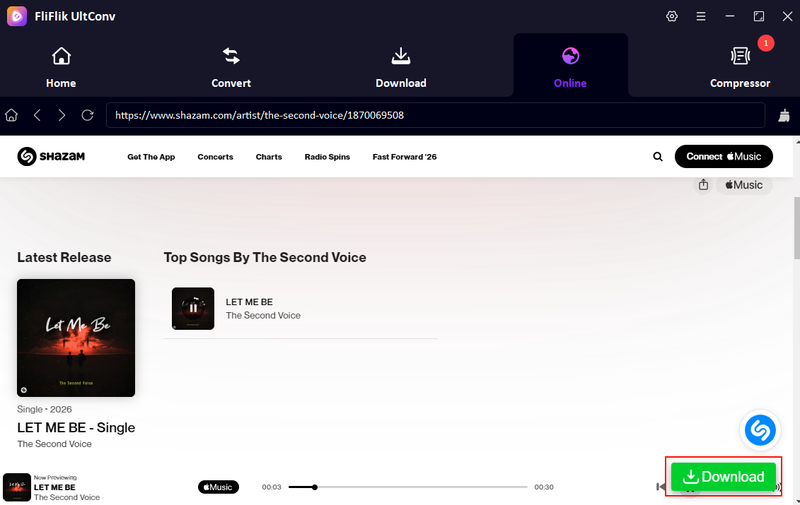
The platform will open inside UltConv’s built-in browser, allowing you to browse music and locate the track you want to download. Select the song, and click the Download button to start the process.
-
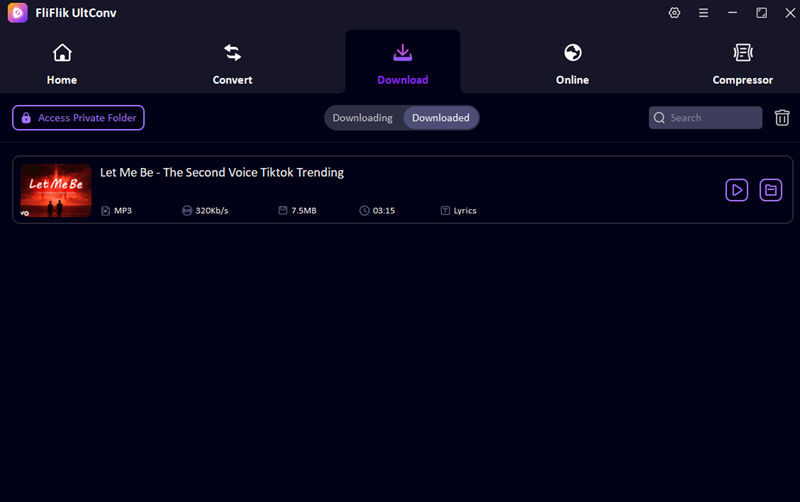
UltConv will start analyzing and downloading the track. Once it finishes, go to the Downloaded section to access your MP3 file and listen offline anytime.


Part 2. How to Download from Shazam to MP3 Free on Android
One simple way to save songs you discover on Shazam is by using an Android app like ShazaMusic. This tool works as a companion downloader. Instead of downloading directly from Shazam, it lets you search for the song online and convert it into an MP3 file that you can store on your phone for offline listening. The app includes a built-in browser so you can find music and convert it without switching between multiple apps. This makes the process relatively simple for Android users who want to keep track as MP3 files instead of just streaming them.
- Converts online videos into MP3 files for offline listening
- Built‑in browser for searching and downloading music in one place
- Works alongside Shazam to save the identified song as MP3
- Simple interface that’s easy for beginners to use
- Mainly converts online videos to MP3, not direct music downloads
- Depends on external sources like video platforms for the audio
- Limited control over audio quality settings
- Requires searching for the song again after identifying it with Shazam
▼ Steps to Download from Shazam to MP3 on Android
- Step 1: Open Shazam and identify the song you want to download. Note the song title and artist.
- Step 2: Install and open ShazaMusic on your Android device.
- Step 3: Use the built-in search browser inside the app to find the same song online.
- Step 4: Select the video or audio source and choose the Convert to MP3 option.
- Step 5: Start the conversion and download. After it finishes, the MP3 file will be saved on your phone for offline listening.
Part 3. How to Download from Shazam to MP3 Online Free
Another simple option is using an online downloader like FollowDEH Shazam Downloader. This web‑based tool lets you paste a Shazam link and download the original media file directly to your device without installing any software. Since it runs in your browser, you can use it on almost any device, including Windows, Mac, Android, or iPhone. The tool is designed to be quick and straightforward. You only need to paste the Shazam track link, and the site will process it and generate a download option. According to the tool page, the service is free to use, requires no registration, and delivers downloads instantly from the supported platform.
- Works directly in the browser with no installation
- Free to use and does not require registration
- Instant download processing after pasting the link
- Compatible with multiple devices and operating systems
- Requires a Shazam link rather than downloading directly from the app
- Download success may vary depending on the track source
- Limited control over output format or quality
- Depends on an internet connection to process downloads
▼ Steps to Download from Shazam to MP3 Online
- Step 1: Open Shazam and identify the song you want to download. Copy the track link.
-
Step 2:
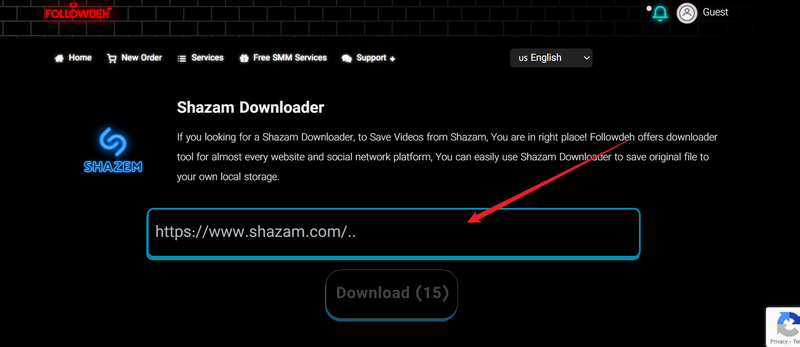
Go to the FollowDEH Shazam Downloader website in your browser, and paste the Shazam song link into the input box on the page.
- Step 3: Click the Download button and wait for the tool to process the link.
- Step 4: Once the file is ready, click the generated download option to save the MP3 file to your device.

Part 4. How to Download from Shazam to MP3 Free with Developer Tool
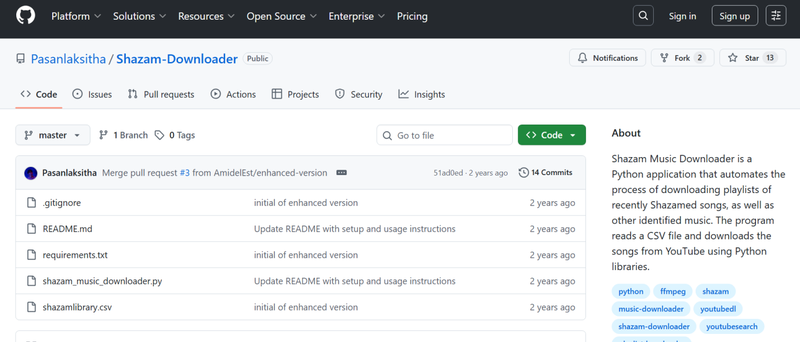
Another method is using an open‑source developer project like Shazam Downloader on GitHub. This tool is designed for users who are comfortable running scripts or developer tools on their computer. Instead of downloading music directly from Shazam, the program takes the song information identified by Shazam and fetches the audio from other online sources. Tools like this are usually created by developers and shared publicly, which means they are free to use and customizable. However, they often require some technical setup, such as installing dependencies or running commands in a terminal, so they are better suited for advanced users rather than beginners.
- Free and open‑source project available on GitHub
- Can automatically fetch songs based on Shazam results
- Allows customization or modification of the code
- Works without relying on paid music subscriptions
- Requires technical knowledge to install and run
- Setup may involve command‑line tools or dependencies
- Download sources can vary depending on availability
- Not as user‑friendly as regular download software
▼ Steps to Download from Shazam to MP3 Using the Developer Tool
-
Step 1:
Visit the
Shazam Downloader
project page on GitHub and download or clone the repository to your computer.
- Step 2: Install the required dependencies listed on the project page (such as Python or related packages).
- Step 3: Open the tool and enter the Shazam track link or song information you want to download.
- Step 4: Run the script or command provided by the tool to start the download process.
- Step 5: Once the process finishes, the MP3 file will be saved in the specified output folder on your computer.

Bonus Tips: Using UltConv to Download Shazam Song to MP3 from Your Music APP
Since Shazam mainly identifies songs rather than downloading them, a common workaround is to connect it with a streaming service like Apple Music or Spotify. Once connected, the songs you identify can automatically appear in a playlist inside the music app. From there, tools like FliFlik UltConv can download and convert those tracks into MP3 files for offline listening.
This method is convenient because Shazam handles song discovery while the music app stores the tracks in one place. UltConv can then download the songs from the streaming service and convert them into a format that works on any device.
▼ Steps to Download Shazam Songs to MP3 via Spotify
- Step 1: Open Shazam on your device and go to My Music. Then tap the Settings icon and connect Shazam with Apple Music.
-
Step 2:
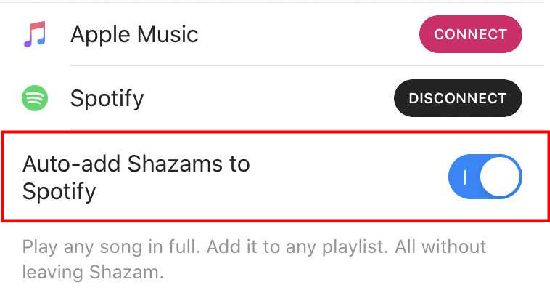
Enable the option to
sync Shazam tracks so
identified songs appear automatically in your Spotify library or Apple Music library.
-
Step 3:
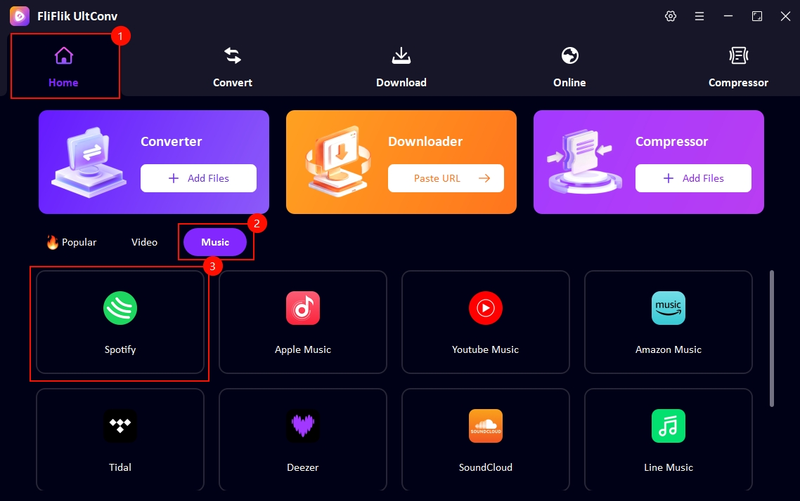
Launch FliFlik UltConv, open
Spotify Converter
under the Music section in Home, and then log in with your account and find the playlist where your Shazam songs are stored. UltConv also supports
downloading Apple Music to MP3
.
-
Step 4:
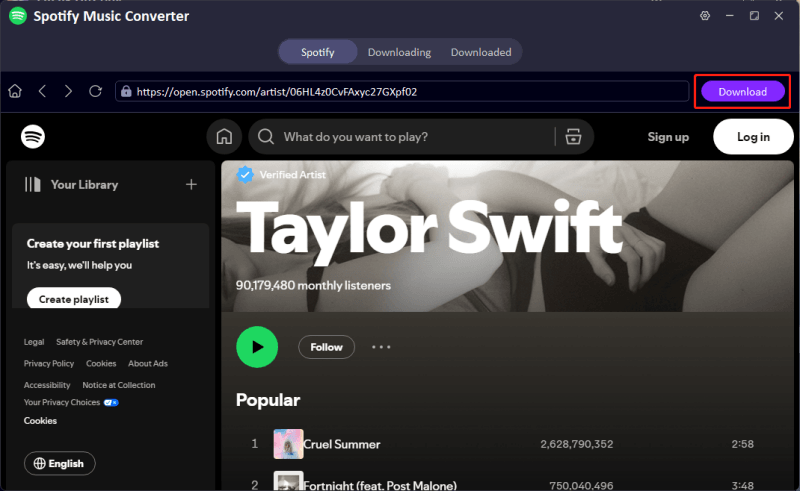
Click the Download button in the upper-right corner to start the download process.
-
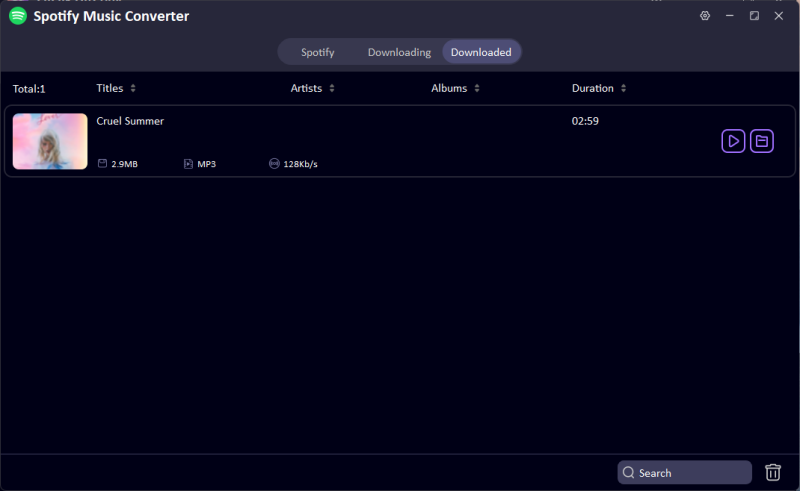
Step 5:
Then you can check the 320kbps song as MP3 in the Downloaded tab.


Conclusion
If you’ve been trying to download from Shazam to MP3 for free, there are several ways to make it happen. You can use Android apps, online downloaders, or developer tools, or connect Shazam with streaming services to access the music you discover. Each method works a little differently, but the goal is the same: saving your favorite tracks for offline listening. For a simpler and more reliable solution, tools like FliFlik UltConv Shazam to MP3 Converter make the process much easier. It allows you to download songs from supported music platforms and convert them directly to MP3 while keeping good audio quality and track information. If you regularly discover new music through Shazam, UltConv music converter can help you quickly turn those finds into a personal offline music library.
 Secure Download
Secure Download
Secure Download
Hey there! I am Maxwell Clark. I'm always looking for new tech tools that make a difference, from making visuals and audio better to making workflows better. I'm going to share tips and tricks for using AI tools for videos, audio, and images. I'm excited to help you navigate the digital world more efficiently and creatively!

