

 7 minutes read


If you use Tidal often, you’ve probably wondered how to save your music so you can play it anytime without worrying about Wi-Fi or data. Maybe you’re on a long commute, maybe you travel a lot, or maybe you just like keeping your favorite songs in one place. Tidal does offer offline listening, but it only works inside the app. If you want more freedom, like choosing your own audio format, keeping full metadata, or downloading whole playlists at once, there are other ways to do it. In this article, we will share 10 practical methods to download music from Tidal, including both paid and free options, so you can choose whatever fits your routine.

Part 1. Are Downloads Free on Tidal?
No, Tidal downloads are not free. Although Tidal allows Premium and HiFi subscribers to save songs for offline listening, these downloads are only associated with the app and thus cannot be transferred to other devices or opened outside the Tidal environment. Hence, the majority of users want to find methods to keep their favorite songs forever.
If you’re wondering how to download music from Tidal without restrictions, this is where Tidal downloaders come in. They allow you to convert and save songs, playlists, and albums in popular formats like MP3, AAC, or FLAC, so you can enjoy your music offline anytime, anywhere. In this guide, we’ve tested and compiled 10 effective methods to download from Tidal, covering both official and third-party solutions, so you can pick the one that fits your needs best.
Part 2. 10 Tested Methods to Download Music from Tidal
Now that you know why downloads aren’t free on Tidal, let’s explore the best ways to get your music offline. Here are 10 tested ways to download music from Tidal in 2026.
1. FliFlik UltConv Tidal Converter
FliFlik UltConv Tidal Converter is a powerful and versatile tool designed to download from Tidal effortlessly. It allows you to save songs, albums, playlists, artists, podcasts, and audiobooks locally, giving you full offline access without being tied to the Tidal app. The software supports multiple output formats like MP3, M4A, WAV, AAC, FLAC, AIFF, and MKA, while keeping audio quality lossless up to 320 Kbps.
Batch downloading is also supported, making it easy to save entire playlists or albums at once. One of UltConv Tidal Converter’s standout features is its ability to preserve all ID3 tags and metadata, including song titles, artists, albums, and album artwork, so your offline library stays organized and searchable. Plus, it works across thousands of streaming platforms, including Spotify, Apple Music, Deezer, and Tidal, making it a one-stop solution for managing your digital music collection.

- Download songs, albums, playlists, artists, and podcasts from Tidal and other platforms
- Convert music to MP3, M4A, WAV, AAC, FLAC, AIFF, MKA, and more
- Up to 320 Kbps lossless audio quality
- Preserve all ID3 tags and metadata, including track info and artwork
- Batch download playlists or albums at 10X high speed
- Supports 10,000+ streaming platforms, including Spotify, Apple Music, Deezer, and Tidal
▼ Steps to Download Tidal Songs with UltConv Tidal Converter:
-
Download and install UltConv Tidal Converter on your Windows or Mac computer. The setup is fast and only takes a few minutes.
-
Open UltConv and click the music tab, and select Tidal Converter.

-
Next, sign in to your Tidal account and browse the site directly within the program no need to switch to a browser.

-
Find the tracks, playlist, or album you want, then click the Download button.

-
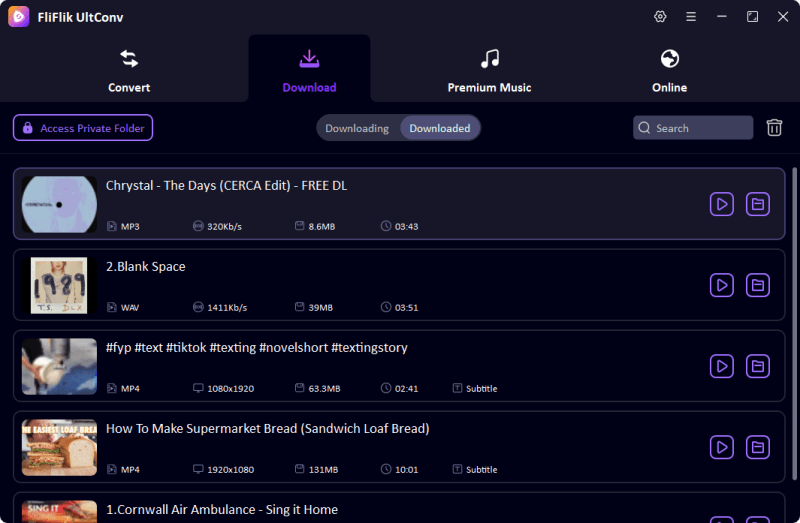
The download will start immediately. Once finished, go to the Downloaded tab to find your songs. Your Tidal tracks are now saved locally and ready to play offline on any device.


2. TuneCable Tidal Music Converter

TuneCable Tidal Music Converter is a reliable tool that allows users to download from Tidal and save tracks for offline listening without needing the Tidal app. It supports multiple output formats and preserves the original audio quality and metadata, making it easy to manage your music library across devices. Whether you want individual songs or full playlists, TuneCable handles batch downloads efficiently.
- Convert Tidal music to MP3, AAC, WAV, FLAC, and more
- Preserve ID3 tags, album artwork, and metadata
- Batch download playlists and albums
- Works on both Windows and Mac
- Free version has limited downloads
- Advanced features require a paid subscription
3. ViWizard Tidal Music Converter

ViWizard Tidal Music Converter lets you download from Tidal with lossless audio quality while keeping all ID3 tags intact. It’s designed for both beginners and advanced users, offering a simple interface with batch download capabilities. The tool also allows you to convert Tidal tracks into multiple formats for playback on any device.
- Convert Tidal music to MP3, AAC, FLAC, WAV, and more
- Preserve ID3 tags, album artwork, and metadata
- Batch download playlists, albums, and artists
- Maintains original audio quality
- Free trial limits the number of songs per session
- Some advanced features are locked behind a paid license\
4. iDownerGo Music Downloader

iDownerGo Music Downloader is a versatile solution for users who want to download from Tidal and other streaming platforms. It focuses on high-speed downloads while keeping audio quality intact. The software also preserves metadata and supports multiple output formats, making it convenient to build a personal offline music collection.
- Supports MP3, AAC, WAV, FLAC, and more
- Preserves ID3 tags and metadata
- Batch download playlists, albums, and tracks
- High-speed downloads
- Free version has limitations on the number of downloads
- Updated UI
5. Tidabie Tidal Music Converter

Tidabie Tidal Music Converter allows you to download from Tidal without a Premium subscription and save music offline in multiple formats. It preserves high-quality audio, ID3 tags, and album artwork, while enabling batch downloads of playlists and albums. It’s a convenient choice for users asking, how do you download music on Tidal outside of the official app.
- Convert Tidal music to MP3, AAC, FLAC, WAV, and more
- Preserve all metadata and album artwork
- Supports batch downloads of songs, playlists, and albums
- Maintains high audio quality
- Free trial restricts the number of songs
- Full functionality requires a paid license
- Subscription fee is higher than competitors\
6. NoteBurner Tidal Music Downloader

NoteBurner Tidal Music Downloader is a versatile tool that lets you download from Tidal and save music offline in multiple formats. It focuses on maintaining original audio quality while preserving all ID3 tags, album artwork, and metadata. Batch download functionality makes it easy to save entire playlists or albums quickly, making it perfect for building a personal music library.
- Convert Tidal music to MP3, AAC, FLAC, and more
- Preserve all ID3 tags, album artwork, and metadata
- Supports batch downloads
- Supports 48 interface languages
- Free version limits downloads
- Full features require a paid subscription
7. Athame Tidal Downloader

Athame Tidal Downloader allows users to download from Tidal and transform music into standard formats for offline listening. It’s lightweight, easy to use, and designed for users who want a simple way to save tracks without a complex setup. Athame also preserves track information to keep your music library organized.
- Download Tidal tracks without losing quality
- Convert music to MP3, AAC, and WAV
- Preserve ID3 tags and metadata
- Simple and lightweight interface
- Supports batch downloads
- Limited format options compared to other converters
- Development updates are less frequent
- Fewer advanced features
8. Audacity Tidal Music Recorder

Audacity Tidal Music Recorder is a free, open-source tool that can download from Tidal by recording audio in real-time. While it requires manual recording and setup, it’s a flexible solution for users who want full control over audio capture and editing. It’s also suitable for capturing podcasts or live streams from Tidal.
- Free and open-source
- Records any audio playing on your system
- Supports multiple output formats (MP3, WAV, etc.)
- Full control over recording settings
- Works on Windows, Mac, and Linux
- Real-time recording can be slower than direct downloads
- Manual setup required for best results
- No built-in batch download or playlist support
9. Streamrip Tidal Music Downloader

Streamrip Tidal Music Downloader is an open-source tool that allows users to download from Tidal quickly and efficiently. It focuses on high-quality audio extraction and supports multiple formats. Streamrip is lightweight and works well for users who prefer a simple solution without a bulky interface.
- Open-source and free to use
- Download Tidal songs, albums, and playlists
- Preserve high-quality audio
- Lightweight and fast
- Supports multiple output formats
- Requires basic technical knowledge to set up
- No official customer support
- Limited batch management features
10. Tidal-dl

Tidal-dl is a command-line tool that lets you download from Tidal in high-quality formats like FLAC. It’s ideal for tech-savvy users who want full control over output formats and batch downloads. Tidal-dl preserves metadata and audio quality, making it a powerful solution for building a personal offline music library.
- Free and open-source
- Download music in FLAC, MP3, and other formats
- Preserve ID3 tags and metadata
- Works on Windows, Mac, and Linux
- Command-line interface may be challenging for beginners
- Requires manual input for some settings
- No graphical interface
▼ How to Download Tidal Music via Tidal-dl:
- Step 1: Open Tidal-dl on your computer. You’ll see a prompt asking for your Tidal username and password. Enter your credentials to access your Tidal account.
- Step 2: To set FLAC as your download format, type the number “2” into the command prompt where it asks for the output format, then press Enter. This ensures the music is saved in high-quality FLAC format.
- Step 3: Open the Tidal Web Player in your browser and navigate to the music you want to download. Right-click on the track or playlist, select “Copy link address,” then return to Tidal-dl, paste the URL into the command prompt, and press Enter. The download will start immediately.
Part 3. Comparison of 10 Methods to Download Music from Tidal
With so many tools available, it helps to see how they stack up side by side. Here’s a quick comparison of the 10 methods we covered for downloading from Tidal:
| Method | Price | Output Formats | Download Speed | ID3 Tags & Metadata | Batch Download | Stability |
|---|---|---|---|---|---|---|
| FliFlik UltConv | $9.95/Month | 100+ MP3, M4A, WAV, AAC, FLAC, AIFF, MKA | 10X | Yes | Yes | Very stable |
| TuneCable | $26.95/ 3 Months | MP3, AAC, WAV, FLAC | 10X | Yes | Yes | Stable |
| ViWizard | $14.95/Month | MP3, AAC, WAV, FLAC | Fast | Yes | Yes | Stable |
| iDownerGo | $19.95/Month | MP3, AAC, WAV, FLAC | 10X | Yes | Yes | Stable |
| Tidabie | $26.95/ 3 Months | MP3, AAC, WAV, FLAC | Fast | Yes | Yes | Stable |
| NoteBurner | $14.95/Month | MP3, AAC, WAV, FLAC | Fast | Yes | Yes | Stable |
| Athame | Free | MP3, AAC, WAV | Moderate | Yes | Limited | Moderate |
| Audacity Recorder | Free | MP3, WAV, others via export | Slow | Manual | No | Moderate |
| Streamrip Tidal | Free/Open-source | MP3, FLAC | Moderate | Yes | Limited | Moderate |
| Tidal-dl | Free/Open-source | FLAC, MP3, others | Moderate | Yes | Limited | Stable, tech-savvy users only |
Final Thoughts
Downloading your favorite music shouldn’t feel complicated. Once you know how to download from Tidal, you can listen to your tracks anytime you want. Tidal’s built-in offline feature works, but it only saves music inside the app. Third-party tools give you more freedom by letting you download songs in different formats, keep all the metadata, and even save whole playlists at once. Among all the options, FliFlik UltConv Tidal Converter stands out for its speed and ease of use, making it the go-to solution for building a permanent offline music library. Take control of your music collection today and experience seamless offline listening with FliFlik UltConv Tidal Converter.
 Secure Download
Secure Download
Secure Download
FAQs
Q1. Can you download music from Tidal?
Yes, Tidal allows downloads for Premium and HiFi subscribers, and third-party tools let you save tracks permanently.
Q2. Does Tidal allow offline downloads?
Yes, but only within the Tidal app. The downloads cannot be played outside the app. You can use tools like FliFlik UltConv Tidal Converter to download music offline.
Q3. Can you download songs from Tidal to a USB?
Not directly via Tidal. You need third-party converters like FliFlik UltConv Tidal Converter to save music locally and transfer it to a USB.
Hey there! I am Maxwell Clark. I'm always looking for new tech tools that make a difference, from making visuals and audio better to making workflows better. I'm going to share tips and tricks for using AI tools for videos, audio, and images. I'm excited to help you navigate the digital world more efficiently and creatively!

