

 7 minutes read


Ever tried taking your favorite Deezer songs with you and realized you can’t? It’s a bit annoying. Deezer is great for streaming, but sometimes you don’t want to depend on Wi-Fi or mobile data. Maybe you just want your music on another device, or you want everything offline for travel.
The good thing is you’re not stuck. There are several ways to download Tracks from Deezer so you can listen whenever you want. Some options are built right into the app. Others offer you more freedom, like choosing the format and audio quality. In this guide, we’ll walk through the 10 best ways to download Deezer tracks in 2026. Nothing complicated. Just clear, simple methods you can use to get your music offline and enjoy it anytime, anywhere.

Part 1. Comparison of 10 Ways to Download Tracks from Deezer
Before we get into the details of each tool in Part 2, it helps to start with a quick side-by-side comparison. This gives you a clear look at which tools are faster, which offer better audio quality, and which support batch downloads or ID3 tags. It’s a simple way to see how they differ before getting into the details of each tool.
| Method/Tool | Download Method | Speed | Output Quality | Batch Capability | ID3 Tag Support | Pricing |
|---|---|---|---|---|---|---|
| FliFlik UltConv Deezer Converter | Windows and Mac | 10X fast | Up to 320 Kbps lossless | Yes | Full | $9.95/Month |
| TunePat Deezer Music Converter | Windows and Mac | 10X | 128 Kbps | Yes | Yes | $ 24.95/3 Month |
| Macsome Deezer Music Converter | Windows and Mac | 10X | Lossless | Yes | Yes | $14.95/Month |
| NoteBurner Deezer Music Converter | Windows and Mac | 10X | Lossless | Yes | Yes | $14.95/Month |
| Tunefab Deezer Music Converter | Windows and Mac | 35X | Lossless | Yes | Yes | $25.95/month |
| ViWizard Streaming Audio Recorder | Real-time recording | Real-time | Depend on original quality | Yes | Yes | $29.95/Month |
| DeeKeep Deezer Music Converter | Windows and Mac | 10X | Lossless | Yes | Yes | $14.95/Month |
| DeeMix | Windows and Mac | 1X | 128Kbps | Yes | Yes | Free/Paid |
| DeezMate | Online | 1X | 128Kbps | Yes | Yes | Free/Paid |
| Telegram Bot (@Deezload2bot) | Cloud-based download | 1X | 128Kbps | Limited | Yes | Free |
Part 2. 10 Best Ways to Download Tracks from Deezer
Some of these options come built into the app, while others give you more freedom with formats, quality, and how you save your music offline. With that in mind, here are the 10 best ways to download Deezer tracks in 2026.
1. FliFlik UltConv Deezer Converter
If you’re looking for a simple way to download tracks from Deezer without any issues, then FliFlik UltConv Deezer Converter is our top recommendation. This powerful tool doesn’t just work with Deezer; it supports Spotify, Apple Music, Tidal, and thousands of other streaming platforms. It lets you save your favorite songs, albums, playlists, and podcasts so you can listen offline, on any device, without worrying about restrictions or format compatibility.
UltConv Deezer Converter is designed to give you total control over your music library. You can convert Deezer tracks into multiple formats, MP3, WAV, AAC, etc. It preserves the original quality and keeps all your ID3 tags and metadata intact. Whether you want to batch download playlists or save individual songs, UltConv Deezer Converter handles it quickly and efficiently, letting you enjoy your music wherever and however you like.

- Supports over 10,000 streaming platforms, including Spotify, Apple Music, SoundCloud, and more
- Batch download entire playlists, albums, or artist catalogs at 10X speed
- Download songs, albums, playlists, artists, podcasts, and audiobooks from Deezer
- Convert music to MP3, M4A, WAV, AAC, FLAC, AIFF, MKA, and more
- Enjoy up to 320 Kbps lossless audio for high-quality listening
- Preserve all ID3 tags and metadata, including song title, artist, album, and artwork
▼ Steps to Download Deezer Songs with UltConv Deezer Converter:
-
Download and install UltConv Deezer Converter on your Windows or Mac computer. Setup is quick and takes only a few minutes.
-
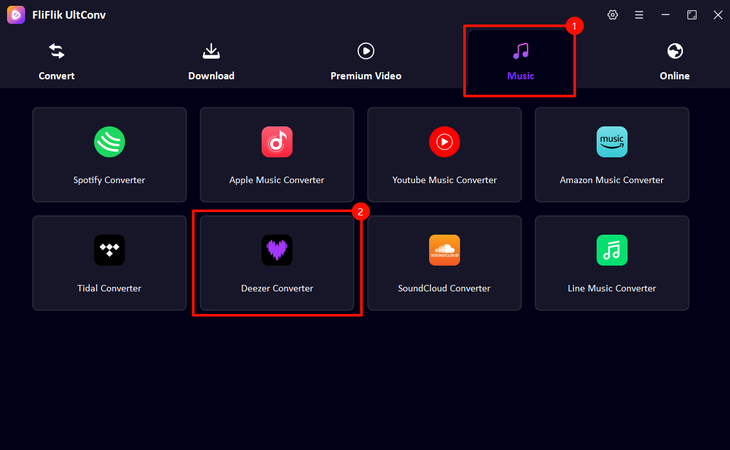
Open UltConv and click the Music tab, then select Deezer Converter.
-
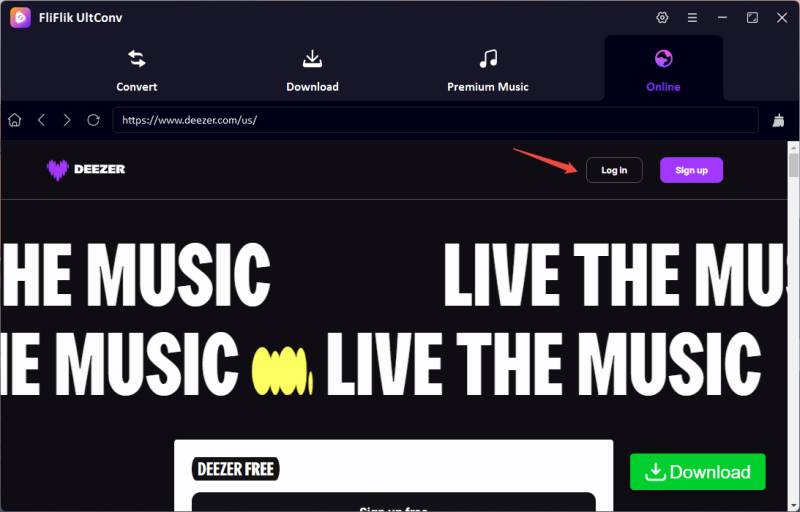
Next, inside UltConv, sign in to your Deezer account and browse the site directly within the program; no need to switch to a browser.
-
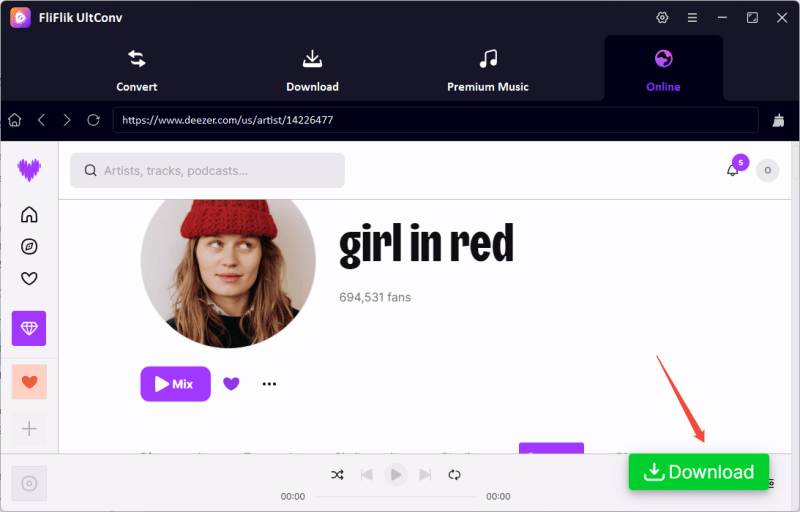
Find the tracks, playlist, or album you want, then click the Download button. Choose your preferred format, like MP3 or FLAC, for conversion.
-
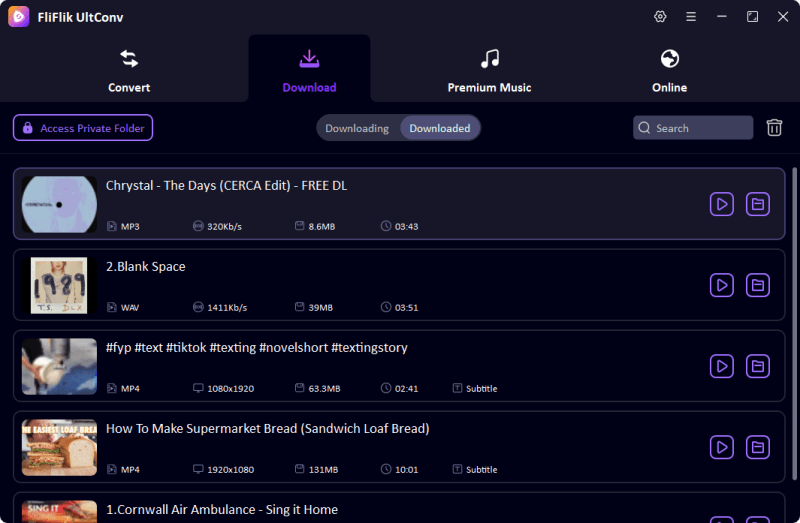
The download starts immediately. Once finished, go to the Downloaded tab to find your songs. Your Deezer tracks are now saved locally and ready to play offline on any device.


2. TunePat Deezer Music Converter

TunePat Deezer Music Converter is another reliable tool for anyone who wants to enjoy Deezer music offline without. It works with both Windows and Mac, allowing users to convert songs, playlists, and albums into popular formats like MP3, AAC, FLAC, and WAV. What makes TunePat stand out is its ability to preserve ID3 tags and metadata, keeping your library organized exactly the way it appears in Deezer.
- Supports MP3, AAC, FLAC, WAV, and other formats
- Keeps ID3 tags and metadata intact
- Fast batch downloads
- Works on Windows and Mac
- Allows offline listening without Deezer Premium
- The free version has limited downloads
- Advanced features require a paid subscription
- The interface can feel a bit cluttered for new users
3. Macsome Deezer Music Converter

Macsome Deezer Music Converter is designed for users who want a seamless way to download and convert Deezer music into high-quality audio files. The software works on both Windows and Mac and can convert tracks into MP3, AAC, FLAC, and WAV formats. Macsome focuses on keeping your music library organized by preserving ID3 tags, track names, and album artwork. Its clean, user-friendly interface makes it easy for beginners and advanced users to navigate. Whether you’re downloading a single song or an entire playlist, Macsome ensures the original sound quality is maintained for the best listening experience offline.
- Supports multiple output formats including MP3, AAC, FLAC, and WAV
- Preserves ID3 tags and track info
- Batch conversion for playlists and albums
- Simple, user-friendly interface
- Maintains high audio quality
- Free trial limits the number of songs you can download
- Some features are locked behind a premium license
- Lacks advanced editing options for metadata
4. NoteBurner Deezer Music Converter

NoteBurner Deezer Music Converter is perfect for anyone looking to save Deezer music locally and enjoy it offline. Available for both Windows and Mac, it supports converting songs, playlists, and albums into popular formats like MP3, AAC, FLAC, and WAV. NoteBurner focuses on maintaining high audio quality while keeping all ID3 tags, album artwork, and metadata intact. The program also supports batch downloading, making it ideal for users with large playlists. Its intuitive design allows easy navigation even for beginners, while advanced users can still benefit from its high-quality output and flexible format options.
- Converts to MP3, AAC, FLAC, and WAV
- Retains ID3 tags and album artwork
- Supports batch downloads of songs, playlists, and albums
- Works on both Windows and Mac
- Maintains original audio quality
- The free version is limited in functionality
- Requires a paid license for full features
- The interface is slightly less intuitive for beginners
5. Tunefab Deezer Music Converter

Tunefab Deezer Music Converter is a tool designed for users who want to save their favorite Deezer tracks for offline listening. It works on both Windows and Mac and supports downloading songs, albums, and playlists in high-quality audio. Tunefab can preserve original sound quality while keeping all ID3 tags and metadata intact, making it easy to organize your music library. Its simple interface and batch download capability make it suitable for both casual listeners and power users who want to build a personal music collection without being tied to the Deezer app.
- Converts Deezer music to MP3, AAC, FLAC, WAV, and more
- Preserves ID3 tags, album artwork, and metadata
- Supports batch downloads of songs, albums, and playlists
- Maintains high audio quality
- Works on both Windows and Mac
- Simple and user-friendly interface
- Free version limits the number of songs you can download
- Advanced features require a paid license
- Interface may feel basic compared to competitors
6. ViWizard Streaming Audio Recorder

ViWizard Streaming Audio Recorder is a nice option for recording music from Deezer and other streaming platforms. Unlike standard converters, ViWizard captures audio in real time, making it possible to record not just songs but also podcasts, radio, and other streaming content. It’s compatible with both Windows and Mac and allows users to save tracks in multiple formats like MP3, WAV, AAC, and FLAC. One of its standout features is the ability to automatically split recordings by track and preserve ID3 tags, making library management easy. ViWizard is ideal for those who want full control over streaming audio recordings.
- Supports multiple formats including MP3, WAV, AAC, FLAC
- Captures songs, podcasts, and radio streams
- Preserves ID3 tags and metadata
- Works on both Windows and Mac
- Recording speed depends on real-time playback
- Free version limits the number of recordings
- Interface can feel complex for beginners
- The subscription price is high
7. DeeKeep Deezer Music Converter

DeeKeep Deezer Music Converter is designed to help Deezer users download their favorite music in high quality and store it locally for offline listening. It supports multiple output formats, including MP3, AAC, FLAC, and WAV, while keeping all metadata intact. The software works on both Windows and Mac, allowing batch downloads of songs, albums, or playlists at a fast pace. DeeKeep focuses on preserving original sound quality, making it suitable for audiophiles who want their tracks to sound as good offline as they do streaming. It’s simple enough for beginners but still powerful for advanced users.
- Converts to MP3, AAC, FLAC, WAV, and more
- Maintains ID3 tags, album artwork, and metadata
- Supports batch downloads of playlists, albums, and artists
- Keeps original audio quality
- Free trial limits downloads
- Full features require a paid license
- Interface may feel basic compared to competitors
8. DeeMix

DeeMix is a straightforward Deezer music converter for users who want quick and simple downloads of their favorite Deezer tracks. It supports standard formats like MP3, AAC, and FLAC, and preserves ID3 tags and metadata to keep your library organized. DeeMix allows batch downloading of songs, albums, and playlists, making it convenient for users with large music libraries. While it’s not as feature-packed as some competitors, its ease of use and fast conversion make it appealing for casual listeners who just want offline access without extra complexity.
- Converts Deezer music to MP3, AAC, and FLAC
- Preserves ID3 tags and metadata
- Supports batch downloads of songs, albums, and playlists
- Maintains decent audio quality
- Fewer advanced features than other converters
- Limited customization options for output quality
- May not handle very large playlists as efficiently
9. DeezMate

DeezMate is a lightweight online Deezer music downloader that allows users to quickly save tracks, albums, and playlists for offline listening. It supports multiple output formats such as MP3, FLAC, and AAC, while keeping ID3 tags and metadata intact for easy organization. The tool is designed for users who want a straightforward solution without extra complexity. DeezMate works online, and it’s ideal for casual listeners who want high-quality downloads without dealing with complicated settings or advanced features.
- Converts Deezer music to MP3, FLAC, and AAC
- Preserves ID3 tags and metadata
- Supports batch downloads of tracks, albums, and playlists
- Simple and easy-to-use interface
- Limited advanced features compared to premium converters
- May struggle with very large playlists
- The free version may have download limits
10. Telegram Bot (@Deezload2bot)
The @Deezload2bot on Telegram is a convenient way to download Deezer music directly through the messaging app. It’s ideal for users who want a quick solution without installing software. The bot allows you to save songs, albums, or playlists in MP3 format and keeps the ID3 tags intact. Since it runs on Telegram, it works on Windows, Mac, and mobile devices with the app installed. While it’s easy and fast, the Telegram bot has limitations compared to full-featured desktop converters, such as fewer format options and smaller batch downloads.
- Downloads songs, albums, and playlists in MP3
- Preserves ID3 tags and metadata
- Works on Windows, Mac, and mobile devices
- Limited output format options (mostly MP3)
- Cannot handle very large playlists efficiently
- Relies on Telegram availability and bot uptime
▼ How It Works:
- Step 1: Open Telegram and search @Deezload2bot.
- Step 2: Start the bot and follow the instructions to link your Deezer account if needed.
-
Step 3:
Send the Deezer song, album, or playlist link you want to download.

- Step 4: Choose your preferred format (usually MP3).
- Step 5: The bot processes your request and sends the downloadable file directly to the chat.

Final Thoughts
As we discussed, if you want to download tracks from Deezer easily and enjoy them offline, there are plenty of options, from desktop converters to Telegram bots. Each has its own pros and cons, and you can choose according to your needs. Among all of them, FliFlik UltConv Deezer Converter stands out for its speed, flexibility, and high-quality output. It supports multiple formats, preserves ID3 tags and metadata, and works across Windows and Mac. Whether you want to save individual songs or entire playlists, UltConv Deezer Converter makes it simple to build your own offline music library without losing sound quality.
 Secure Download
Secure Download
Secure Download
FAQs
Q1. Can you download tracks from Deezer?
Yes, you can download tracks from Deezer. The platform allows offline listening through its official app for Premium subscribers. Additionally, third-party tools like FliFlik UltConv Deezer Converter will let you save songs, albums, and playlists locally, so you can enjoy your favorite music anytime, even without an internet connection.
Q2. How to convert Deezer to MP3?
To convert Deezer music to MP3, you need a dedicated Deezer converter like FliFlik UltConv Deezer Converter. Simply log in to your Deezer account through the software, select the songs you want, and choose MP3 as the output format. The software will save high-quality, DRM-free files for offline playback.
Q3. What is the best Deezer downloader?
The best Deezer downloader depends on your needs, but FliFlik UltConv Deezer Converter stands out. It supports multiple formats, preserves ID3 tags and metadata, allows batch downloads, and maintains high-quality audio.
Q4. Is downloading from Deezer legal?
Downloading from Deezer for offline use via the official Premium app is legal. If you use third-party software to save music outside the app, make sure it is for personal use only.
Hey there! I am Maxwell Clark. I'm always looking for new tech tools that make a difference, from making visuals and audio better to making workflows better. I'm going to share tips and tricks for using AI tools for videos, audio, and images. I'm excited to help you navigate the digital world more efficiently and creatively!

