

 7 minutes read


While WAV files offer exceptional audio quality, their large file sizes make them impractical for everyday use. In contrast, MP3 files are more compact and highly compatible. Whether you’re looking to save storage space or enjoy seamless playback on desktop/mobile devices, converting WAV files to MP3 is a common need.
In this article, we will show you how to convert a WAV file to MP3 using different methods on Windows, Mac, and mobile devices. Whether you prioritize speed, quality, or ease of use, you’ll find the WAV to MP3 converter that best suits your device and needs.

Part 1. How to Convert WAV to MP3 on Windows&Mac
1. FliFlik UltConv Video Downloader
If you frequently need to convert WAV files to MP3, FliFlik UltConv Video Downloader r is a highly professional desktop application. It supports high-quality audio extraction at 320kbps and batch conversion, allowing you to convert large WAV files in an entire folder to space-saving MP3 files in one go.
It also handles conversions between over 100 formats (including FLAC, AAC, and more), offering a powerful, ad-free solution for managing your high-fidelity audio library and ensuring device compatibility.

- Download from 10,000+ websites, YouTube, TikTok, Instagram etc.
- Support 100+ video and audio formats, MP4, MP3, MKV etc.
- Download videos up to 4K UHD quality
- Extract audio up to 320kbps
- Batch download playlists, albums, and channels
- Built-in browser for direct downloads
- Fast downloading and conversion speed
▼ Steps to Download YouTube to MP3 with UltConv Video Downloader
-
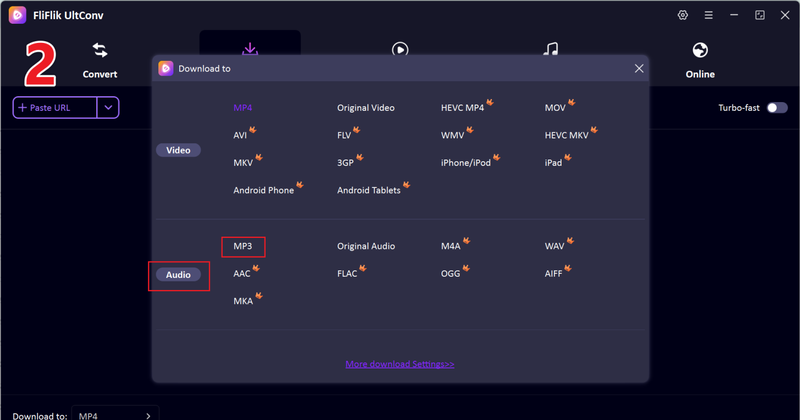
First, download and install FliFlik UltConv Video Downloader on your computer. After opening the program, go to the Download tab and choose the Download to option at the bottom to select your format.
FREE DOWNLOAD![secure download]() Secure Download
FREE DOWNLOAD
Secure Download
FREE DOWNLOAD![secure download]() Secure Download
Secure Download

-
Select your preferred output format. Choose MP3 if you only need audio, or pick another format depending on your needs.
-
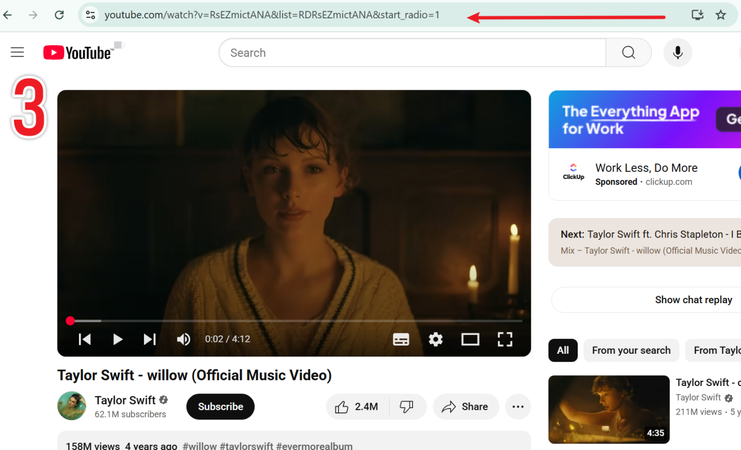
Open YouTube in your browser, click the Share button on the video or playlist, and copy the video link. Then return to UltConv.
-
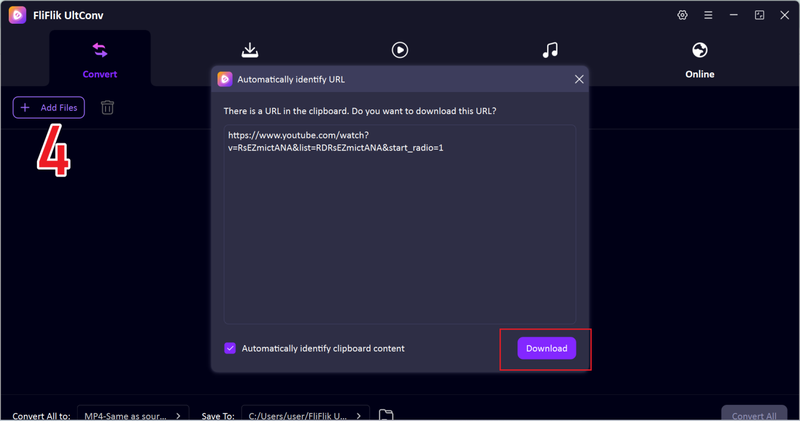
The program will usually detect the link automatically and display a download window. Click Download to start saving the file.
-
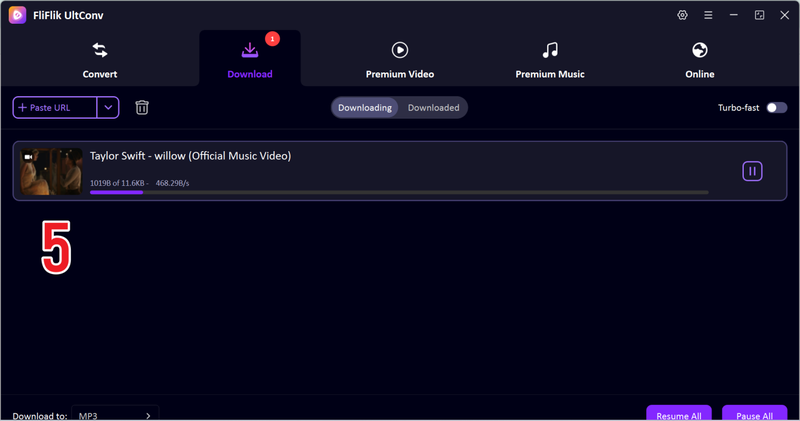
Last, just wait a few minutes and you’ll see the downloaded MP3 YouTube music video in the downloaded section.


2. VideoLAN

VideoLAN (VLC Media Player) is a widely used open-source media player that can also be used for basic audio and video conversion tasks. Many users rely on VLC because it is free, lightweight, and supports almost all media file formats. It is not just a player; it also provides simple conversion features that allow users to change media files into different formats. While it is mainly known as a playback tool, some users use VLC to perform basic how to convert wav to mp3 tasks.
- Completely free and open-source
- Supports almost all video and audio formats
- Works on Windows, Mac, and mobile devices
- Conversion process is not very beginner-friendly
- Limited advanced audio quality settings compared to dedicated converters
Part 2. How to Convert WAV to MP3 Online Free
1. CloudConvert

CloudConvert is a popular online file conversion platform that helps users quickly handle how to convert wav to mp3 without installing software. You just upload your WAV file, choose MP3 as the output format, and start converting directly in your browser. The platform supports many file types, not only audio but also video, documents, and images, making it a flexible choice for everyday conversion tasks.
- Simple and beginner-friendly interface
- Supports multiple file formats besides audio
- Allows basic quality customization
- Free version has daily conversion limits
- Requires stable internet connection
2. FreeConvert

FreeConvert is another reliable online tool for converting wav to mp3 files without installing applications. The platform supports high-quality audio conversion and allows users to adjust audio settings before downloading the final MP3 file. It is designed for users who want quick, no-installation audio conversion directly from their browser.
- Supports high-quality MP3 output
- Allows advanced audio settings adjustment
- Easy drag-and-drop file upload
- Contains ads on the free version
- File size limits for free users
Part 3. How to Convert WAV to MP3 on iPhone&Android
1. File Converter

File Converter is a simple mobile app that helps Android users to convert wav to mp3 directly on their phones without needing a computer. You can upload audio files from your device storage and convert them into MP3 or other formats in just a few taps. It is designed for users who want quick and convenient audio conversion while on the go.
- Supports multiple audio and document formats
- Easy drag-and-upload file conversion
- Simple interface for beginners
- Contains ads in the free version
- Some advanced features require in-app purchases
2. The Audio Converter

The Audio Converter is a useful iPhone app that helps users convert audio files when learning how to convert a wav file to mp3 on mobile devices. The app supports importing audio from cloud storage, emails, or local files, making it convenient for iOS users who need quick conversions.
- Supports cloud storage file import
- Fast and simple conversion process
- Good audio quality output
- Limited free features
- Some features require paid upgrades
FAQs
Q1. How to convert a WAV to MP3 on Mac?
You can use VLC Media Player to import files and select MP3 as the output format. For faster, higher-quality batch processing, FliFlik UltConv Video Downloader is the best all-in-one Desktop File Converter.
Q2. What is the best WAV to MP3 converter?
For a comprehensive solution, FliFlik UltConv Video Downloader is the preferred tool, combining high-quality batch conversion with multi-format support and reliable performance.
Conclusion
Converting WAV to MP3 is a practical way to save storage space, improve compatibility, and make audio files easier to share across devices. You can use desktop software, online converters, or mobile apps, depending on your convenience and device.
FliFlik UltConv Video Downloader combines downloading and converting features, supports high-quality audio output, and works across multiple streaming platforms. For a reliable solution, UltConv is the best choice for converting WAV to MP3 and providing professional results.
 Secure Download
Secure Download
Secure Download
Hello, I research and introduce useful solutions for AI videos, images, and audio tips in our daily life. If you learn these things, you can easily deal with the problems of the new era.

