

 By
By  9 minutes read


Shutterstock is one of the largest libraries of stock photos, illustrations, and videos used by designers, marketers, and content creators around the world. The platform offers millions of high‑quality assets, but there’s one small hurdle. When you preview an image or video without purchasing it, a large watermark appears across the content. It can make the file difficult to use when you just want to preview visuals, test layouts, or explore design ideas.
Because of this, many people search for tools like a Shutterstock image downloader. In this article, we’ll introduce Top 5 Shutterstock downloaders and compare their features and help you figure out which option works best for downloading Shutterstock images or videos.
🚀 Save high-quality stock videos straight to your Android gallery for offline design previews—get Video Download on Google Play.

Part 1. Why Use a Shutterstock Image & Video Downloader?
Platforms like Shutterstock make it easy to find high‑quality photos, illustrations, and videos for creative projects. Designers, marketers, bloggers, and video editors often browse Shutterstock to discover visuals that fit their content.
While these Shutterstock watermark protects the original creator’s work, but it can make it difficult to properly review the content before deciding whether it fits your project. That’s why some users turn to tools like a Shutterstock downloader. In short, a Shutterstock downloader can help users access content more conveniently when they want to explore, test, or analyze media for creative work.
Part 2. Top 5 Shutterstock Downloaders You Can Try
1. FliFlik UltConv Video Downloader
If you want a reliable way to download stock media, FliFlik UltConv Video Downloader is one of the most powerful tools available. It’s designed to download videos and music from 10,000+ websites, including platforms like Shutterstock. With this tool, you can easily save Shutterstock videos in formats like MP4/MKV and watch them offline whenever you need.
Unlike many online downloaders, UltConv works as a desktop program. This means faster downloads, better stability, and more control over the file quality. It also supports high‑resolution video downloads in 4K, 2K, 1080p, and batch processing, which can save a lot of time if you’re downloading multiple files.

- Supports YouTube, TikTok, Vimeo, etc for downloading videos and music.
- Save videos and music in MP4, MP3, and 100+ formats
- Download videos in HD quality up to 4K and even 8K resolution
- Batch download multiple videos, playlists, or channels at once
- Convert videos to audio formats like MP3 with up to 320kbps quality
▼ Download Shutterstock Video to MP4 with FliFlik UltConv Video Downloader
Saving a video from Shutterstock is straightforward with FliFlik UltConv Video Downloader. After installing the software on your computer, follow these simple steps to download the video in MP4 format.
 Secure Download
Secure Download
Secure Download
-
Open UltConv on your computer and go to the Download to option in the main interface.

-
Choose MP4 as the output format so the Shutterstock video will be saved in a compatible format.

-
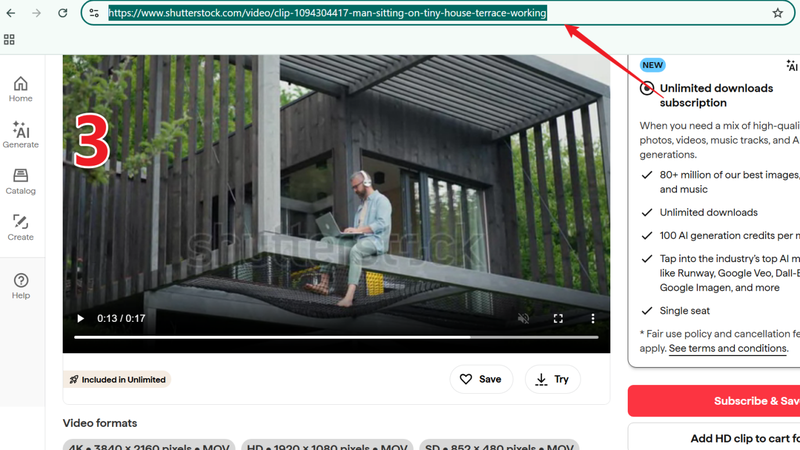
Visit Shutterstock and find the video you want to download. Copy the video page URL from the browser address bar.
-
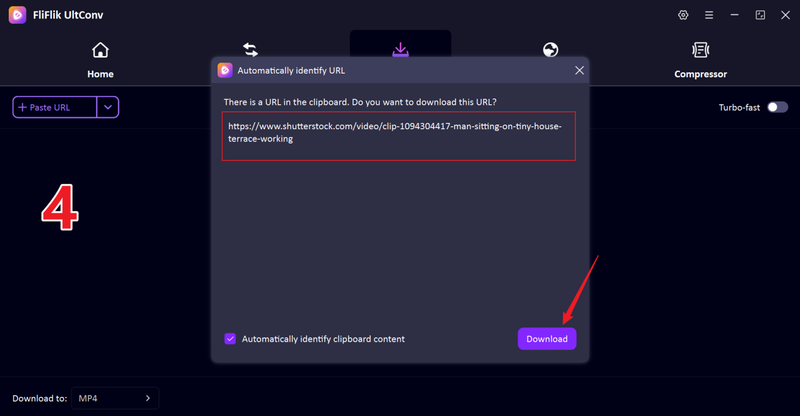
Paste the copied Shutterstock link into UltConv. The software will automatically detect the video and prepare it for downloading.
-
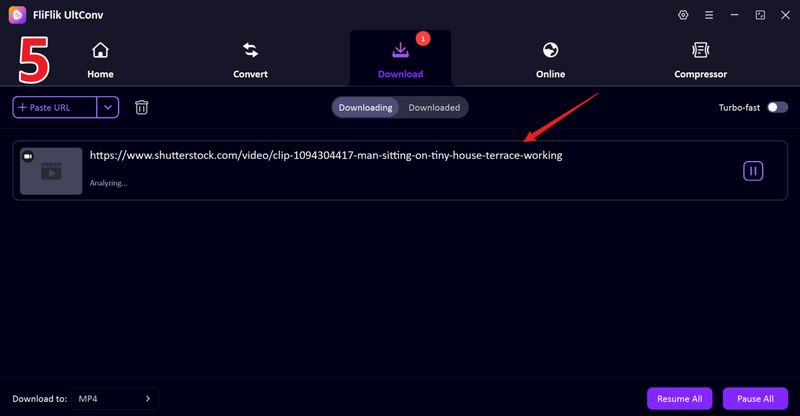
Click the Download button and wait for the process to finish. The video will be saved to your computer in MP4 format for offline use.


2. Steptodown Shutterstock Downloader

Steptodown is a browser‑based Shutterstock image and video downloader designed for users who want a quick way to save preview media files. The tool works directly online, so there’s no software to install. All you need to do is copy the link of the file from Shutterstock and paste it into the search box on the Steptodown page. Within seconds, the tool processes the link and generates a downloadable file.
- Works directly in the browser without installing software
- Simple copy‑and‑paste process for quick downloads
- Supports both Shutterstock images and videos
- Ads or pop‑ups appear during the process
- Download speed vary depending on server load
3. Downloader.la Shutterstock Downloader

Downloader.la Shutterstock focuses on convenience and quick access, making it a practical option for users who need occasional downloads without installing additional programs. The interface is minimal and easy to navigate. Once you paste the link, the tool processes the file and provides a download button within a few seconds. Because everything runs online, Downloader.la works on computers, tablets, and smartphones as long as you have a browser and internet connection.
- Clean interface that is easy to use
- Works on both desktop and mobile devices
- No registration or installation required
- Limited options for choosing output quality
- Some links fail to generate download results
4. ZtoolZ Shutterstock Downloader

ZtoolZ offers a variety of online utilities, and one of its tools is a Shutterstock downloader that helps users extract images and videos from Shutterstock links. The platform is designed for simplicity, allowing users to paste a media link and generate a download file quickly. Because ZtoolZ runs entirely online, it can be accessed from any device with a browser. This makes it useful for users who want a fast way to grab preview content without installing software.
- Easy to access from any browser or device
- Simple interface with minimal steps
- Supports downloading both images and videos
- Download success rate vary for some links
- Lacks advanced download or format options
5. Fetchpik Shutterstock Downloader

Fetchpik is another online tool designed to help users download images from Shutterstock quickly. The platform focuses mainly on image downloads and offers a straightforward method for retrieving files using a Shutterstock URL. Because it’s web‑based, Fetchpik works across multiple devices without requiring installation or account registration. This makes it convenient for designers, bloggers, or content creators who occasionally need to preview stock images for projects or layouts.
- Fast and simple download process
- No account or software installation required
- Accessible from both desktop and mobile browsers
- Mainly supports image downloads rather than videos
- The website display ads during the download process
Part 3. What is the Best Shutterstock Downloader
Choosing between an online downloader and desktop software depends on your needs: online tools (like Steptodown or Downloader.la) are convenient for quick, one-time use but often suffer from ads and lower quality, while desktop software (like FliFlik UltConv) offers superior speed, reliability, and high-quality results for more frequent users.
| Tool | Media Supported | Best For | Safety | Download Speed | Watermark Removal | Price |
|---|---|---|---|---|---|---|
| FliFlik UltConv | Video, audio, multiple formats | Stable downloading and conversion | High | Very fast | Yes | Paid with free trial |
| Steptodown | Images and videos | Quick online downloads | Medium | Moderate | Sometimes | Free |
| Downloader.la | Images and videos | Simple link-based downloads | Low–Medium | Moderate | Limited | Free |
| ZtoolZ | Mainly images | Quick image downloads | Medium | Moderate | Limited | Free |
| Fetchpik | Mostly images | Fast single image downloads | Medium | Moderate | Limited | Free |
FAQs
Q1. Can I download images from Shutterstock for free?
Generally, no. As a premium platform, Shutterstock requires a paid license for most assets to ensure legal use. While they occasionally offer limited free trials or “Images of the Week,” purchasing a license directly is the only way to guarantee unrestricted, high-quality, and legally safe files.
Q2. Is Shutterstock free to use?
Shutterstock itself is not a free platform, but browsing and previewing content is free. You can search the library, explore images, and view preview versions with watermarks.
Q3. How to download Shutterstock videos without watermark online?
Online Shutterstock video downloader tool like Steptodown allows you to paste a video URL and generate a downloadable file, but can be inconsistent. For better stability and format control (like MP4), dedicated software is often the more reliable choice.
Conclusion
Now, as we have seen, finding the right Shutterstock downloader is easy really comes down to what you need. Online tools can be useful when you want a quick way to grab a preview image or test a video download without installing anything. If you want a smoother experience with better stability, higher download quality, and more control over formats, a dedicated downloader like FliFlik UltConv Video Downloader is usually the better option.
Secure Download
Secure Download
