

 8 minutes read


Pandora stands out as a go-to music streaming platform for a lot of people. Its personalized radio stations and playlists really pull you in, and the song recommendations often hit the mark. Every day, millions jump on to find new artists, play old favorites, and basically shape their own soundtrack. But here’s the catch: if you want to listen offline, Pandora doesn’t make it easy, especially if you’re using the free version or even some of the paid plans.
In this article, we will explain how to download songs from Pandora, including the limits of the free version, official options with Plus and Premium, and safe alternatives without a subscription.

Part 1. The Limitations of Pandora’s Free Version
Pandora’s free version is perfect for casual listeners who just want to explore music, but it comes with several restrictions that can affect your listening experience. These limits will help you decide whether upgrading to Premium or using other methods to save music is worth it.
1. Ads Between Songs
The free version plays frequent ads, interrupting your music and breaking the flow of playlists or stations. These ads can be audio or visual, and sometimes multiple ads appear within a short period.
2. Limited Skips
You can only skip a few songs per hour on free Pandora. This means if a song you don’t like comes up, you might have to listen to it rather than moving on to the next track.
3. No Offline Listening
Free users cannot download songs for offline playback. You need an internet connection to stream music, which can be inconvenient when traveling or in areas with poor connectivity.
4. Lower Audio Quality
The free plan streams music at lower bitrates compared to Premium, which may result in reduced sound quality. Audiophiles or users with high-quality headphones may notice the difference.
5. Limited On-Demand Playback
You can’t select specific songs on-demand; instead, you can only play curated stations or playlists. This limits control over your listening experience, especially if you want to play a favorite song immediately.
Part 2. How to Download Songs from Pandora With Premium/Plus?
The easiest and safest way to save music from Pandora is by using the built-in download feature available for its subscription plans. With an active Pandora Plus or Pandora Premium account, you can enjoy offline listening without relying on third-party tools. While Plus lets you download your favorite radio stations, Premium gives you full control over songs, albums, and playlists. Keep in mind that downloaded tracks remain accessible only within the Pandora app and require an active subscription.
How to Download Radio Stations on Pandora with Plus?
Pandora Plus allows you to save up to three radio stations for offline playback. The app automatically downloads tracks from these stations, so you can enjoy your music even without an internet connection. Here’s how to check and play your downloaded stations:
- Step 1: Open the Pandora app on your iPhone or Android device.
- Step 2: Navigate to the “My Collection” or “My Library” section.
- Step 3: Tap “Show Downloads Only” to view all your offline stations.
- Step 4: Select any downloaded station to listen offline without internet access.
How to Download Music on Pandora with Premium?
Pandora Premium goes a step further, letting you save specific songs, albums, playlists, or stations for offline listening. The process is simple and gives you full control over what you want to hear anywhere.
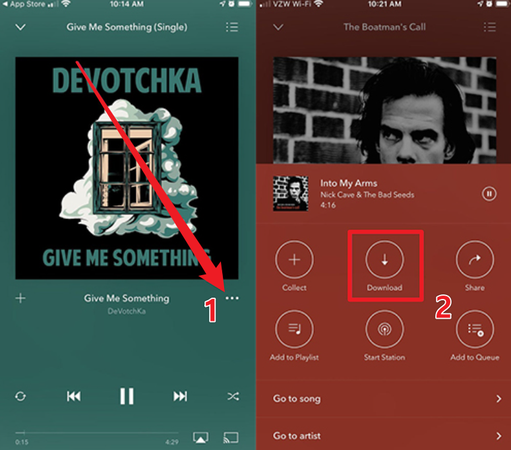
- Step 1: Open the Pandora app and search for the song, album, playlist, or radio station you want to download.
- Step 2: Tap the three-dot menu next to the item you want to save.
- Step 3: Select the Download icon (usually a downward-facing arrow).
-
Step 4:
Wait for the download to finish, then access your music offline through the Downloads section.
Even with Pandora Plus or Premium, there are a few things to keep in mind. Any music you download can only be played inside the Pandora app, so you won’t be able to move the files to another device or use them in a different music player. Also, if your subscription ends, all your downloaded songs will disappear until you renew.

Part 3. How to Download Songs from Pandora Without Premium
The free version of Pandora doesn’t allow offline downloads, so the best option is to use a trusted desktop tool that can grab music directly from the platform. With the right software, you can download songs, playlists, or even albums in high quality and listen anytime without worrying about subscription limits.
🔥 Best Third-Party Desktop Pandora Music Downloader – FliFlik UltConv
FliFlik UltConv Spotify Converter is a reliable way to download music directly from Pandora and other streaming platforms, giving you permanent access to your favorite tracks without needing Plus or Premium. With UltConv Spotify Converter, downloading your music is simple and flexible. You can save individual songs, full playlists, or entire albums in high-quality audio, up to 320 Kbps.
It supports multiple formats like MP3, WAV, AAC, FLAC, and M4A, so your tracks work on any device. The software also keeps all ID3 tags and metadata intact, making it easy to organize your music library. Plus, you can batch download multiple songs or entire playlists at once, saving time while building your offline collection.

- Supports downloading music from over 10,000 websites, including Pandora, Spotify, SoundCloud, YouTube, and Apple Music
- Save individual songs, full playlists, or entire albums for offline listening
- Choose from multiple audio formats: MP3, WAV, AAC, FLAC, M4A, and more
- Maintain all ID3 tags and metadata, keeping your music library organized
- Download music in high-quality audio up to 320 Kbps for lossless listening
- Batch download multiple tracks or playlists at once to save time
▼ How to download Spotify Music with UltConv Spotify Converter:
Before you begin, make sure you have UltConv Spotify Converter installed on your computer. Once that’s ready, follow these steps to save your favorite Pandora songs or playlists:
 Secure Download
Secure Download
Secure Download
-
Open UltConv Spotify Converter. On the main screen, click Download, then select “Download to” from the menu.

-
Choose MP3 from the list of available formats. If you prefer a different format or audio quality, you can select it here.

-
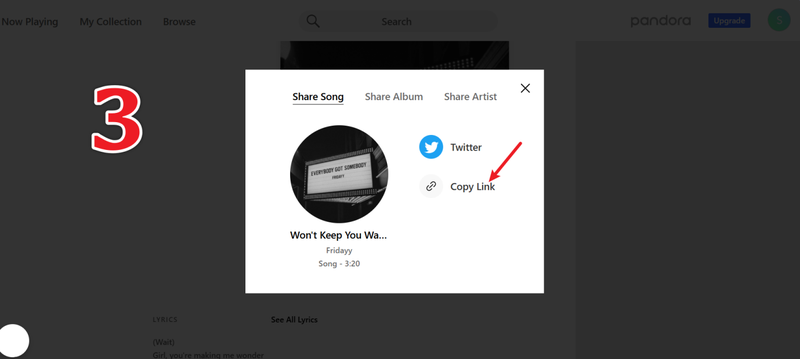
Open Pandora in your browser or app and find the track or playlist you want. Tap the Share button to copy the link, then return to UltConv.
-
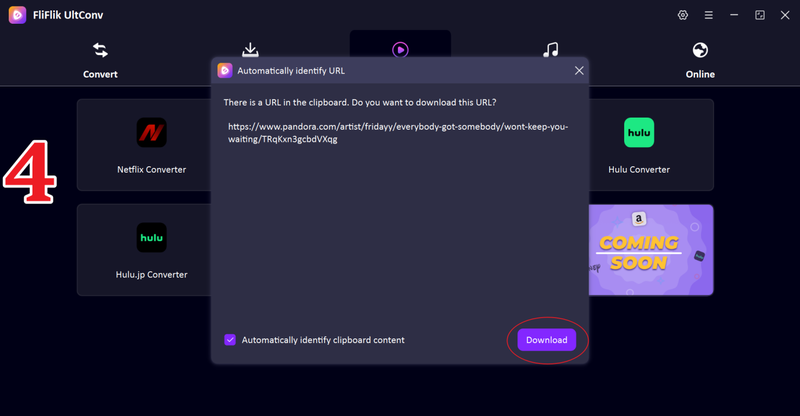
UltConv will detect the track automatically and display a pop-up window with details. Click Download to save the music file to your computer.
-
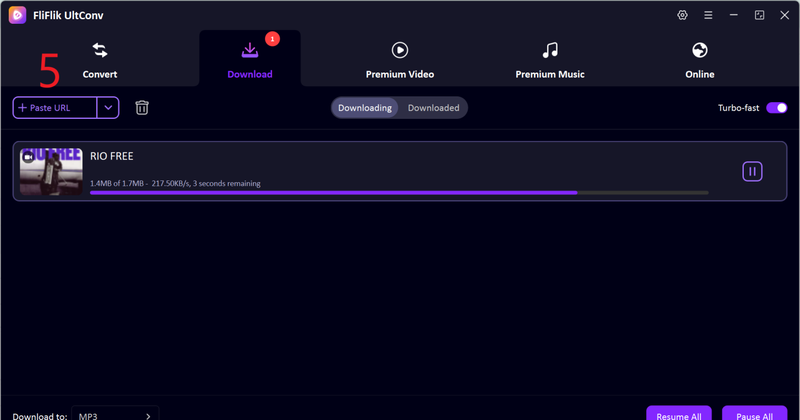
If the pop-up doesn’t appear, simply paste the copied Spotify link into the URL box in UltConv and click Download. Your file will start saving immediately.


FAQs
Q1. How to download music from Pandora without a premium?
You can use a trusted desktop tool like FliFlik UltConv Spotify Converter to download songs, playlists, or albums from Pandora, even without a Plus or Premium subscription. It allows you to save music in high-quality formats and listen offline anytime.
Q2. Can you download songs from Pandora to a computer?
Yes, with a desktop downloader such as UltConv Spotify Converter, you can save Pandora tracks directly to your PC or Mac. The downloaded files can be played anytime, without needing the Pandora app.
Q3. What is the best Pandora music downloader?
FliFlik UltConv Spotify Converter is one of the best options. It supports thousands of websites, multiple formats like MP3, WAV, AAC, FLAC, keeps all ID3 tags, and lets you batch download songs and playlists quickly.
Conclusion
So, now you know downloading music from Pandora is no longer limited to subscribers. Whether you have a free account or a Premium plan, tools like FliFlik UltConv Spotify Converter make it easy to save your favorite tracks in high-quality formats, keep them organized with metadata, and enjoy offline playback anytime. With support for multiple formats, batch downloads, and thousands of streaming sites, UltConv Spotify Converter gives you full control over your music library and ensures you never have to worry about losing access to your favorite songs.
Secure Download
Secure Download
Hello, I research and introduce useful solutions for AI videos, images, and audio tips in our daily life. If you learn these things, you can easily deal with the problems of the new era.

