

 8 minutes read


Spotify and Apple Music both have their fans, and honestly, people bounce between them all the time. Maybe you want a better sound. Maybe you just like how Apple Music handles your library, or you want to save a few bucks with a bundle. Whatever the reason, one question keeps popping up: how to transfer playlists from Spotify to Apple Music without starting over from scratch?
While there’s no official one-click option built into either platform, several reliable tools make the process simple, fast, and mostly automated. In this article, I’ll walk you through the best options for converting playlist from spotify to apple music. By the time you’re done, you’ll know exactly how to take your playlists with you, no stress required.

Part 1. How to Transfer Playlists from Spotify to Apple Music?
Below are the most reliable tools people use when they want to move playlists without rebuilding them from scratch. Each one works a little differently, so the “best” option really depends on how often you transfer music and how much control you want.
1. SongShift

SongShift is one of the most popular playlist transfer tools, especially among iPhone and iPad users. It’s built specifically for Apple platforms, which makes it feel native, clean, and easy to understand from the first launch. Once you connect Spotify and Apple Music, SongShift scans your playlists and matches tracks automatically. You don’t need to manually search for songs or recreate playlists one by one. It works quietly in the background and notifies you when transfers are complete. SongShift is ideal if you mainly live in the Apple ecosystem and want something that “just works” without much setup or technical hassle.
Price: Free version available, starting at $6.99/month
- Very simple interface, especially for iOS users
- Automatic song matching saves time
- Works well for large playlists
- Limited features in the free version
- No native Android support
2. Soundiiz

Soundiiz is a web-based music management tool designed for people who use multiple streaming services. Unlike apps focused only on transfers, Soundiiz also lets you edit playlists, sync libraries, and manage your music across platforms. Because it runs in a browser, you can use it on Windows, Mac, Linux, or even a tablet. Spotify to Apple Music transfers are straightforward: connect both accounts, choose your playlist, and let Soundiiz handle the rest. It’s especially useful if you switch services often or want deeper control over how playlists are converted.
Price: Free version available, $5 per month billed monthly
- Works on any device with a browser
- Supports many music platforms
- Advanced playlist management tools
- Some features locked behind premium
- Interface may feel overwhelming at first
3. Tune My Music

Tune My Music focuses on speed and simplicity. It’s a browser-based tool that lets you move playlists between Spotify and Apple Music in just a few clicks. You don’t need to install anything, and the setup process is quick even for first-time users. The tool scans your Spotify playlist, matches songs on Apple Music, and creates a new playlist automatically. It’s a solid choice if you only need to transfer playlists once or twice and don’t want to sign up for a complex service.
Price: Free version, $2/month
- No installation required
- Fast and easy to use
- Clean, beginner-friendly layout
- Free version has transfer limits
- Fewer customization options
4. Free Your Music

Free Your Music is designed for people who switch streaming services regularly. It’s available on desktop and mobile, making it convenient if you manage playlists across devices. After linking Spotify and Apple Music, the app transfers playlists, albums, and liked songs with minimal input. It also supports offline transfers in some cases, which can be helpful if your internet connection isn’t stable. Free Your Music feels more like a long-term companion rather than a one-time tool.
Price: Free trial available, $249.99 Lifetime
- Available on desktop and mobile
- Supports many music services
- Good for frequent transfers
- Full access requires payment
- Matching accuracy can vary
5. Playlistor

Playlistor is an online tool that takes a slightly different approach by focusing on accuracy and simplicity within Apple Music. Instead of syncing accounts directly, it helps you recreate Spotify playlists inside Apple Music by matching tracks one by one. This method gives you more control over the final result and avoids account permission issues. While it may take a bit longer than fully automated tools, Playlistor is a good option if you care about precise matches and prefer a more hands-on process.
Price: Free
- No account syncing required
- High accuracy for song matching
- Simple, focused tool
- Not fully automated
- Limited to Apple Music users
Part 2. Best Spotify and Apple Music Playlists Downloader [Windows & Mac]
Moving playlists between Spotify and Apple Music only solves half the problem. A lot of users don’t just want their playlists synced; they want to own their music. That means downloading tracks in real audio formats, keeping the quality intact, and playing them anywhere without app limits. This is exactly where a desktop downloader becomes the smarter option.
FliFlik UltConv Spotify Converter is designed for users who want full control over their music library. It doesn’t just download Spotify or Apple Music tracks. It converts them into standard audio files you can keep forever, organize properly, and play on any device. The tool supports over 10,000 websites, handles more than 100 output formats up to 320kbps audio quality, and keeps all song details intact, which makes it far more flexible than online tools or playlist transfer apps.

- Download songs, albums, and full playlists from Spotify and Apple Music without Premium
- Supports over 10,000 music and video websites beyond Spotify and Apple Music
- Supports 100+ output formats including MP3, M4A, AAC, WAV, FLAC, and AIFF
- Preserve full ID3 tags like song title, artist, album, track number, and cover art
- Batch download entire playlists, albums, or artists in one go
- High-quality audio output up to 320 kbps with no noticeable quality loss
▼ Download Spotify Songs with UltConv Spotify Music Converter:
-
Download and install UltConv Spotify Music Converter on your Windows or Mac computer. Launch the software once the installation is complete.
FREE DOWNLOAD![secure download]() Secure Download
FREE DOWNLOAD
Secure Download
FREE DOWNLOAD![secure download]() Secure Download
Secure Download
-
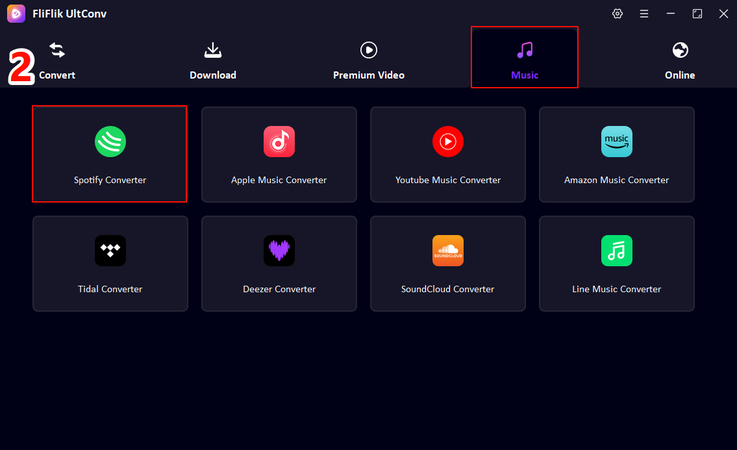
From the main interface, head to the Premium Music section and choose Spotify Music Converter to continue.
-
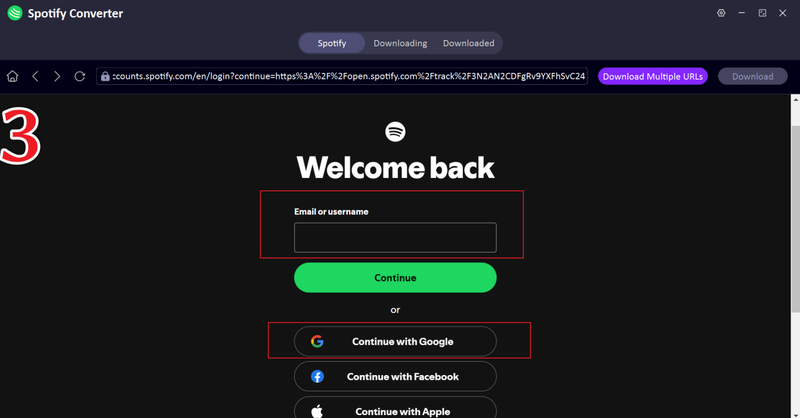
Log in to your Spotify account inside UltConv. You can use a free Spotify account—there’s no need for a Premium subscription.
-
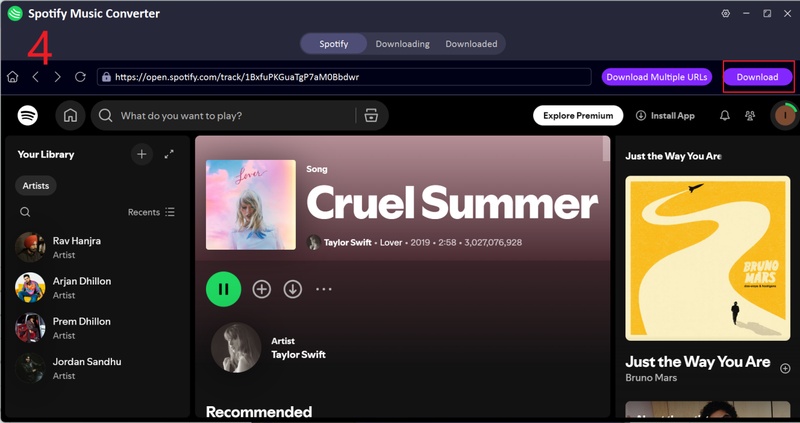
Browse Spotify and select the songs, playlists, or albums you want to save. Click the Download button to convert them into MP3 or another supported audio format.
-
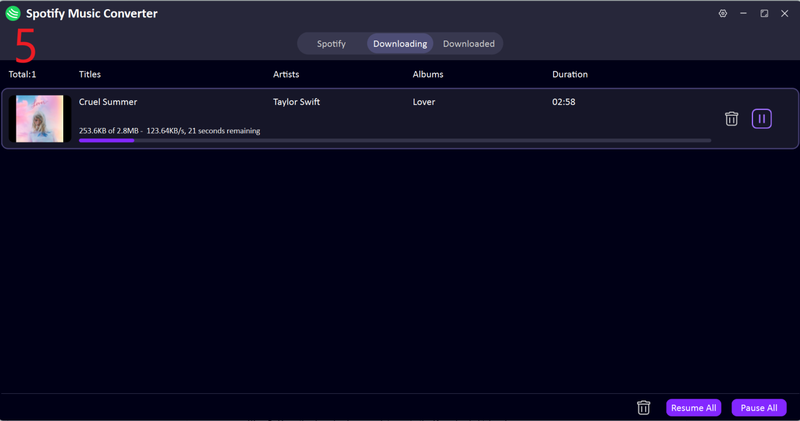
Once the process finishes, open the Downloaded section to find your files. Your Spotify tracks are now stored locally and ready for offline playback on any device.


With UltConv, your music is saved directly to your computer in standard audio formats, free from Spotify’s offline or app-only restrictions.
FAQs
Q1. Can I transfer playlists from Spotify to Apple Music?
Yes, you can. Spotify doesn’t offer a built-in way to move playlists to Apple Music, but third-party tools make it possible to copy your playlists along with song titles, artists, and albums in just a few steps.
Q2. Can you convert a Spotify playlist to Apple Music?
You can’t directly “convert” Spotify playlists inside either app, but playlist transfer services can recreate your Spotify playlist in Apple Music by matching tracks from both platforms’ catalogs.
Q3. Is transferring playlists from Spotify to Apple Music free?
Some tools offer free transfers with limits, like a cap on the number of songs or playlists. For large playlists or unlimited transfers, most services require a paid plan.
Conclusion
So, now you know how to transfer a playlist from Spotify to Apple music. You can switch from Spotify to Apple Music without starting your music library from scratch. With the right playlist transfer tool, you can move your favorite playlists quickly and keep your listening habits intact.
And if you want to download your favorite tracks for offline listening then FliFlik UltConv Spotify Converter is the right tool for you. You can download your music in your preferred format and listen offline without any streaming issues.
 Secure Download
Secure Download
Secure Download
Hello, I research and introduce useful solutions for AI videos, images, and audio tips in our daily life. If you learn these things, you can easily deal with the problems of the new era.

