

 5 minutes read


Spotify fans now have a simple way to see their listening habits. Spotify Icebergify turns your Spotify data into an iceberg chart. It shows your top artists and tracks at the top and the least-played ones at the bottom. You can see your music taste at a glance. It’s easy to share with friends or just explore your own patterns. In 2026, Icebergify works even better with Spotify, letting you create your personal music iceberg quickly. Here’s how to get your Spotify Icebergify step by step.

Part 1. What is Icebergify?
Icebergify is a tool that turns your Spotify listening history into a visual iceberg chart. It ranks your top 50 artists, not just by how often you play them, but by their global recognition. This gives a clear picture of both your mainstream favorites and your hidden musical gems.
How Does Icebergify Work?
Icebergify Spotify organizes your artists into three layers based on popularity and listener engagement:
- Top Layer: Your most-played mainstream artists, the ones you stream almost every day.
- Middle Layer: Well-known but more niche musicians, artists you enjoy occasionally, or artists you discovered years ago.
- Bottom Layer: Hidden gems, independent or less-popular artists who make your music taste unique.

The higher an artist appears, the more mainstream they are; the lower they are, the more niche. This structure mirrors a real iceberg: the tip shows what’s obvious, while the deeper layers reveal the true diversity of your music. It’s a simple way to see whether your listening habits lean mainstream or alternative.
Part 2. How to Create Your Spotify Iceberg with Icebergify
You can generate your Spotify Icebergify chart on both desktop and mobile devices. Here’s how:
▼ How to Get Your Spotify Iceberg on Desktop?
- Step 1: Open your browser and search for Icebergify, and click the Create Yours button.
- Step 2: Log in with your Spotify credentials. The login is secure and won’t affect your account.
- Step 3: Review the permissions Icebergify requests, then click Agree.
-
Step 4:
Your current-month Spotify Iceberg will appear. To see all-time rankings, click ”
Click here to see your all-time Iceberg!
”


▼ How to Get Your Spotify Iceberg on Mobile (Android/iPhone)?
- Step 1: Open your mobile browser and visit Icebergify.
-
Step 2:
Tap Create Yours and log in to your Spotify account.
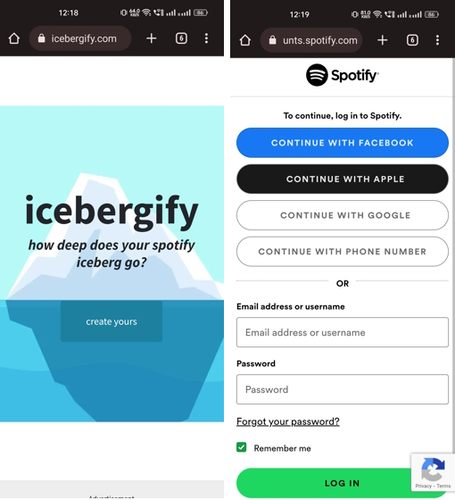
- Step 3: Grant the required permissions by tapping Agree.
- Step 4: Your Spotify Iceberg will generate automatically for the current month. Use the all-time option to view your full listening history.

Part 3. Best Way to Download Your Favourite Songs from Spotify
If you want to take full control of your Spotify library, especially while exploring your Spotify or music iceberg Spotify, FliFlik UltConv Spotify Downloader is a standout solution. Unlike traditional downloaders, UltConv doesn’t just save individual songs; it lets you batch download entire playlists, albums, podcasts, and even audiobooks. The software works with both free and premium Spotify accounts, so you don’t need a subscription to enjoy offline listening. UltConv Spotify Downloader also ensures your music stays organized and high-quality. It preserves all ID3 tags, album artwork, and metadata, so your downloaded files are ready to use in any media player or device. With output options like MP3, AAC, WAV, FLAC, and M4A, it’s flexible for any setup. The 10X fast download speed, combined with its support for thousands of streaming sites, makes UltConv a powerful tool for anyone looking to save, convert, and enjoy Spotify music offline.

- Download Spotify songs, albums, artists, and playlists
- Convert Spotify music to MP3, AAC, WAV, FLAC, M4A, and more
- Preserve up to 320 Kbps lossless audio quality
- Keep all ID3 tags and metadata intact
- Batch download playlists, albums, and podcasts at 10X speed
- Works with free Spotify accounts, no Premium required
▼ Steps to Download Spotify Songs with UltConv Spotify Downloader:
-
Download and install UltConv Spotify Downloader on your PC or Mac. Open the program once installed.
FREE DOWNLOAD![secure download]() Secure Download
FREE DOWNLOAD
Secure Download
FREE DOWNLOAD![secure download]() Secure Download
Secure Download
-
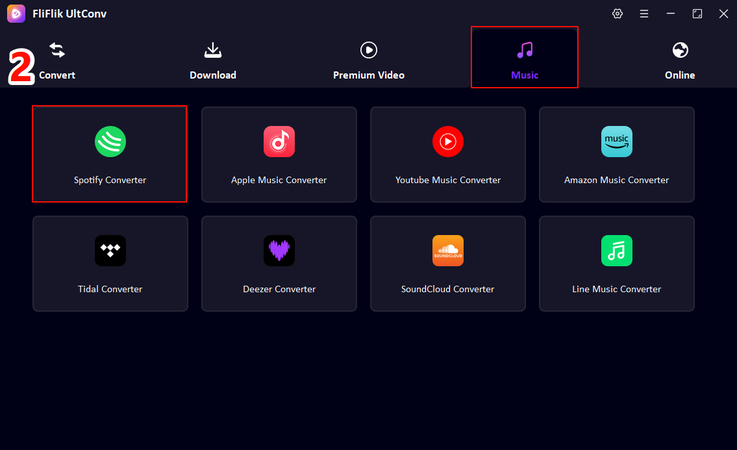
In the interface, go to the Music tab and select Spotify Music Converter.
-
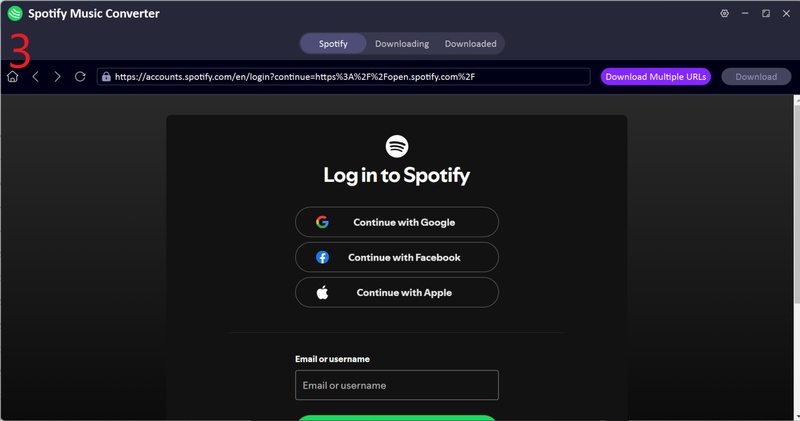
Log in to your Spotify account directly in UltConv. Free accounts work perfectly.
-
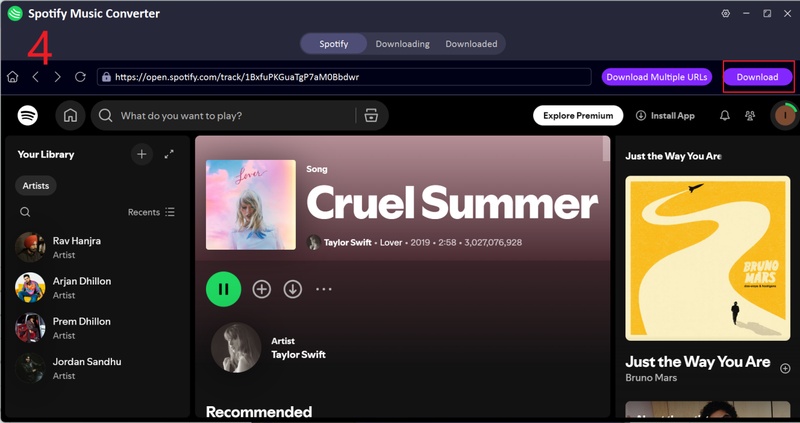
Browse and play your Spotify library and choose the songs, albums, or playlists you want to download.
-
Once the conversion is finished, go to the Downloaded tab. Your music files are ready for offline listening, complete with all metadata and album art.
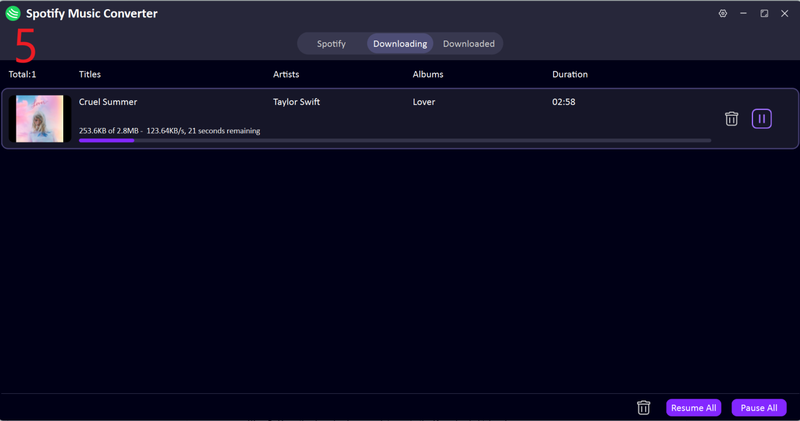


With UltConv Spotify Downloader, you can save your favorite tracks directly to your device, enjoy unlimited offline playback, and explore your Spotify icebergify insights without streaming limits.
Final Words
Spotify Icebergify is a fun and insightful way to see your music taste at a glance, from mainstream hits to hidden gems. It shows not just what you listen to, but how unique your musical journey really is. While exploring your icebergify, you’ll want a reliable way to save your favorite tracks and playlists for offline listening. This is where FliFlik UltConv Spotify Downloader comes in. It lets you download songs, albums, podcasts, and playlists directly to your computer, keeping all ID3 tags, album art, and high-quality audio intact. With batch downloads and 10X fast speed, UltConv Spotify Downloader makes managing your Spotify library easy and flexible. Check out UltConv Spotify Downloader today to turn your icebergify insights into a personal offline collection. Never worry about streaming limits again, and enjoy your music anytime, anywhere.
 Secure Download
Secure Download
Secure Download
Hey there! I am Maxwell Clark. I'm always looking for new tech tools that make a difference, from making visuals and audio better to making workflows better. I'm going to share tips and tricks for using AI tools for videos, audio, and images. I'm excited to help you navigate the digital world more efficiently and creatively!

