

 6 minutes read


If you’ve ever wanted to save a song from YouTube as an audio file, you may have heard about Convert2MP3. It is an online tool that lets people turn videos into MP3 files so they can listen to music offline. But is Convert2MP3 actually safe to use? Some versions of the site have disappeared, and others may show ads or redirects.
In this article, we’ll explain what Convert2MP3 is, whether is Convert2MP3 safe, how to use it to download YouTube videos as MP3, and also show you a better alternative tool if you want a smoother and safer downloading experience.

Part 1. Is Convert2MP3 Safe to Use?
Convert2MP3 was once a popular online tool that allowed users to convert videos from platforms like YouTube into MP3 audio files. Many users used this MP3 converter Convert2MP3 service because it was simple to use. However, safety is a common concern.
For instance, some versions of Convert2MP3 are no longer active, and others may contain pop‑up ads, redirects, or suspicious download buttons. These problems can sometimes lead users to unwanted websites or risky files. Because of this, the safety of the platform usually depend on which mirror or version of the site you visit. So while Convert2MP3 may work for basic conversions, you should be careful and consider safer Convert2MP3 alternatives if you want a more reliable way to download and convert videos to MP3.
Part 2. How to Use Convert2MP3 to Download YouTube to MP3
Now when it comes to use to turn a video into an MP3 file, Convert2MP3 works in a very simple way. Below is a simple step‑by‑step guide we explained to show you how the process usually works.
- Step 1: First, open YouTube and find the video you want to convert to MP3. Copy the video URL from the browser’s address bar.
-
Step 2:
Go to the Convert2MP3 website and paste the copied video link into the conversion box. You can also search for the video directly on the page by typing its title.
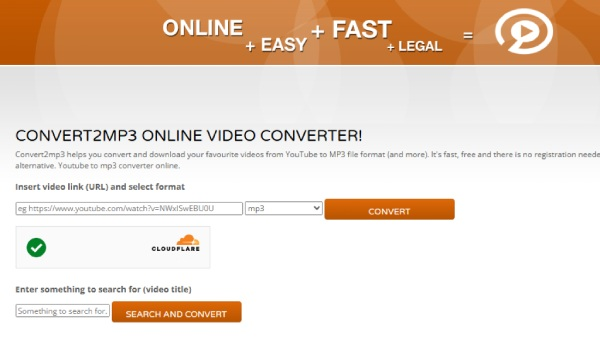
- Step 3: Choose the format you want. In most cases, people select MP3 because they only want the audio from the video.
- Step 4: Click the Convert button. The tool will process the video and change it into an MP3 file.

Once the conversion finishes, you can download the MP3 file to your device. Some versions also allow you to edit the file name or artist information before saving.
Part 3. Best Convert2MP3 Alternative – FliFlik UltConv Video Downloader
If Convert2MP3 is not working for you or you want something more stable, a dedicated downloader can be a better solution. FliFlik UltConv Video Downloader works as a full video and audio downloading tool. It can download videos and audio from 10,000+ platforms such as YouTube, TikTok, Vimeo, Facebook, and many other streaming websites.
Another helpful feature is its format flexibility. The tool allows you to convert videos into multiple formats like MP3, MP4, WAV, AAC, and FLAC, along with many other output formats. This makes it easy to play the downloaded files on phones, tablets, laptops, or media players. For users who only want the audio from a video, the program can quickly convert the video into a high‑quality MP3 file without losing sound quality.

- Download videos from 10,000+ websites, YouTube, TikTok, Instagram, etc
- Save videos as MP4, MP3, and 100+ output formats
- Download movies in 1080p, 2K, 4K, and even 8K quality
- Batch download multiple videos, playlists, or channels at once
- Convert video to audio without losing sound quality
▼ Steps to Download YouTube to MP3 with FliFlik UltConv Video Downloader
Saving music from YouTube using FliFlik UltConv Video Downloader is straightforward. Once the program is installed on your computer, just follow these steps.
 Secure Download
Secure Download
Secure Download
-
Launch the software and go to the Download tab. Then click the Download To option to start setting up your download.

-
Choose the format you want to save the video in. For movies, MP3 is usually the most common option.

-
Open YouTube in your browser, locate the music you want to download, and copy its URL from the address bar.

-
Go back to UltConv and paste the copied link into the downloader field. The program will automatically detect the video and prepare it for downloading.

-
Click the Download button. The software will begin saving the movie to your selected folder so you can listen it offline whenever you want.



FAQs
Q1. Is Convert2MP3.net still active now?
The original Convert2MP3.net website is no longer consistently active. Some mirror sites may still appear online, but they can be unreliable or filled with ads.
Q2. What is the best mp3 converter Convert2MP3 alternative?
A good alternative is FliFlik UltConv Video Downloader. It allows you to download videos from sites like YouTube and convert them to MP3 or other formats with better quality and more download options.
Q3. How to download YouTube to MP3 with Convert2MP3?
Normally, you copy the YouTube video link, paste it into the Convert2MP3 website, chooseMP3as the format, and click convert. After the process finishes, you can download the MP3 file to your device.
Conclusion
In this guide, we looked at whether Convert2MP3 is safe, how people used it to convert videos from YouTube into MP3, and why many users are now searching for better options. If you want a smoother and more reliable experience, FliFlik UltConv Video Downloader is a solid alternative. With this tool, you can easily save music or convert videos to MP3.
Secure Download
Secure Download
Hello, I research and introduce useful solutions for AI videos, images, and audio tips in our daily life. If you learn these things, you can easily deal with the problems of the new era.

