

 6 minutes read


YouTube has millions of songs, podcasts, and audio content, but streaming constantly can use a lot of data and doesn’t always work in areas with weak internet. Listening to music offline is still something many people want.
This article will show you how MP3ify works, whether it is safe to use, and how you can download high-quality YouTube audio step by step. We will also look at MP3ify alternative options, including more powerful downloaders that offer better quality, faster speeds, and more format support.

Part 1. What is an MP3ify Converter?
MP3ify is an online tool designed to help users download audio from the most popular sites and save it as MP3 files. It is commonly used by people who want to listen to music offline without streaming videos repeatedly. The tool works directly in the browser, which means there is no need to install software.

- Convert YouTube videos to MP3 audio
- Browser-based tool with no installation required
- Supports basic audio extraction from video links
- Simple and fast conversion process
- Very easy to use for beginners
- Free to access for basic downloads
- Fast conversion for short videos
- Limited audio quality control
- Contains ads and pop-ups during use
- Limited advanced downloading features compared to premium downloaders
Part 2. Is MP3ify Safe?
Although MP3ify is more secure than most free applications because it does not require installation, its advertising-supported model presents other challenges. To find songs similar to others and download them safely, keep the following key points in mind:
- Browser-Based Safety: Since it runs in-browser, you avoid the bundled malware often found in desktop installers.
- Ad Risks: The site relies on pop-ups and redirects that may lead to risky websites or fake download buttons.
- Best Practices: Always use an ad blocker, keep your antivirus active, and avoid clicking suspicious external links.
Part 3. How to Use MP3ify to Download High-Quality YouTube Audio
In this section, we’ll walk through how MP3ify converts YouTube videos into MP3 files. Here are the simple steps to follow.
- Step 1: Open MP3ify and enter a YouTube video link or search for the video using keywords.
- Step 2: Click the Download button to proceed to the conversion page.
-
Step 3:
Select the highest available MP3 quality option for better audio output.
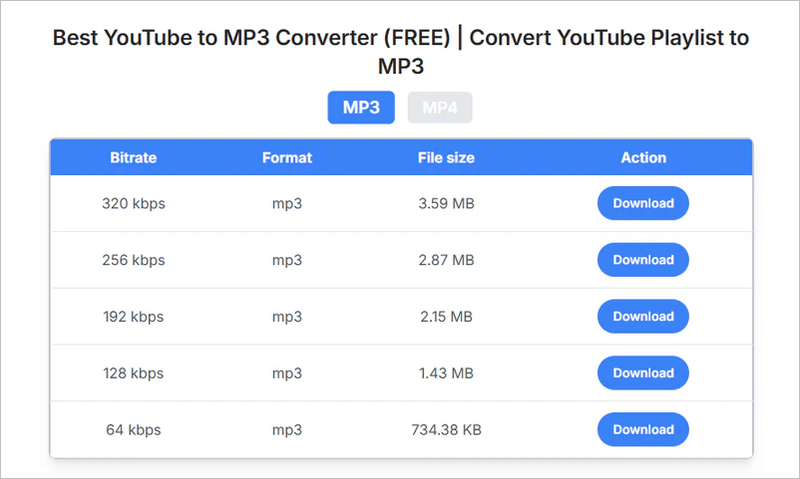
- Step 4: Click the final download button to save the audio file to your device.

Pro Tip. FliFlik UltConv – Best All-in-One MP3ify Alternative in 2026
If you want more control than basic converters like MP3ify, then FliFlik UltConv Video Downloader is the most reliable option to use. Instead of just converting videos to MP3, this tool lets you download and convert media in 100+ formats, including MP3, MP4, MKV, WAV, and more. You can choose various quality options, including up to 320kbps MP3 for audio and 1080p, 2K, or 4K for video resolutions.
It works with 10,000+ websites, so you’re not limited to just YouTube; you can download content from social media, streaming platforms, and many other sites in one place. Below are some main features of this tool.

- Download videos from 10,000+ websites, YouTube, TikTok, Instagram, etc
- Batch download videos and music in 100+ formats
- Convert video to MP3 audio without quality loss
- Download videos in 4K, 2K, and 1080p and MP3 audio up to 320kbps
- Remove DRM protection from Spotify and Apple Music
- Built-in browser for direct downloading and searching
- Support playlist, album, and channel downloads in one click
▼ Steps to Download YouTube to MP3 with UltConv Video Downloader
-
Start by downloading and installing FliFlik UltConv Video Downloader on your PC. Once the software is launched, open the Download section and click the ” Download to ” option at the bottom to set your format.
FREE DOWNLOAD![secure download]() Secure Download
FREE DOWNLOAD
Secure Download
FREE DOWNLOAD![secure download]() Secure Download
Secure Download

-
Pick the output format you want. Select MP3 if you only need audio, or choose another video format depending on your requirements.
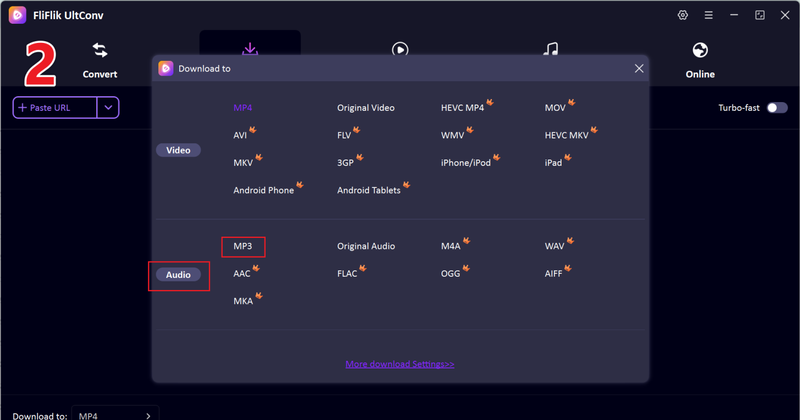
-
Go to YouTube in your browser, press the Share button on the video or playlist, or copy the video link from the browser. Then switch back to UltConv.

-
The tool will usually recognize the link automatically and show a download pop-up. Click Download to begin saving the file.

-
After that, the download process will automatically start, and you can watch the YouTube video offline in the ‘downloaded’ section after just a few minutes.



FAQs
Q1. Is MP3ify safe to use?
mp3ify itself does not require installation, which lowers some risks. However, like many online converters, it may display pop-ups or redirect ads. These can sometimes lead to suspicious pages
Q2. Can MP3ify still be used on Android or iPhone?
MP3ify can be accessed via a web browser on both Android and iPhone, allowing you to find similar songs anytime and anywhere. However, mobile users should be prepared to frequently redirect, and iOS systems may have file management limitations.
Q3. What is the best MP3ify alternative?
If you want more stable downloads, higher quality options, and support for multiple formats, FliFlik UltConv Video Downloader is a strong MP3ify alternative. It offers better control over output quality and avoids the typical issues found on free online converters.
Conclusion
MP3ify offers a quick way to turn YouTube videos into MP3 files, especially for casual users who want something simple and browser-based. But convenience sometimes comes with trade-offs like ads, redirects, or limited quality control.
For ordinary users or those seeking high-quality audio, specialized desktop tools like FliFlik UltConv Video Downloader is a more reliable, high-performance choice for building seamless offline libraries.
 Secure Download
Secure Download
Secure Download
Hello, I research and introduce useful solutions for AI videos, images, and audio tips in our daily life. If you learn these things, you can easily deal with the problems of the new era.

