

 8 minutes read


If you are looking for more control over Spotify without having a premium, you must have searched for Revanced Spotify. Many people use it to skip ads or unlock extra features, but it is not always straightforward to use. Setup takes time, updates can stop working, and results vary from one device to another. Results might also differ from one device to another. This is the reason why you must understand how ReVanced Spotify works. In this article, we’ll look at how to use it step by step and then the best alternatives in 2026 that are more convenient and reliable.

Part 1. What is ReVanced Spotify?

ReVanced Spotify is a modified version of the official Spotify app that aims to unlock features normally reserved for Premium users. People usually discover it through communities like Spotify Revanced Reddit, where users share setup guides and real-world experiences. The idea is simple. You install a patched version of Spotify and gain access to things like ad-free listening and fewer playback limits without paying for a subscription.
That said, it’s important to understand what you’re actually using. ReVanced Spotify is not an official app. It relies on modified files, manual updates, and third-party patches. While it can work well for some users, it also comes with risks and limitations that are easy to overlook if you only focus on the features.
- Familiar Interface: The layout looks almost identical to the official Spotify app, so navigation feels natural right away. Home, Search, and Library all work as expected, with a few extra settings added for mod features.
- Ad-free Listening: One of the main reasons people use ReVanced Spotify is to remove audio and banner ads, allowing uninterrupted music playback.
- Unlimited Skips: Unlike Spotify Free, you can skip tracks as often as you like, even when listening to playlists.
- High-Quality Audio Streaming: ReVanced Spotify often unlocks higher bitrate streaming, including up to 320 kbps, which makes a noticeable difference with good headphones.
- Offline Playback: Some builds allow downloading songs and playlists for offline listening, similar to Spotify Premium.
Limitations You Should Know
ReVanced Spotify comes with trade-offs. Installation is not beginner-friendly and usually requires patching the app manually. Updates can break features, forcing you to repeat the process. There’s also a security risk when downloading modified apps from untrusted sources, and accounts can be limited or flagged over time. If you want a safer and more stable way to keep Spotify music offline across Android, Windows, and macOS, using a dedicated Spotify converter is often the more reliable option.
Part 2. How to Install and Use ReVanced Spotify?
Before you start, make sure your Android device meets the basic requirements. ReVanced Spotify usually works on devices running Android 6.0 or higher, with at least 100MB of free storage and 2GB of RAM for smooth performance. Note that this mod is generally only available for Android users; iOS users can’t install it easily due to Apple’s restrictions.
▼ Steps to Install ReVanced Spotify
- Step 1: ReVanced Manager is the tool needed to patch the Spotify APK. Look for it on verified sources online to avoid malware.
- Step 2: Get the latest Spotify APK from a trusted source. Make sure it matches the version supported by ReVanced patches. Use your File Manager to find the APK in the Downloads folder and tap Install.
- Step 3: Install the ReVanced Manager APK on your device. If this is your first time installing apps from unknown sources, enable the option in your settings.
- Step 4: Open ReVanced Manager, select the Spotify APK, and apply the patches. The app will guide you through the process step by step.
-
Step 5:
Once patched, install the modified Spotify APK on your device. After installation, open the app and enjoy the unlocked features.
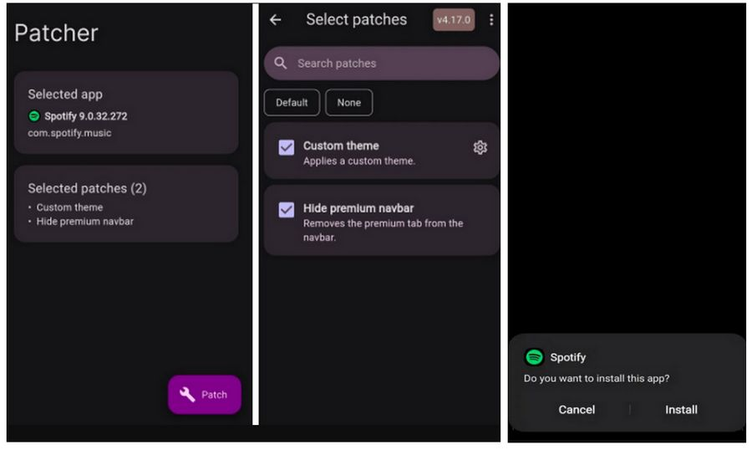

ReVanced Spotify is distributed as an APK from unofficial sources, which can carry security risks. If you want a safer option, consider using a reputable Spotify Downloader or official Spotify Premium for uninterrupted access.
Part 3. How to Do if ReVanced Not Working?
Even with careful installation, ReVanced Spotify can sometimes run into problems. Many users on ReVanced Spotify Reddit report issues ranging from installation errors to login troubles. Knowing how to handle them can save a lot of frustration. Here is the list of some common Issues and how to Fix Them
1. “App Not Installed” Error
If you see this error, it’s usually because the official Spotify app is still installed on your device. The patched ReVanced APK cannot coexist with the original app. To fix this, uninstall the official Spotify app completely, restart your device, and then try installing the ReVanced APK again.
2. Patching Fails
Sometimes, ReVanced Manager cannot patch the Spotify APK correctly. Ensure your internet connection is stable and that your device has enough free storage. If patching still fails, try downloading a different version of the Spotify APK that matches the supported version for ReVanced. Rebooting your device before patching can also help, as it clears temporary system issues that might block the process.
3. Login Issues
Some users encounter login problems after installing ReVanced Spotify. A common solution is to go to your device settings, clear the app data and cache, and then reopen the app. If that doesn’t work, uninstalling and reinstalling the patched app can sometimes resolve authentication errors.
ReVanced Spotify can be a bit unpredictable. It’s a modded app, so updates from Spotify can break the patch, features may stop working, and sometimes installation goes wrong. On top of that, downloading APKs from third-party sites carries some risk. Because of this, even if it works for now, it might stop after an update or run into bugs. For a smoother, more reliable experience, it’s worth looking at safer Revanced Spotify alternatives that give you similar features without all the hassle.
Part 4. Best Alternative to Revanced Spotify
As we saw earlier, ReVanced Spotify comes with several limitations and can be unreliable at times. For those who want a safer and more consistent way to enjoy Spotify music, FliFlik UltConv Spotify Converter is a solid alternative. It’s a desktop tool available for Windows and macOS that allows you to download and convert Spotify songs, playlists, albums, podcasts, and more without a Premium account. Unlike modded apps, it provides a stable and secure environment for offline listening.
UltConv Spotify Converter also offers flexibility across devices and formats. You can convert Spotify music to MP3, AAC, FLAC, WAV, M4A, AIFF, and MKA, keeping full audio quality up to 320 Kbps. Batch downloads, metadata preservation, and support for multiple streaming platforms make it a comprehensive tool for managing your music library efficiently.

- Support for 10,000+ streaming sites, not only Spotify
- Download Spotify songs, albums, playlists, and podcasts
- Convert Spotify music to MP3, AAC, FLAC, M4A, etc.
- Lossless audio quality up to 320 Kbps
- Batch download multiple tracks at 10x speed
- Keep ID3 tags and metadata info
▼ Download Spotify Songs with UltConv Spotify Music Converter:
-
Install UltConv Spotify Music Converter on your Windows or Mac computer. After installation, open the program to get started.
FREE DOWNLOAD![secure download]() Secure Download
FREE DOWNLOAD
Secure Download
FREE DOWNLOAD![secure download]() Secure Download
Secure Download
-
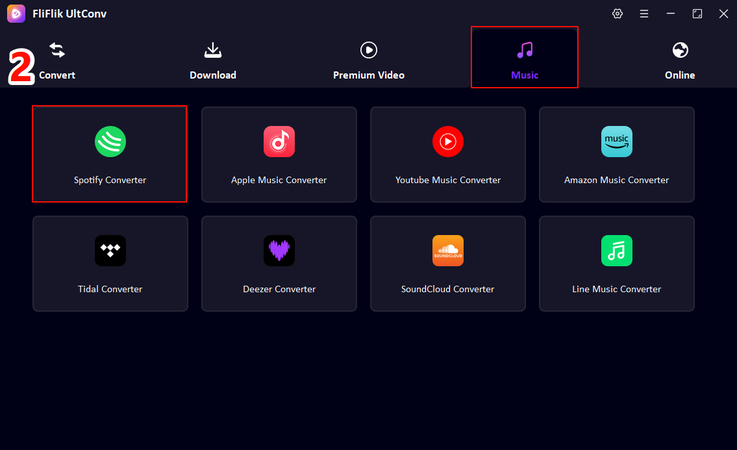
Go to the Premium Music section and select Spotify Music Converter.
-
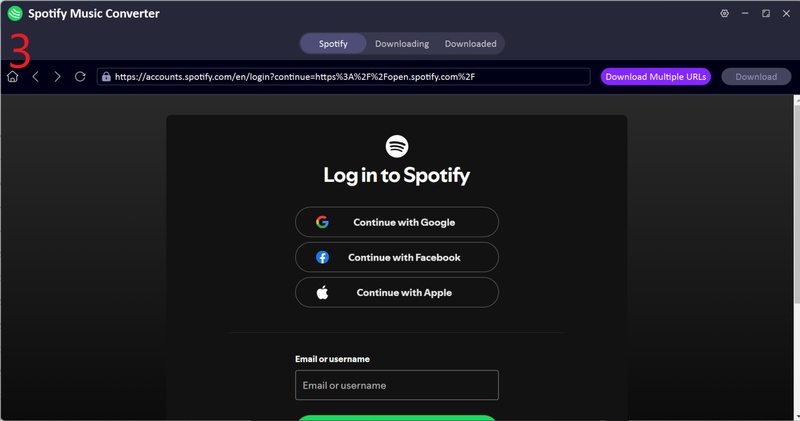
Log in to your Spotify account within UltConv. You don’t need a Premium subscription account, free account works just fine.
-
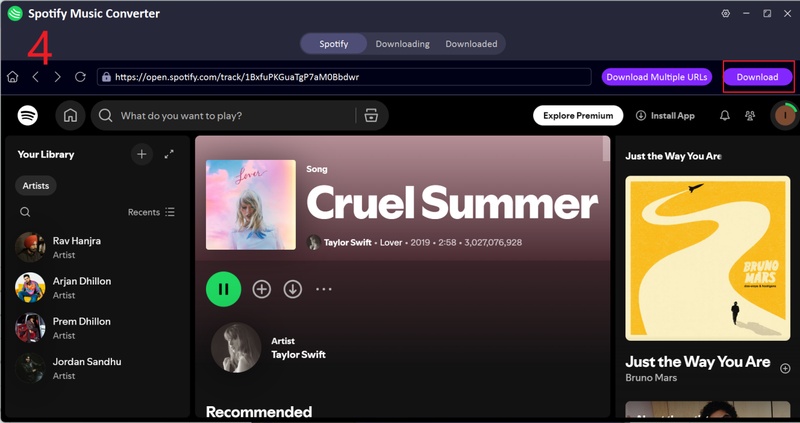
Choose the songs, playlists, or albums you want to download, then click Download to start converting them to MP3.
-
Once the process finishes, open the Downloaded tab to access your music. Your Spotify tracks are now saved as MP3 and ready to play offline on any device.
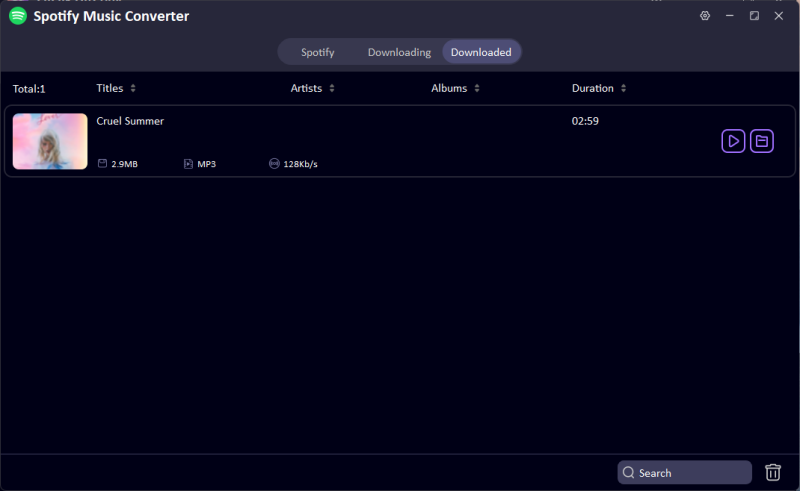


This way, you can download Spotify music in your preferred format without any of the usual restrictions from the official Spotify app.
Final Words
ReVanced Spotify sounds amazing at first if you want Premium features without paying, but as we’ve seen, it’s not always smooth sailing. Installation can be tricky, updates can break things, and there’s always a bit of risk when downloading modded apps. If you want something that just works without the headaches, FliFlik UltConv Spotify Converter is a much safer bet. With it, you can download songs, playlists, albums, and podcasts, keep high-quality audio, and convert to multiple formats all without worrying about errors or crashes. For anyone who wants offline listening that’s easy, reliable, and hassle-free, UltConv Spotify Converter makes the experience simple and enjoyable.
 Secure Download
Secure Download
Secure Download
FAQs
Q1. How do I log in to ReVanced Spotify?
Open the patched ReVanced Spotify app and sign in with your Spotify account. Free accounts work, but if you encounter login issues, clearing the app cache or reinstalling the APK can help.
Q2. What is the alternative to ReVanced Spotify?
A safe and reliable alternative is FliFlik UltConv Spotify Converter, which allows downloading and converting Spotify music without a Premium account, while keeping high-quality audio and metadata intact.
Hey there! I am Maxwell Clark. I'm always looking for new tech tools that make a difference, from making visuals and audio better to making workflows better. I'm going to share tips and tricks for using AI tools for videos, audio, and images. I'm excited to help you navigate the digital world more efficiently and creatively!

