

 8 minutes read


Looking for a solid SoundCloud downloader extension can feel like a headache. Some do the job, some barely work, and a few just bog down your browser. So, we rolled up our sleeves and tested a bunch for 2026. Here, you’ll find six free SoundCloud downloader extensions that actually work. Want to download a single song? Maybe a whole playlist? Doesn’t matter. These extensions handle both without any tech fuss. They sit quietly in your browser and work fast. When you’re done reading, you’ll know which ones are safe, reliable, and don’t waste your time.

Part 1. Top 6 Free SoundCloud Downloader Extensions
Finding a reliable tool to save music from SoundCloud isn’t always easy. Many extensions promise downloads, but only a few actually work well. We’ve tested a few, and here are the top six to get you started.
1. Addoncrop

Addoncrop SoundCloud Music Downloader is a browser extension built for simplicity. Once installed, it adds a download button in the lower right corner, making it easy to save music instantly. It works with most modern browsers and doesn’t require extra software or complicated setup. You can download single songs quickly, and it even handles short playlists without trouble. While long playlists or private tracks can occasionally cause issues, Addoncrop is lightweight, free, and reliable. If you want a straightforward extension SoundCloud downloader that works with minimal effort, this is a solid choice.
- Simple and clean interface
- Compatible with most browsers
- Lightweight and free
- Struggles with very long playlists
- Download errors happen frequently
- May fail to download some songs
2. SoundCloud Track Downloader

The SoundCloud Track Downloader is a SoundCloud downloader Chrome extension designed for Chrome users. After adding it, a download button appears below every track, so saving music is instant and easy. It works directly on SoundCloud pages without needing additional apps. While it handles single tracks efficiently, it doesn’t support full playlists and only works on Chrome. Despite these limits, it’s fast, lightweight, and perfect if you only need to download individual songs quickly. For casual users who want a no-fuss option, this extension does the job well.
- Quick installation
- Easy to use
- Works directly on SoundCloud pages
- Chrome-only
- Doesn’t support playlists
- Only supports limited song downloads
3. ZoundCloud Downloader

ZoundCloud Downloader is an open-source tool that works across multiple platforms. It allows downloading individual tracks or full playlists, offering flexibility for frequent users. The setup is slightly more technical compared to other extensions, but once configured, it’s very reliable. It’s lightweight and doesn’t slow down your browser. The interface isn’t the most beginner-friendly, so it might take a few minutes to get used to. If you want a free, open-source option that handles playlists, keeps downloads organized, and works on multiple devices, ZoundCloud Downloader is worth the extra effort.
- Open-source and free
- Supports playlists
- Works on multiple platforms
- Setup can be tricky for beginners
- The interface is not very intuitive
- Configuration may be difficult for beginners
4. SoundCloud Downloader (Firefox)

SoundCloud Downloader is a Firefox-specific extension that makes saving tracks from SoundCloud quick and easy. Once installed, it adds a small download button directly below each track, letting you grab songs instantly. It works well for both individual tracks and short playlists. The extension is lightweight, free, and doesn’t interfere with your browser performance. While it’s simple to use, very large playlists can sometimes fail to download, and it doesn’t support private tracks. Overall, it’s a reliable choice for Firefox users who want a no-fuss extension SoundCloud downloader.
- Lightweight and fast
- Easy to install and use
- Works with both tracks and short playlists
- Large playlists may fail
- No support for private tracks
- No support batch download
5. SoundCloud Downloader (Chrome)

The SoundCloud Downloader is a Chrome SoundCloud downloader extension designed for Chrome users who want to save tracks quickly. After installation, it places a download button below every track, allowing instant access to songs. It handles single tracks efficiently and is lightweight, so it doesn’t slow down your browser. However, playlist support is limited, and some users have reported occasional glitches on very large playlists. For anyone looking for a simple, free, and functional Chrome SoundCloud downloader extension, this tool gets the job done without extra setup or complications.
- Easy and quick installation
- Lightweight, doesn’t slow the browser
- Direct download button on tracks
- Limited playlist support
- Occasional glitches on large playlists
6. SoundCloud to MP3

SoundCloud to MP3 is a Chrome extension focused on converting and saving SoundCloud tracks as MP3 files. Once added, it shows a download button under each track, allowing fast access to songs for offline listening. While it’s fast and free, it may struggle with private tracks or longer playlists. The interface is simple, making it suitable even for beginners. For users who primarily want to convert SoundCloud tracks to MP3 quickly, this extension is a reliable, easy-to-use option.
- Converts tracks to MP3 quickly
- Simple interface, beginner-friendly
- Free to use
- Doesn’t support private tracks
- Long playlists may fail
- Limited output formats support
Part 2. Common Limits of SoundCloud Downloader Extensions
SoundCloud downloader extensions are convenient, but they’re not perfect. Many users run into issues when trying to save tracks, playlists, or albums. Here are some of the most common limitations you might face:
- Some extensions are unstable and crash sometimes
- Many don’t support DRM-protected tracks
- The success rate can be low for long playlists
- Private tracks often cannot be downloaded
- Browser compatibility is limited for certain tools
- Some extensions slow down your browser
- Occasional glitches when downloading multiple tracks at once
- Limited format options for saving music
- Updates may be infrequent, causing broken downloads
- Batch downloads are not always supported
Part 3. Best Alternative to SoundCloud Downloader Extensions
As we discussed, browser extensions can be handy, but they often have limits. Some crash, struggle with long playlists, or don’t support private tracks. If you listen to a lot of SoundCloud music, this can get frustrating. FliFlik UltConv SoundCloud Downloader solves these problems. It’s a desktop tool that lets you download single tracks, entire playlists, and even podcasts without interruptions.
The tool also gives you control over audio quality. You can save music in high-quality formats up to 320 Kbps, preserving the original sound. It supports multiple formats like MP3, AAC, WAV, FLAC, and M4A, so your downloads work on any device: phones, laptops, car systems, or portable players. Batch downloads are easy; all ID3 tags and metadata are kept intact, including song titles, artists, albums, and artwork. Unlike extensions, it’s stable, fast, and reliable, making offline listening a seamless experience.

- Supports over 10,000 streaming sites, including Spotify, Apple Music, and Deezer
- Download SoundCloud songs, playlists, and podcasts easily
- Convert tracks to MP3, AAC, WAV, FLAC, M4A, and 100+ formats
- Keep all ID3 tags and metadata intact
- High-quality downloads up to 320 Kbps
- Batch download multiple tracks or playlists at once
- Works without logging into a SoundCloud account
▼ How to Download SoundCloud Playlist to MP3 with UltConv SoundCloud Downloader?
-
Download and install FliFlik UltConv SoundCloud Downloader on your computer.
FREE DOWNLOAD![secure download]() Secure Download
FREE DOWNLOAD
Secure Download
FREE DOWNLOAD![secure download]() Secure Download
Secure Download
-
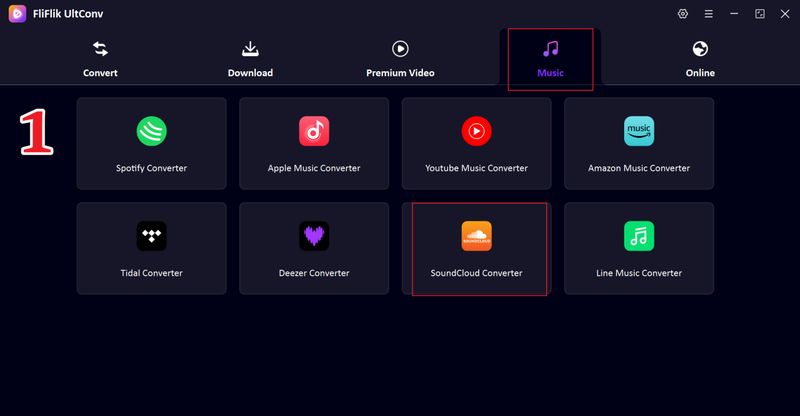
Open UltConv and go to the Music section, then select the SoundCloud Converter.
-
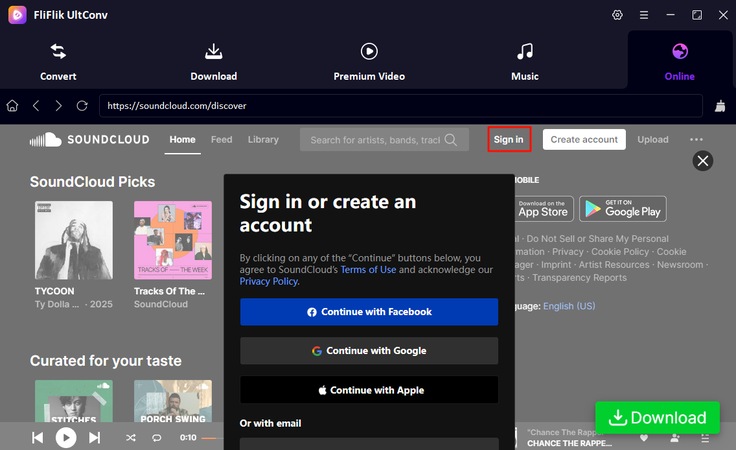
Sign in to your SoundCloud account to access your favorite playlists from your Likes.
-
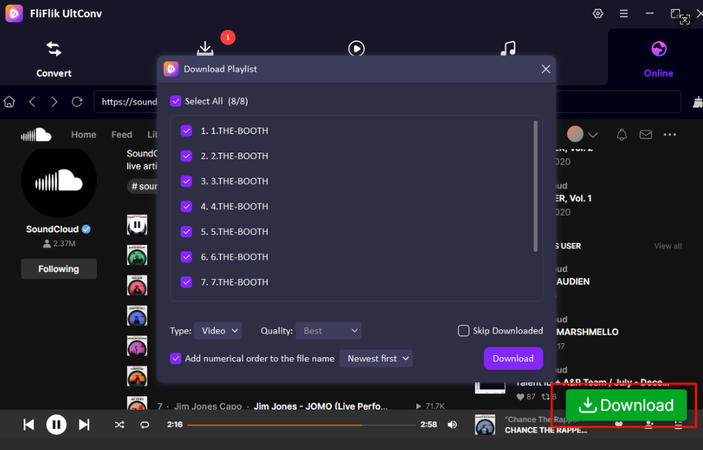
Browse SoundCloud within UltConv, choose the playlist you want, and click the Download button.
-
Once the download is complete, you can find your playlist in the Download section.
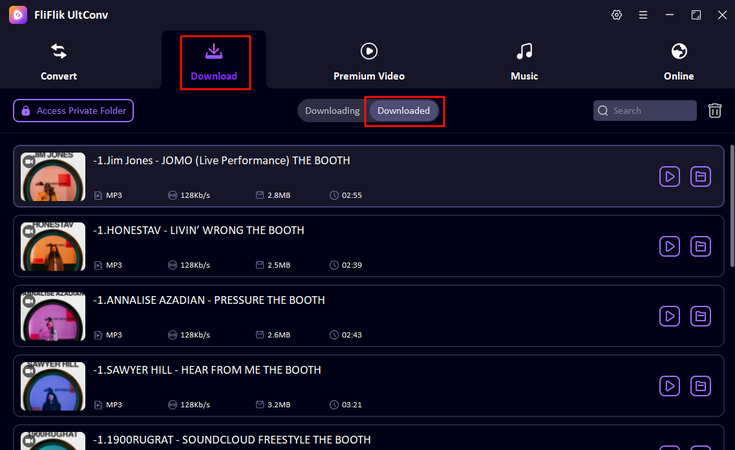


That’s it! Your SoundCloud playlist is now saved on your device, ready for offline listening anytime.
Part 4. UltConv SoundCloud Downloader VS. SoundCloud Download Extensions
When it comes to saving music from SoundCloud, browser extensions are convenient but limited. FliFlik UltConv SoundCloud Downloader offers more features, higher quality, and greater reliability. Here’s a quick comparison between UltConv SoundCloud Downloader and common SoundCloud download extensions:
| Feature | UltConv SoundCloud Downloader | 5 Browser Extensions |
|---|---|---|
| Max Output Quality | Up to 320 Kbps (high-quality audio) | Usually limited to standard quality |
| Output Formats | MP3, AAC, WAV, FLAC, M4A 100+ formats | Mostly MP3 only |
| Download Speed | 10X Faster (batch + multi-thread support) | Slower, depends on the browser |
| Batch Download | Yes, entire playlists/albums at once | Limited or none |
| ID3 Tag Support | Yes, it keep all ID3 tags and metadata intact | Often missing or partial |
| DRM Removal | Works around restrictions reliably | Most cannot handle DRM |
| Success Rate | High and stable for playlists and large files | Mixed; may fail on long playlists or private tracks |
Final Words
Finding a reliable SoundCloud downloader extension can be tricky, as most browser tools have limits like low quality, slow speeds, or failed downloads. That’s why a desktop solution like FliFlik UltConv SoundCloud Downloader stands out. It lets you download songs, playlists, and podcasts in high-quality formats up to 320 Kbps, keeps all ID3 tags intact, and supports batch downloads without any hassle. Whether you want MP3, FLAC, or WAV, UltConv ensures your music works on any device, offline and anytime.
 Secure Download
Secure Download
Secure Download
Hey there! I am Maxwell Clark. I'm always looking for new tech tools that make a difference, from making visuals and audio better to making workflows better. I'm going to share tips and tricks for using AI tools for videos, audio, and images. I'm excited to help you navigate the digital world more efficiently and creatively!

