

 7 minutes read


SoundCloud’s packed with music, but sometimes streaming just isn’t enough. Maybe you want your favorite tracks offline, and you want them to sound as good as possible. That’s where converting SoundCloud to FLAC comes in. FLAC keeps all the detail and richness that gets lost with MP3s, so every note hits the way it should. Whether you’re after a single song, a whole album, or an entire playlist, downloading in FLAC gives you that full, high-quality experience at home, on the road, wherever you listen.
This article walks you through five solid ways to save SoundCloud tracks as FLAC files. Different methods suit different devices and setups, so just pick what fits your style.

- Way 1: Best Way to Download SoundCloud to FLAC
- Way 2: Download SoundCloud to FLAC with an Online Tool
- Way 3: Download SoundCloud to FLAC with Browser Extension
- Way 4: Download SoundCloud to FLAC with an Open Source Tool
- Way 5: Save SoundCloud to FLAC with Record Tool
- Comparison between 5 SoundCloud to FLAC Methods
- Final Words
Content Table:
Way 1: Best Way to Download SoundCloud to FLAC
The first SoundCloud to FLAC converter that we recommend is FliFlik UltConv SoundCloud Converter. Unlike standard streaming, this tool allows you to save individual tracks, full playlists, entire albums, and even podcasts directly to your computer, so you can enjoy them offline at any time. The real advantage lies in how it handles downloads: you can choose the format you want, including FLAC, MP3, WAV, M4A, and more, while maintaining the original audio quality.
UltConv SoundCloud Converter also supports batch downloading at 10X super speed, meaning you can grab multiple songs or complete playlists at once without waiting for each track individually. During the download process, all ID3 tags, metadata, and album artwork are preserved, making it easy to organize your music library. Even if you don’t have a SoundCloud premium account, UltConv SoundCloud Converter gives you full access to lossless downloads, so you never compromise on quality or convenience.

- Supports over 10,000 streaming platforms, including Spotify, Apple Music, Napster, Deezer, TIDAL, and more
- Download SoundCloud songs, albums, playlists, podcasts, and artists
- Preserve high-quality audio, up to 320 Kbps MP3 or lossless FLAC
- Convert music to 100+ formats like FLAC, MP3, WAV, M4A, and AAC
- Batch download entire playlists or albums at 10X speed
- Keep all ID3 tags, album art, and metadata intact
▼ Steps to Download SoundCloud Songs to MP3 with UltConv SoundCloud Converter:
-
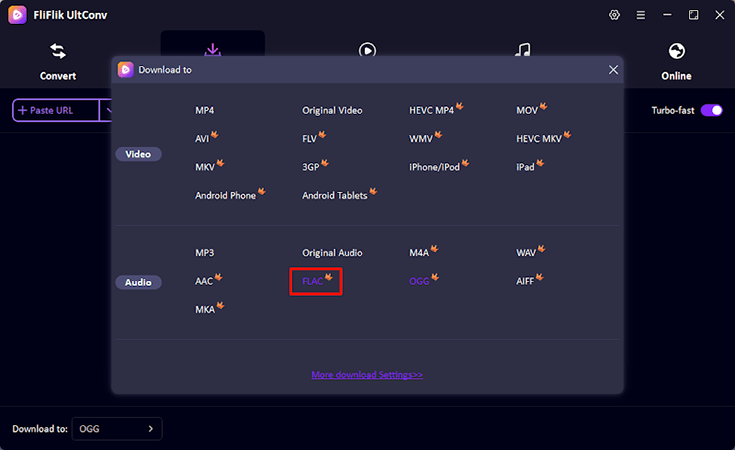
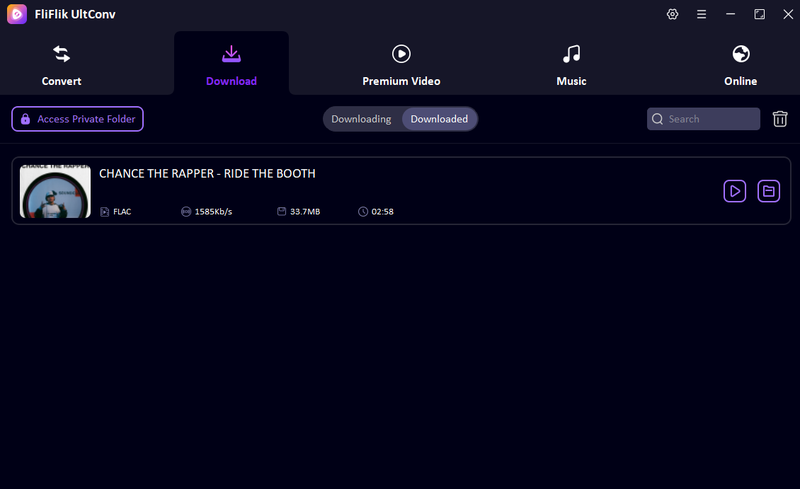
Download and install UltConv, open it, go to the Download tab, and click the ” Download to ” button at the bottom. Choose FLAC as the output format.
FREE DOWNLOAD![secure download]() Secure Download
FREE DOWNLOAD
Secure Download
FREE DOWNLOAD![secure download]() Secure Download
Secure Download
-
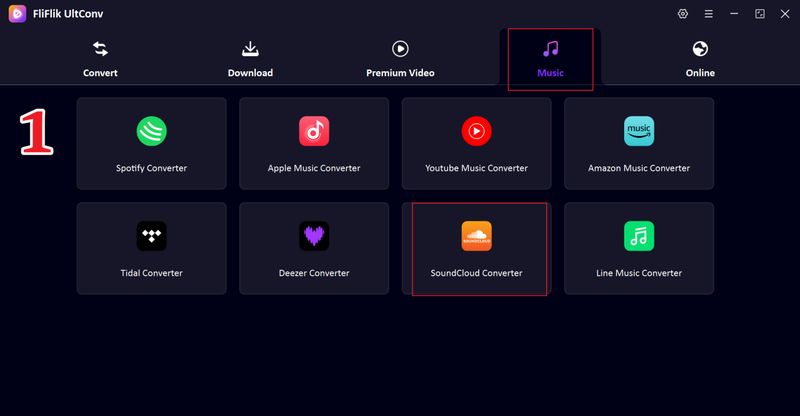
Go to the Music tab and click on SoundCloud Converter.
-
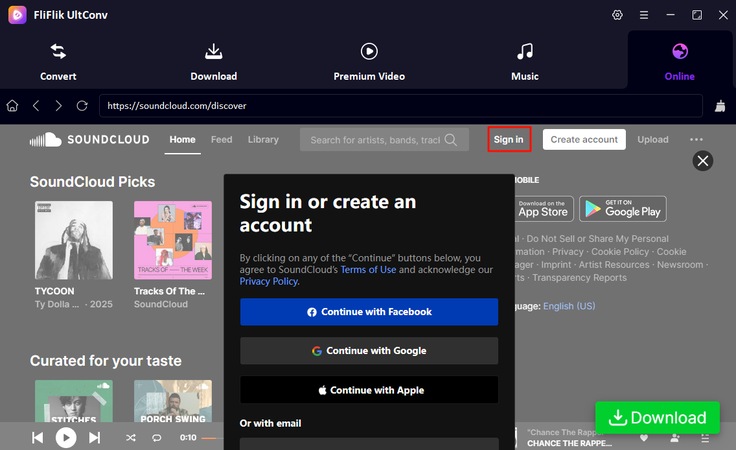
Sign in to your SoundCloud account to access your library.
-
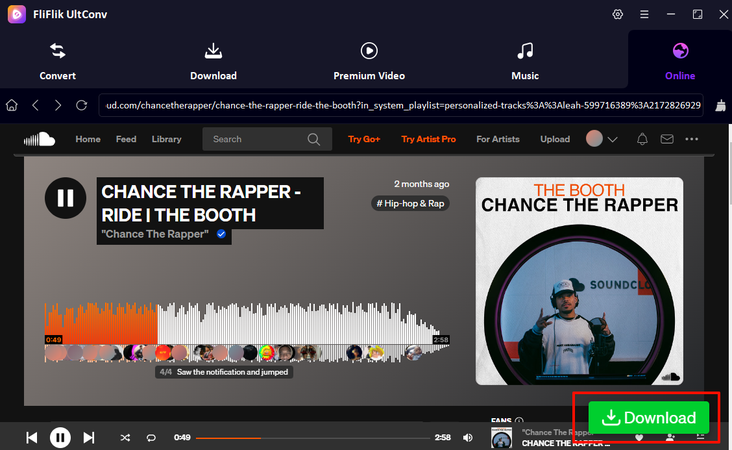
Browse SoundCloud and find the track or playlist you want to download. Start playing it, and a green Download button will appear; then click the Download button.
-
The download will begin immediately. Once completed, your music in FLAC format will be saved to your device, ready for offline listening.


Way 2: Download SoundCloud to FLAC with an Online Tool
For those who prefer not to install software, online tools like Soundcloudrips make it easy to grab tracks from SoundCloud directly in your browser. Soundcloudrips supports multiple formats, including MP3, FLAC, and WAV, allowing you to enjoy lossless audio without any extra setup. You don’t need a premium account, and the tool works on Windows, Mac, and even mobile devices. It’s straightforward and convenient for quick downloads of individual tracks or small playlists.
- No software installation required
- Supports FLAC for lossless audio
- Works across all devices and operating systems
- Limited batch download options
- Ads on the website can be distracting
- May not work for some tracks or playlists
▼ Steps to Use Soundcloudrips:
-
Step 1: Open Soundcloudrips in your browser.
-
Step 2: Go to SoundCloud and copy the link of the track you want to download.
-
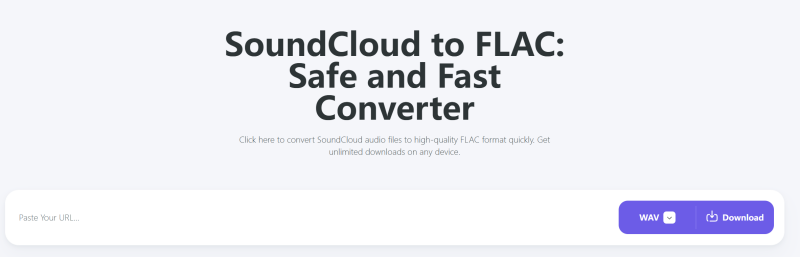
Step 3: Paste the link into the search box on Soundcloudrips.
-
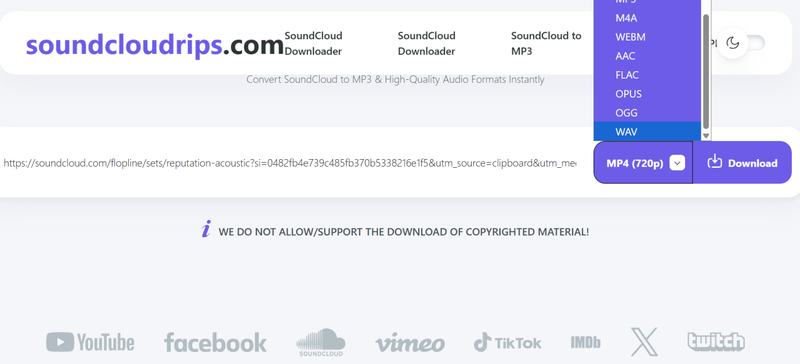
Step 4: Select FLAC (or your preferred format) from the available options.
-
Step 5: Click Download. The tool will start analyzing your song, click the Download button again, will start downloading, ready to enjoy offline.


Way 3: Download SoundCloud to FLAC with Browser Extension
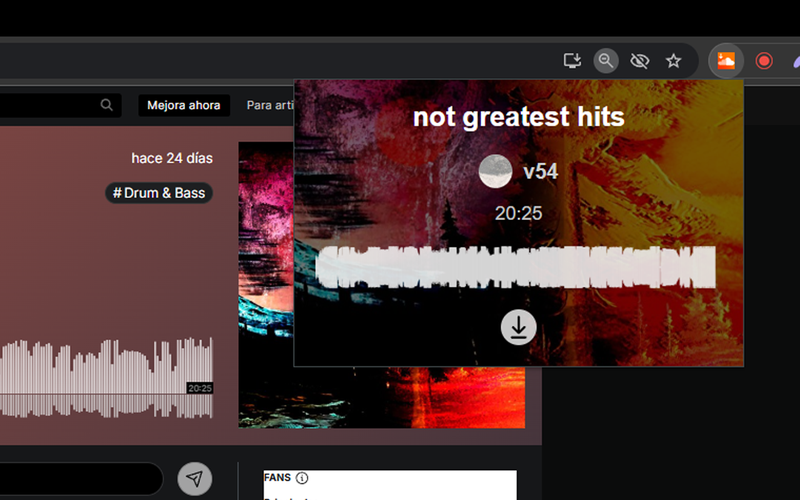
If you often download tracks from SoundCloud, using a browser extension can save a lot of time. SoundCloud Track Downloader is a popular extension available for Chrome and Firefox. It adds a download button directly on SoundCloud’s web interface, so you don’t have to copy and paste links every time. The extension supports multiple formats, including FLAC, MP3, and WAV, letting you preserve high-quality audio. It’s lightweight, free, and doesn’t require you to install extra software on your computer.
- Supports FLAC for lossless audio
- Quick access without leaving the SoundCloud page
- Free and lightweight
- Only works with limited songs
- Some browsers may block the extension
- Occasional updates may temporarily disable the extension
▼ Steps to Use SoundCloud Track Downloader:
-
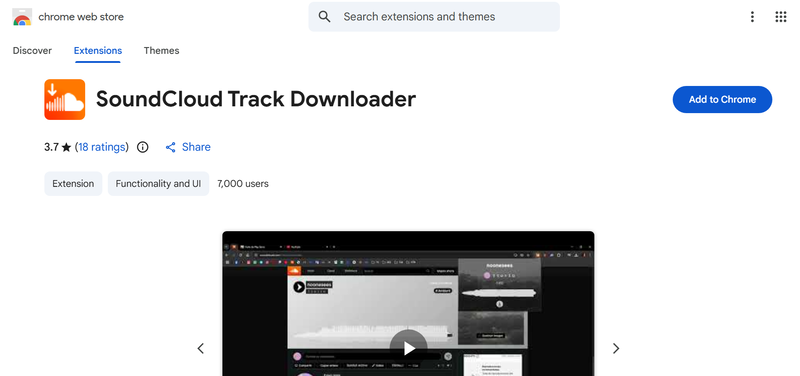
Step 1: Install the SoundCloud Track Downloader from the Chrome Web Store or Firefox Add-ons.
-
Step 2: Open SoundCloud in your browser and log in to your account.
-
Step 3: Navigate to the track or playlist you want to download.
-
Step 4: Look for the new Download button added below the track.
-
Step 5: Click Download and select FLAC as your preferred format. The track will start downloading immediately.


Way 4: Download SoundCloud to FLAC with an Open Source Tool
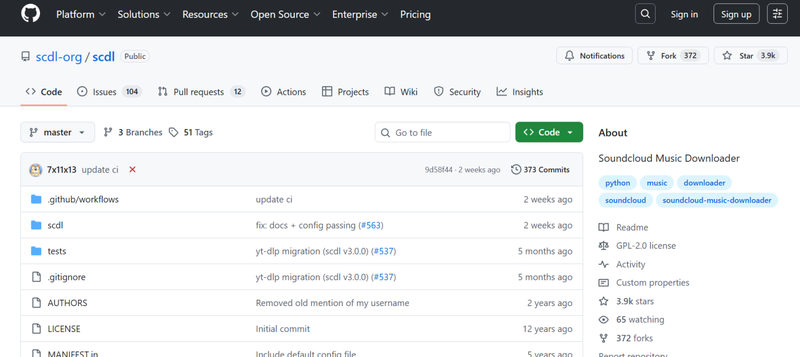
For users who prefer open-source solutions, SoundCloud Music Downloader is a solid choice. This tool is free, lightweight, and can convert tracks from SoundCloud to multiple formats, including FLAC, MP3, and WAV. Being open-source, it’s transparent, regularly updated by the community, and compatible with both Windows and macOS. It’s particularly popular among enthusiasts who browse for “Soundcloud to flac reddit” tips, as many users share optimized settings and usage tricks. With this downloader, you can grab single tracks or entire playlists without the restrictions of some web-based tools.
- Completely free and open-source
- Supports high-quality FLAC downloads
- Lightweight and simple to use
- Only works for public tracks
- Lacks official customer support
- Installation may be difficult for beginners.
▼ Steps to Use SoundCloud Music Downloader:
-
Step 1: Download and install the open-source software from its official repository.
-
Step 2: Open the program and log in with your SoundCloud account.
-
Step 3: Copy the link of the track or playlist you want to download from SoundCloud.
-
Step 4: Paste the URL into the downloader’s input field and select FLAC as your output format.
-
Step 5: Click Download and wait for the software to save the tracks to your computer.

Way 5: Save SoundCloud to FLAC with Record Tool
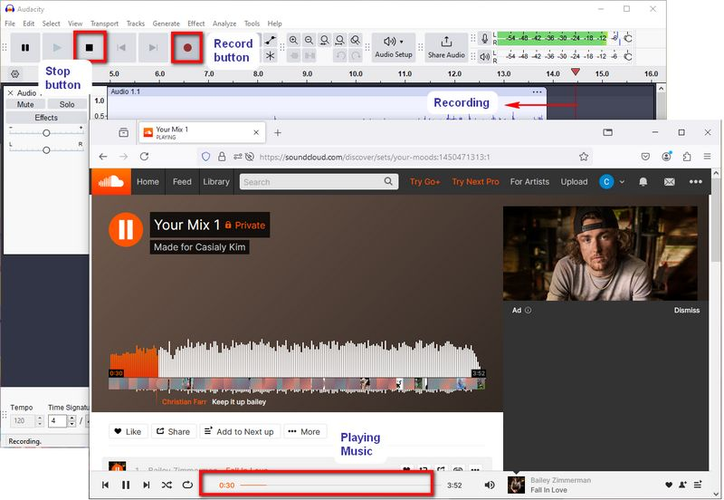
If you’re okay with recording tracks instead of downloading directly, Audacity is one of the best free tools out there. It’s an open-source audio editor and recorder that lets you capture high-quality audio from your computer in real time. You can record any SoundCloud track playing on your device and export it as FLAC, MP3, WAV, or other formats. Audacity is flexible because you can adjust recording quality, trim unwanted sections, and apply basic effects. This method is particularly useful for tracks that aren’t available for direct download, and many users share tips on “soundcloud to flac reddit” for getting the best settings.
- Free and open-source
- Record any audio playing on your computer
- Can edit and trim recordings within the program
- Real-time recording takes as long as the track’s duration
- No direct batch download of multiple tracks
- Requires manual setup for recording input and output
▼ Steps to Use Audacity for SoundCloud:
-
Step 1: Download and install Audacity from the official site.
-
Step 2: Open Audacity and configure your recording device to capture system audio. On Windows, you may need to enable “Stereo Mix” or a similar input.
-
Step 3: Open SoundCloud in your browser and play the track you want to record.
-
Step 4: In Audacity, click the Record button and let it capture the audio while the track plays.
-
Step 5: Once finished, click Stop, then go to File > Export > Export as FLAC. Name your file and save it to your computer.

Comparison between 5 SoundCloud to FLAC Methods
Now, let’s see how each tool stacks up across key factors like output quality, speed, and ease of use. This table gives a quick overview so you can easily spot which SoundCloud to FLAC downloader fits your needs best.
| Method/Tool | Output Quality | Output Format | Download Speed | Batch Download | Ease of Use | Success Rate |
|---|---|---|---|---|---|---|
| FliFlik UltConv | Lossless, up to 320 Kbps | FLAC, MP3, WAV, M4A, AIFF, 100+ formats, etc. | Very fast (10X) | Yes, playlists & albums | Very user-friendly | 100% |
| Soundcloudrips | depends on the source | FLAC, MP3 | 1X | Limited | Easy | 60% nearly |
| SoundCloud Track Downloader | 256 Kbps Max | FLAC, MP3 | 1X | No | Simple | 50% nearly |
| Soundcloud Music Downloader | depends on the source | FLAC, MP3, WAV | 1X | No | A little difficult for beginners | 80% nearly |
| Audacity | Same as recording | FLAC, WAV, MP3 | Real-time | No | Moderate | 90% nearly |
Final Words
Downloading high-quality tracks from SoundCloud to FLAC doesn’t have to be complicated. Whether you’re converting single songs, playlists, or full albums, these tools give you options to save your music in FLAC or other formats. For the fastest, most reliable, and most flexible experience, FliFlik UltConv SoundCloud Converter stands out. It preserves every detail of your tracks, supports batch downloads, and works across multiple platforms. If you’re serious about keeping your SoundCloud library organized and offline in true lossless quality, give FliFlik UltConv a try. Your music collection deserves the best.
 Secure Download
Secure Download
Secure Download
Hey there! I am Maxwell Clark. I'm always looking for new tech tools that make a difference, from making visuals and audio better to making workflows better. I'm going to share tips and tricks for using AI tools for videos, audio, and images. I'm excited to help you navigate the digital world more efficiently and creatively!

