

 8 minutes read


SoundCloud is packed with remixes, indie releases, podcasts, and tracks you won’t always find on mainstream platforms. But streaming isn’t the same as having a file you can actually use. Many users look for ways to convert Soundcloud to M4A so they can store music locally, transfer it to an iPhone, or manage it inside their music library.
M4A is a smart choice. It offers better sound quality than MP3 at similar file sizes and works perfectly across Apple devices and modern media players. The challenge? SoundCloud doesn’t always provide direct downloads in M4A format. In this article, we’ll walk through four working tools that help you download SoundCloud tracks and save them as M4A files quickly and safely. Let’s break it down.

Part 1. Why Convert SoundCloud to M4A?
Streaming is convenient, but it doesn’t always give you flexibility. Converting SoundCloud tracks to M4A gives you more control over how and where you listen. Here are the main reasons people choose M4A:
- Better Audio Quality: M4A typically uses AAC encoding, which delivers clearer and more detailed sound than MP3 at the same bitrate. You get cleaner vocals and better overall balance without increasing file size.
- Smaller File Size: Compared to lossless formats, M4A keeps storage usage reasonable. It compresses audio efficiently, so you can store more songs without sacrificing noticeable quality.
- Excellent Compatibility: M4A works seamlessly with iPhone, iPad, Mac, iTunes, and Apple Music. No extra conversion steps. Just import and play.
- Better Metadata Support: M4A files support album artwork, artist names, track numbers, and other ID3-style tags. That makes organizing your music library much easier.
- Flexible Offline Playback: Once converted, your SoundCloud tracks are no longer tied to streaming. You can transfer them to any compatible device and listen without internet access.
Part 2. Best Way to Download SoundCloud to M4A [Top Pick]
If you’re looking for a stable SoundCloud to M4A download solution, a dedicated desktop converter is usually the safest route. FliFlik UltConv SoundCloud Converter is built for people who want real control over their music. It connects directly to SoundCloud through a built-in web player, lets you select tracks or playlists, and converts them into M4A files stored locally on your computer. No streaming limits. No temporary downloads.
What makes it stand out is consistency. You can batch download full playlists, choose output quality up to 320 Kbps, and keep metadata like artist name, artwork, and track info. It also supports multiple streaming platforms, so you’re not locked into one service. If you’re serious about building an offline music library instead of relying on streaming access, this is the practical route.

- Download SoundCloud songs, playlists, and albums directly
- Convert SoundCloud to M4A, MP3, AAC, WAV, FLAC, and more
- Support up to 320 Kbps high-quality audio
- Batch download multiple tracks at once
- Keep ID3 tags, artist info, and album artwork
- Support 10,000+ streaming music platforms, Soundcloud, Spotify, Tidal, etc
▼ How to Download SoundCloud to M4A with UltConv SoundCloud Converter?
-
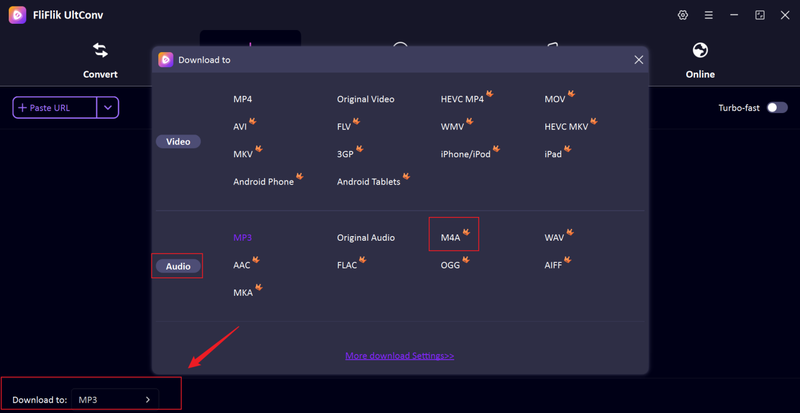
Download and install FliFlik UltConv Spotify Converter on your computer. Open the program, go to the Download section, and click the Download to option at the bottom. Select M4A as your output format.
FREE DOWNLOAD![secure download]() Secure Download
FREE DOWNLOAD
Secure Download
FREE DOWNLOAD![secure download]() Secure Download
Secure Download
-
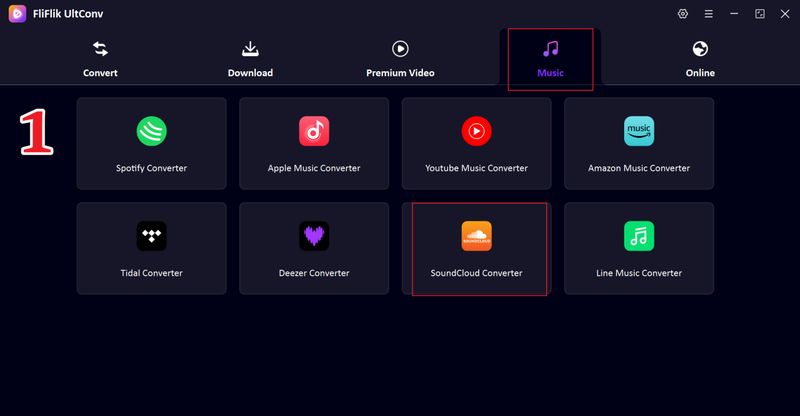
Switch to the Music tab and choose SoundCloud Converter from the supported platforms.
-
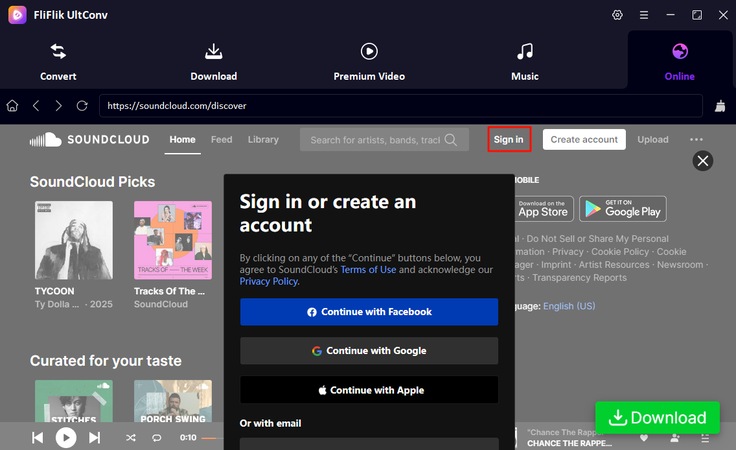
Log in to your SoundCloud account inside the built-in web player to access your playlists and liked tracks.
-
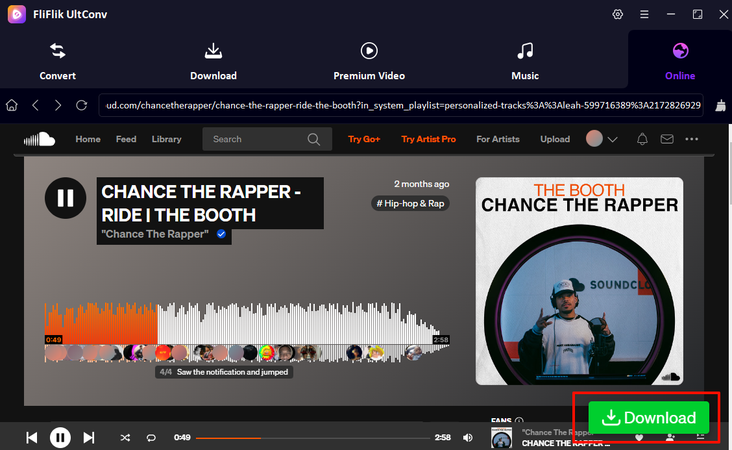
Browse SoundCloud and open the track or playlist you want. Start playing it, and a green Download button will appear. Click it to begin processing.
-
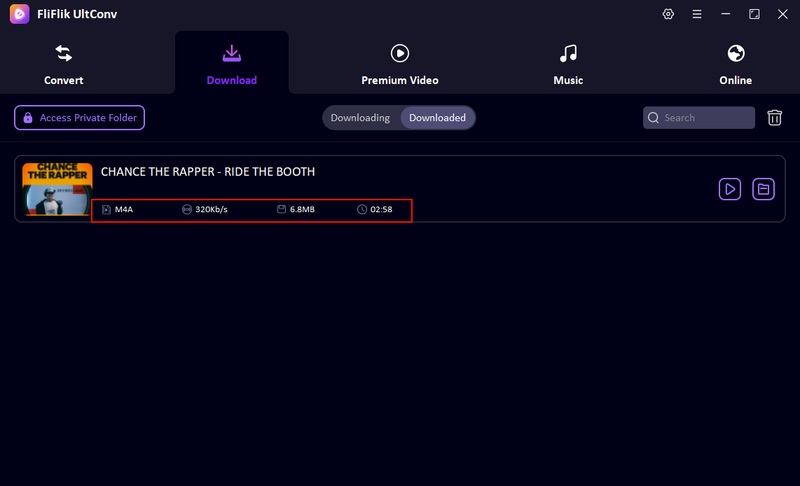
The download will start immediately. Once finished, your SoundCloud music will be saved as M4A files on your computer, ready for offline listening.


Part 3. 3 Free SoundCloud to M4A Converters Online
Below are three web-based tools that let you convert SoundCloud to M4A without installing software. These online converters are simple to use, but they come with limits in quality and reliability compared to desktop solutions.
1. Soundcloudrips

Soundcloudrips is a straightforward online downloader that extracts audio from SoundCloud tracks and offers it in downloadable formats, including M4A when available. You just paste a SoundCloud link, and the tool processes it for you.
- No software installation required
- Works directly in the browser
- Simple and quick conversion for individual tracks
- Free to use
- Output quality may vary and is often low to medium
- Doesn’t support batch downloads
- Metadata (like artist name or artwork) is usually missing
- Reliability depends on SoundCloud link formats
2. ConverterFactory

ConverterFactory provides a web-based SoundCloud converter with M4A output options. You paste a SoundCloud URL, and the site attempts to generate a downloadable audio file in the chosen format.
- Converts links to M4A without extension or download
- Clean, minimal interface
- Works on multiple devices and browsers
- Quality and success rate can vary
- Doesn’t handle playlists or multiple tracks at once
- Metadata and ID3 tagging are limited or absent
- Occasional site instability
3. Downcloud.cc

Downcloud.cc is another free online SoundCloud downloader that supports direct audio extraction. It claims to support various output formats, including M4A, and focuses on quick downloads.
- Free and web-based
- Easy to use for quick individual track downloads
- No account or sign-in needed
- Output quality is not guaranteed
- No batch conversion features
- Lacks proper metadata retention
- Ads or redirects may appear during use
Part 4. Quick Comparison of 4 Spotify to M4A Converters
Before we look at the details, it helps to see how these SoundCloud-to-M4A converters stack up side by side. Some are simple online tools that work without installation, while others are desktop programs built for reliable quality and bigger downloads. This table highlights the key differences so you can decide what fits your needs.
| Feature | UltConv SoundCloud Converter | Soundcloudrips (Online) | ConverterFactory (Online) | Downcloud.cc (Online) |
|---|---|---|---|---|
| Type | Desktop software | Web-based | Web-based | Web-based |
| Support Sites | SoundCloud + 10,000+ platforms | SoundCloud only | SoundCloud only | SoundCloud only |
| DRM Removal | ✅ | ❌ | ❌ | ❌ |
| Output Format | 100+ M4A, MP3, AAC, WAV, FLAC, etc. | M4A/MP3 (varies) | M4A/MP3 (varies) | M4A/MP3 (varies) |
| Audio Quality | High (up to 320 Kbps) | Low to medium | Low to medium | Low to medium |
| Playlist Support | ✅ | ❌ | ❌ | ❌ |
| Ads | ❌ | ✅ | ✅ | ✅ |
Final Words
Converting SoundCloud to M4A is a simple way to enjoy better sound quality and keep your favorite music on your device. Online tools are fast, but they can be unstable and sometimes give lower-quality files. If you want better results and smoother downloads, a good converter is a smarter choice. Try FliFlik UltConv SoundCloud Converter for an easy and reliable way to download and convert SoundCloud music. It helps you save music quickly and listen offline anytime. Give UltConv SoundCloud Converter a try and start building your offline music collection today.
 Secure Download
Secure Download
Secure Download
Hey there! I am Maxwell Clark. I'm always looking for new tech tools that make a difference, from making visuals and audio better to making workflows better. I'm going to share tips and tricks for using AI tools for videos, audio, and images. I'm excited to help you navigate the digital world more efficiently and creatively!

