

 8 minutes read


Many users store their favorite SoundCloud tracks for offline use, editing, or sharing on other platforms. Here we are going to convert SoundCloud to MP4. Because SoundCloud mainly provides audio streaming, MP4 format improves compatibility with video editing software, social platforms, and storage devices. This guide explains how to convert SoundCloud tracks to MP4 in Windows, Mac, Android, and online environments. From reliable desktop tools to easy online tools, we introduce the best conversion methods. Any method is simple and safe for personal use. By the time you finish reading this guide, you will find the best method for your device and the converter.

- Part 1. Why You Might Need to Convert SoundCloud to MP4?
- Part 2. How to Convert SoundCloud to MP4 on Windows & Mac
- Part 3. How to Convert SoundCloud to MP4 on Android
- Part 4. How to Convert SoundCloud to MP4 Online
- Part 5. Quick Comparison of 3 SoundCloud to MP4 Converters
- Final Thoughts
Content Table:
Part 1. Why You Might Need to Convert SoundCloud to MP4?
SoundCloud specializes in voice, but there are still many users who convert tracks to MP4 for various reasons. With the SoundCloud to MP4 conversion tool, you can get compatible files with more devices and tools. The main reasons are:
1. Platform Compatibility
Some social platforms accept MP4, but do not support uploading pure audio files. Converting SoundCloud to MP4 makes it easier to upload tracks to YouTube, TikTok, Facebook, etc.
2. Upload Requirements
Video editing software, online modules, and presentation tools often require MP4 as their primary format. MP4 also has a small video frame size, making it easy to upload and attach to many tools.
3. Archives and Offline Use
Some users want to save SoundCloud tracks in one place. Saving MP4 files makes it easier to organize and simplify playback on PC, TV, and tablet.
4. Visual Content Creation
If you want to create a short video with a simple background or waveform, converting SoundCloud to MP4 will be the first time.
Disclaimer
This guide only covers personal use, offline viewing, and personal content. Do not use the SoundCloud to MP4 conversion tool for commercial use, distribution, or re-uploading of other content without permission or required licenses.
Part 2. How to Convert SoundCloud to MP4 on Windows & Mac
The most stable method for Windows and Mac users is the use of FliFlik UltConv SoundCloud Converter. This tool is not an online converter, so you need to install it on your computer, which gives you fast and stable results. UltConv supports more than 10,000 websites and supports a large number of audio and video formats. You can download MP4, MP3, WAV, and OGG files, save playlists, and convert videos to audio. Because processing is done locally, it works more smoothly than most online tools for long downloads, large playlists, and high-quality files.

- Save videos from over 10,000 sites, including YouTube, Facebook, SoundCloud, Vimeo, X, Instagram, Twitch, Dailymotion, TikTok, etc.
- Download video and audio in more than 100 formats, including MP4, MP3, WAV, and OGG.
- Download the entire playlist, channels, and albums with a simple click.
- Convert video to audio (MP3, WAV, OGG) without compromising image quality.
- Download 4K, 2K, 1080p videos and up to 320kbps audio.
- Very stable even for long downloads, large playlists, high-quality output tasks.
▼ Steps to Convert SoundCloud to MP4 with FliFlik UltConv
Here is a step-by-step guide on how to use FliFlik UltConv. Follow these simple steps to download and convert videos, playlists, and channels in high-quality formats easily.
-
Go to the official website and download UltConv Video Downloader. Install it on your computer.
FREE DOWNLOAD![secure download]() Secure Download
FREE DOWNLOAD
Secure Download
FREE DOWNLOAD![secure download]() Secure Download
Secure Download
-
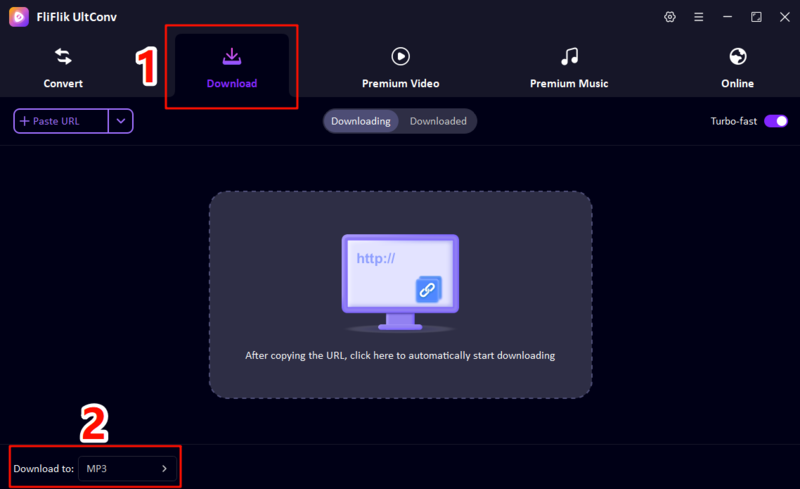
Open UltConv Video Downloader. Click Download from the main menu. Then choose Download to and select MP3 or any other audio format you prefer.
-
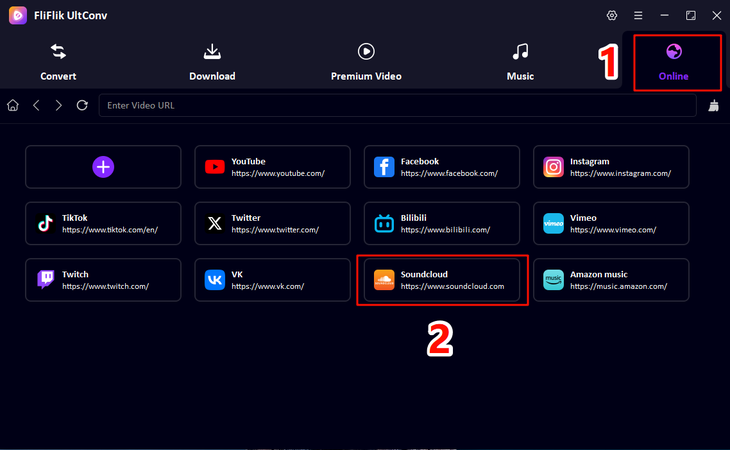
Navigate to “Music” in UltConv, select SoundCloud Converter from the available options, and log in to your SoundCloud account.
-
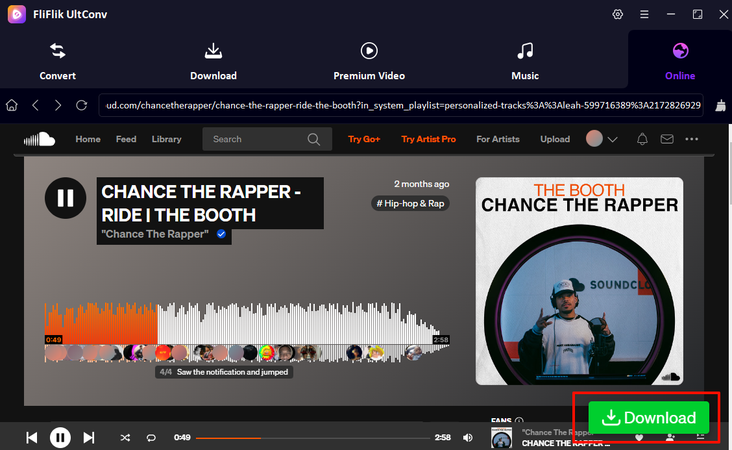
Play the track or playlist you want to save. Click the Download button in the lower right corner.
-
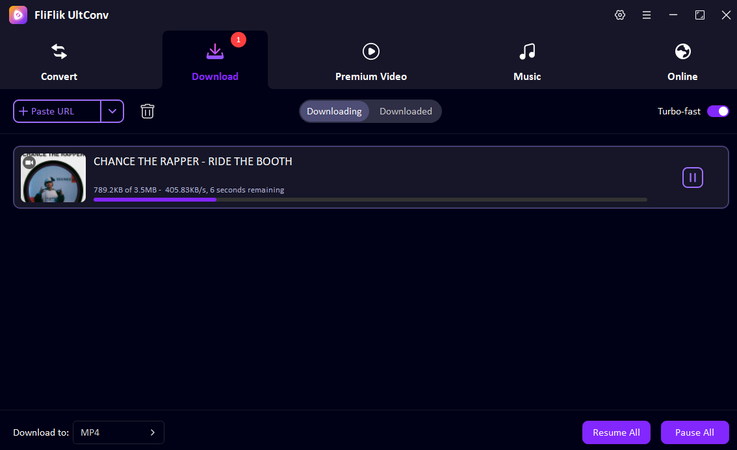
Then you can check the downloading process. Just wait for a few seconds, and then you can enjoy your song.


Part 3. How to Convert SoundCloud to MP4 on Android
Android users can convert SoundCloud tracks using FliFlik UltConv for Android. This application is convenient and allows downloading from many platforms like SoundCloud, YouTube, Facebook, TikTok, etc. You are able to store files in MP4, MP3, WAV, and OGG formats and can download several files at the same time. There is also an inbuilt browser in UltConv, hence you can access SoundCloud directly in the application and download it instead of having to copy the link. It is compatible with the majority of Android smartphones and offers a consistent speed and a decent quality of the output, so it is a safe and effective option for mobile users.
- Download from thousands of websites such as YouTube, SoundCloud, Vimeo, X, TikTok, Facebook, etc.
- Download audio and video in MP4, MP3, WAV, and OGG formats on mobile devices.
- Save playlists and multiple tracks at once.
- Intuitive interface with simple button operation.
- Supports 720p, 1080p, and 4K video on compatible devices.
- Built-in browser that can be downloaded directly without switching the app.
▼ Steps to Convert SoundCloud to MP4 with UltConv for Android
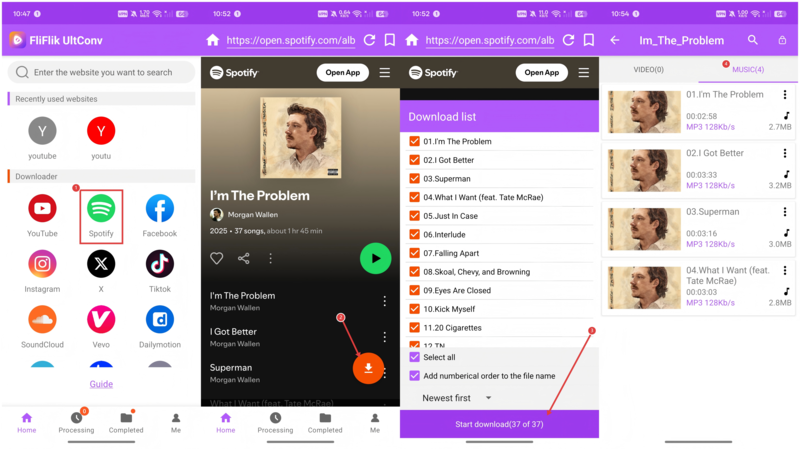
- Step 1: Download and install UltConv for Android on your mobile device.
- Step 2: Open FliFlik UltConv. Then go to SoundCloud and choose the music track you want to download.
- Step 3: Tap the Download button. Pick your preferred quality and select MP4 as the format.
-
Step 4:
Press
Start Download. The app will convert and save the SoundCloud track as an MP4 file on your device.

Part 4. How to Convert SoundCloud to MP4 Online
You can also use tools such as BitDownloader to convert SoundCloud to MP4 in case you prefer to solve it quickly without installing the software. The online converter works directly on the browser and is easy to use. Just copy the SoundCloud track link, paste it into the site download box, select the format to MP4, and click “Download.” This method is quick and convenient for short tracks, but with limitations. Large playlists and long tracks may fail to convert and may result in poor output quality. The download speed depends on the server situation. Ads may be displayed during processing.
Pros & Cons
| Pros | Cons |
|---|---|
| No installation required | May fail on long tracks |
| Works on computers and mobile devices | Not stable for playlists |
| Simple interface | Speed depends on server load |
| Quick for short clips | Output quality is limited |
-
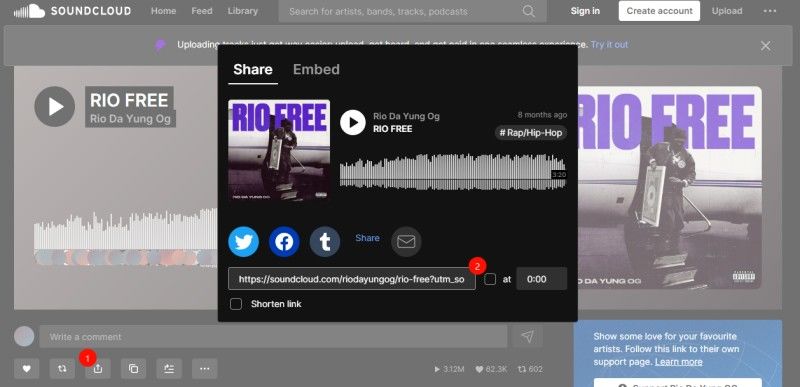
Step 1:
Go to the SoundCloud website where the video is posted and copy the link of the video you want to download.
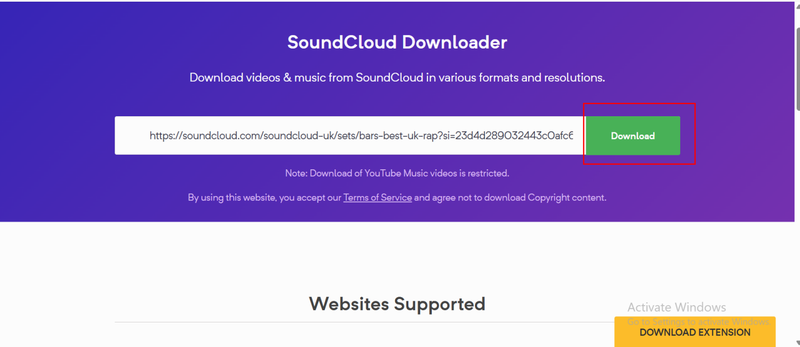
- Step 2: Paste the copied link into the search box at the top of this page. Then click Download or press Enter.
-
Step 3:
BitDownload will scan the link and show all available download options. Right-click on the Download button and select Save As or Download to save the video to your device.


Part 5. Quick Comparison of 3 SoundCloud to MP4 Converters
To help you choose the right tool, we’ve compared three popular ways to convert SoundCloud to MP4: FliFlik UltConv for Windows/Mac, UltConv for Android, and Bitdownloader.
| Feature | FliFlik UltConv (PC & Mac) | UltConv Android App | Bitdownloader Online |
|---|---|---|---|
| Conversion Type | Software, high stability | Mobile App | Online, browser-based |
| Convert Speed | Very fast (local processing) | Fast | Depends on server |
| Output Quality | 4K, 2K, 1080p, 320 kbps | Up to 4K, 320 kbps | Limited quality |
| Batch Capability | Yes (large playlists) | Yes | No |
| Stability | Excellent | Good | Low–Medium |
| Supported Sites | 10,000+ | 1000+ | Limited |
| Formats | MP4, MP3, WAV, OGG, etc. | MP4, MP3, WAV, OGG | Mostly MP4, MP3 |
Final Thoughts
With the right tools, it’s easy to convert SoundCloud to MP4 on any device. Online tools can be used for simple tasks, but they are not stable for long-term work. FliFlik UltConv SoundCloud Converter is ideal for desktop users looking for stable download, high quality, batch processing, and thousands of websites. High-speed processing, rich format support, excellent output quality, it is a solid choice that can be used widely from everyday users to content creators. If you want to save and manage files across devices smoothly, try FliFlik UltConv for the next download.
 Secure Download
Secure Download
Secure Download
Hey there! I am Maxwell Clark. I'm always looking for new tech tools that make a difference, from making visuals and audio better to making workflows better. I'm going to share tips and tricks for using AI tools for videos, audio, and images. I'm excited to help you navigate the digital world more efficiently and creatively!

