

 8 minutes read


People keep searching for a Spotify IPA for one simple reason. They want premium Spotify features without limits. No ads. Unlimited skips. Offline playback. On iPhone, that usually means sideloading a modified IPA file instead of using the App Store version.
Here’s the thing. Spotify IPA files can work, but they come with trade-offs. Accounts get logged out. Features break after updates. Some IPAs stop working overnight. Others raise real security risks. Apple cracks down. Spotify patches fast. That’s why many users now look beyond Spotify IPA and start asking a better question. What’s the safest and most stable way to save Spotify music and listen offline, without hacks or constant fixes? In this article, we’ll look at the best Spotify IPA options in 2026. Then we’ll compare them with a more reliable alternative that actually holds up long-term.

Part 1. What is Spotify IPA?
A Spotify IPA is a modified iOS app file that lets you install Spotify outside the App Store. People usually sideload it using tools like AltStore or Sideloadly. The goal is simple. Unlock features that are normally limited to Premium, such as ad-free listening and unlimited skips.
Here’s how it works. The original Spotify app is altered, then packed as an IPA file. When installed on an iPhone, it runs like a normal app, but without official approval from Apple or Spotify. This is why IPA Spotify versions often stop working after updates, require frequent re-signing, or trigger account warnings. It’s a workaround, not an official solution. And while it can work for a while, stability and security are always uncertain.
Part 2. Top 4 Spotify Premium IPAs for iOS
Here are four of the most talked-about Spotify Premium IPA for iOS options that people use to get extra features on their iPhones. Each one has its own strengths and limitations, and none are official releases from Spotify.
1. Spotify++ IPA

Spotify++ IPA Site: https://github.com/ClickAppz/Spotify-Premium-IPA
Spotify++ IPA is a modified version of the official Spotify app that offers extra features beyond what the free tier normally allows. It’s built from a patched IPA file, so you can install it on an iPhone using sideloading tools like AltStore or Sideloadly. Users pick it because it aims to unlock premium-like features without paying for a subscription. The project is hosted on GitHub and maintained by a community rather than Spotify itself.
- Attempts to enable ad-free listening
- Offers unlimited skips and some premium-style controls
- Works on most iOS devices that allow sideloading
- Free and open source
- Not an official Spotify release
- Features can break after updates
- May require frequent re-signing
- Risk of account logout or warning
2. Eevee Spotify IPA

Eevee Spotify IPA Site:https://github.com/whoeevee/EeveeSpotifyReborn
Eevee Spotify IPA is another community-driven build that patches the Spotify app to add unlocked features. Many people refer to it as a Spotify mod IPA because it modifies premium restrictions to let users skip ads and play tracks with fewer limits. Like Spotify++ IPA, it’s distributed as a GitHub project and must be sideloaded onto an iPhone. It’s popular because it’s regularly updated by contributors and often includes tweaks not found in other builds.
- Aims to remove ads and limits on playback
- Community updates can be frequent
- Works on a range of iOS versions
- Open-source platform on GitHub
- Still unofficial and unsupported by Spotify
- Side effects include sign-out, crashes, or feature rollback
- Needs sideloading tools and occasional reinstallation
- May be blocked by Spotify after major app changes
3. SpotveeC

SpotveeC Site: https://github.com/SpotCompiled/SpotveeC
SpotveeC is another community-built IPA that aims to extend the functionality of the official Spotify app on iOS. Like other modified builds, it must be sideloaded using tools like AltStore or Sideloadly. SpotveeC focuses on delivering an unlocked experience with fewer restrictions on playback, but it does not support offline downloads, so you still need an internet connection to play music. It’s hosted on GitHub and kept alive by contributors interested in experimenting with Spotify features outside the standard app.
- Tries to remove playback limits
- Works on a range of iOS devices
- Open-source and free to use
- Updated publicly on GitHub
- Not an official Spotify app
- No offline download support
- Features can break after updates
- Requires sideloading tools and occasional re-installation
4. SpotilifeC

SpotilifeC Site: https://github.com/SpotCompiled/SpotilifeC
SpotilifeC is a modified Spotify IPA project similar to SpotveeC, designed to unlock extra playback features on iPhones. Like other modded builds, it must be installed outside the App Store using sideloading tools, and it does not support offline downloads, meaning you can’t save tracks for listening without an internet connection. SpotilifeC is also maintained on GitHub, where developers update it to try to stay compatible with newer iOS and Spotify versions.
- Attempts to reduce restrictions on track playback
- Available for multiple iOS versions
- Open-source and free
- Easy to find and install with sideload tools
- No offline download support
- Not supported by Spotify officially
- Stability issues after updates
- Requires re-signing and manual setup
All 4 Spotify IPA options aim to unlock premium-style features on iOS without requiring a payment. Spotify++ and Eevee Spotify IPA are usually the most stable and feature-rich, so if you must pick one, Eevee Spotify IPA is often the best overall choice due to active development and smoother playback. But here’s the real issue. Almost all Spotify IPA files do not support true offline downloads. You still need an internet connection. Songs are streamed, not saved. Updates break them often. Re-signing is required. And none of them are official or reliable in the long term.
What this really means is simple. If offline listening matters, and for most people it does, an IPA is not the right solution. A proper alternative is a desktop music converter that actually downloads Spotify songs as MP3 and lets you play them anywhere, anytime, with no internet and no app limits. That’s the safer and more practical route in 2026. We will discuss this next.
Part 3. Best Spotify IPA Alternative to Save Spotify Songs Freely
FliFlik UltConv Spotify Converter is built for one thing Spotify IPAs struggle with: real downloads. It lets you save Spotify songs, albums, playlists, artists, podcasts, and even audiobooks as local files you fully own. No premium account is needed. Once downloaded, your music works offline forever, with no app limits or playback restrictions. You can convert Spotify tracks to MP3, M4A, AAC, WAV, or FLAC, with audio quality up to 320 Kbps and true lossless output for clean, high-fidelity sound.
UltConv Spotify Converter also makes bulk downloading easy. Paste a playlist or album link and download everything at once at up to 10× speed. All ID3 tags stay intact, including song titles, artist names, album info, and cover art, so your library stays organized. It works not just on Spotify but over 10,000 streaming sites, making it a practical long-term alternative to Spotify IPA tools that don’t support offline downloads.

- Download Spotify songs, albums, playlists, artists, podcasts, and audiobooks
- Convert Spotify music to MP3, M4A, AAC, WAV, FLAC, AIFF, and 100+ formats
- Preserve up to 320 Kbps audio quality with lossless output
- Batch download entire playlists or albums at 10× speed
- Keep all ID3 tags, metadata, and album artwork intact
- Download Spotify tracks without needing a Premium account
- Works offline anytime after downloading, no app limits
- Supports over 10,000 streaming platforms, including Apple Music, Deezer, and TIDAL
▼ How to Download Spotify Songs with UltConv SpotifyConverter?
-
Install UltConv Spotify Converter on your Windows or Mac computer. Once installed, launch the app to start.
FREE DOWNLOAD![secure download]() Secure Download
FREE DOWNLOAD
Secure Download
FREE DOWNLOAD![secure download]() Secure Download
Secure Download
-
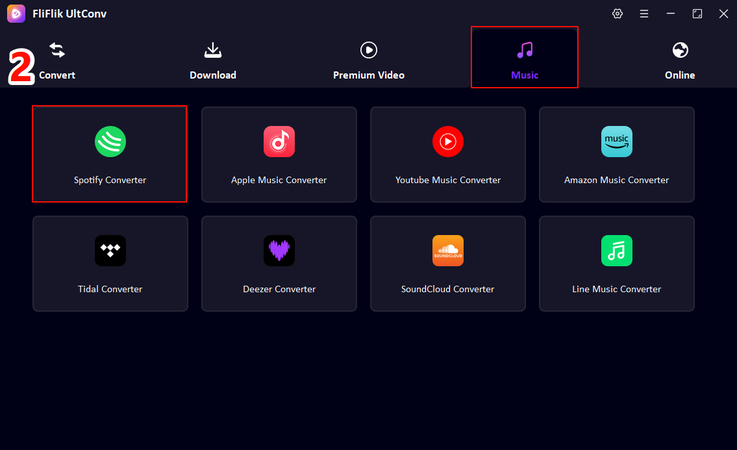
In the UltConv interface, navigate to the Music section and choose Spotify Converter.
-
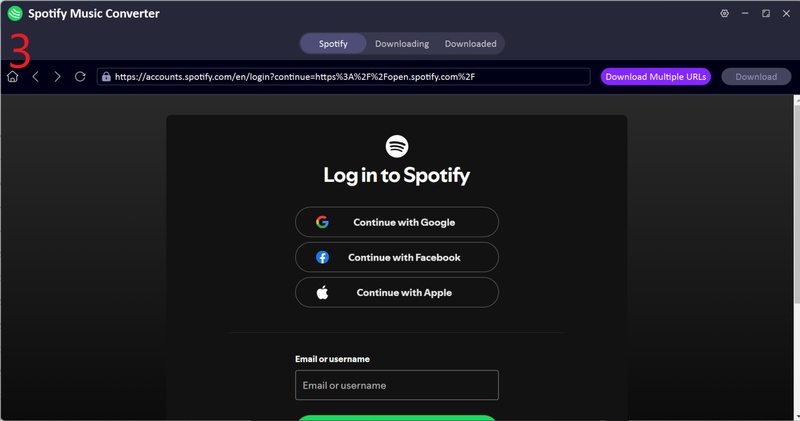
Log into your Spotify account within UltConv. You don’t need a premium subscription; free accounts work fine.
-
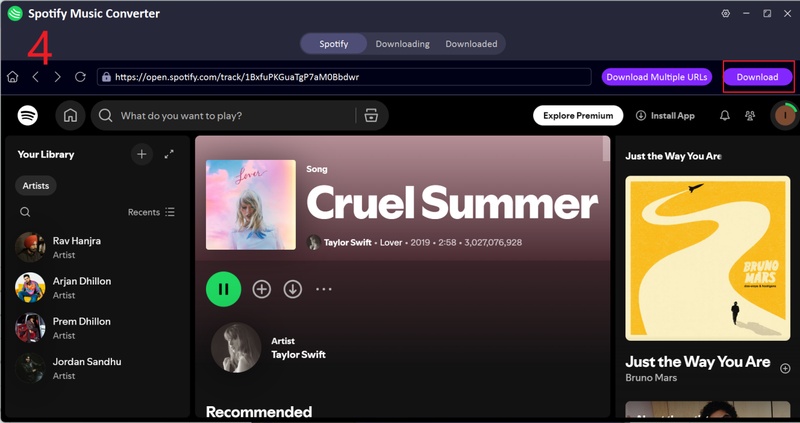
Browse your library and select the tracks, playlists, or albums you want. Click Download, and pick your output format, such as MP3, FLAC, or WAV.
-
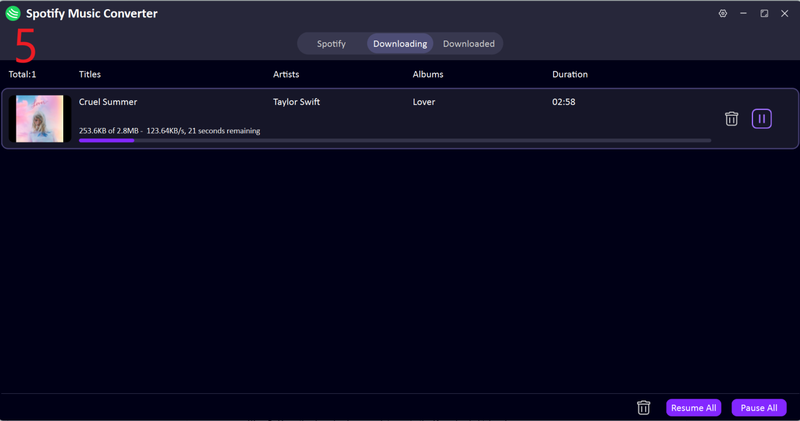
Once the download is finished, go to the Downloaded tab to access your music. All metadata, including album art and song info, is preserved, ready to play offline.


With UltConv, you can save Spotify content directly to your computer. No streaming restrictions, offline access, and full control over format and quality make it a practical alternative to Spotify IPA tools.
Final Words
Wrapping up, while Spotify IPA tools can get the job done, most of them lack offline support, playlist downloads, and proper audio quality. FliFlik UltConv Spotify Converter solves all of these problems. It lets you download songs, albums, playlists, and podcasts in high-quality formats like MP3, FLAC, WAV, and more. You can batch download, keep ID3 tags intact, and enjoy your music anywhere, anytime, without needing a premium account. If you want a smooth, reliable way to save Spotify tracks and build a personal music library, FliFlik UltConv Spotify Converter is the best choice. It supports thousands of streaming platforms, preserves full metadata, and makes offline listening effortless. Stop worrying about streaming limits and start using UltConv to enjoy Spotify on your own terms.
 Secure Download
Secure Download
Secure Download
Hey there! I am Maxwell Clark. I'm always looking for new tech tools that make a difference, from making visuals and audio better to making workflows better. I'm going to share tips and tricks for using AI tools for videos, audio, and images. I'm excited to help you navigate the digital world more efficiently and creatively!

