

 8 minutes read


We all love Spotify, but even with Spotify Premium, your downloaded tracks will play inside the app. And also, you can only listen to your downloads until your premium Spotify subscription is active. Also, you can’t move your downloaded tracks to other devices, as the downloaded files will not be in common formats. That’s frustrating if you want real control over your music.
This is exactly why a Spotify music downloader is a real game-changer. A reliable third-party downloader will save your Spotify songs as MP3, WAV, or other formats. Once downloaded, your downloads are yours, and you keep them permanently and can listen anywhere without limits. In this article, we will share some best free options for PC, Android, and online use.

Part 1. Best Spotify Music Downloader – FliFlik UltConv for Windows&Mac
If you want a Spotify music downloader that actually works without limits, FliFlik UltConv Spotify Converter is our top pick. It’s perfect for downloading songs, albums, playlists, podcasts, or even entire artists from Spotify. The best part? You don’t need a Premium account to use it. Just a few clicks and your favorite music is saved as real audio files you can play anywhere.
What makes UltConv Spotify Converter stand out is how flexible it is. You can convert Spotify tracks into MP3, AAC, WAV, FLAC, M4A, AIFF, and MKA. It preserves full ID3 tags, album art, and metadata, so your music library stays organized. The output quality is up to 320 Kbps for clear, high-quality sound. Batch downloads are fast, letting you grab entire playlists or albums in minutes.

- Supports 10,000+ streaming music sites, including Apple Music, SoundCloud, TIDAL, and more
- Batch download Spotify songs, playlists, albums, artists, podcasts, and audiobooks
- Convert music to MP3, AAC, WAV, FLAC, M4A, and more
- Enjoy high-quality audio up to 320 Kbps
- Preserve ID3 tags and metadata, including album artwork
- Works without a Spotify Premium account
▼ Download Spotify Songs with UltConv Spotify Music Converter:
-
Download and install UltConv Spotify Music Converter on your Windows or Mac computer. Once installed, open the program to get started.
FREE DOWNLOAD![secure download]() Secure Download
FREE DOWNLOAD
Secure Download
FREE DOWNLOAD![secure download]() Secure Download
Secure Download
-
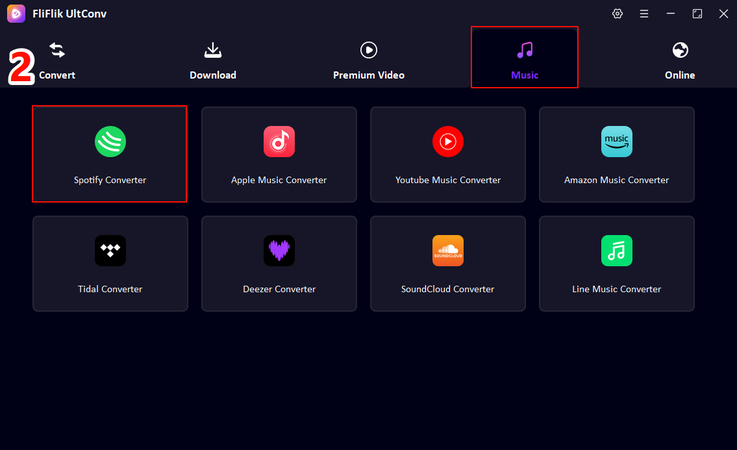
In UltConv, go to the Premium Music section and select Spotify Music Converter.
-
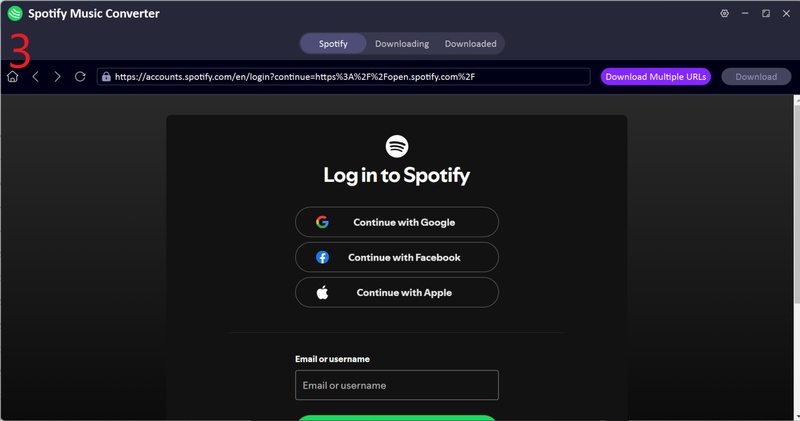
Sign in to your Spotify account directly within UltConv. No Premium subscription is needed; free accounts work perfectly.
-
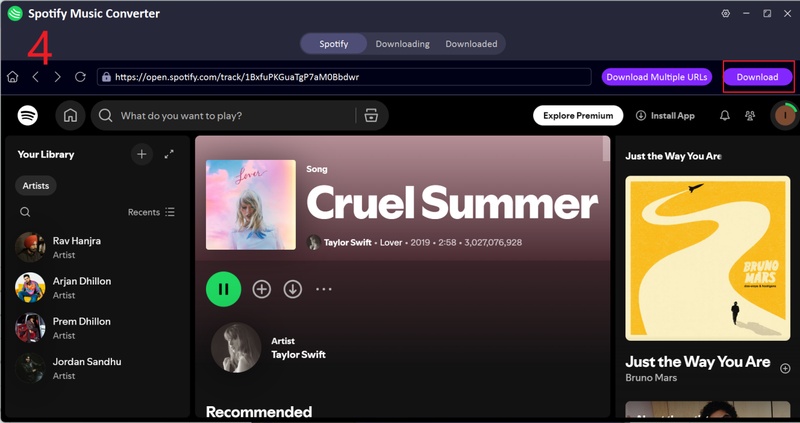
Pick the songs, playlists, or albums you want to download. Click Download to start converting them to MP3.
-
After the conversion is complete, go to the Downloaded tab to access your files. Your Spotify music is now saved as MP3 and ready to play offline on any device.
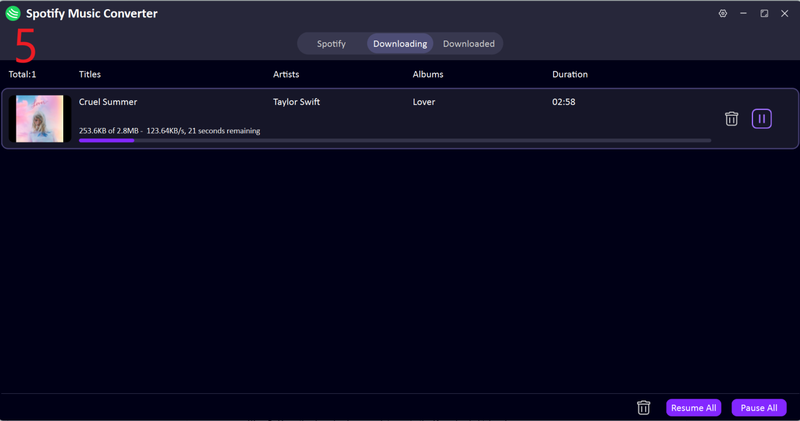


And your songs will be downloaded right into your device in your favorite format without any official Spotify download limitations.
Part 2. Top 2 Spotify Music Downloader Apps for Android
If you want to download Spotify music directly on your Android device, some reliable apps make the process quick and simple. Here are two of the best Spotify music downloader apps you can try.
1. Fildo

Fildo is a reliable Spotify music downloader app for Android that works with Spotify and many other music sources. You can search for tracks, playlists, and albums, and download them in high-quality MP3 format. Its clean interface and simple navigation make it very beginner-friendly. You don’t need a Spotify Premium account to use it, and it even lets you stream songs before downloading, so you can preview them. While it lacks some of the advanced features of a desktop converter, Fildo is a solid choice for Android users who want a fast and reliable way to save their favorite music offline.
2. SpotiFlyer

SpotiFlyer is a lightweight Android app made for downloading Spotify music. You paste a track or playlist link into the app and download it as an MP3 or M4A file. It’s free, doesn’t need a Premium account, and works well for single tracks or small playlists. The app keeps basic info like artist and song title. While it doesn’t have desktop features like large batch downloads or advanced format options, SpotiFlyer is a simple, quick solution for offline listening on Android.
Part 3. Top 2 Online Spotify Music Downloader Free Sites
If you don’t want to install anything, then online Spotify music downloader sites can be a quick solution. Here are two reliable options you can try.
1. SPOTIDOWN

SPOTIDOWN is a free online Spotify music downloader that works directly in your browser. You simply copy a Spotify track, album, or playlist link and paste it into SPOTIDOWN to start downloading. The site supports MP3 downloads and keeps basic song details like title and artist intact. It’s fast and convenient, making it ideal for users who need a quick offline copy without installing any apps. While SPOTIDOWN works well for individual songs, it may struggle with very large playlists, and output options are limited compared to desktop tools. Still, it’s a solid choice for casual use.
2. SpotifyDownloader

SpotifyDownloader is another reliable online Spotify music downloader. It allows you to download songs, albums, and playlists straight from your browser, making it ideal for users who want a fast, no-installation solution. The site supports MP3 downloads and retains essential metadata such as artist name and track title. Its interface is simple, so even beginners can use it without confusion. While it doesn’t offer the advanced features of desktop converters or mobile apps, SpotifyDownloader is perfect for quickly grabbing a few songs for offline listening.
FAQs
Q1. Is the Spotify music downloader APK safe to use?
Most Spotify music downloader APKs are safe if you download them from official or trusted sources. However, some third-party APKs may contain ads or malware, so always check reviews and avoid unknown websites. You can use a reliable downloader like UltConv Spotify Converter to download Spotify music safely.
Q2. How can I download Spotify music on my Android?
You can use Android apps like Fildo or SpotiFlyer. Simply install the app, paste your Spotify song, album, or playlist link, and select the format to download. Both apps work without a Spotify Premium account and let you save music in MP3 or other common formats for offline listening.
Q3. What is the best Spotify music downloader online?
For quick, browser-based downloads, SPOTIDOWN and SpotifyDownloader are top options. They let you download tracks without installing any software, support MP3 output, and retain basic metadata like song title and artist.
Conclusion
In this article, we’ve covered the best Spotify music downloader options for PC, Android, and online use. Desktop software like FliFlik UltConv Spotify Converter offers high-quality downloads, batch processing, and full control over your music library. Android apps like Fildo and SpotiFlyer make it easy to save songs on the go, while online sites such as SPOTIDOWN and SpotifyDownloader are convenient for quick downloads.
For a safe and easy experience, FliFlik UltConv Spotify Converter is the top pick. With one click, you can download full playlists or albums without a Premium account and enjoy your Spotify music offline anytime.
 Secure Download
Secure Download
Secure Download
Hello, I research and introduce useful solutions for AI videos, images, and audio tips in our daily life. If you learn these things, you can easily deal with the problems of the new era.

