

 7 minutes read


A Spotify music visualizer is an application that turns sound into an experience of visual sketches. It turns the color and shape of an image or sketch relative to your favorite music. It will grab the beat and respond efficiently. If you are a Spotify user, these visualizers can make your experience more immersive and fun by turning every song into a mini light show.
In this article, we will share the best desktop and online Spotify music visualizer tools. We will compare their features and show you a simple way to download Spotify songs for offline listening. This way, you can enjoy music anywhere, anytime, without worrying about ads.

Part 1. Does Spotify Have a Visualizer?
No, Spotify does not offer music visualization. At one time, there was a simple Spotify visualizer feature available for web player users, but it was removed in updates. It means you’ll have to rely on a third-party tool if you want to see your music animated, or see colours, or some visualization effect. Fortunately, there are many available options. You can pick from the many desktop apps and online platforms that provide stunning visualizations that sync beautifully with your preferred track. We will discuss some best options next.
Part 2. Top 3 Spotify Visualizers on Desktop
When it comes to desktop Spotify visualizers, here are the top three options you should try.
1. Kauna Spotify Visualizer

Kauna is a modern desktop Spotify visualizer that will make your Spotify listening experience more immersive. It offers smooth, real-time animations that respond to your music. You will get options to adjust colors, shapes, and effects to match the mood of any track. The interface is clean and beginner-friendly, yet it provides advanced controls for users who want more customization. Whether you’re at a party, streaming, or just listening at home, Kauna makes your music come alive. It’s light, easy to use, and works smoothly with Spotify.
- Highly customizable effects and colors
- Easy to use, beginner-friendly interface
- Smooth performance without lag
- Limited pre-built visual themes
- Minor bugs are reported occasionally
2. Synesthesia Music Visualizer

Synesthesia is a professional-grade music visualizer that turns Spotify tracks into a dynamic experience with interactive visuals. It offers a wide variety of 3D animations, particle effects, and frequency-based visuals that react in real time to every beat. You can assign colors, shapes, and textures to specific sounds and can create a unique visual experience for each song. While it’s perfect for casual listeners, it’s also popular among VJs and content creators who want to include real-time music visuals in live performances or streams. Synesthesia also supports multi-monitor setups, enhancing the visual experience across larger displays.
- Advanced visual effects and 3D animations
- Multi-monitor support for immersive displays
- Highly customizable for personal or professional use
- Resource-intensive, may slow older systems
- Slightly steep learning curve for beginners
3. VSXu Music Visualizer

VSXu is an open-source music visualizer that works with Spotify via desktop integration. It’s known for its real-time audio analysis and extensive library of community-created visual effects. Here you can explore pre-made visuals or design your own. This option is highly flexible for different styles of music. VSXu focuses on precision, mapping visuals to every beat, melody, and bassline. It’s ideal for people who want detailed, technical, and interactive visual feedback from their music. The interface might look old-fashioned, but its features and customization options make it popular with enthusiasts and advanced users.
- Open-source with a large library of effects
- Real-time audio analysis for precise visuals
- Highly customizable and flexible
- Dated interface may feel clunky
- Setup can be complex for newcomers
Part 3. Top 3 Spotify Visualizer Online
If you don’t want to install anything on your computer, online Spotify visualizers are a great alternative. Here are the top options for online Spotify music visualization.
1. Kaleidosync Spotify Music Visualizer

Kaleidosync is a popular online Spotify visualizer that turns your Spotify tracks into mesmerizing, colorful animations in real time. It uses patterns and geometric shapes that pulse and shift with the rhythm of your music. The interface is simple and will let you tweak colors, motion speed, and visual density with simple controls. It works on any browser, making it perfect for quick sessions or live streams. Whether you want a relaxing light show or dynamic visuals for parties, Kaleidosync delivers a smooth and visually appealing experience.
- Runs entirely in the browser, no installation required
- Customizable colors and animation styles
- Smooth, real-time visuals
- Limited advanced effects compared to desktop apps
- Some features require a stable internet connection
2. Wavesync Spotify Visualizer

Wavesync transforms your Spotify music into fluid wave-based animations that react to beats, basslines, and melodies. It’s designed to be user-friendly, so anyone can create visually appealing music displays in seconds. Wavesync offers several preset themes, and you can adjust colors and shapes to match your style or mood. It’s perfect for casual listeners who want a quick visual boost or streamers looking to add live music visuals to their content.
- Easy to use with presets for quick setup
- Smooth wave-based animations
- Works on any device with a browser
- Limited customization for advanced users
- May lag on slower internet connections
3. Tessellator Spotify Visualizer

Tessellator is an online tool that turns Spotify tracks into intricate, tile-based animations that react dynamically to music. Its unique geometric patterns make each song look visually distinct, offering a fresh perspective on your favorite tracks. The interface is simple and interactive, allowing users to tweak colors, speed, and pattern density without needing advanced technical skills. Since it’s browser-based, you can enjoy Tessellator on any device, from desktops to tablets, making it a versatile choice for music visualization on the go.
- Unique tile-based animations
- Customizable colors and speed
- Browser-based, no installation needed
- May not support offline use
- Fewer effects than desktop options
Bonus Tip. How to Download Spotify Music Without Premium for Offline Visualization
Spotify is fun to listen to, but many visualizers only work with local files, and streaming online can be slow or full of ads. The easiest way to avoid these issues is to just download your Spotify songs first. You can find many online tools. But these tools are often unreliable and will only allow you 1 song at a time. Here we will recommend that you use a reliable tool like FliFlik UltConv Spotify Converter.
It solves the problem by allowing you to download your favorite Spotify songs, playlists, albums, and podcasts directly to your device without a premium subscription. You can batch download your complete playlist at once in a few seconds. It’s fast and reliable. Once your music is saved locally, you can easily sync it with any visualizer, listen offline anytime, and enjoy seamless, ad-free playback. No more interruptions, just a smooth, flexible music experience that’s always ready when you are.

- Download Spotify songs, albums, playlists, artists, and podcasts without Premium
- Convert Spotify music to MP3, FLAC, M4A, WAV, AAC, AIFF, and more
- Preserve up to 320 Kbps lossless audio for high-quality playback
- Keep all ID3 tags and metadata, including track info and album artwork
- Supports batch downloads at fast speeds
▼ Steps to Download Spotify Songs with UltConv Spotify Music Converter:
-
Start by downloading and installing FliFlik UltConv Spotify Converter on your PC.
FREE DOWNLOAD![secure download]() Secure Download
FREE DOWNLOAD
Secure Download
FREE DOWNLOAD![secure download]() Secure Download
Secure Download
-
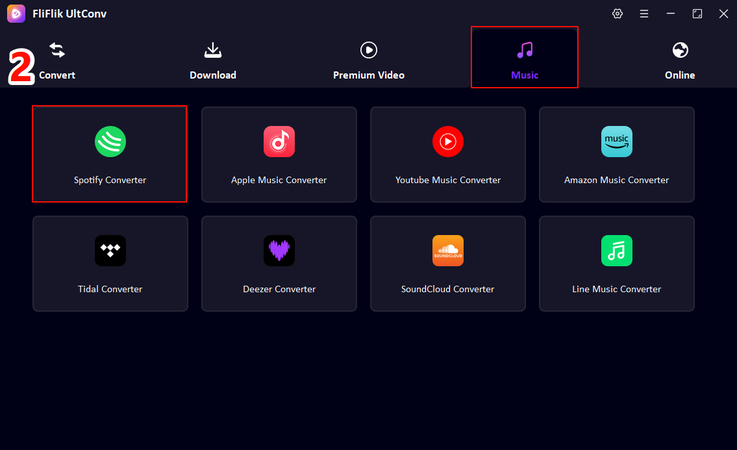
Open the app, then go to the Premium Music category and select Spotify Music Converter to get started.
-
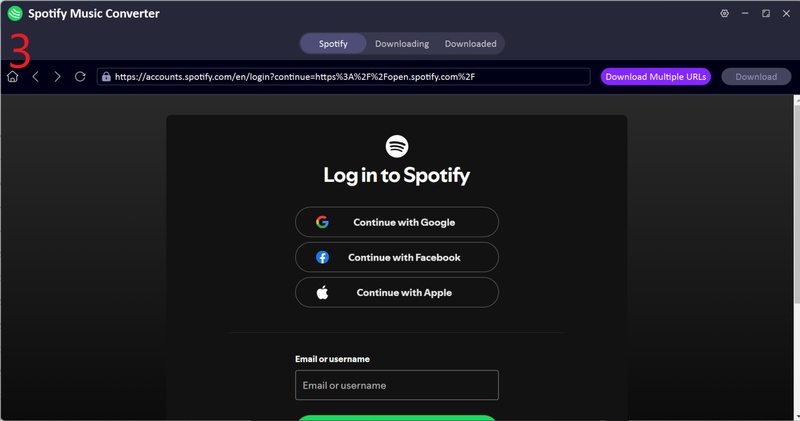
Log in to your Spotify account within the converter to link it.
-
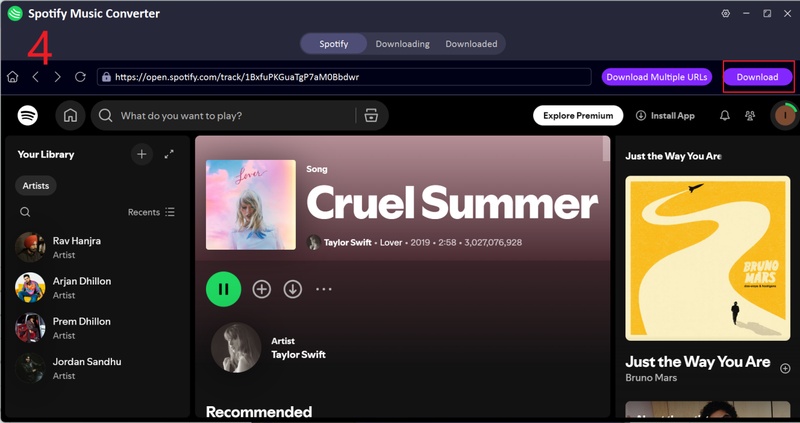
Pick the song, album, or playlist you want to download, then click the Download button.
-
Once the download is complete, head to the Downloaded tab to find your saved tracks.
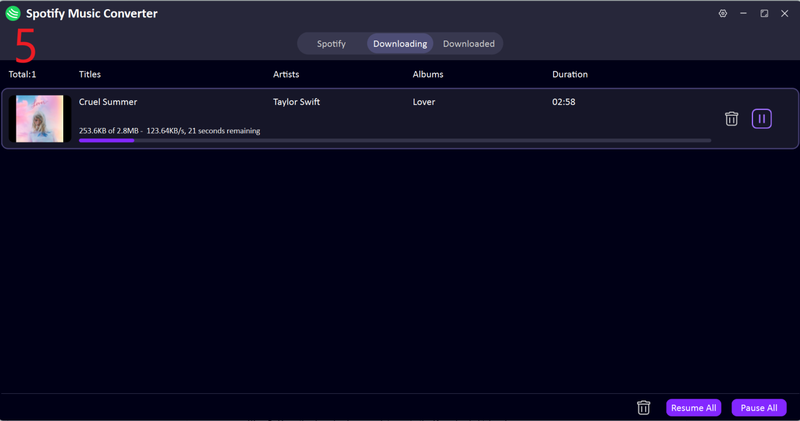


Now, you can easily download multiple tracks at once with high speed and top-notch quality. This method is our top recommendation for saving Spotify playlists as MP3s.
FAQs
Q1. What is a Spotify music visualizer?
A Spotify music visualizer is a tool that turns your music into moving visuals. It reacts to the beats, rhythm, and tempo in real time, showing animations, colors, and patterns that match your song. Basically, it makes listening more immersive and fun by giving your music a visual life of its own.
Q2. How do Spotify visualizers work?
Spotify visualizers work by reading the audio from your tracks and turning it into real-time visuals. They match the visuals to the music’s tempo, volume, and frequencies. Some let you customize patterns, colors, and themes, while others keep it simple with good, moving effects that make listening more engaging.
Conclusion
No doubt, adding a visualizer to your Spotify music just makes everything more fun. You get to see your favorite songs come alive with cool effects while they play. The trick is, most visualizers work best with files stored on your computer. Just right, FliFlik UltConv Spotify Converter can provide you with good assistance.
You can download your tracks and play them offline. No slow streams, no ads, no interruptions. No matter if you’re chilling at home, traveling, or just want a backup of your music, having your songs downloaded with a visualizer running makes the whole experience way more enjoyable.
 Secure Download
Secure Download
Secure Download
Hello, I research and introduce useful solutions for AI videos, images, and audio tips in our daily life. If you learn these things, you can easily deal with the problems of the new era.

