

 7 minutes read


If you enjoy keeping your favorite episodes for later listening, you have likely thought about how to download Spotify podcasts without complications. Good news: there are many tools to help you accomplish this. A reliable Spotify podcast to MP3 downloader makes the process straightforward. You copy the link, paste it in the tool, select your preferred format, and that’s it.
This article will share eight top options in 2026. Each tool operates slightly differently, so you will learn what makes them valuable and where they have limitations. By the time you finish reading, you will understand which tool suits your needs and how you can begin downloading podcasts with only a few simple steps.

Part 1. Top 8 Best Spotify Podcast Downloaders [Desktop & Online]
It’s easy to save your favorite Spotify podcasts with the right Spotify podcast downloader. Here’s a list of the top 8 tools you can use on desktop or online.
1. FliFlik UltConv Spotify Downloader
Let’s start with the tool that deserves the top spot. FliFlik UltConv Spotify Downloader works smoothly, handles big files without slowing down, and keeps the audio quality exactly the way you want it. If you care about downloading Spotify podcasts without running into format issues or restrictions, this one gives you the easiest path. It’s designed for everyday users who just want to save episodes, playlists, or full shows with a couple of clicks.
What makes it even better is how quickly it processes everything. You can pull entire playlists, convert them to your preferred format, and automatically organize them. No Premium account needed. No messy setup. Just load the link and let it work.

- Supports downloading Spotify podcasts, songs, playlists, artists, and albums
- Converts Spotify audio to MP3, AAC, WAV, FLAC, M4A, and more
- Keeps full audio quality up to 320 Kbps
- Saves ID3 tags and metadata for clean organization
- Works without a Spotify Premium account
- Fast conversion with reliable output every time
▼ Steps to Download Spotify Podcast with UltConv Spotify Downloader:
-
Install UltConv Spotify Music Converter on your Windows or Mac. Open it once the setup is done.
FREE DOWNLOAD![secure download]() Secure Download
FREE DOWNLOAD
Secure Download
FREE DOWNLOAD![secure download]() Secure Download
Secure Download
-
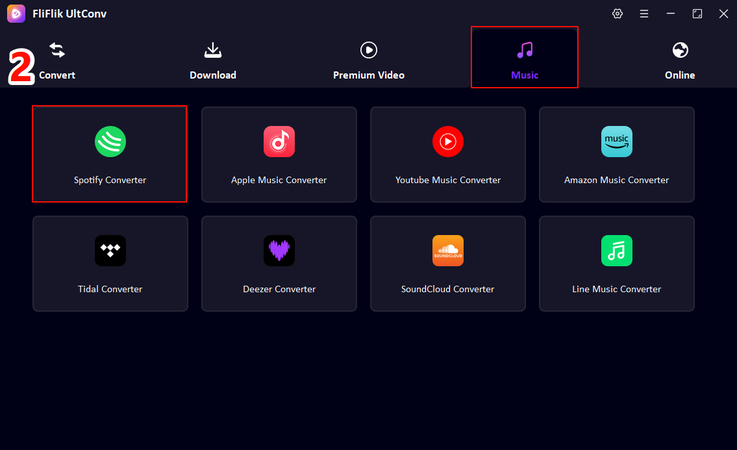
In the main dashboard, open the Music tab and choose Spotify Music Converter.
-
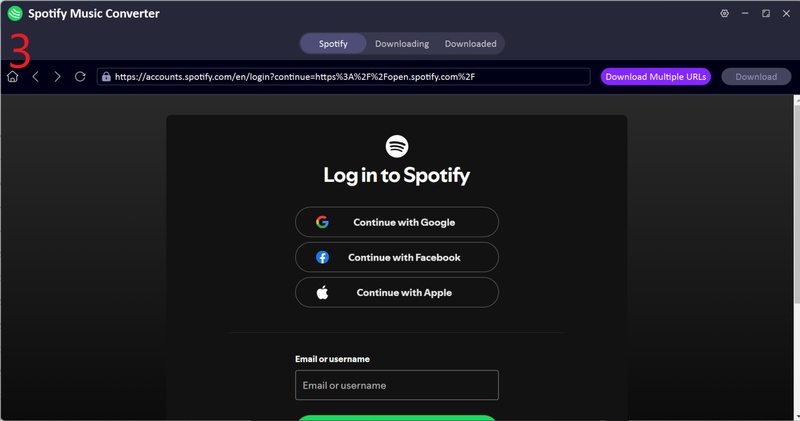
Sign in to your Spotify account directly within UltConv. No Premium subscription is required; free accounts work perfectly.
-
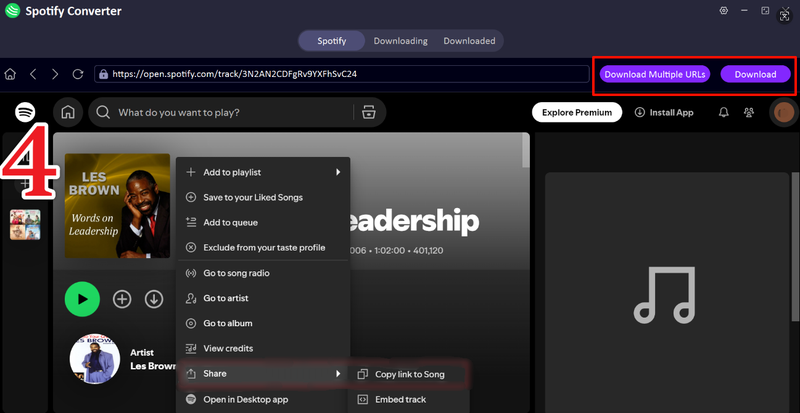
Pick the Spotify podcast, show, or episode you want to save. Click the Download button in the upper right corner.
-
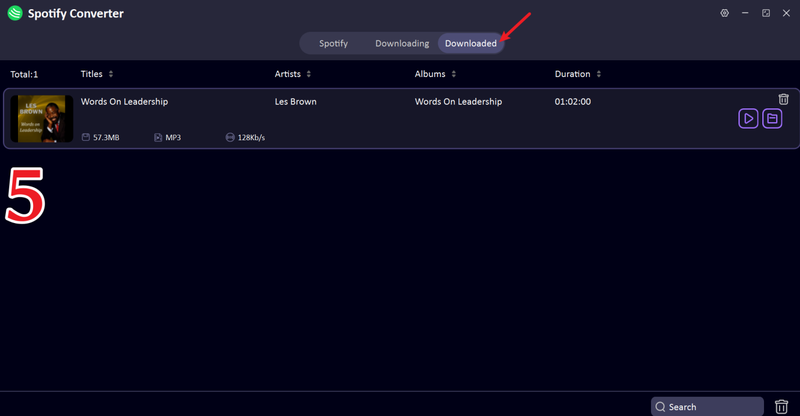
When the conversion finishes, open the Downloaded tab. Your podcast files will be ready to play offline on any device.


2. NoteBurner Spotify Music Converter

If you’re looking for a reliable way to save your favorite shows, NoteBurner Spotify Music Converter is a solid choice. This tool works well as a Spotify downloader video podcasts, letting you grab episodes quickly without losing sound quality. It’s simple to use and keeps your podcasts organized with proper metadata, making it easy to listen offline or transfer to other devices.
- Converts Spotify podcasts to MP3, AAC, FLAC, WAV
- Keeps ID3 tags and metadata
- Works with free Spotify accounts
- Fast conversion speed
- Batch downloads are limited in the free version
- Some advanced features require a paid plan
- Features could be fewer
▼ Steps to Download Spotify Podcasts with NoteBurner:
- Step 1: Download and install NoteBurner on your computer, then open the program.
- Step 2: Sign in to your Spotify account in NoteBurner. Free accounts work fine.
- Step 3: Select the podcast or episode you want to download, choose MP3 as the format, and click Download.
3. Sidify Spotify Music Converter

Next up is Sidify Spotify Music Converter, another strong option if you want a straightforward Spotify downloader video podcast tool. Sidify focuses on keeping your podcasts high quality while making the process quick and painless. It’s ideal if you want to grab a few episodes at a time and enjoy offline listening without worrying about losing any details or metadata.
- Supports MP3, AAC, WAV, FLAC output
- Maintains original audio quality
- Keeps ID3 tags and artwork
- Works with free Spotify accounts
- Free version has limited download speed
- Only a few formats in free mode
- Batch download requires premium
▼ Steps to Download Spotify Podcasts with Sidify:
- Step 1: Install Sidify and open it on your Windows or Mac device.
- Step 2: Log in to your Spotify account inside Sidify.
- Step 3: Choose the podcast or episodes you want, select MP3 as output, and start the download.
4. DRmare Spotify Music Converter

DRmare Spotify Music Converter is another flexible Spotify downloader video podcast tool designed for users who want high-quality audio and batch processing. It works seamlessly with free and premium Spotify accounts and preserves all the episode metadata. DRmare is particularly useful for people who want to download multiple podcasts at once without any hassle.
- Converts Spotify podcasts to MP3, AAC, WAV, FLAC
- Supports batch downloads
- Maintains ID3 tags and metadata
- Fast and stable conversion
- Free trial limits downloads
- Some advanced features require a paid subscription
- Interface may feel overwhelming for beginners
▼ Steps to Download Spotify Podcasts with DRmare:
- Step 1: Download and open DRmare on your computer.
- Step 2: Sign in to your Spotify account within DRmare.
- Step 3: Select the podcast or episodes you want, choose MP3 as the output, and click Convert.
5. AudiCable Spotify Music Converter

If you want a smooth way to save your favorite shows, AudiCable Spotify Music Converter is a strong option. This tool works as a reliable Spotify podcast to MP3 downloader, letting you quickly grab episodes without losing audio quality. It’s simple to use, supports multiple formats, and keeps metadata intact, so your downloaded podcasts are organized and ready to play offline anytime.
- Converts Spotify podcasts to MP3, AAC, FLAC, WAV
- Preserves ID3 tags and metadata
- Supports batch downloads
- Works with free Spotify accounts
- Free version limits the number of downloads
- Advanced features require a paid plan
- Interface can be slightly complex for beginners
▼ Steps to Download Spotify Podcasts with AudiCable:
- Step 1: Download and install AudiCable on your computer, then open the program.
- Step 2: Log in to your Spotify account inside AudiCable.
- Step 3: Select the podcast or episode you want to save, choose MP3 as the output, and click Download.
6. Podcast MP3 Downloader

Podcast MP3 Downloader is a lightweight, easy-to-use tool for anyone who wants to save Spotify podcasts as MP3 files. It focuses on simplicity and speed, making it perfect for casual users. You don’t need a premium account, and it keeps your podcast metadata so everything stays organized.
- Downloads Spotify podcasts to MP3 easily
- Maintains ID3 tags and artwork
- No premium account needed
- Fast and simple
- Limited formats (MP3 only)
- Batch downloads are not supported
- Fewer advanced features
▼ Steps to Download Spotify Podcasts with Podcast MP3 Downloader:
- Step 1: Open Podcast MP3 Downloader on your device.
- Step 2: Search for the artist’s name.
- Step 3: Next, choose the podcast you want to download and click Download.
7. SpotiDown

SpotiDown is a straightforward Spotify podcast downloader to MP3 that works entirely online. You don’t need to install software, and it quickly converts episodes to MP3. Its simplicity makes it great for users who want a fast, hassle-free download without extra features.
- Online tool, no installation required
- Quick conversion to MP3
- Maintains podcast audio quality
- Works with free Spotify accounts
- Limited to single episodes at a time
- No batch download
- Only supports the MP3 format
8. PasteDownload

PasteDownload is another easy-to-use online tool for saving Spotify podcasts. It allows you to download episodes quickly and keep the audio quality intact. While it doesn’t offer advanced features, it’s perfect for users who just need a reliable tool to grab a few podcasts and listen offline.
- Fast downloads directly in browser
- Maintains audio quality
- Simple interface
- Works without Spotify Premium
- Single-episode download only
- Limited format options
- No advanced features
Part 2. Comparison Table of the 8 Best Spotify Podcast Downloader
After reviewing the 8 best tools for downloading Spotify podcasts, it’s useful to see how they compare at a glance. We’ve already gone through each tool’s features, pros, cons, and step-by-step instructions. Now, this table highlights the key aspects: type, output quality, format options, batch download support, speed, and ID3 tag preservation so you can quickly identify the tool that fits your needs.
| Tool | Type | Max Output Quality | Output Format | Batch Download | Download Speed | ID3 Tags |
|---|---|---|---|---|---|---|
| FliFlik UltConv | Software | 320 Kbps / Lossless | 100+ formats MP3, AAC, FLAC, WAV, M4A | Yes | Very Fast | |
| (10X) | Yes | |||||
| NoteBurner | Software | 320 Kbps | MP3, AAC, FLAC, WAV | Yes | Fast | Yes |
| Sidify | Software | 320 Kbps | MP3, AAC, WAV, FLAC | Yes | Fast | Yes |
| DRmare | Software | 320 Kbps | MP3, AAC, WAV, FLAC | Yes | Fast | Yes |
| AudiCable | Software | 320 Kbps | MP3, AAC, FLAC, WAV | Yes | Fast | Yes |
| Podcast MP3 Downloader | Online | 128 Kbps | MP3 | No | Medium | Yes |
| SpotiDown | Online | 128 Kbps | MP3 | No | Fast | No |
| PastDownload | Online | 128 Kbps | MP3 | No | Fast | No |
Final Words
Saving your favorite podcasts from Spotify has never been simpler. Whether you want offline listening, personal archives, or the ability to repurpose audio, a reliable Spotify podcast downloader makes the process effortless. Among all the options, FliFlik UltConv Spotify Downloader stands out as the best choice. It supports batch downloads, maintains high-quality audio up to 320 Kbps, preserves ID3 tags, and works quickly and efficiently. If you want a fast, reliable way to save Spotify podcasts, this tool is your top pick.
 Secure Download
Secure Download
Secure Download
Hey there! I am Maxwell Clark. I'm always looking for new tech tools that make a difference, from making visuals and audio better to making workflows better. I'm going to share tips and tricks for using AI tools for videos, audio, and images. I'm excited to help you navigate the digital world more efficiently and creatively!

