

 7 minutes read


Can you download songs from Spotify Premium for offline listening? Yes, Spotify Premium lets you download songs. But the problem is that your downloaded songs will stay within the app, and you need to have an active subscription to listen to them offline. These downloads will not save your songs as MP3 files, so you can’t transfer them to other devices. That’s why many users look for a reliable Spotify song downloader that gives them real audio files they can use freely.
With reliable tools, you can download Spotify songs in MP3, MP4, or WAV formats and listen without limits. This article will share the 6 best tools to download Spotify songs in your preferred format for complete offline listening. One of these tools is definitely going to be your next favorite way to download Spotify songs quickly.

Part 1. 🥇Top Desktop Spotify Song Downloaders for PC and Mac
If you are on a desktop and want a complete solution to download everything from Spotify in a few seconds, then this tool should be your go-to option. FliFlik UltConv Spotify Converter is our first recommendation because it keeps things simple and gives you full control over your music. To download your favorite music with this tool, you don’t need Spotify Premium. It lets you convert Spotify tracks into popular formats like MP3, WAV, FLAC, M4A, and more, while keeping the sound quality intact.
You can go up to 320 Kbps, and download full playlists, albums, or artists in one go with the batch downloading feature. Another best thing is that these tools support 10,000+ streaming music sites like Spotify, Apple Music, SoundCloud, Tidal, Amazon Music, etc. Also, UltConv Spotify Converter keeps all song info, title, artist, track ID, and album art, so your downloaded Spotify music stays organized. So, if your goal is to build a clean, offline music library that works across devices, this tool makes the whole process feel easy and reliable.

- Supports 10,000+ streaming music sites, including Apple Music, SoundCloud, TIDAL, and more
- Batch download Spotify songs, playlists, albums, artists, podcasts, and audiobooks
- Convert Spotify music to MP3, AAC, WAV, FLAC, M4A, and other formats
- High-quality output up to 320 Kbps with lossless audio
- Preserve ID3 tags and metadata, including album artwork
- Works without Spotify Premium
▼ Steps to Download Spotify Songs with UltConv Spotify Music Converter:
-
First, download and install UltConv Spotify Converter on your Windows or Mac computer. Open the program once the installation is complete.
FREE DOWNLOAD![secure download]() Secure Download
FREE DOWNLOAD
Secure Download
FREE DOWNLOAD![secure download]() Secure Download
Secure Download
-
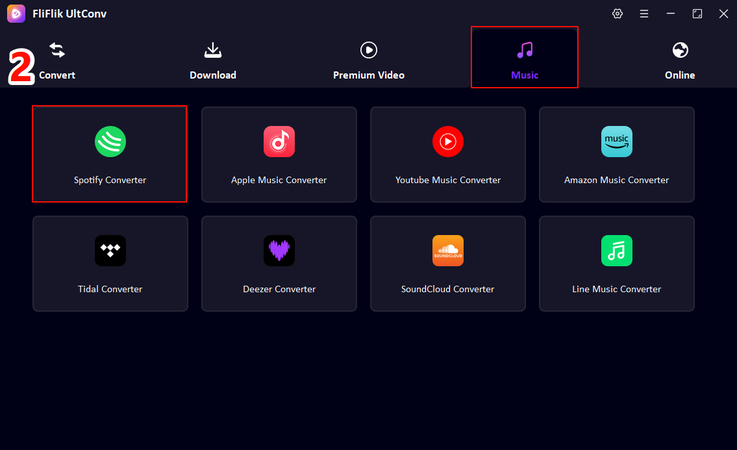
Next, in the UltConv, go to the Music Tab and select Spotify Converter.
-
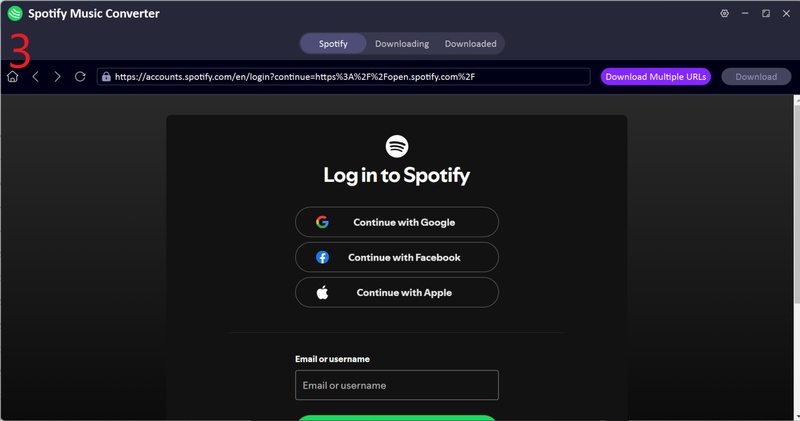
Sign in to your Spotify account directly within UltConv. A Premium subscription isn’t required. Your free Spotify accounts will work just fine.
-
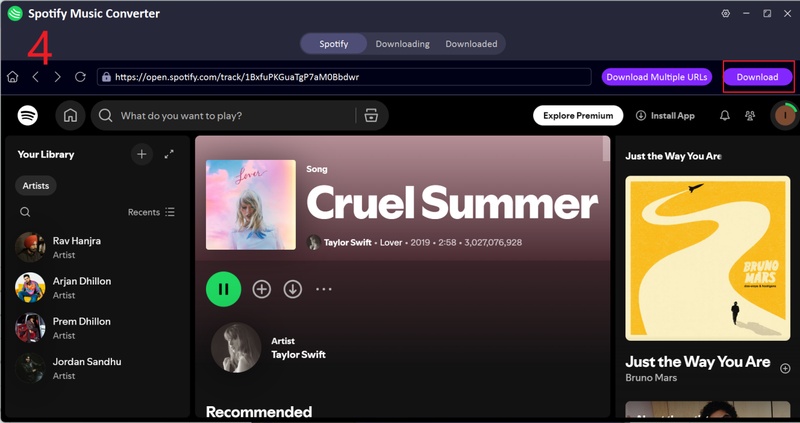
Choose the songs, playlists, or albums you want to download. Click the Download button to start converting them to MP3.
-
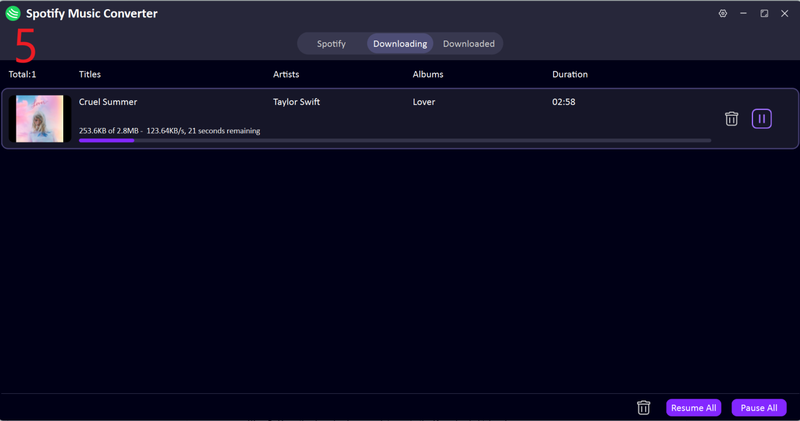
Once the conversion finishes, open the Downloaded tab to access your files. Your Spotify music is now saved as MP3 files and ready to play offline on any device.


Easy right? This is the best way overall to download your whole playlist or multiple songs at once without any streaming limitations.
Part 2. 5 Online Free Spotify Song Downloaders You Can Try
If you want some online solutions, then online Spotify song downloaders are also good options. Below are five options you can try.
1. SpotDownloader

SpotDownloader is a straightforward online tool for downloading Spotify songs. It works entirely in your browser, making it convenient if you’re on a shared computer or just want a quick, hassle-free option. To use it, you copy a Spotify track link, paste it into the site, and wait for the download to generate. It outputs songs in MP3 format and usually preserves basic details like the track title and artist name. For casual users, the process feels familiar and easy, especially if you’ve used other online media downloaders before. However, it’s mainly designed for single tracks rather than large playlists, and its performance can vary depending on server load.
- No software installation required
- Simple copy-and-paste workflow
- Works on most browsers and devices
- Limited support for playlists and albums
- Download speed and quality can be inconsistent
2. SpotifyMate

SpotifyMate is another well-known online Spotify downloader that focuses on simplicity and ease of use. The interface is clean, and you don’t need an account to get started. Just paste your Spotify link, click download, and the site takes care of the rest. It’s especially handy for quickly grabbing individual songs without worrying about advanced settings. SpotifyMate usually saves tracks as MP3 files and sometimes includes album art, which is a nice bonus for an online tool. However, you will see so many ads, and larger downloads can occasionally fail without any warning.
- Clean and beginner-friendly interface
- No signup or login required
- Supports basic MP3 downloads
- Ads can interrupt the experience
- Not reliable for long playlists
3. SpotiDownloader

SpotiDownloader is designed for users who just want a quick solution. Have a Spotify link? It turns it into an MP3 file fast. The site works on both desktop and mobile browsers, making it convenient for downloading music on the go. It handles individual tracks well, but offers little control over output quality or file formats. In short, it’s a handy quick fix rather than a tool for managing a full music library.
- Mobile-friendly design
- Fast processing for single tracks
- No installation needed
- Limited format and quality options
- Playlist support is unreliable
4. SpotiDown

SpotiDown is a lightweight online Spotify downloader that focuses on speed. You paste your link, wait a moment, and download your file. It works best with single songs and short links. The site doesn’t overwhelm you with settings, which can be a good thing if you just want your music quickly. However, like most free online tools, it struggles with large playlists and may occasionally fail due to copyright blocks or server issues.
- Fast and minimal interface
- Works without registration
- Compatible with most browsers
- No advanced download options
- Can stop working without notice
5. Spotdown

Spotdown rounds out the list as a basic Spotify song downloader online for light use. It’s designed for users who don’t want to install software and only need a few tracks now and then. The site supports MP3 downloads and usually processes links quickly. That said, quality control is limited, and ads are common. It’s best used as a backup option rather than your main downloader, especially if you care about consistent audio quality or organized files.
- Easy to use with no setup
- Quick downloads for single songs
- Works across devices
- Ads and pop-ups
- Limited control over output quality
Quick Selection: Compare the Top 6 Spotify Song Downloaders
Desktop tools like FliFlik UltConv offer more control, higher audio quality, and support for batch downloads. Online downloaders are quicker for single tracks and don’t require installation. How to choose the best spotify song downloader?
| Tool | Pricing | Supported Platforms | Batch Download | Output Quality | MP3 & MP4 Support | Speed |
|---|---|---|---|---|---|---|
| FliFlik UltConv | Paid/Free | 10,000+ Streaming Music Sites, Spotify, Apple Music, SoundCloud, etc. | Yes | Up to 320 Kbps, lossless | MP3, AAC, WAV, FLAC, M4A, etc | Fast, 10X speed |
| SpotDownloader | Free | Spotify | Limited | Medium | MP3 only | Moderate |
| SpotifyMate | Free | Spotify | Limited | Medium | MP3 only | Moderate |
| SpotiDownloader | Free | Spotify | Limited | Medium | MP3 only | Fast |
| SpotiDown | Free | Spotify | Limited | Medium | MP3 only | Fast |
| Spotdown | Free | Spotify | Limited | Low-Medium | MP3 only | Moderate |
FAQs
Q1. How to download songs from Spotify on my computer?
You can use a Spotify song downloader, either a desktop tool or an online service. Desktop tools like FliFlik UltConv let you download songs, albums, or playlists in high-quality MP3, WAV, or FLAC. Online downloaders are quicker for single tracks but usually have limits on playlists and formats.
Q2. What is the best Spotify song downloader?
For full control, high-quality audio, and batch downloads, desktop tools like FliFlik UltConv Spotify Converter are the best choice. They allow conversion to multiple formats, preserve ID3 tags, and work without a Premium account. Online downloaders are convenient for casual use, but they’re not as reliable or feature-rich.
Q3. Is it legal to download Spotify songs to MP3?
Downloading Spotify songs for personal offline use is generally considered a gray area. We advise you to only download Spotify songs for personal use. Don’t share it publicly.
Conclusion
To wrap things up, we’ve looked at both desktop and online Spotify song downloaders and what they offer. Desktop tools like FliFlik UltConv Spotify Converter give you more control, better quality, and the ability to download multiple tracks at once. Online tools are quicker for single songs and don’t need installation. The tool you choose depends on your needs.
If you want a simple, flexible way to enjoy music offline, FliFlik UltConv Spotify Converter works well. It downloads tracks in high quality, in your preferred format, and doesn’t require a Spotify Premium account. It’s our top recommendation for anyone looking for a reliable Spotify song downloader.
 Secure Download
Secure Download
Secure Download
Hello, I research and introduce useful solutions for AI videos, images, and audio tips in our daily life. If you learn these things, you can easily deal with the problems of the new era.

