

 8 minutes read


Spotify is great for streaming music, but saving songs as real audio files is another story. Many users search for Spotify to M4A conversion because M4A offers a good balance between sound quality and file size. Compared with MP3, M4A can provide better audio clarity while keeping storage space reasonable. That makes it a popular choice for iPhone and music library management.
However, Spotify music is protected, so you cannot directly download M4A files inside the Spotify app. You’ll need third-party converters to save songs as local files. In this article, we will review six reliable Spotify to M4A converters in 2026, showing their features, quality, and steps to use them. Let’s find the best option for your music needs.

Part 1. Why Do You Need A Great Spotify to M4A Converter?
There are several good reasons people look for a Spotify to M4A converter. The main issue is that Spotify doesn’t allow direct M4A downloads, so you cannot save songs in that format inside the app. A converter helps turn streamed music into real audio files you can store and transfer freely.
- Spotify doesn’t support M4A downloads: Spotify only allows offline playback inside its app. You cannot export music as M4A, MP3, or other audio files without a converter.
- Apple ecosystem compatibility: M4A works perfectly with Apple devices like iPhone, iPad, and Mac computers. If you want seamless playback across Apple Music players, M4A is a smart choice.
- Better audio quality: M4A can offer better sound quality at smaller file sizes compared to some other formats, especially when using high bitrate settings.
- Offline music ownership: Converters help you keep music as personal files instead of temporary streaming cache data.
Part 2. Top 6 Spotify to M4A Converters
Choosing the right converter matters because quality, speed, and usability can vary a lot. Below are six reliable tools that help turn Spotify music into M4A files with better control over audio quality and offline playback options. Let’s take a look at the best choices available in 2026.
1. FliFlik UltConv Spotify Converter
If you want to download Spotify music as real audio files instead of just listening inside the app, a good converter can make life much easier. Spotify itself doesn’t allow you to export songs as M4A files, which is why many users look for a smarter solution. FliFlik UltConv Spotify Converter is built to solve exactly this problem. It lets you download Spotify songs, playlists, albums, artists, and podcasts directly to your computer as permanent music files.
UltConv Spotify Converter works like a personal music downloader and converter combined. You can save Spotify tracks in formats like M4A, MP3, FLAC, AAC, and WAV with high quality. The tool supports up to 320 Kbps lossless-style audio output, keeps metadata, and allows batch downloading so you can save an entire playlist in one go without waiting for each song.

- Download Spotify songs, playlists, album, and podcasts
- Convert Spotify to M4A, MP3, AAC, WAV, FLAC, and more
- Support high-quality audio up to 320 kbps
- Keep ID3 tags, album cover, and metadata info
- Batch download multiple tracks, playlists, album quickly
- Support 10,000+ streaming platforms like Apple Music, Tidal
▼ Steps to Download Spotify Songs with UltConv Spotify Converter:
-
Begin by downloading and installing the FliFlik UltConv Spotify Converter on your computer. After installation, launch the program to get started.
FREE DOWNLOAD![secure download]() Secure Download
FREE DOWNLOAD
Secure Download
FREE DOWNLOAD![secure download]() Secure Download
Secure Download
-
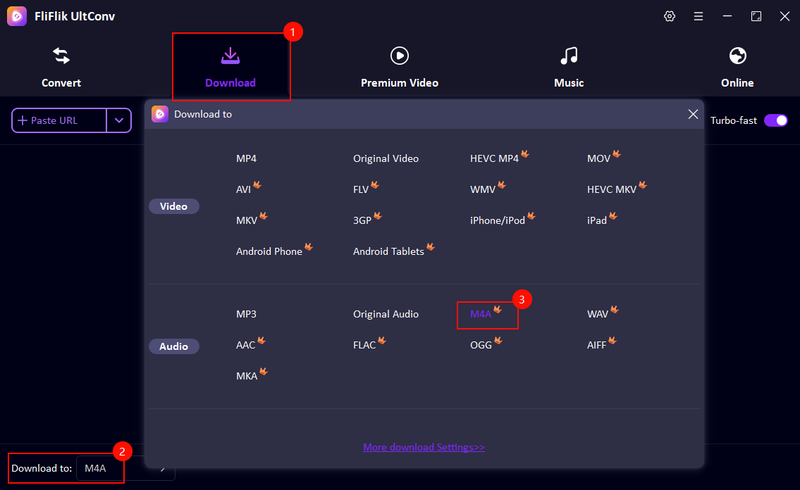
In the interface, go to the Download tab, then hit the Download to button at the end to select your output format as M4A.
-
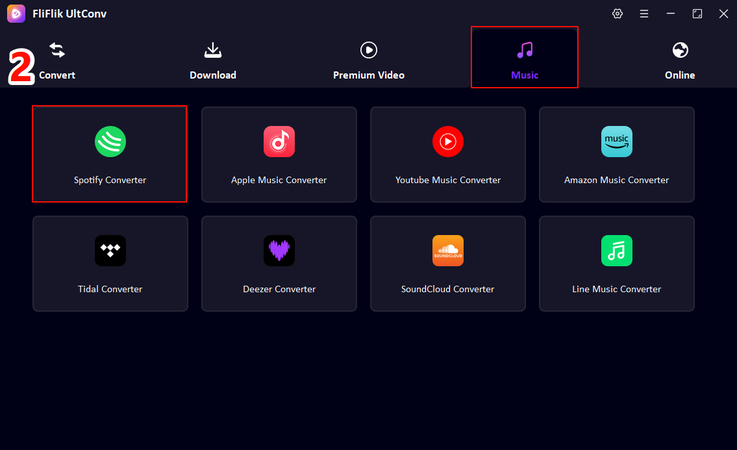
Launch the Music tab and click the Spotify Convertrr
-
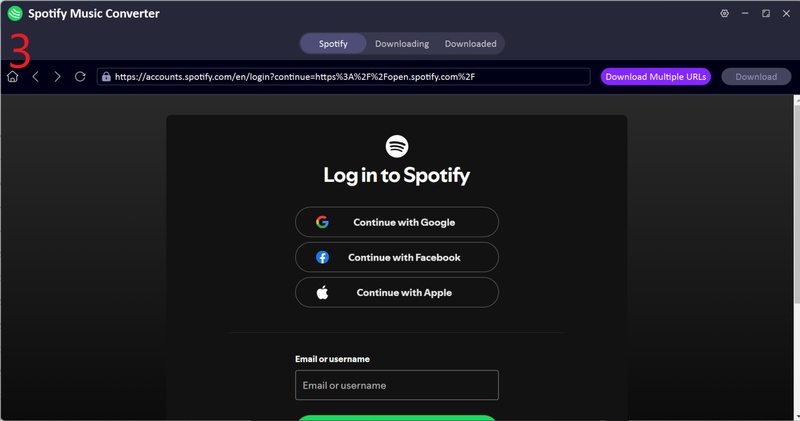
Sign in to your Spotify account directly through the built-in web player inside UltConv. Both free and premium Spotify accounts can be used.
-
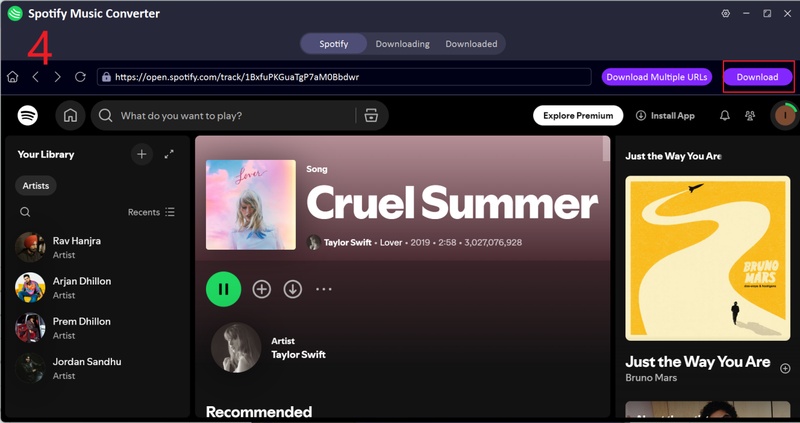
Browse your Spotify library and choose the songs, albums, or playlists you want to download.
-
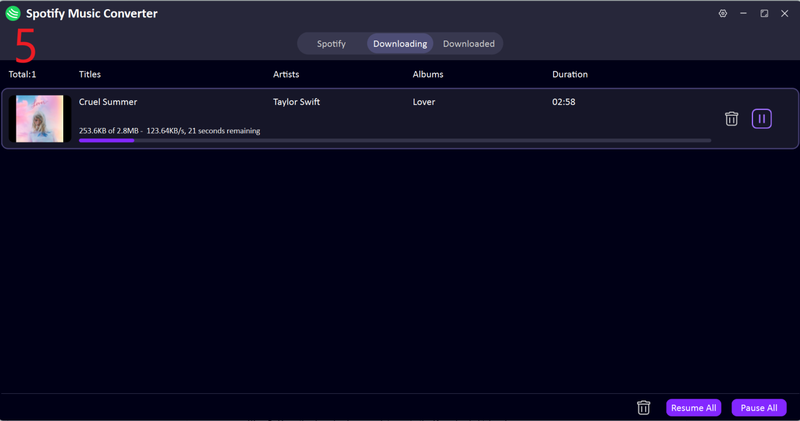
After the conversion process is complete, open the Downloaded section to access your saved M4A music files, which include album art and metadata information.


2. SpotifyDownloader

SpotifyDownloader is a web-based tool that claims to work as a Spotify to m4a converter online. You paste a Spotify track or playlist link, and the site attempts to provide a downloadable audio file, often in MP3 or M4A format, without installing software. It’s quick and doesn’t require account sign-in, which makes it appealing for occasional downloads.
- No software installation required, works in any browser
- Simple interface, easy to use for beginners
- Fast link conversion for single tracks
- Supports basic link-to-audio conversion
- Output quality varies and may be low
- Not reliable for full albums or large playlists
- Doesn’t retain metadata like album art or tags
- Can be unstable depending on Spotify’s backend changes
3. Snappxify

Snappxify is another online Spotify converter that lets you turn Spotify links into downloadable audio. It supports multiple formats and aims to simplify the conversion process. However, downloads often require unlocking the Pro version, which means free users may be limited.
- Clean, beginner-friendly interface
- Converts Spotify links without extensions
- Supports multiple output formats
- Downloading requires a Pro unlock; free access is limited
- Output quality may be inconsistent
- Metadata retention isn’t always accurate
4. ConverterFactory

ConverterFactory is advertised as a Spotify to MA online converter that allows users to paste Spotify URLs and receive downloadable audio files. It focuses on convenience and quick conversions without needing apps or extensions.
- Works entirely in the browser, no installation needed
- Supports direct Spotify link pasting for quick conversion
- Offers M4A output along with other formats
- Quality and reliability vary depending on link recognition
- May not hold up for large playlists or albums
- Limited metadata retention in some cases
- Ads or pop-ups can be intrusive
5. TuneCable

TuneCable is a desktop converter and downloader that supports Spotify and other streaming platforms. It focuses on converting music to common formats like MP3 or M4A for offline playback on any device. Unlike pure online tools, it requires installation but offers more stable results.
- Reliable desktop conversion for full albums and playlists
- Supports MP3, M4A, FLAC, and more
- Retains metadata and ID3 tags well
- Requires software installation
- Some advanced features may require purchase
- Not as instant as online converters
6. AudFree

AudFree Spotify Music Converter is a popular desktop tool designed to help users download and convert Spotify music to local files. It works with both free and Premium accounts and emphasizes high-quality output with tag preservation.
- Converts Spotify to MP3, AAC, WAV, FLAC, M4A, etc.
- Batch download support for playlists and albums
- Keeps metadata, track info, and album art
- The desktop app has no browser-only option
- Requires purchase for full features
- The interface can feel complex for absolute beginners
Part 3. Comparison Between 6 Spotify to M4A Converters
Before jumping into the conclusion, it helps to know what really matters in a converter. Some users care about speed; others want better audio quality or stronger DRM removal. This table gives you a quick snapshot so you can see which Spotify to M4A converter fits your needs at a glance. Let’s compare them directly.
| Feature | UltConv Spotify Converter | SpotifyDownloader | Snappxify | Converter Factory | TuneCableSpotify Downloader | AudFree Spotify Converter |
|---|---|---|---|---|---|---|
| Type | Desktop software | Web-based online converter | Web-based online (Pro required) | Web-based online converter | Desktop software | Desktop software |
| Supported Sites | Spotify + 10,000+ platforms | Spotify links only | Spotify + some streaming links | Spotify + similar links | Spotify only | Spotify only |
| DRM Removal | ✅ | ❌ | ❌ | ❌ | ✅ | ✅ |
| Output Format | 100+ MP3, M4A, WAV, FLAC, AAC, AIFF | MP3/M4A (limited) | MP3/M4A (limited) | MP3, M4A | MP3, M4A, FLAC | MP3, M4A, FLAC, WAV |
| Audio Quality | Up to 320 Kbps/high quality | Variable/low | Variable/low | Variable/low | Up to original quality | Up to 320 Kbps |
| Batch Download | ✅ | ❌ | Limited (Pro) | ❌ | ✅ | ✅ |
| Metadata Retention | ✅ | ❌ | ❌ | ❌ | ✅ | ✅ |
| Stability | High | Low/unstable | Medium (Pro required) | Low/unstable | Medium-High | Medium-High |
Final Words
Converting Spotify to M4A is a smart way to enjoy better audio compatibility and keep your music files portable across Apple devices and music players. Online tools are quick, but they often lack stability and quality control. Desktop converters usually provide better audio fidelity, batch downloading, and DRM removal for long-term listening. If you want the most reliable solution, try FliFlik UltConv Spotify Downloader. It supports high-quality downloads, multiple formats, and fast batch conversion without premium limits. If you want your Spotify music saved safely as M4A files, this is a practical choice. Give it a try and build your personal music library the easy way.
 Secure Download
Secure Download
Secure Download
Hey there! I am Maxwell Clark. I'm always looking for new tech tools that make a difference, from making visuals and audio better to making workflows better. I'm going to share tips and tricks for using AI tools for videos, audio, and images. I'm excited to help you navigate the digital world more efficiently and creatively!

