

 8 minutes read


Music lovers are always hunting for faster ways to save their favorite tracks without juggling apps or complicated tools. That’s exactly where a Telegram music bot comes in. These smart bots let you search, preview, and download Spotify songs right inside Telegram, often in just a few taps. No browser hopping. No sketchy extensions.
In this guide, we’ve rounded up 15+ Telegram music bots that actually work in 2026, covering everything from MP3 downloads to high-quality audio options. You’ll also learn what each bot does best, its limitations, and which ones are worth your time. Let’s break it down and help you find the easiest way to grab your music for offline listening.

Part 1. How to Use Telegram Music Bots to Download Spotify Songs?
Telegram music bots are small but powerful tools built right into Telegram. Think of them as chat-based downloaders. You message the bot, drop in a Spotify link (or just type a song name), and it sends back downloadable audio files. Most work like a lightweight Spotify online MP3 converter, while some advanced ones can handle playlists, batch downloads, and even FLAC output. In simple terms, a music bot Telegram setup lets you grab tracks without opening extra websites or installing heavy software.
- Free and easy to use
- Works directly inside Telegram
- Supports song, album, and playlist links
- Some bots offer 320kbps MP3
- No separate downloader needed
- Audio quality varies by bot
- Many limit speed or file size
- Bots go offline often
- Batch downloads aren’t always reliable
- Success rate can be inconsistent
▼ How to Download Spotify Songs with a Telegram Bot
- Step 1: Install Telegram on your device (Windows, macOS, Android, or iPhone).
- Step 2: In Telegram’s search bar, type “Spotify Downloader” or open a bot link. Tap Start or send /start to activate it.
- Step 3: Open Spotify, copy the link to your song, album, or playlist (Share > Copy Link), then paste it into the bot chat. You can also search by artist or track name.
-
Step 4:
Wait a few seconds. The bot will analyze your link and show download options, usually MP3 at 128kbps or 320kbps. Some bots also provide extra settings for format or quality.
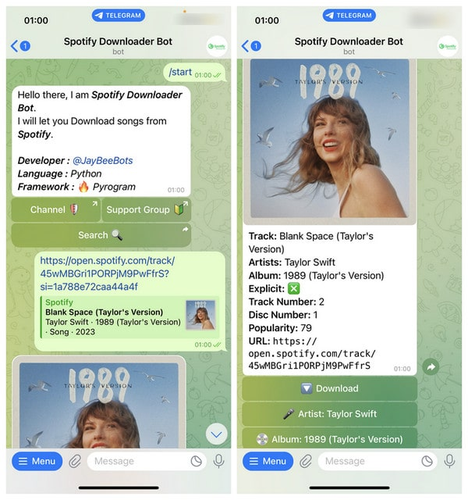

That’s it. Your Spotify track will be delivered straight into your chat, ready for offline listening.
Part 2. Better Telegram Music Bot Alternative to Download Spotify
Telegram bots are convenient, but they come with limits. Quality is inconsistent, downloads fail, playlists break, and you rarely get real control over formats or metadata. If you want stable downloads, lossless audio, and full playlists saved in one go, a desktop tool simply does more. That’s where FliFlik UltConv Spotify Downloader stands out. Instead of relying on Telegram servers, UltConv connects directly to Spotify and saves your music locally in high quality. You can download entire albums, playlists, podcasts, and even audiobooks, then convert everything to MP3, FLAC, WAV, or M4A while keeping artwork and ID3 tags intact. No premium account required. It’s basically what Telegram bots try to be, just faster, cleaner, and far more reliable.

- Download Spotify songs, albums, artists, podcasts, and playlists
- Convert Spotify to MP3, FLAC, WAV, AAC, M4A, and more
- Download from 10,000+ sites, including Spotify, Apple Music, and more
- Enjoy lossless audio with up to 320 kbps output
- Keep full ID3 tags and album artwork
- Batch download playlists at 10X speed
- Works without a Spotify Premium account
▼ Steps to Download Spotify Songs with UltConv Spotify Downloader:
-
Download and install UltConv Spotify Downloader on your Windows or Mac computer, then launch the program.
FREE DOWNLOAD![secure download]() Secure Download
FREE DOWNLOAD
Secure Download
FREE DOWNLOAD![secure download]() Secure Download
Secure Download
-
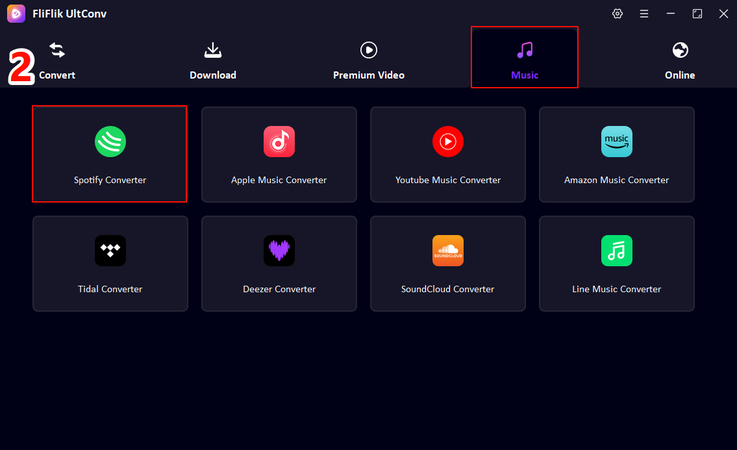
From the main interface, open the Music tab and choose Spotify Music Converter.
-
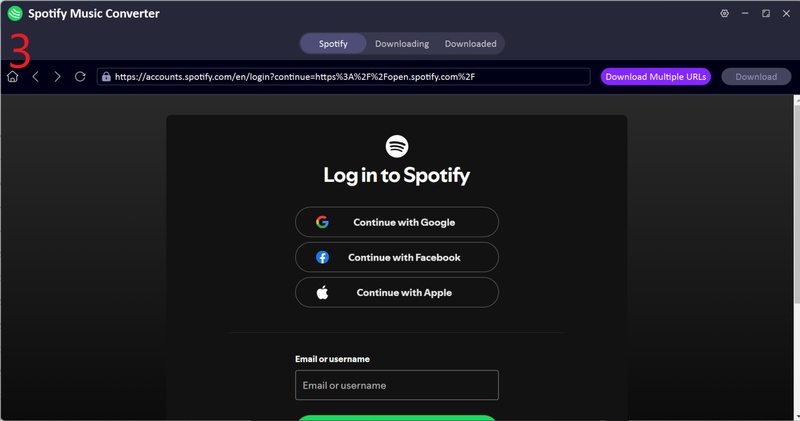
Sign in to your Spotify account directly inside UltConv. Free accounts work fine.
-
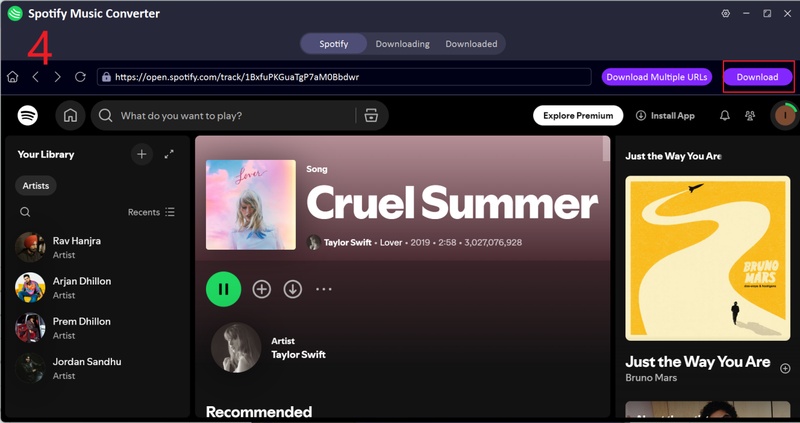
Browse Spotify within UltConv and pick the songs, albums, or playlists you want to save, and click the Download button in the upper-right corner.
-
After conversion finishes, open the Downloaded tab to access your music, complete with metadata and album art.
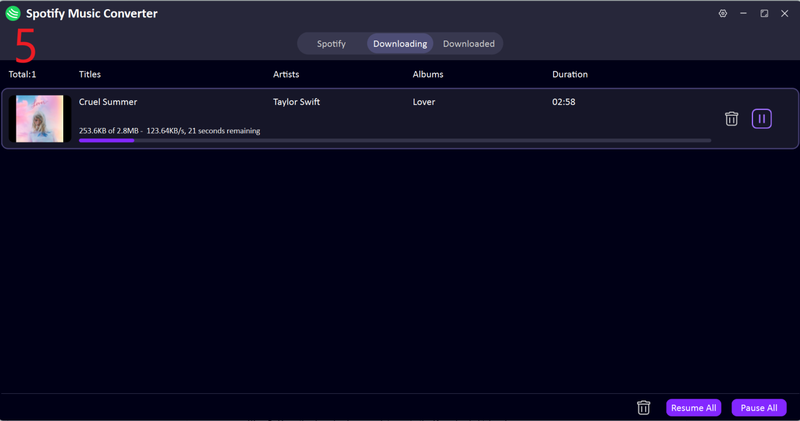


With UltConv Spotify Downloader, your favorite tracks are stored directly on your device, ready for unlimited offline listening—no bots, no quality loss, no interruptions
Part 3. 15+ Telegram Bots for Music to Download Spotify
These Telegram bots let you pull Spotify tracks straight into your chat window. Some focus on speed, others on audio quality, and a few also handle platforms like YouTube or Deezer. Below are some of the most reliable options to get started.
1. Spotify Music Downloader (@Spotify_downloa_bot)

Spotify Music Downloader is one of the easiest bots for grabbing Spotify tracks through Telegram. Just paste a song or playlist link, and the bot converts it into downloadable audio within seconds. It usually delivers MP3 files with cover art and basic metadata, making it ideal for quick single-track downloads or small playlists.
2. SpotifyDownloaderBot (@spotify_downloader_bot)

SpotifyDownloaderBot supports songs, albums, playlists, and sometimes even YouTube links. Drop your Spotify URL, wait a moment, and you’ll get MP3 downloads (often up to 320 kbps). It’s a solid all‑rounder if you switch between platforms.
3. Song Ref | Music Search (@Spotify_Downloader_File_Bot)

Song Ref | Music Search works well when you don’t already have Spotify links. You can search by song title or artist directly inside Telegram, preview results, then download your pick. It mixes music discovery with downloading, which feels surprisingly smooth.
4. Music Downloader (@musicshuntersbot)

Music Downloader handles Spotify, Deezer, and several other platforms. Along with link downloads, it supports keyword searches and basic batch requests. If you want a broader telegram bot music option instead of Spotify-only, this one gives you more flexibility.
5. Music Downloader (@SpotSeekBot)

SpotSeekBot focuses mainly on Spotify content. Paste a track, album, or playlist link, and it sends back audio files directly in chat, usually with album artwork included. Fast responses, simple flow, no extra steps.
6. Music Downloader Bot (@ytsongdl_bot)

Music Downloader Bot is a lightweight Telegram bot that pulls audio from Spotify, YouTube, and a few other sources. You can paste links or search by song name, then download MP3 files directly in chat. It’s especially handy when you just want quick access to tracks without touching any settings.
7. Spotify Downloader Bot (@JayBeeSpotifyBot)

Spotify Downloader Bot focuses on converting Spotify links into downloadable audio files. Drop in a song or playlist URL, and the bot handles the rest. While it doesn’t offer many format options, it’s reliable for basic Spotify-to-MP3 downloads.
8. SpotDL (@SpotDLoader_bot)

SpotDL works as a simple Telegram bot for music that supports Spotify tracks and playlists. It fetches audio using metadata matching and usually delivers decent-quality MP3 files with album art. Great if you want clean tags without manual editing.
9. SpotifyMusic Bot (@Music_SpotifyBot)

SpotifyMusic Bot lets you search songs by name or paste Spotify links for instant downloads. It returns audio files directly in Telegram and often includes cover images. The interface feels chat-like and beginner-friendly.
10. 320kbps (@musicHQbot)

320kbps is built for users who care about sound quality. As the name suggests, it aims to deliver higher‑bitrate MP3 files whenever possible. You can search tracks or paste links, making it a good pick for building a higher-quality offline library.
11. Tune Bot (@TuneBot)

Tune Bot acts like a mini music assistant inside Telegram. It helps discover tracks, preview songs, and download audio from multiple platforms. If you’re looking for a flexible Spotify music downloader Telegram bot, this one also doubles as a music search tool.
12. AUSENS (@AusensBot)

AUSENS supports Spotify and YouTube links, converting them into downloadable audio files. It’s straightforward: paste a link, wait a few seconds, then grab your MP3. Not flashy, but it gets the job done.
13. Spotify (@spotifybot)

Spotify is Telegram’s official Spotify bot. While it doesn’t directly download music, it’s useful for previews, track info, and sharing songs across chats. Many users pair it with downloader bots for discovery first, downloads second.
14. Spotify Music Downloader (@SpotifyMusicDownloaderBot)

Spotify Music Downloader is one of the more popular Telegram music bots for pulling Spotify tracks into MP3 format. It supports songs, albums, and playlists and usually includes metadata and cover art, making files easy to organize afterward.
15. DeezLoad (@DeezLoad2Bot)

DeezLoad is a Deezer-based bot that many Spotify users rely on indirectly. You can paste Spotify links, and it finds matching tracks on Deezer, often offering higher-quality downloads like FLAC. It’s a favorite for audiophiles who want more than a standard MP3.
Final Words
Using a Telegram music bot can be a quick way to grab Spotify tracks, especially for single songs or casual listening. But let’s be honest. Bots are unstable, quality varies, and playlists often fail halfway through. If you care about sound quality, full albums, or keeping your music organized, a proper downloader makes a real difference. That’s why FliFlik UltConv Spotify Downloader stands out. It lets you download Spotify songs, playlists, podcasts, and more in MP3 or FLAC with full metadata preserved, all at fast speeds and without needing Premium. It’s the best option to use overall.
 Secure Download
Secure Download
Secure Download
Hey there! I am Maxwell Clark. I'm always looking for new tech tools that make a difference, from making visuals and audio better to making workflows better. I'm going to share tips and tricks for using AI tools for videos, audio, and images. I'm excited to help you navigate the digital world more efficiently and creatively!

