

 8 minutes read


Amazon Music gives you access to a massive library of millions of songs, playlists, albums, the whole deal. But when it comes to listening offline, they’re locked down with DRM. The songs you download through the Amazon Music app aren’t really yours. TunePat Amazon Music Converter claims it can strip away Amazon’s DRM and turn those tracks into standard formats like MP3, so you can finally listen offline without restrictions.
In this article, I’ll break down exactly how the TunePat Amazon Music Converter works, stack it up against the FliFlik UltConv Music Converter, and help you figure out which one actually fits your needs.

Part 1. What is TunePat Amazon Music Converter

TunePat Amazon Music Converter is a desktop tool designed to turn Amazon Music tracks into standard audio files you can actually use. Instead of being locked inside the Amazon Music app, your songs can be saved as MP3 or other common formats and played anywhere. It works with Amazon Music Free, Prime, and Unlimited, and supports downloads of single songs, full albums, playlists, and even podcasts.
TunePat removes Amazon’s DRM protection while keeping the original audio quality as close as possible to the source. Once converted, the files behave like normal music files. You can store them locally, transfer them to other devices, or use them with any media player you prefer.
- Convert Amazon Music to MP3, AAC, WAV, FLAC, AIFF, and ALAC
- Preserve HD and Ultra HD audio quality from the original tracks
- Download songs, albums, playlists, and podcasts in batches
- Up to 10x conversion speed with adjustable settings
- Keep full ID3 tags like title, artist, album, artwork, and year
- Save lyrics, edit tags, and burn music to CDs
- Supports multiple output formats with good audio quality
- Batch conversion saves time for large playlists
- Keeps metadata organized after conversion
- Requires a desktop computer to use
- Advanced features are locked behind the paid version
Part 2. How to Use the TunePat Amazon Music Converter?
TunePat Amazon Music Converter is fairly easy to use once you understand the flow. You download the app, sign in to Amazon Music, choose your output settings, and start converting. Below is a clear, step-by-step guide.
- Step 1: Go to the official TunePat website and download the Amazon Music Converter for Windows or macOS. Follow the on-screen instructions to complete the installation.
-
Step 2:
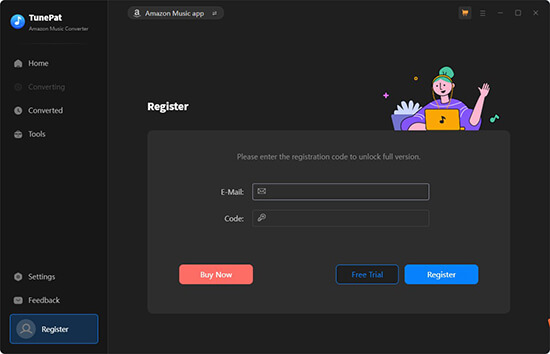
Open the software on your computer. If you have purchased a license, click the Register option and enter your serial key to unlock the full version.
-
Step 3:
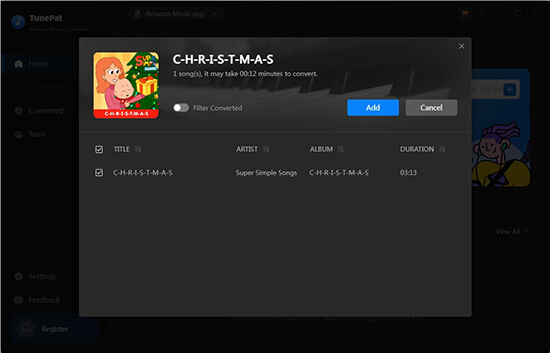
Select either the Amazon Music app or the Amazon Music web player. Sign in to your Amazon account, then browse your music library. Drag and drop songs, albums, or playlists into TunePat, or click the Add button.
-
Step 4:
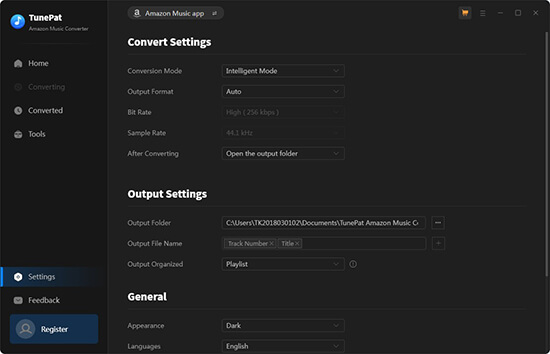
Open the Settings menu from the top-right corner. Choose your output format such as MP3 or FLAC, adjust audio quality, and select the output folder.
-
Step 5:
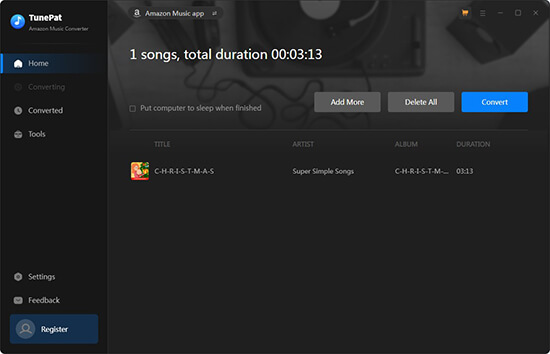
Click the Convert button to begin the process. TunePat will convert the selected tracks and save them to your computer for offline playback on any device.


Part 3. Best TunePat Amazon Converter Alternative – FliFlik UltConv Music Converter
Unlike TunePat, which focuses solely on Amazon Music, FliFlik UltConv Music Converter lets you download songs, albums, playlists, podcasts, and audiobooks from Spotify, Apple Music, Deezer, SoundCloud, Napster, iHeartRadio, Bandcamp, TIDAL, MixCloud, and over 10,000+ other streaming sites.
It also supports a wide range of output formats, including MP3, AAC, WAV, FLAC, M4A, AIFF, and MKA, so you can play your music on any device without compatibility issues. Whether you want to convert a single track or batch-download entire playlists, UltConv Music Converter keeps your files organized by preserving full ID3 tags like title, artist, album, artwork, and more. Its lossless audio quality up to 320 kbps ensures your music sounds just as good offline as it does streaming.

- Download Spotify songs, playlists, albums, artists, and podcasts
- Supports 10,000+ streaming music sites beyond Spotify, Apple Music, and Amazon Music
- Convert Spotify to MP3, AAC, WAV, FLAC, M4A, and 100+ more
- Lossless audio quality up to 320 kbps
- Batch download at up to 10x speed
- Works without a Spotify Premium account
▼ How to Download Amazon Music to MP3 with UltConv Music Converter?
Follow these steps to save Amazon Music songs to MP3 or other formats using UltConv Music Converter:
-
Visit the UltConv official website, download the Music Converter for Windows or Mac, and install it on your computer.
FREE DOWNLOAD![secure download]() Secure Download
FREE DOWNLOAD
Secure Download
FREE DOWNLOAD![secure download]() Secure Download
Secure Download
-
Launch UltConv, go to the Music section on the homepage, and choose Amazon Music Converter from the list.

-
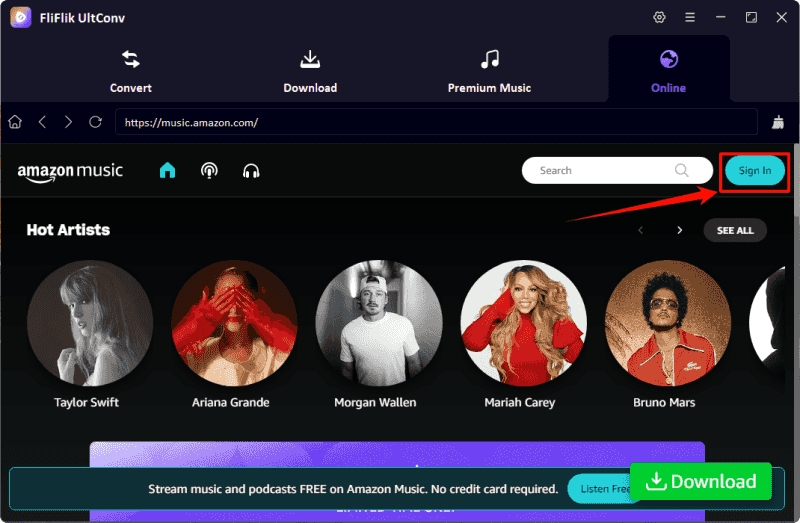
Sign in with your Amazon account ID. After logging in, your Apple Music library will load inside UltConv.
-
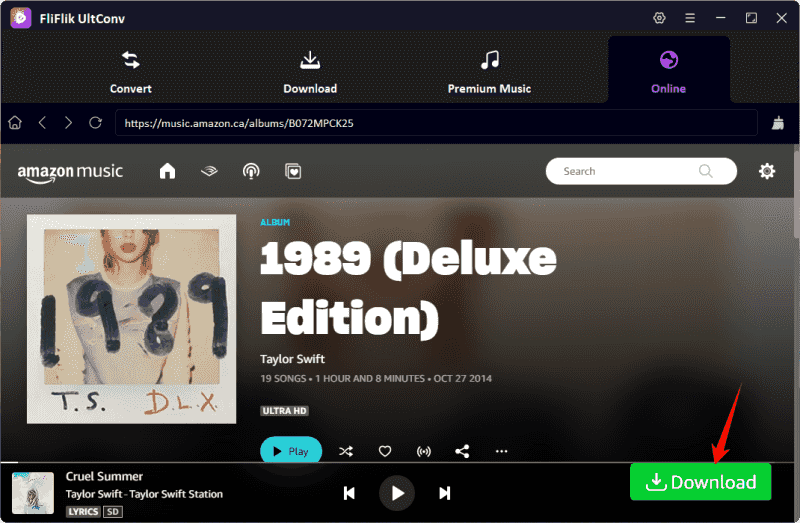
Browse your library, select the songs, albums, or playlists you want, and click the Download button.
-
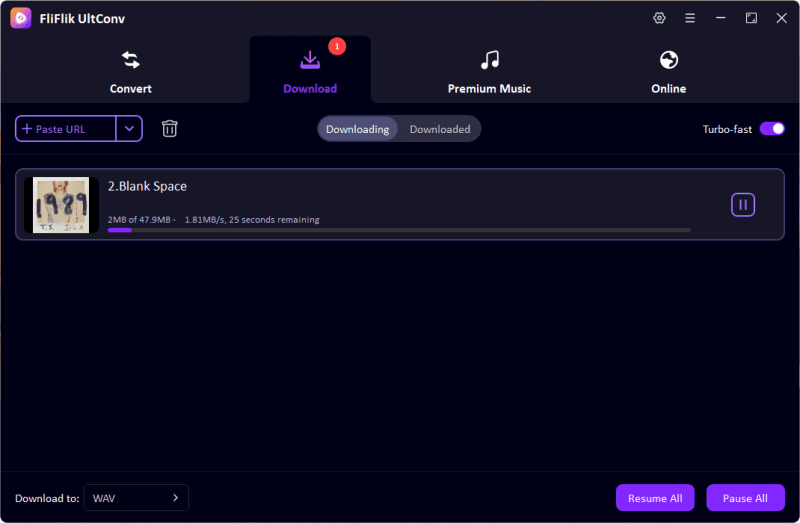
Your tracks will begin downloading. You can check progress in the Downloading tab. Once complete, the songs will be saved as DRM-free MP3 (or your chosen format), ready for offline listening.


TunePat Amazon Music Converter VS. FliFlik UltConv Music Converter
TunePat Amazon Music Converter is built specifically for Amazon Music users. It does one job and sticks to it: converting Amazon Music tracks into standard audio files while keeping quality and tags intact. FliFlik UltConv Music Converter works as a multi-platform music converter, letting you download and convert tracks, playlists, podcasts, and albums from Amazon, Spotify and many other services, even without a Premium account. It’s better suited for users who listen across platforms and want one tool to manage everything.
Quick Comparison Table Between TunePat VS. FliFlik UltConv
| Feature | FliFlik UltConv Music Converter | TunePat Amazon Music Converter |
|---|---|---|
| Price | Paid software with free trial | Paid software with free trial |
| Supported Platforms | Spotify + 10,000+ music sites | Amazon Music only |
| Supported Formats | MP3, AAC, WAV, FLAC, M4A, AIFF, MKA AND 100+ formats | MP3, AAC, WAV, FLAC, AIFF, ALAC |
| Audio Quality | Up to 320 kbps, lossless quality | HD & Ultra HD lossless |
| Download Speed | Up to 10x faster | Up to 10x faster |
| Batch Download | Yes | Yes |
| DRM Removal | Spotify, Tidal, Amazon Music, and other music platforms | Amazon Music |
| ID3 Tag Support | Yes | Yes |
| Suitable For | Spotify users and multi-platform listeners | Amazon Music–only users |
FAQs
Q1. Is TunePat Safe and Legal to Use?
Yes, TunePat Amazon Music Converter is generally safe to use on Windows and Mac. It doesn’t contain malware, and it only converts the music you have access to through your Amazon account. However, always use it responsibly and for personal use to avoid violating Amazon’s terms of service.
Q2. What is the best music MP3 converter?
While there are many options, FliFlik UltConv Music Converter stands out. It supports over 10,000 streaming sites, converts music to MP3, AAC, WAV, FLAC, and more, preserves ID3 tags, and works even without premium accounts, making it reliable for offline listening.
Conclusion
If you’re looking to convert Amazon Music, TunePat Amazon Music Converter does the job efficiently. It supports multiple formats, maintains original audio quality, and keeps metadata intact. However, for a more flexible and all-in-one solution, FliFlik UltConv Music Converter is highly recommended.
It covers not just Amazon Music but Spotify, Apple Music, and other platforms, allowing you to download entire playlists, albums, or podcasts in MP3 or other formats. Its fast conversion speed and batch download support, make it a reliable choice for anyone who wants offline music without losing quality.
 Secure Download
Secure Download
Secure Download
Hello, I research and introduce useful solutions for AI videos, images, and audio tips in our daily life. If you learn these things, you can easily deal with the problems of the new era.

