

 8 minutes read


Deezloader was once a popular tool for downloading high-quality tracks from Deezer for free. It didn’t matter if you were on Windows, Mac, Linux, or even Android; Deezloader had you covered. The Deezloader Reddit was buzzing back then, packed with guides, APK links, and all sorts of advice for getting the app to work.
In this article, we’ll explain what Deezloader was, why it’s no longer usable, and highlight 5 alternatives that actually work in 2026. Each downloader is explained clearly, with key features, pros and cons, and step-by-step guidance so you can pick the best option for your needs.

Part 1. What are Deezloader & Deezloader Remix?

Deezloader was a music-downloading app that let users save tracks, playlists, and full albums from Deezer in MP3 or high-quality FLAC. It worked across multiple platforms, including Windows, Mac, Linux, Android, and iOS. The idea was simple: download Deezer content directly to your device without paying for a subscription. To connect to Deezer’s library, users either signed in through the app or used an ARL token pulled from their browser cookies for account verification.
Over time, the original Deezloader evolved. Developers expanded their basic feature set, improved performance, and added new tools. This led to the release of Deezloader Remix, a more polished and capable version. Deezloader Remix supported Windows, Mac, and Linux, while a separate mobile edition was created for Android users, bringing the same upgraded experience to smartphones.
- Free to use with high-quality, lossless FLAC support
- Preserves Deezer metadata and album art (ID3 tags)
- Allows batch downloads of albums and playlists
- Cross-platform: Android, iOS, Windows, Mac, Linux
- Unofficial, legally gray, and risky
- Dependent on Deezer’s API; prone to breaking
- Potential security risks as non-legitimate software
Part 2. Does Deezloader Still Work?
No. Deezloader, including Deezloader Remix, no longer work reliably as of 2026. Legal takedowns, Deezer API updates, and security measures have rendered all versions non-functional. Even if you find old download links or APKs, they no longer work. Community forums and Reddit threads confirm that attempts to download songs now fail, and the app hasn’t been updated for years. In short, while Deezloader was once widely popular, it’s unsafe, unsupported, and should no longer be used.
Part 3. 5 Best Deezloader Alternatives That Actually Work
Even though Deezloader is gone, there are reliable Deezloader alternatives to download Deezer music in 2026. Here are the 5 best options to try.
1. FliFlik UltConv Deezer Downloader
FliFlik UltConv Deezer Downloader is our top pick for downloading music from Deezer in 2026. It’s a professional desktop app for Windows and Mac that goes far beyond basic downloading. You can grab individual tracks, full albums, or entire playlists from Deezer, all in high-quality audio formats. UltConv also supports thousands of other platforms like Spotify, Apple Music, and SoundCloud, making it a versatile tool for any music lover. The interface is clean and intuitive, so even beginners can start downloading without hassle. On top of that, it preserves all ID3 tags and album artwork, keeping your offline library perfectly organized.

- Supports 10,000+ streaming platforms (Deezer, Spotify, SoundCloud, Apple Music)
- Batch downloads entire playlists or albums at 10× speed
- Converts music to 100+ formats: MP3, M4A, WAV, AAC, FLAC, AIFF, MKA
- Maintains up to 320 Kbps audio quality
- Preserves all metadata (artist, title, album art)
- Handles songs, albums, playlists, podcasts, and audiobooks
▼ Steps to Download Deezer Songs with UltConv Deezer Converter
-
Download and install UltConv Deezer Converter on your Windows or Mac computer. The setup is quick and only takes a few minutes.
FREE DOWNLOAD![secure download]() Secure Download
FREE DOWNLOAD
Secure Download
FREE DOWNLOAD![secure download]() Secure Download
Secure Download
-
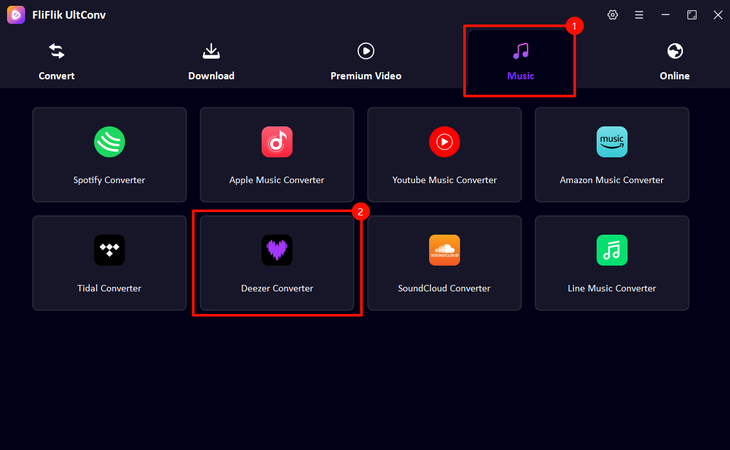
Open UltConv and click the Music tab, then select Deezer Converter.
-
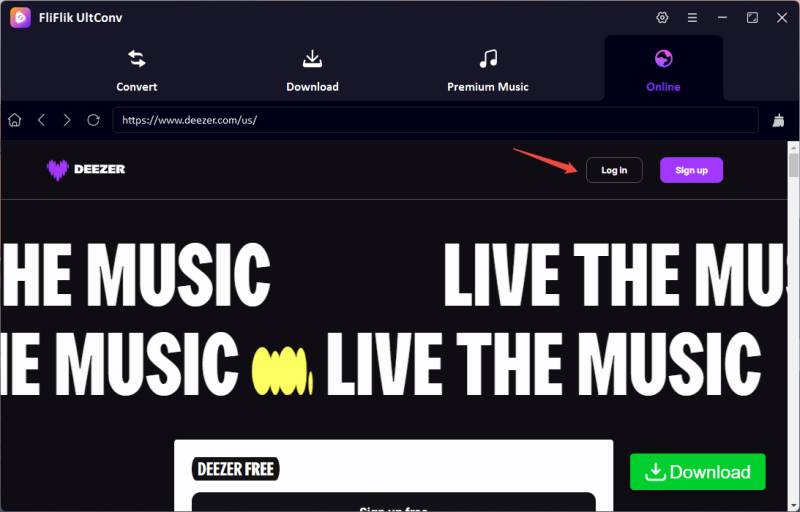
Sign in to your Deezer account directly within UltConv. You can browse Deezer without switching to a browser.
-
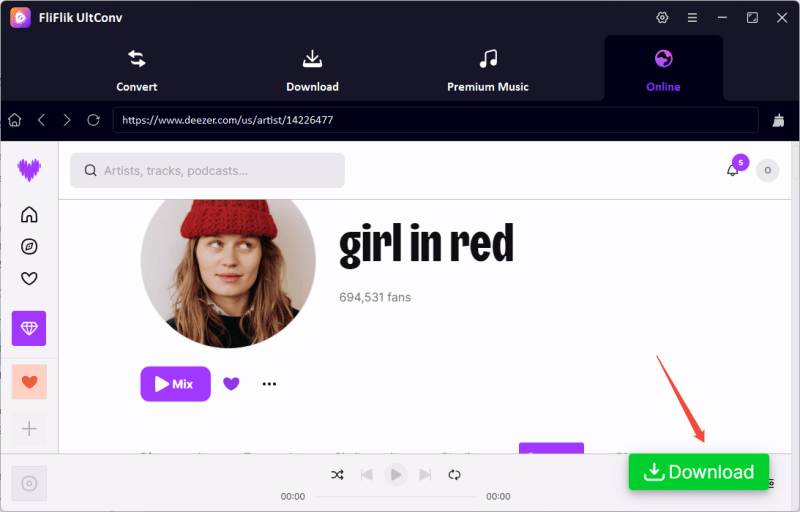
Find the track, playlist, or album you want, then click the Download button. Choose your preferred format, such as MP3 or FLAC.
-
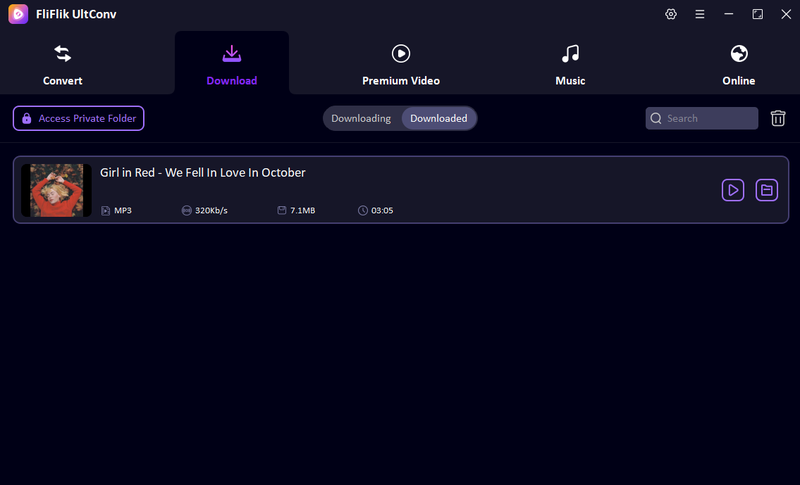
The download starts immediately. When it’s finished, go to the Downloaded tab to access your songs. Your Deezer tracks are now saved locally and ready to play offline on any device.


2. Deemix

Deemix is a free, open-source Deezer downloader built for Windows, Mac, and Linux. Originally developed from the Deezloader Remix project, it allows users to search for songs, albums, and playlists and download them in MP3, AAC, or FLAC formats. Deemix is perfect for people who want a lightweight yet powerful tool for batch downloads. It automatically keeps all ID3 metadata and album artwork intact, so your library stays neat and organized. While it lacks some advanced features of commercial apps, it’s entirely free and reliable for anyone who doesn’t mind a simpler interface or a command-line setup.
- Free and open-source
- Supports batch downloading
- Maintains metadata and ID3 tags
- Works across multiple desktop platforms
- Minimal GUI or command-line interface
- Limited output customization
- Large playlists may take longer to process
3. Telegram Bot (@deezload2bot)

The @Deezload2bot on Telegram is a cloud-based alternative that doesn’t require installing any software. You simply add the bot to Telegram (available on PC, Mac, iOS, or Android), send a Deezer track, album, or playlist link, and the bot returns an MP3 file ready for download. It’s simple, fast, and preserves ID3 tags for organized music libraries. This is ideal for casual users who just want to save individual songs or smaller playlists without installing a full desktop client. However, it only outputs MP3s and can struggle with very large playlists, depending on the bot’s uptime.
- No installation required
- Works across devices via Telegram
- Preserves ID3 tags
- Quick downloads for smaller playlists
- MP3 only (no FLAC)
- Batch downloads limited
- Depends on bot uptime and Telegram availability
4. Songs Downloader for Deezer (Android)

Songs Downloader for Deezer is a free Android app designed for quickly saving music on your phone. You don’t need to log in; simply copy a Deezer track or playlist link and paste it into the app. It fetches the audio in the background, supporting multi-threaded downloads that can boost speed up to 3×. It’s lightweight and easy to use, making it a convenient option for mobile users who want offline access without any desktop software. While it’s free and fast, the app includes ads, mainly outputs MP3s, and lacks support for lossless formats.
- Free to use, no login required
- Multi-threaded downloads (~3× speed)
- Lightweight, runs in the background
- Contains ads
- MP3 only (no FLAC)
- Android only
5. AIDS Deezer (Android)

AIDS Deezer is another Android downloader that allows users to fetch songs and albums directly from Deezer in MP3 or FLAC format. You can search for artists, albums, or tracks and download them individually or in batches. The app doesn’t require a Deezer account, making it convenient for casual offline listening. It also preserves metadata and artwork to keep your music library organized. However, it’s an unofficial app, so its reliability depends on Deezer’s service, and legal or security risks exist. Despite that, it’s a solid mobile option for free Deezer downloads in 2026.
- Download any Deezer track or album
- Supports MP3 and FLAC
- Batch downloads multiple songs
- No Deezer account required
- Unofficial and legally gray
- May break if Deezer updates
- Android only
Part 4. Quick Comparison Between 5 Deezloader Alternatives
Before wrapping up, here’s a quick side-by-side look at the five Deezloader alternatives we just covered. In this quick comparison, we will highlight their main differences in format support, speed, batch downloads, and overall ease of use, so you can quickly compare everything at a glance.
| Tool | Type | Output Formats | Speed | ID3 Tag Support | Batch Downloads |
|---|---|---|---|---|---|
| FliFlik UltConv | Desktop (Win/Mac) | 100+ formats: MP3, M4A, WAV, AAC, FLAC, etc. | ~10× | Yes | Yes (albums/playlists) |
| Deemix | Desktop (Win/Mac/Linux) | MP3, AAC, FLAC | ~1× | Yes | Limited |
| Telegram @deezload2bot | Cloud bot | MP3 | ~1× | Yes | Limited |
| Songs Downloader | Android | MP3 | Up to ~3× | Not specified | Yes |
| AIDS Deezer | Android | MP3, FLAC | Not specified | Yes | Yes |
Final Words
Deezloader had its moment, but those days are long gone. Today, it’s outdated, unsupported, and risky to install. If you’re looking for a reliable way to save Deezer music in 2026, FliFlik UltConv Video Downloader stands out as a practical replacement. It delivers fast downloads, supports batch saving, keeps full ID3 tags, and works with multiple audio formats. Whether you’re grabbing a single song, a full album, or entire playlists, UltConv video downloader keeps things simple. No broken links. No abandoned software. Just a stable tool that does what it promises. If offline listening matters to you, FliFlik UltConv Video Downloader is worth a try.
 Secure Download
Secure Download
Secure Download
FAQs
Q1. Is Deezloader safe to use?
Not anymore. Deezloader was never an official Deezer app, and it relied on loopholes to access content. Since development stopped, it hasn’t received security updates, which makes it risky to install. On top of that, using it may expose you to malware and legal issues.
Q2. Does Deezloader still work?
No. Both Deezloader and Deezloader Remix are completely defunct. Deezer blocked access years ago, download links no longer function, and the apps can’t connect to Deezer’s servers. Even if you find an old copy online, it simply won’t work. You can use reliable Deezloader alternatives like UltConv Video Downloader to download your favourite Deezer tracks.
Hey there! I am Maxwell Clark. I'm always looking for new tech tools that make a difference, from making visuals and audio better to making workflows better. I'm going to share tips and tricks for using AI tools for videos, audio, and images. I'm excited to help you navigate the digital world more efficiently and creatively!

