

 6 minutes read


These days, streaming platforms keep adding new features. If you want to save SoundCloud tracks for offline listening, Klickaud.org steps in with a simple fix. It’s a free website that lets you convert and download SoundCloud tracks as MP3s, promising fast speeds and good quality. But, is it worth trying? In this review, in this Klickaud review we will walk you through how Klickaud works, what it gets right, where it falls short, and Klickaud’s better alternative for downloading from SoundCloud.

Part 1. What is Klickaud
Klickaud is a popular online SoundCloud downloader. No software installation or login is required. Simply paste a SoundCloud link and get an MP3. Klickaud supports audio quality from 128 kbps up to 320 kbps and handles most SoundCloud songs, remixes, and even long podcasts over an hour. Klickaud’s interface is simple and mostly stable; it automatically retrieves track metadata and delivers fast downloads.

- No sign-up or software needed
- Supports up to 320 kbps output
- Can download long podcasts and extended tracks
- Just paste your SoundCloud link and click download
- Retrieves track title and artwork automatically
 Limitations:
- Often unstable; fails to download frequently
- The site displays advertisements during use
- Album/artist tags are not saved in the file
- Klickaud has had bugs; backups are advised if it fails
- Only converts to MP3 format
Part 2. How to Use Klickaud to Download SoundCloud Songs
Downloading tracks with Klickaud is straightforward. You just need the SoundCloud link, and Klickaud will handle the conversion to MP3. Follow these simple steps to get your music offline quickly with Soundcloud to MP3 Klickaud downloader:
-
Step 1: Open SoundCloud and find the track or podcast you want. Copy its URL from the browser’s address bar.
-
Step 2: Visit Klickaud, paste the copied URL into the input box, and click Convert.
-
Step 3: Wait a few seconds. Klickaud will process the link and then show you the Download the Song as MP3. Click the button to save your song.


Part 3. Best Klickaud Alternative — UltConv SoundCloud Downloader
While Klickaud is handy for quick downloads, it has some limitations, no playlist support, occasional downtime, and minimal format options. If you’re looking for something more reliable, FliFlik UltConv SoundCloud Downloader is a powerful desktop solution that goes beyond single-track downloads. It’s designed to handle entire playlists, albums, and even multiple streaming platforms with ease.
UltConv SoundCloud Downloader is lightweight and user-friendly, making it ideal for both beginners and experienced users. You can convert SoundCloud music to high-quality MP3s at 320kbps, or choose from other formats like WAV, FLAC, OGG, or AAC. The software keeps all metadata intact, including track titles, album names, and artist info, so your music library stays organized. Beyond SoundCloud, UltConv supports thousands of other streaming sites, making it a versatile tool for anyone who wants offline access to music, podcasts, and other audio content.

- Compatible with 10,000+ streaming sites, Spotify, Tidal, Soundcloud, etc
- Converts SoundCloud music to 320 kbps MP3 and other formats
- Supports batch downloads of playlists, albums, or multiple tracks simultaneously.
- Maintains full metadata in ID3 tags, including title, artist, album, and genre
- Fast, stable, and reliable downloads without interruptions
Using UltConv to download SoundCloud tracks is simple and efficient. With just a few clicks, you can save single songs or entire playlists in high-quality MP3 format, ready to enjoy offline anytime.
▼ Steps to Download SoundCloud Music With UltConv SoundCloud Converter:
Before you begin, download and install UltConv SoundCloud Converter from the official site. Once it’s set up, follow these quick steps to save your favorite SoundCloud tracks or playlists.
 Secure Download
Secure Download
Secure Download
-
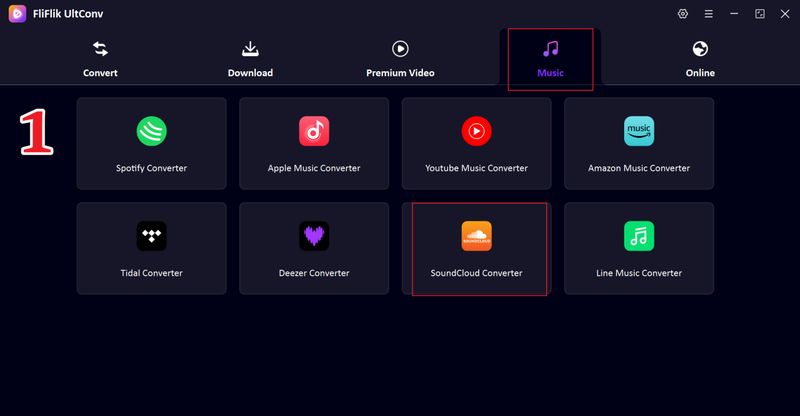
Open UltConv, go to the Music section, and select SoundCloud Converter from the list.
-
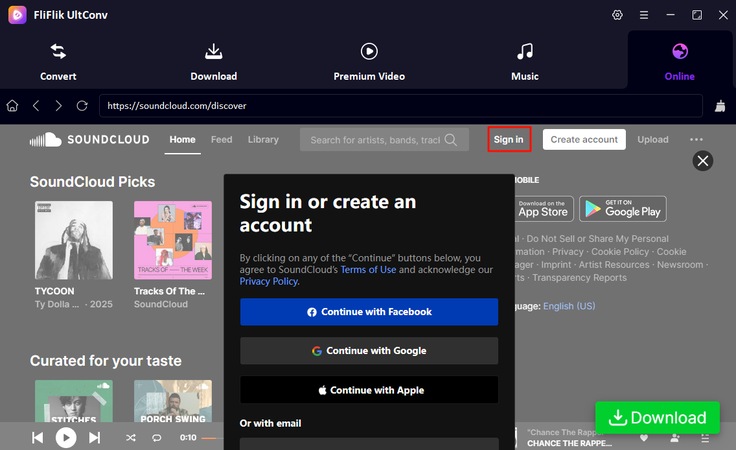
Sign in to your SoundCloud account directly inside UltConv so the tool can access your music library.
-
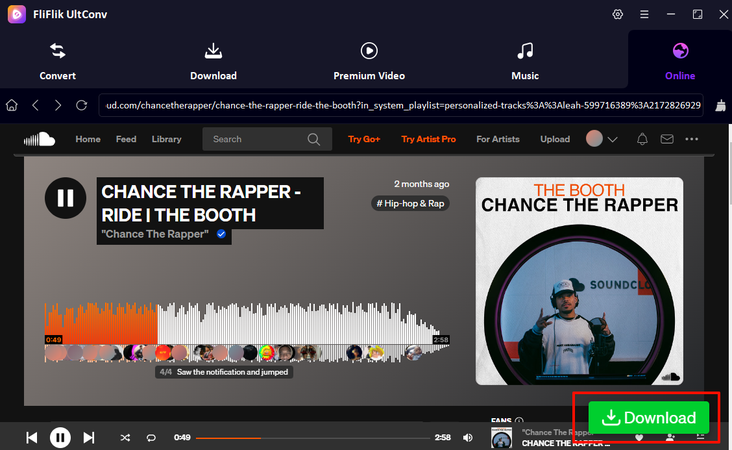
Browse SoundCloud and play the song or playlist you want. A green download button will appear. Click it to continue.
-
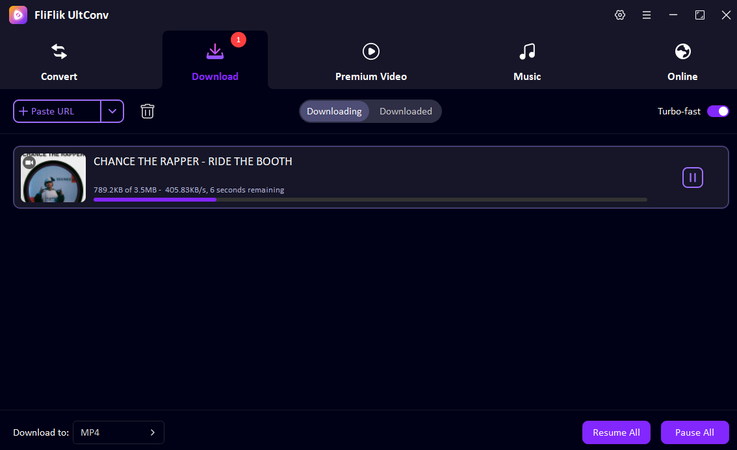
Next, you will see your song will start downloading in your preferred format.


UltConv makes downloading music fast, organized, and flexible, whether you’re saving a single track or an entire playlist. It’s the perfect solution for anyone who wants more control, better quality, and fewer interruptions than basic online converters.
Part 4. Klickaud vs. UltConv SoundCloud Downloader
Now that we’ve looked at the features and limitations of both Klickaud and, we offer you a better alternative option. Now, let’s see how we can compare both. Here’s a side-by-side look at Klickaud vs. UltConv SoundCloud Downloader key differences to help you choose the best tool for downloading SoundCloud tracks.
| Features | UltConv SoundCloud Downloader | Klickaud |
|---|---|---|
| Max Quality | MP3 up to 320 kbps | MP3 up to 320 kbps |
| Output Formats | MP3, WAV, FLAC, OGG, AAC, AIFF, 100+ formats | MP3 only |
| Website Support | 10,000+ websites support | SoundCloud |
| Batch Download | Yes (playlists, albums) | No (single tracks only) |
| Download Speed | Very fast (desktop, multi-threaded; 10× speed) | Normal (web-based, “now faster” updates) |
| Download Limit | No limitations | Unlimited for public tracks (free) |
| Best For | Power users who need batch downloads and format flexibility | Quick single-track downloads on any device |
Conclusion
Yes, Klickaud is convenient for grabbing individual SoundCloud tracks, but it has limitations like no playlist support, missing ID3 tags, and occasional downtime. For a more powerful, reliable, and high-quality experience, FliFlik UltConv SoundCloud Downloader is the better choice. Download playlists or albums effortlessly, keep full metadata, and enjoy fast, stable downloads. Start using FliFlik UltConv today for a seamless SoundCloud-to-MP3 experience.
Secure Download
Secure Download
Hey there! I am Maxwell Clark. I'm always looking for new tech tools that make a difference, from making visuals and audio better to making workflows better. I'm going to share tips and tricks for using AI tools for videos, audio, and images. I'm excited to help you navigate the digital world more efficiently and creatively!

