

 8 minutes read


DVDs aren’t dead yet, but they’ve definitely become a chore. Every time you want to revisit an old favorite, you’re stuck crawling behind the TV, untangling a mess of cords, and hoping the player still works. It’s exactly why so many people are finally giving up and converting DVD to digital. It means you can save them on your hard drive, stream them on your phone, or back them up to the cloud. No more worrying about scratches or missing cases, especially if you’ve got rare films, family memories, or those old TV box sets you don’t want to lose.
In this article, we will share the whole process of how to convert DVD to digital free, or with paid tools in 2026. We’ll break down which options are actually worth your time, how they stack up, and which one fits your setup.

Part 1. Quick Comparison: Top 4 DVD to Digital Converters
Before getting into detail of each tool, let’s have a quick comparison of the top 5 DVD digital converters in a table.
| Converter | Price | Conversion Speed | Output Quality | Output Formats | Supported Systems | Copy‑Protection Handling |
|---|---|---|---|---|---|---|
| Handbrake | Free | Medium‑Fast (depends on settings) | Very Good (customizable) | MP4, MKV | Windows, macOS, Linux | No (needs workarounds for protected DVDs) |
| VLC Media Player | Free | Slow‑Medium | Good (basic) | MP4, TS, more limited | Windows, macOS, Linux | No (doesn’t handle DRM) |
| MakeMKV | Free (beta)/Paid | Fast | Excellent (1:1 MKV) | MKV only | Windows, macOS, Linux | Yes (handles many protected discs) |
| Vudu Disc to Digital | Paid (per title) | Quick (simple service) | Good (streaming quality) | Digital in Vudu apps | Web/Apps | Yes (official service) |
Part 2. How to Convert DVD to Digital Free & Paid
Now, let’s take a quick look at some of the best tools you can use to convert your DVDs to digital files. Each has its strengths and weaknesses, depending on whether you want a free option or paid one.
1. Handbrake

Handbrake is one of the most popular free video converters available, and for good reason. It’s open-source, lightweight, and powerful, letting you convert DVDs to digital files in formats like MP4 and MKV. What makes Handbrake stand out is the level of control it gives you; you can tweak resolution, bitrate, audio tracks, and even add subtitles. It’s perfect for people who want high-quality digital copies of their DVDs and don’t mind spending a little time learning the software.
- Completely free and open-source
- Advanced customization for video and audio quality
- Supports multiple output formats
- Can’t rip copy-protected DVDs without additional tools
- May feel complicated for beginners
2. VLC Media Player

Most people know VLC as a simple media player, but it’s capable of much more. Beyond playing almost any video format, VLC can convert DVDs into digital files, making it a handy free option if you don’t want to install specialized software. It’s compatible with Windows, Mac, and Linux, and can produce MP4 and other basic file types. The interface for ripping can be a bit confusing at first, and the output options are limited, but for basic DVD-to-digital conversions, VLC does the job without charging a cent.
- Free and widely available on multiple platforms
- Can play almost any media type
- Lightweight and easy to install
- Limited output format choices
- DVD ripping interface is not very intuitive
3. MakeMKV

MakeMKV is designed specifically for ripping DVDs and Blu-rays into MKV files, which retain all the original video and audio quality. It focuses on preserving content exactly as it appears on your DVD, including multiple audio tracks and subtitles, which is a big plus for collectors or cinephiles. The main downside is that it primarily outputs MKV, so if you want MP4 or other formats, you’ll need a second tool for conversion.
- Handles copy-protected DVDs
- Maintains original video and audio quality
- Quick and easy to use
- Limited to MKV output
- Advanced features may require a paid license
4. Vudu

Vudu offers a unique approach to converting DVDs: its Disc to Digital service lets you turn your physical DVDs into digital copies that you can stream anywhere. Unlike traditional ripping software, Vudu handles everything for you; you just scan the barcode or insert the disc, and it converts it into a digital version linked to your account. This makes it incredibly convenient, especially if you want a legal and hassle-free way to enjoy your movies on phones, tablets, or smart TVs.
- Fully legal way to digitize DVDs
- No technical setup required
- Stream your movies across multiple devices
- Paid service
- Limited to supported DVD titles and regions
Extra Tip: How to Save Streaming Movies Locally (Like Your DVDs)
Digitizing your CD is a good way to save classic works, but on modern screens, a resolution of 480 pixels might seem a bit “outdated.” To bridge the gap between nostalgia and high-definition, FliFlik UltConv Netflix D ownloader allows you to build a premium offline library by directly downloading 1080p/4k HD movies from platforms like Netflix, Disney+, and YouTube. This is the ultimate upgrade for your collection, ensuring that your favorite blockbusters are permanently preserved in the clear movie quality they deserve.
UltConv removes DRM, so you can watch videos on any device without the Netflix app. Also batch downloads let you save entire seasons at once, and metadata like episode titles stays intact, keeping your library organized. With UltConv, your Netflix content becomes a portable, offline, ad-free collection.

- Download Netflix movies, TV shows, anime, and originals
- Convert videos to MP4 or MKV, compatible with almost all devices
- Save subtitles as internal or external files with full multilingual support
- Batch download multiple episodes or entire seasons at once
- Choose video quality from 480p, 720p, 1080p, up to 4K UHD
- Watch offline on any device (Windows, Mac, iPad, Nintendo Switch, Steam Deck, etc.)
- Remove DRM restrictions for unrestricted playback
▼ How to Download Netflix Videos with FliFlik UltConv Netflix Downloader?
-
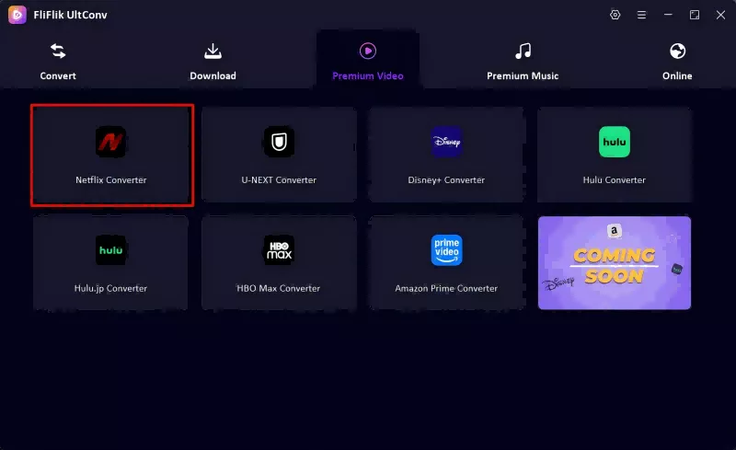
Open UltConv and navigate to the Premium Video section, where the Netflix downloader is located.
FREE DOWNLOAD![secure download]() Secure Download
FREE DOWNLOAD
Secure Download
FREE DOWNLOAD![secure download]() Secure Download
Secure Download
-
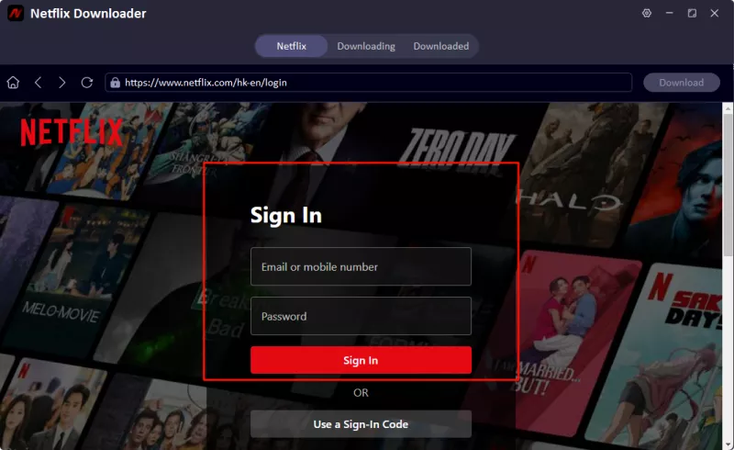
Sign in to your Netflix account directly within UltConv. This allows the tool to access your library, including premium content.
-
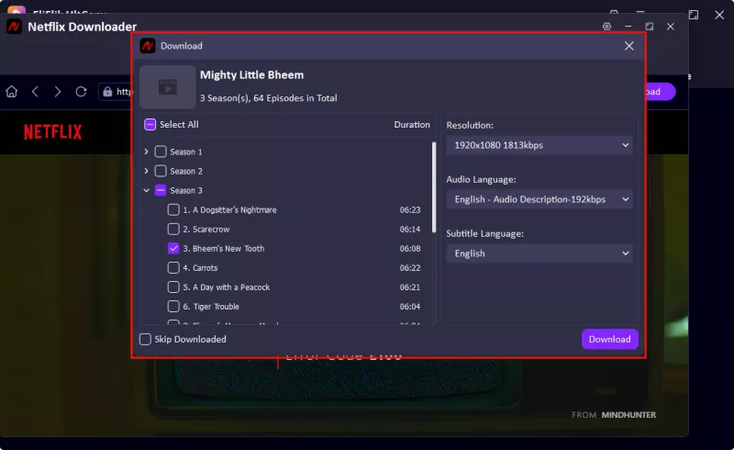
Browse your Netflix library and select the movies, TV shows, or episodes you want to download. Before downloading, choose your preferred video resolution, audio track, and subtitle language.
-
Click Download. UltConv will save the video in MP4 or MKV format, keeping the original video and audio quality intact.
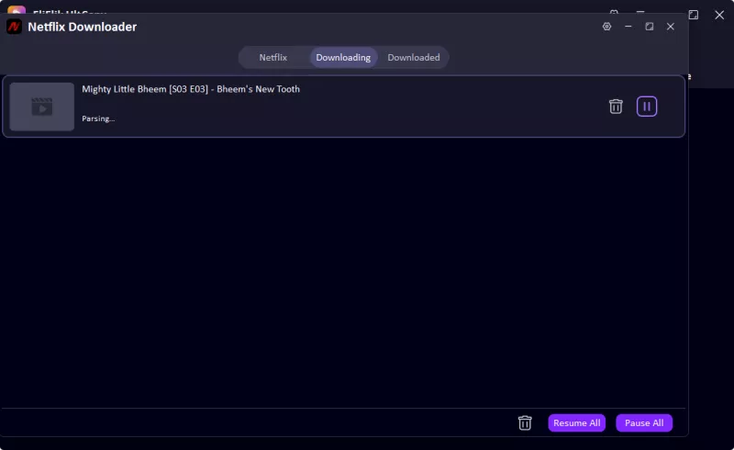


With UltConv Netflix Downloader, you’re not just saving videos, you’re building a portable, high-quality library of Netflix content that can be enjoyed offline, on any device, without buffering, DRM limits, or ads.
FAQs
Q1. How do I convert DVDs to digital?
Use tools like Handbrake, VLC, or MakeMKV to turn your DVD into a video file. Insert the disc, choose an output format (MP4 or MKV), and start the conversion.
Q2. How to convert a DVD to digital online for free?
Free online converters exist, but can be slow or unsafe. Offline tools like Handbrake or VLC are safer, faster, and give you control over quality and format.
Q3. Is it legal to convert DVD to digital format?
Converting DVDs you own for personal use is usually fine. Copying DRM-protected commercial discs without permission may be illegal. Paid services like Vudu provide a fully legal option.
Conclusion
Whether you choose free tools like Handbrake or paid services like Vudu, digitizing your DVD collection is a simple way to protect your movies and enjoy seamless access across all your devices. For streaming content, FliFlik UltConv Netflix Downloader lets you download Netflix movies and shows in MP4 or MKV, and watch offline anywhere. Take control of your media by converting DVDs to digital and save streaming videos, high-definition library you can enjoy anytime, anywhere.
 Secure Download
Secure Download
Secure Download
Hello, I research and introduce useful solutions for AI videos, images, and audio tips in our daily life. If you learn these things, you can easily deal with the problems of the new era.

