

 6 minutes read


Looking for a reliable Dailymotion MP4 downloader? Whether you need to save news clips, music videos, or tutorials for offline viewing, converting Dailymotion videos to MP4 format is the best way to ensure smooth playback on any device.
In this guide, we’ll introduce the fastest ways to download Dailymotion HD videos to MP4. We’ll compare professional desktop software for Windows and Mac with quick browser tools that require no installation. Easily build your permanent offline video library with just a few clicks.

Part 1. Best Dailymotion MP4 Downloader on Windows&Mac
For users seeking high-quality videos, FliFlik UltConv Video Downloader is the professional alternative to unreliable online converters. Unlike browser tools that limit video length or fail to handle large files, UltConv delivers a stable and reliable desktop experience. With just one click, save Dailymotion videos as high-quality MP4 files, ensuring fast, complete downloads free of ads
UltConv supports over 10,000 websites including YouTube, TikTok, and Instagram, with support for resolutions up to 8K. Renowned for its efficiency, it delivers download speeds up to 10 times faster, supports batch downloading of entire playlists, and can even remove DRM protection from music platforms. With its built-in browser and secure private folder, it stands as the most reliable all-in-one downloader for Windows and Mac users.

- Download videos from 10,000+ websites, including Dailymotion, YouTube, TikTok, Reddit, and Instagram
- Save videos in MP4 up to 8K and audio in 320kbps
- Batch download videos, music, playlists, channels, and albums
- Convert videos to MP3 and 100+ other formats without quality loss
- Remove DRM from Spotify, Apple Music, and YouTube Music
- Built-in browser for finding and downloading content inside the app
- Private folder to protect your downloads with a password
▼ How to Download Dailymotion Videos as MP4 with FliFlik UltConv Video Downloader?
-
Get UltConv from the official website and install it on your Windows or Mac computer. Launch the program once setup is complete.
FREE DOWNLOAD![secure download]() Secure Download
FREE DOWNLOAD
Secure Download
FREE DOWNLOAD![secure download]() Secure Download
Secure Download
-
Click the Download tab, then hit the Download to button at the end to select your output format.

-
Choose MP4 for video or MP3 for audio-only downloads.

-
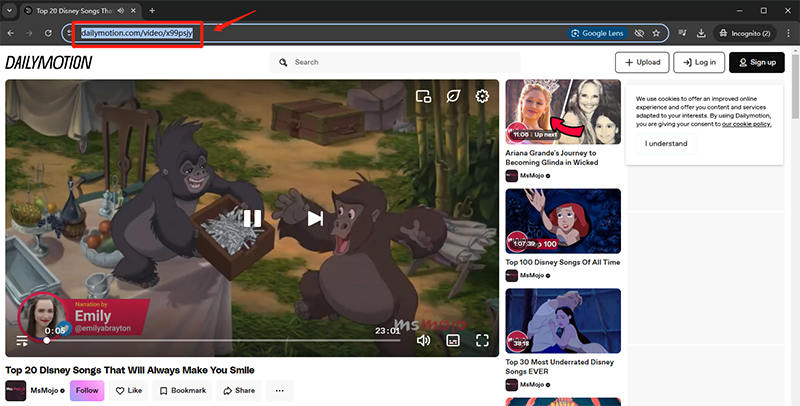
Visit Dailymotion, copy the video URL you want to save, then return to UltConv.
-
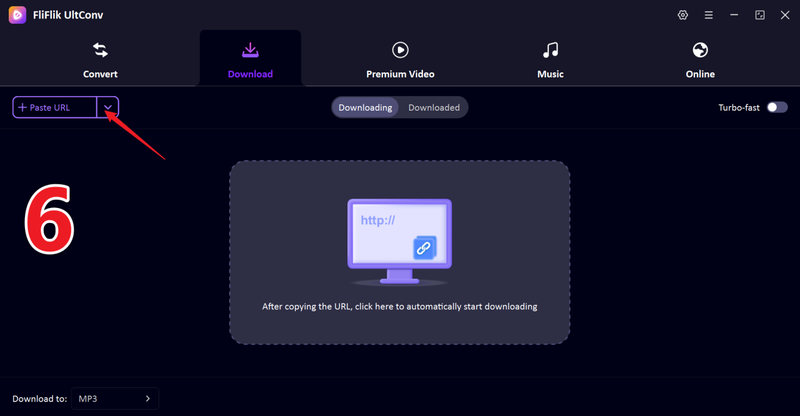
If the link isn’t detected, paste it manually into the URL bar and click Download.
-
Your video will start downloading. Once finished, your Dailymotion MP4 file is ready to watch offline anytime.
With UltConv, you can save Dailymotion videos, playlists, or favorite clips and watch them later without internet, even in Airplane Mode.


Part 2. How to Convert Dailymotion to MP4 with Online Tools
Not everyone wants to install software just to save a video. If you need a quick free option, online Dailymotion to MP4 downloaders are a solid choice. Here are three reliable online tools.
1. SaveTheVideo.com

SaveTheVideo.com is a flexible online downloader that works with Dailymotion and several other video sites. It grabs the video link you paste and offers MP4 as a download option. The interface is simple and clean, with no account required. This makes it a good pick when you just want a quick MP4 conversion without extra steps.
- Works with many video platforms, including Dailymotion
- No signup or installation needed
- Supports basic quality selection
- Upload and conversion can be slow on large files
- Ads and extra links on the page can be distracting
2. DMVideo

DMVideo is a straightforward tool focused on converting Dailymotion videos to MP4. The site loads fast, and the process is almost the same for every download: paste the link, choose MP4, and download. It doesn’t overwhelm you with settings, which makes it a good choice for basic needs.
- Simple and easy to use.
- No account or signup.
- Works on desktop and mobile browsers
- Limited format options beyond MP4
- Some ads and popup links can appear
3. Vidomon

Vidomon offers a clean online interface for saving Dailymotion videos in MP4. You paste the video link and the site processes it quickly. It also displays preview thumbnails so you can confirm the video before downloading. While it keeps things simple, it doesn’t offer advanced quality controls beyond standard MP4 output.
- Preview thumbnails before you download
- No install or login needed
- Works on most browsers
- Quality options are limited
- Occasional ads on the page
FAQs
Q1. How to convert a Dailymotion video to MP4 for free?
You can convert Dailymotion to MP4 for free using tools like FliFlik UltConv Video Downloader. It’s a powerful tool to batch download multiple videos at once.
Q2. Is it legal to download Dailymotion to MP4?
It depends. Downloading your own content or videos with permission is usually fine, but saving copyrighted material for redistribution may violate Dailymotion’s terms and local laws. Always check regulations and use downloads for personal offline viewing only.
Q3. Can I convert Dailymotion to MP4 on my computer?
Yes, absolutely. Desktop tools like FliFlik UltConv Video Downloader let you convert Dailymotion to MP4 directly on Windows or Mac. Compared to online converters, desktop software offers higher video quality, faster speeds, batch downloads, and better stability, especially for large or HD videos.
Conclusion
While online tools can quickly resolve issues, they often limit download quality and speed. For a more reliable experience, FliFlik UltConv Video Downloader is a smarter choice over Dailymotion and over 10,000 other websites.
It offers high-quality 4K downloads, one-click playlist saving, and speeds up to 10 times faster than any browser tool. Furthermore, UltConv features batch downloading and DRM music conversion, ensuring you get perfect offline files every time without worrying about common technical issues.
 Secure Download
Secure Download
Secure Download
Hello, I research and introduce useful solutions for AI videos, images, and audio tips in our daily life. If you learn these things, you can easily deal with the problems of the new era.

