

 8 minutes read


Odysee has quietly become a go-to platform for creators who want more freedom over their content. You’ll find everything there from tech tutorials and documentaries to independent shows and niche communities. Since Odysee lacks a native download feature, you’ll need a third-party tool to save videos for offline viewing, archiving, or MP3 conversion.
In this article, we’ll walk through the best desktop and online Odysee downloaders, compare their features, and show you practical ways to download Odysee videos quickly, safely, and in the format you need.

Part 1. Best Odysee Video Downloader on Windows and Mac Desktop
FliFlik UltConv Video Downloader is a full desktop toolkit built for people who regularly grab videos and audio from different platforms. Beyond Odysee, it works with 10,000+ websites and supports over 100 output formats. You can download videos in resolutions up to 4K, convert clips to MP3 or other audio formats, save entire playlists or channels, and even extract music without quality loss. Everything happens inside one clean interface, so there’s no need to juggle browser tools, converters, or sketchy web pages.

- Download videos from 10,000+ sites, including Odysee, YouTube, TikTok, Instagram etc.
- Export to 100+ formats such as MP4, MKV, MP3, WAV, AAC, and FLAC
- Save videos in HD up to 4K, or downscale to smaller resolutions when needed
- Batch download videos, playlists, channels, or albums in one go
- Convert video to audio without quality loss (up to 320kbps)
- Built-in browser for direct downloading inside the app
- Fast download speeds plus private folder protection for saved files
▼ Steps to Download Odysee Videos with UltConv Video Downloader
First, install UltConv on your Windows or Mac computer and launch the program.
 Secure Download
Secure Download
Secure Download
-
Open UltConv and switch to the Download section. At the bottom of the window, click Download to and set your preferred output format.

-
Choose your desired format from the list.

-
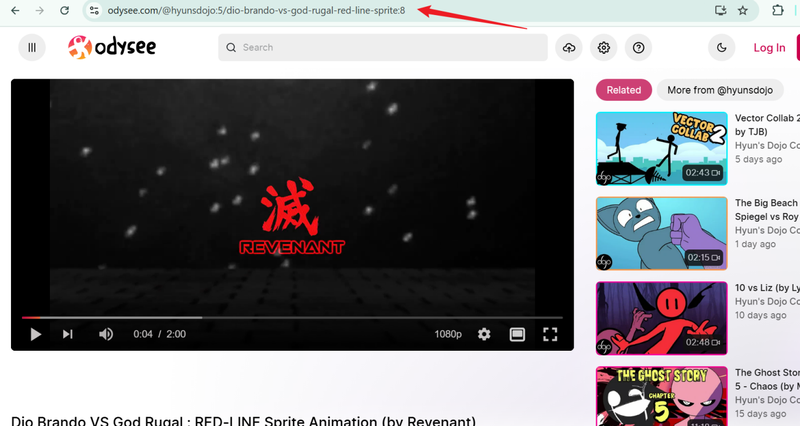
Visit Odysee in your browser, find the video you want, and copy its URL from the address bar.
-
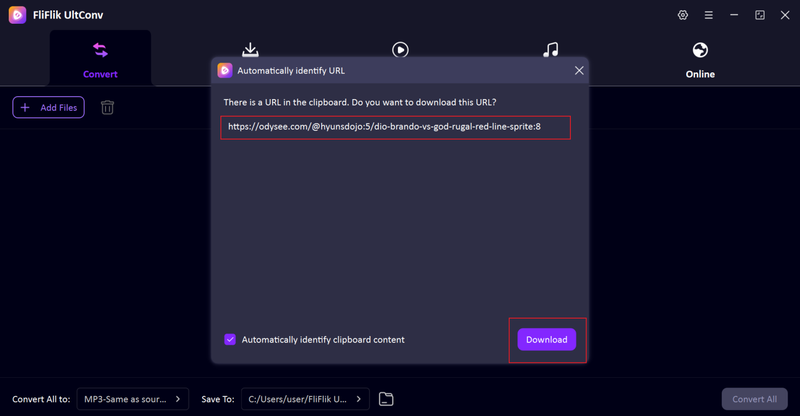
Go back to UltConv. In most cases, the software automatically detects the copied link. When it appears, click Download.
-
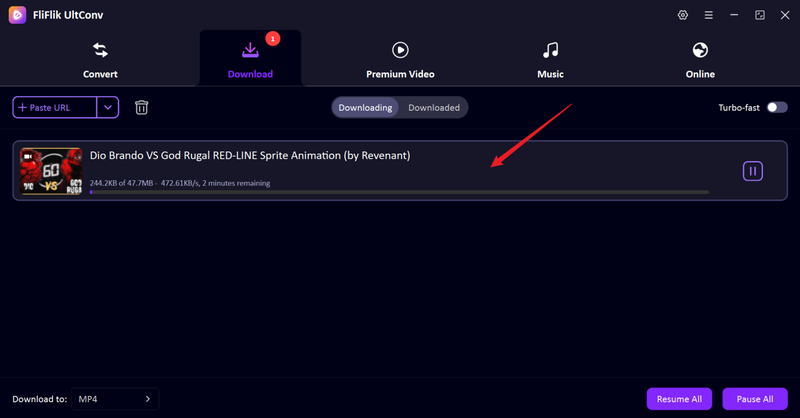
The download starts right away. Once it finishes, your video is saved locally and ready to watch offline.


Part 2. 5 Free Odysee Video Downloader Online Tools
If you don’t want to install desktop software, these free online tools allow you to download videos from Odysee directly from your browser.
1. Experts Tool

Experts Tool Experts Tool provides a simple web-based solution for downloading Odysee videos, requiring no software installation or account registration. Simply paste the link and select the format to complete the download, making it ideal for temporary, small-batch use.
As a free online tool, its performance is limited by network conditions and server load; download speeds may fluctuate, and format options are relatively limited. For ordinary users seeking speed and a hassle-free experience, it’s a practical and efficient solution.
2. AnyDownloader

AnyDownloader is a full-featured browser downloader that allows you to download Odysee videos without installing any software. It boasts a clean interface and fast link detection, making it a convenient option for users who want to easily “copy and paste” across multiple platforms.
It’s best suited for downloading short videos, as browser-based download speeds and limited functionality can be restrictive for users dealing with large files or batch downloads.
3. TubeOffline

TubeOffline is a veteran tool in the video downloading field. Unlike some newer, minimalist tools, it uses a traditional interface layout and offers advanced settings for users who want more granular control over Odysee downloads, such as adjusting resolution and format.
While its speed may be slightly slower during peak server hours, its flexibility makes it ideal for users who prefer feature-rich web tools to simple “one-click” converters.
4. PasteDownload

PasteDownload is designed for speed and convenience. Simply paste the Odysee URL, wait for the program to recognize it, and the resulting video or audio stream will download. It can directly extract MP3 files from Odysee, making it easy to use for beginners or users who only enjoy audio content, without requiring an account.
Like most free online tools, PasteDownload is best suited for small, quick tasks due to its limited format options and potentially varying download speeds.
5. YT2Save

YT2Save is a simple and easy-to-use browser downloader that supports Odysee and other major platforms. Its design philosophy is simplicity and convenience: paste the link, process it, and you can download videos or extract audio as MP3 files.
While it lacks advanced features such as batch downloading or advanced format control, and contains common online ads, it is a reliable “no-install” option for users who want to quickly download single videos.
Part 3. Odysee Video Download Chrome Extension

CocoCut is a convenient Chrome extension that allows users to download Odysee videos without leaving their browser. It works by detecting the media stream in playback and saving content with just a few clicks, eliminating the need to manually copy and paste URLs. This makes it ideal for quickly saving videos.
While it lacks the batch processing and advanced formatting controls of desktop software, it excels at handling complex streams such as HLS. For the average Odysee user who values ease of use, CocoCut is a lightweight and easy-to-use option that allows you to use it effortlessly while browsing.
FAQs
Q1. How to Download Odysee Videos to MP3 Online?
PasteDownload Odysee downloader let you paste a video link and choose MP3 as the output format. Just copy the video URL from Odysee, paste it into an online tool, select MP3, and download. If you want higher bit rate audio or batch downloads, a desktop option like FliFlik UltConv Video Downloader gives you far more control.
Q2. What Video Formats Are Available for Odysee?
Most online downloaders support basic formats like MP4 and sometimes WEBM. Desktop software usually offers more flexibility, including MP4, MKV, and audio formats like MP3, WAV, or FLAC.
Q3. Is it legal to download videos from Odysee?
Downloading videos for personal, offline use is generally fine, especially for content that’s publicly available or released under open licenses. However, reposting or redistributing videos without permission may violate copyright laws.
Conclusion
For users who only occasionally watch Odysee video clips, browser tools and extensions are very convenient because they are fast, free, and require no setup. However, they usually mean slower download speeds, fewer format options, and no batch downloading capability.
If you are a frequent Odysee user, FliFlik UltConv Video Downloader is a better choice. It is a full-featured desktop tool that handles Odysee videos more efficiently—offering faster download speeds, higher resolution, and convenient MP3 extraction. Furthermore, it allows you to manage entire playlists at once, making it more flexible and reliable than simple web-based tools.
Secure Download
Secure Download
Hello, I research and introduce useful solutions for AI videos, images, and audio tips in our daily life. If you learn these things, you can easily deal with the problems of the new era.

