

 7 minutes read


Rutube is one of Russia’s largest video platforms, hosting everything from news clips and documentaries to entertainment shows and user-generated content. While it works fine for streaming online, Rutube doesn’t offer an easy way to save videos for offline viewing. That’s why many users start looking for a reliable Rutube video downloader.
In this article, we’ll share the best desktop and online Rutube downloaders and show you practical ways to save Rutube videos quickly and safely, so you can pick the option that fits your needs.

Part 1. Best Rutube Video Downloader on Windows and Mac
If your goal is simply to download Rutube videos in high quality without fighting pop-ups, broken links, or format limits, FliFlik UltConv Video Downloader is built for exactly that. It gives you full control over quality, format, and downloads. You can save Rutube videos in 720p, 1080p, 2K, or even 4K, convert them to MP3 or other audio formats, and batch-download multiple clips at once.
In short, instead of juggling separate tools for downloading, converting, and managing files, UltConv Video Downloader handles everything in one place, making it a practical choice for anyone who regularly downloads Rutube content.

- Download videos from 10,000+ platforms, including Rutube, YouTube, TikTok, Instagram, and more
- Export to 100+ formats like MP4, MKV, MP3, WAV, AAC, and FLAC etc.
- Save videos in 720p, 1080p, 2K, or 4K, and audio up to 320kbps
- Batch download multiple videos, playlists, or channels at once
- Convert video to audio without quality loss
- Built-in browser for direct downloading inside the app
- Fast download speeds plus private folder protection
▼ Steps to Download Rutube Videos with FliFlik UltConv Video Downloader
Start by installing UltConv on your Windows or Mac computer, then launch the program.
 Secure Download
Secure Download
Secure Download
-
Open UltConv and switch to the Download section. At the bottom of the window, click Download to and choose your preferred output format.

-
Select your desired format from the list (for example, MP4).

-
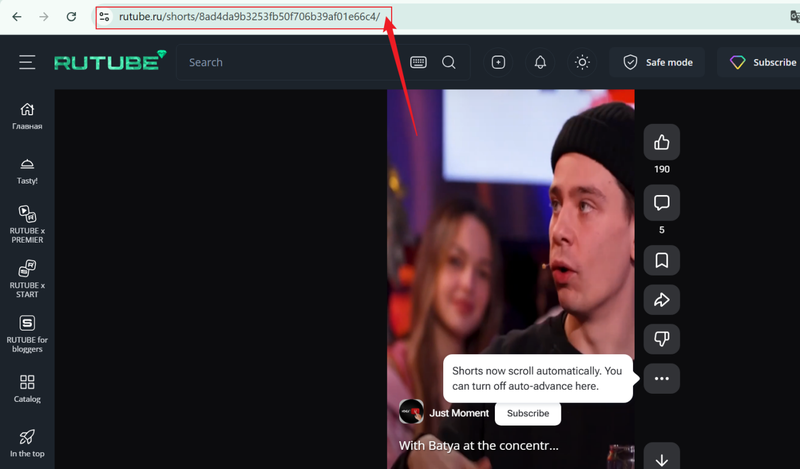
Go to Rutube in your browser, find the video you want, and copy its link from the address bar.
-
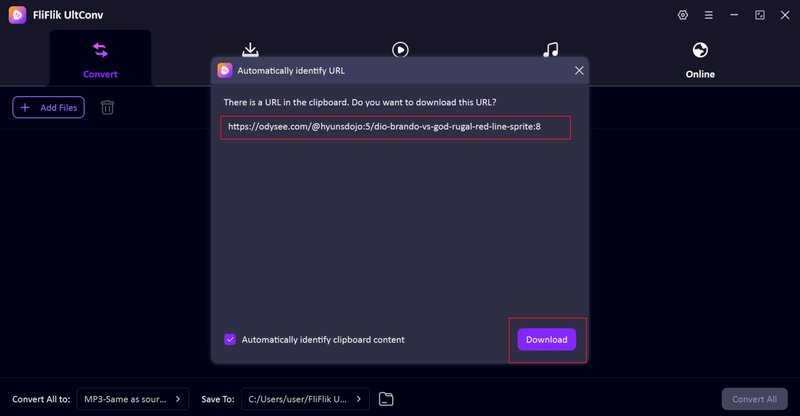
Return to UltConv. In most cases, the app will automatically recognize the copied link. When it appears, click Download.
-
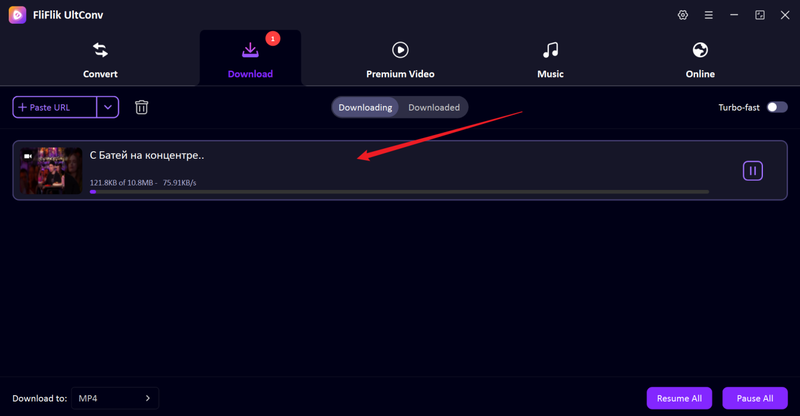
The download begins immediately. Once finished, your Rutube video will be saved on your computer and ready for offline viewing.


Part 2. Top 4 Online Rutube Video Downloader
If you don’t want to install software, online Rutube downloaders are the quickest option. Below are four popular web tools that get the job done.
1. Get-Save

Get-Save focuses on quickly and easily downloading Rutube videos. It’s a lightweight web-based tool that can be used directly in your browser without registration, extension installation, or complicated setup. Simply paste the Rutube link and select the resolution to start downloading.
This tool is ideal for quick, one-off downloads because it avoids the hassle of software installation. However, like many free online downloaders, it’s best suited for downloading single videos; for large projects or batch downloads, the lack of advanced controls can be a limitation.
2. YT1Downloader

YT1Downloader offers a cleaner interface than most online downloaders and gives you basic control over output quality. It’s especially useful if you care about choosing between SD and HD without dealing with pop-ups with every click. While it doesn’t come packed with advanced features, it covers the essentials well: fast processing, common format support, and a simple workflow that even first-time users won’t struggle with.
3. Keepvid

Keepvid is one of those familiar all-purpose downloaders that support Rutube, along with many other platforms. It usually offers MP4 options and sometimes audio-only downloads. Its main appeal is reliability. The site has been around for years, and it’s a go-to choice for users who already know the Keepvid workflow. While the interface isn’t fancy, it’s functional, and downloads are generally stable for shorter videos and casual use.
4. Anytools.pro

Anytools.pro is more than just a video downloader; it’s a toolbox website with dozens of utilities, including Rutube video saving. If you like having multiple online tools in one place, this platform makes sense. It supports standard video formats and works directly in your browser. While it may not be the fastest option on the list, it’s convenient for users who already rely on Anytools.pro for other quick tasks.
Part 3. What is the Best Rutube Video Downloader?
Online tools like Get-Save, YT1Downloader, Keepvid, and Anytools.pro are great for one-off downloads when you’re in a hurry. But the desktop option like FliFlik UltConv Video Downloader pulls ahead fast. Let’s break it down side by side so you can see exactly what each option brings to the table.
| Feature | FliFlik UltConv | Get-Save | YT1Downloader | Keepvid | Anytools.pro |
|---|---|---|---|---|---|
| Batch Download | Yes | No | No | No | No |
| MP3 Extraction | Yes | Limited | Limited | Limited | Limited |
| Output Formats | 100+ formats (MP4, MP3, MKV, WAV, AAC, etc.) | Basic (usually MP4) | Basic (MP4/Audio) | Basic (MP4) | Basic (MP4/Audio) |
| High-Quality Output (720p/1080p/4K) | Yes | Depends on the source | Depends on the source | Depends on the source | Depends on the source |
| Download Speed | Fast, local desktop | Slower, web-based | Slower, web-based | Slower, web-based | Slower, web-based |
| Ads / Redirects | None | Yes | Yes | Yes | Yes |
| Price | Paid (free trial available) | Free | Free | Free | Free |
FAQs
Q1. Is it legal to download from Rutube?
It depends on how you use the content. Rutube allows creators to publish videos publicly, but downloading is generally meant for personal, offline viewing only. If a video is copyrighted, you shouldn’t reuse or redistribute it without permission.
Q2. Can I convert Rutube videos to MP3?
Yes. Tools like FliFlik UltConv Video Downloader make this easy by converting videos to MP3 (and other formats) in one step, while keeping the original sound quality.
Q3. How do I download videos from Rutube for free?
You can use online Rutube downloaders for quick, single downloads. Just paste the video link, pick a format, and save.
Conclusion
Downloading videos from Rutube doesn’t have to be complicated. Online tools work fine for quick, one-off downloads, but they usually come with trade-offs: ads, limited formats, inconsistent speeds, and no batch support. FliFlik UltConv Video Downloader gives you stable downloads, higher resolutions, batch processing, and clean audio conversion in one place. If you download Rutube videos regularly or want more control over quality and formats, UltConv is the smarter long-term choice.
Secure Download
Secure Download
Hello, I research and introduce useful solutions for AI videos, images, and audio tips in our daily life. If you learn these things, you can easily deal with the problems of the new era.

