

 6 minutes read


If you’ve ever spent time singing or listening to Smule, you already know how addictive it can be. With millions of users worldwide and an endless stream of covers, duets, and solo performances, Smule has become a go-to platform for casual singers and serious music fans alike. But Smule doesn’t make it easy to save your favorite songs or performances for offline listening.
In this article, we’ll walk through why a Smule song downloader is useful, how to download Smule songs on desktop and mobile, and which tools actually work, so you can enjoy your favorite tracks anytime, even without an internet connection.

Part 1. Why Do You Need a Smule Downloader?
Smule is great for discovering covers, joining duets, and sharing your own performances but it’s clearly built for streaming, not saving. Once you close the app or lose your connection, those songs are gone unless you recorded them elsewhere. Smule downloader gives you control over your favorite performances instead of keeping everything locked inside the app.
- Save Smule songs as MP3s so you don’t need Wi‑Fi or mobile data.
- Download your performances to store, share, or improve later.
- Build a personal collection of songs you love.
- Extract MP3 files for easier playback on any device.
Part 2. How to Download Smule Songs on Desktop
If you want more than a basic Smule downloader, FliFlik UltConv Video Downloader is built for serious downloading. It’s a full video and music downloader that supports over 10,000 websites and converts files into 100+ formats with high quality preserved. You can download entire playlists, channels, or albums in one click. You can extract audio in up to 320kbps.
It also includes batch downloading, faster processing speeds, keeps ID3 tags, a built-in browser, and even a private folder to secure your files. So while we’re using it here to download Smule songs to MP3, this tool goes far beyond that.

- Download Smule songs directly to MP3 with high audio quality
- Supports 100+ output formats, including MP3, WAV, AAC, FLAC, and AIFF etc.
- Works with 10,000+ websites, not just Smule
- Batch download multiple songs or videos at once
- Extract audio from video without quality loss
- Download playlists and channels in one click
- Built‑in browser for finding content inside the app
▼ How to Download Smule Songs to MP3 with UltConv Video Downloader?
-
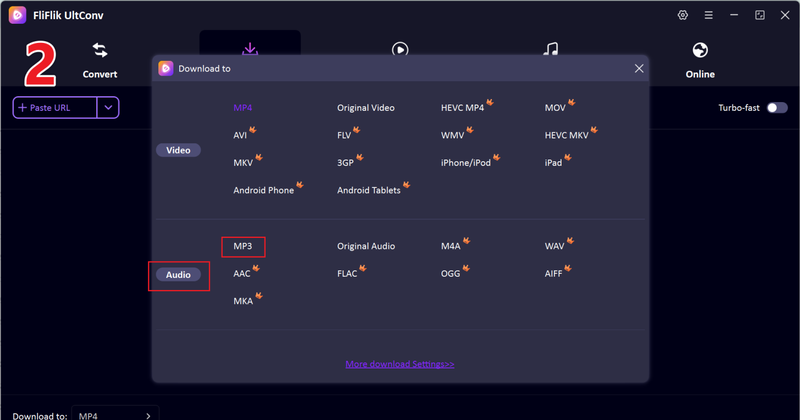
Open UltConv and go to the Download section. Click Download at the bottom to select your output format.

-
Choose MP3 (or another audio format) from the list.
-
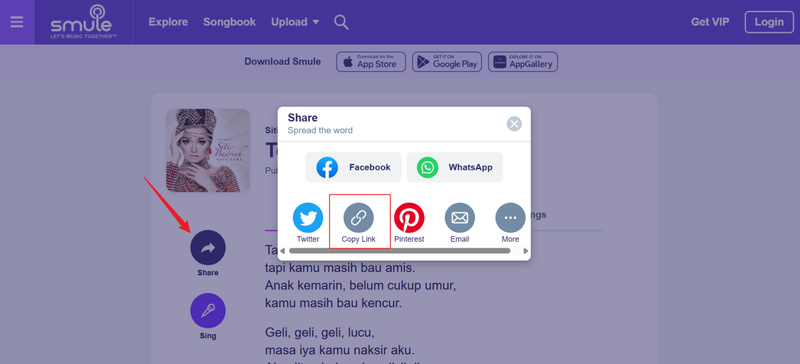
Open Smule in your browser, find the performance you want to save, and copy the share link.
-
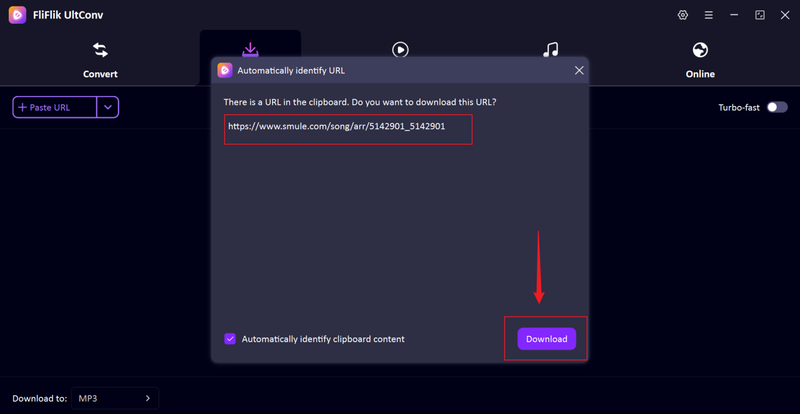
Return to UltConv. The software often detects the copied link automatically. When it appears, click Download.
-
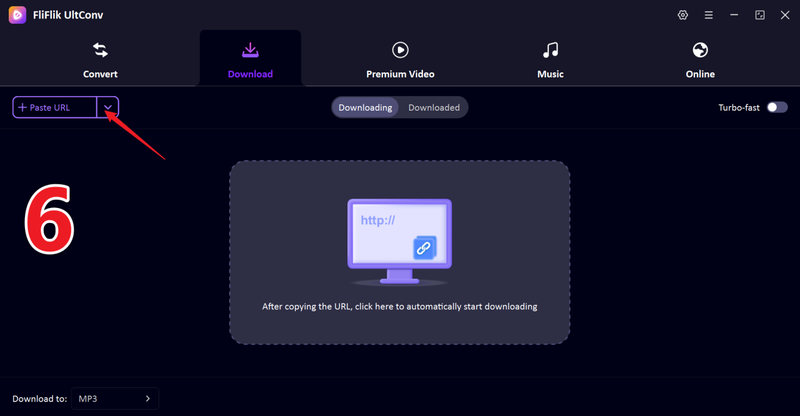
If the link doesn’t show up automatically, paste it manually into UltConv’s input box and press Download.
-
The download will begin immediately. Once complete, your MP3 file will be saved locally and ready for offline listening.


Part 3. How to Download Songs from Smule with an Online Tool
Sownloader offers a quick way to download songs directly from Smule using just your browser. There’s no setup process, no account required, and it works on both desktop and mobile browsers. That makes it convenient if you only need to grab a song occasionally. However, remember online tools usually focus on basic functionality, so you shouldn’t expect advanced format options or bulk downloads.

- No installation required
- Works on both PC and mobile browsers
- Simple and beginner-friendly interface
- Limited download options and formats
- May include ads or slower processing during peak times
Part 4. How to Download Smule to MP3 on Android
If you want to save your favorite Smule performances directly on your Android phone, Song Downloader for Smule can help. This app is built specifically to pull audio from Smule recordings and save it as an MP3 file on your device. It’s a straightforward option for users who mainly listen on mobile and want quick access to tracks offline without complicated steps or desktop software. While it works well for basic MP3 saving, it isn’t as powerful as full desktop solutions.

- Direct MP3 downloads on Android
- Easy and quick setup
- No desktop computer needed
- Limited format and quality options
- May include ads and fewer customization features
FAQs
Q1. Is it legal to download songs from Smule?
It depends on how you use the content. Smule performances are typically protected by copyright. Downloading your own recordings for personal use is generally acceptable, but downloading and redistributing someone else’s performance without permission may violate copyright laws.
Q2. Is Smule free?
Smule offers a free version with limited access to songs and features. However, many popular tracks and advanced options are locked behind a VIP subscription. So yes, you can use Smule for free, but the full experience requires a paid plan.
Q3. What is the best Smule video and song downloader?
If you want high-quality, batch downloads, and more format options, desktop software like FliFlik UltConv video downloader is the most powerful choice. You can batch download multiple songs at once.
Conclusion
Downloading Songs from Smule is easy. Online tools are fine for quick, occasional downloads. Android apps work if you only use your phone. But if you want something more reliable, FliFlik UltConv Video Downloader is the stronger option. It lets you download Smule songs to MP3 in high quality, supports batch downloads, and converts files into 100+ formats. You can save playlists, extract audio cleanly, and manage everything in one place without jumping between different tools.
 Secure Download
Secure Download
Secure Download
Hello, I research and introduce useful solutions for AI videos, images, and audio tips in our daily life. If you learn these things, you can easily deal with the problems of the new era.

