

 8 minutes read


One frustration many Mac users face is that Facebook does not provide a direct “download” button for videos. So if you want to save content for offline viewing or keep a copy of your favorite clips, you have to look for other solutions. That’s where third-party download tools and browser extensions become useful.
In this article, we’ll explore how to download video from Facebook on Mac using reliable software, online downloaders, and browser extensions. We will show you both simple and more advanced methods. By the end, you’ll know several safe options for downloading videos from Facebook on your Mac without complicated steps.

- Part 1. Top 5 Facebook Video Downloader for Mac
- FAQs
- Conclusion
Content Table:
Part 1. Top 5 Facebook Video Downloader for Mac
The tools below help you save videos easily with better control over quality, format, and speed. These are some of the best choices for how to download video from Facebook on Mac in 2026.
1. FliFlik UltConv Video Downloader
FliFlik UltConv Video Downloader is our first recommendation. It is a professional video and music downloading tool designed for users who want a reliable way to save online content on Mac and Windows computers. It works as a powerful alternative to simple online downloaders because it provides better stability, higher quality output, and more format options. Many users choose UltConv Video Downloader when they want to download videos from social platforms like Facebook, as well as other streaming and media sharing websites.
Unlike basic browser downloaders, UltConv Video Downloader supports downloading content from 10,000+ websites. Users can save videos, music, playlists, and live streams with just one click. The software also supports high-definition video quality, allowing downloads up to 8K resolution, depending on source availability. Another advantage is its ability to convert videos into audio formats without losing sound quality.

- Download videos from 10,000+ websites, YouTube, TikTok, Instagram, etc
- Save videos in 720p, 1080p, 2K, 4K, and 8K quality
- Download videos and music to MP4, MP3, and over 100+ formats
- Batch download videos, playlists, and channels
- Convert video to MP4 or audio formats like MP3 without quality loss
- Built-in browser for direct video searching and downloading
▼ How to Download YouTube Videos to MP4 with FliFlik UltConv Video Downloader?
Saving videos from YouTube as MP4 files is simple with FliFlik UltConv Video Downloader. After installing the software on your Mac or Windows computer, you can complete the download in just a few minutes with a few clicks.
 Secure Download
Secure Download
Secure Download
-
Open UltConv and click Download at the bottom of the interface to choose your preferred output format.

-
From the format settings menu, choose your preferred format.

-
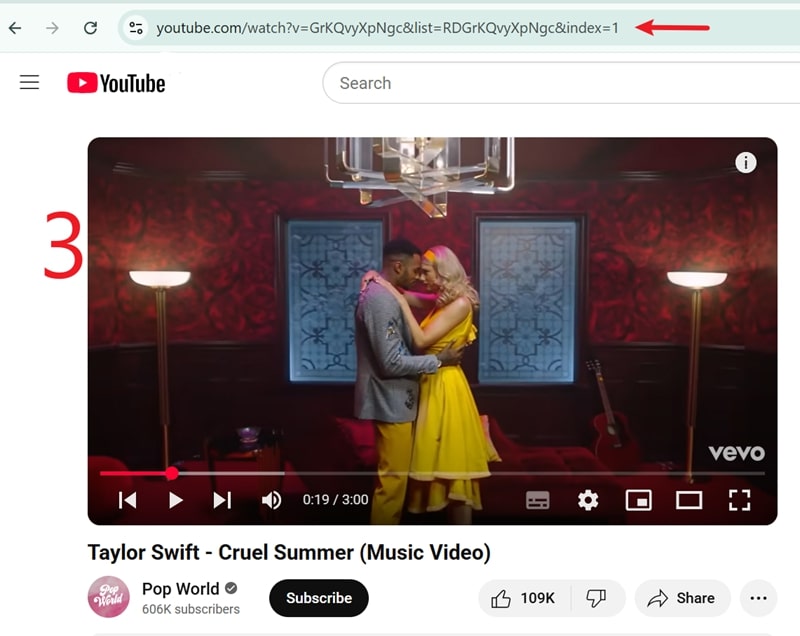
Open YouTube in your browser, find the video you want to save, and copy the video URL from the address bar.
-
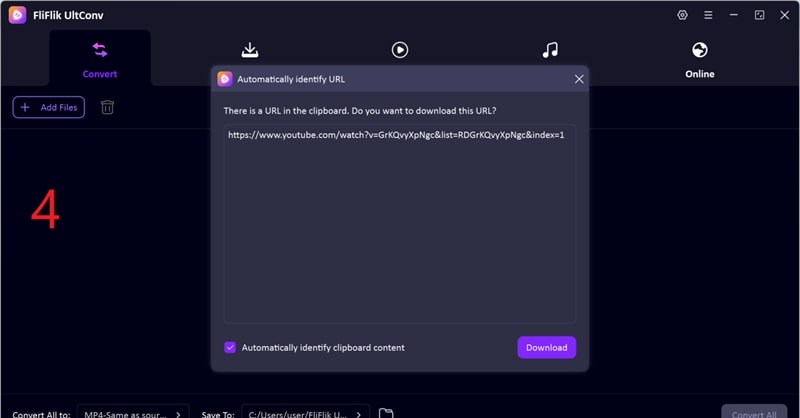
Return to UltConv. The software will usually detect the copied link automatically. Once the video appears, click Download
-
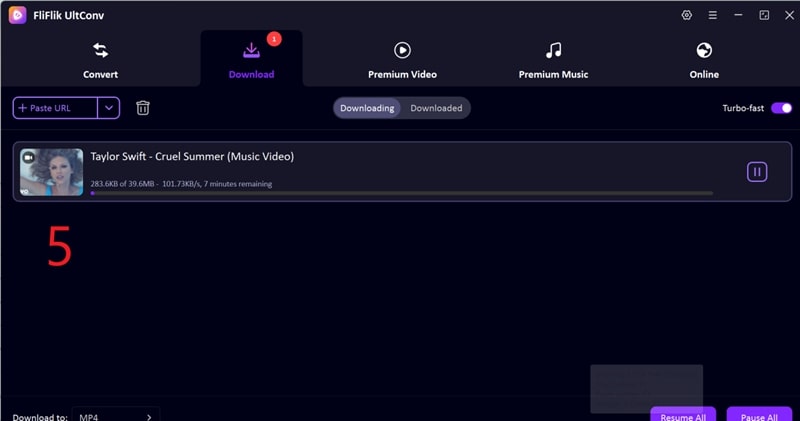
The download will start immediately. When finished, the MP4 file will be saved on your computer for offline viewing.


2. 4K Video Downloader Plus

4K Video Downloader Plus is a powerful desktop downloading tool designed for users who want to save videos from platforms like Facebook, YouTube, and other streaming websites. It is widely used by people who want high-quality downloads and more control over video formats. The tool works by simply copying and pasting the video link into the software, making the downloading process very straightforward even for beginners. It is especially useful for Mac users who want reliable ways to perform how to download video from Facebook on Mac.
- Supports video downloads up to 4K quality
- Easy copy and paste link download method
- Supports subtitles and playlist downloads
- Free version has feature limitations
- Requires software installation
3. FDown.net

FDown.net is an online Facebook video downloader that allows users to quickly save videos from Facebook without installing any software. It is popular among users who prefer simple browser-based solutions. The platform is designed for fast downloading by just copying and pasting the video link into the website. It is useful when you want to download videos quickly without dealing with complex settings.
- No software installation required
- Very simple interface
- Fast download process
- Contains advertisements
- Limited advanced download options
4. FBDownloader

FBDownloader is another web-based video download tool designed to help users save videos from Facebook. It works directly inside the browser and supports multiple video quality options. This tool is commonly used by users who want a lightweight and simple solution for downloading Facebook videos on Mac or Windows systems.
- Supports multiple video quality downloads
- Works on Mac, Windows, and mobile browsers
- Easy copy-paste download process
- Website advertisements may appear
- No batch download support
5. Video DownloadHelper

Video DownloadHelper is a popular browser extension available for Chrome and Firefox that helps users download videos from many websites, including Facebook. Instead of copying video links manually, the extension automatically detects playable videos on web pages and provides download options. This makes it convenient for users who frequently download videos directly from their browser.
- Automatically detects videos on web pages
- Supports multiple video formats
- Works with many websites
- May require companion app installation
- Some features require premium upgrade
6. Video Downloader Professional

Video Downloader Professional is a Chrome browser extension that helps users download videos from social media and streaming platforms, including Facebook. It is designed for users who want a quick and lightweight downloading method without installing full desktop software. The extension integrates directly into the browser toolbar for easy video detection and downloading.
- Very easy to use
- Fast video detection and download
- Works directly inside the browser
- Limited advanced download features
- May fail with protected videos
FAQs
Q1. How to download private videos from Facebook on Mac?
Downloading private videos from Facebook is more complicated because private videos are protected by privacy settings. Normally, you must have permission or access to the video through your own account.
Q2. Is it legal to download Facebook videos?
Downloading videos from Facebook for personal offline viewing is usually fine, but redistributing, reposting, or using copyrighted content without permission may violate copyright laws and platform policies. Always check content ownership and local regulations before downloading.
Conclusion
Whether you prefer desktop software, online downloaders, or browser extensions, downloading Facebook videos on your Mac is incredibly simple with the right tool. Among the many options available, FliFlik UltConv Video Downloader stands as the most reliable choice for Mac users. Supporting thousands of websites, offering high-resolution formats, and featuring time-saving batch download capabilities, it provides a practical and convenient solution for all your media needs.
Secure Download
Secure Download
Hello, I research and introduce useful solutions for AI videos, images, and audio tips in our daily life. If you learn these things, you can easily deal with the problems of the new era.

