

 8 minutes read


Have you ever tried saving amazing video thumbnails? Screenshots often end up blurry or pixelated, and it’s frustrating when you want the full-quality image. YouTube doesn’t provide an official way to download thumbnails directly, but several free tools and methods make it easy.
In this article, we’ll show you the best ways to download YouTube video thumbnails in high quality. You’ll learn how to use a desktop downloader, as well as simple online tools that work from your browser. By the end, you’ll know exactly how to get crisp, clear thumbnails for any video you love.

Part 1. Best YouTube Video Thumbnail Saver on Windows and Mac
FliFlik UltConv Video Downloader is a powerful tool that meets all your media needs and is compatible with both Windows and Mac systems. It can not only save videos but also easily download music, playlists, and live streams from over 10,000 websites including YouTube, Netflix, TikTok, and Spotify. It supports stunning 8K video and clear 320kbps audio, allowing you to build high-quality offline media libraries in just a few seconds.
UltConv also supports bulk downloading of entire albums, converting videos to over 100 formats, and even removing DRM protection from music tracks, allowing you to fully enjoy the music. Whether you’re saving a short video or an entire channel, its 10x download speed and zero-loss conversion feature make it the most comprehensive and reliable downloader currently available.

- Supports 10,000+ websites for video and music downloads
- Saves files in 100+ formats including MP4, MP3, WAV, FLAC
- Downloads videos in HD, 4K, and 8K; audio up to 320 kbps
- Batch download multiple videos, playlists, or albums at once
- Built-in browser to explore and download content directly
- Remove DRM from Spotify, Apple Music, and YouTube Music
- Private folder to secure downloads with a password
▼ How to Download YouTube Videos to MP4 with FliFlik UltConv Video Downloader?
If you want to save any YouTube video as an MP4, FliFlik UltConv Video Downloader makes it simple. After installing the program on your Mac or Windows PC, follow these steps:
 Secure Download
Secure Download
Secure Download
-
Open UltConv Video Downloader and switch to the Download tab. Click the Download to button at the bottom to choose your video format.

-
Pick your desired output format, such as MP4.

-
Go to YouTube, find the video you want, and copy its URL from the browser.

-
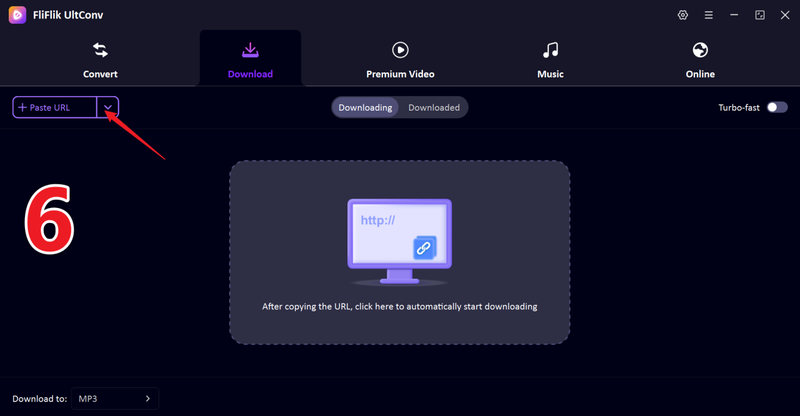
Return to UltConv. If the software detects the link automatically, simply click Download to start saving the video.

-
The download process will begin immediately, and once done, your songs will be saved on your device.

Once the download is complete, your video will be saved as an MP4 file. You can now watch it offline anytime, without ads, buffering, or interruptions.
-
If the video link isn’t detected, paste it manually into the search box and press Download.


Part 2. How to Download YouTube Video Thumbnails Online Free
Sometimes you don’t want to install software and just need a quick way to grab YouTube video thumbnails. Online tools make this easy.
1. Download Youtube Thumbnail

Download Youtube Thumbnail is a simple online tool that lets you grab high-quality thumbnails from any YouTube video. Just paste the video URL, and it provides all available resolutions, including full HD. It works on desktop and mobile without needing installation, making it ideal for content creators who need images for social media, blog posts, or video previews. The tool is fast, reliable, and keeps thumbnails clear without compression, though it focuses solely on images, not full videos.
- Free and easy to use
- Multiple thumbnail resolutions
- Works on mobile and desktop
- Limited to YouTube only
- Ads can appear on the page
2. YouTube Thumbnail Downloader

YouTube Thumbnail Downloader is a free online tool for quickly saving YouTube thumbnails in multiple resolutions. By pasting a video link, you can download images in standard, high, or max quality, suitable for editing or previews. It works on all devices and doesn’t require software installation. The clean interface makes it easy for beginners to use, and it delivers thumbnails fast. Its main focus is thumbnails only, but for creators and marketers, it’s a dependable choice.
- Instant thumbnail download
- Multiple resolutions available
- Clean interface
- Only supports YouTube
- Occasional slow load times
3. YTPeek

YTPeek is an online thumbnail downloader that retrieves high-resolution images from YouTube videos effortlessly. Simply enter the video URL, and it provides various quality options to suit your needs. It works on both desktop and mobile browsers, making it convenient for creators on the go. While the tool only downloads thumbnails, its speed, clarity, and ease of use make it popular for social media, blog posts, and video previews.
- Fast and lightweight
- Shows all thumbnail resolutions
- Mobile-friendly
- Limited to YouTube videos
- Pop-up ads can appear
4. TubePilot

TubePilot is an online YouTube thumbnail downloader designed for speed and ease of use. Paste the video link, and it fetches all available thumbnail sizes for download. The tool works on both PCs and mobile devices, making it convenient for content creators, marketers, or designers who need high-quality visuals for projects. TubePilot focuses exclusively on thumbnails, but its reliability, fast performance, and clear images make it a good choice for anyone needing quick and clean visuals from YouTube videos.
- Clean and modern design
- Quick downloads
- Mobile-friendly
- Only works for YouTube
- Limited customization options
FAQs
Q1. How to download a YouTube thumbnail image?
To save a YouTube thumbnail, use online tools like Download YouTube Thumbnail or YTPeek by pasting the video URL and choosing your resolution. For a more seamless experience, desktop tools like FliFlik UltConv can automatically grab the thumbnail while downloading the video.
Q2. Is it legal to download YouTube video thumbnails?
Yes, downloading thumbnails for personal use or educational purposes is generally legal. However, using them commercially without permission may infringe copyright.
Q3. What is the best YouTube thumbnail saver?
FliFlik UltConv Video Downloader stands out as the most versatile option. It not only downloads thumbnails but also saves videos in HD, supports 10,000+ websites, and allows multiple formats and batch downloads.
Conclusion
Saving high-quality YouTube thumbnails is easier than ever. For quick, casual saving, online tools like YTPeek or TubePilot are fast and convenient, allowing you to grab images for blogs or social media.
For a more professional solution, the FliFlik UltConv video downloader lets you automatically save high-resolution thumbnails while downloading the full video. Choosing the right tool ensures perfect image quality every time, eliminating the need for manual extraction.
Secure Download
Secure Download
Hello, I research and introduce useful solutions for AI videos, images, and audio tips in our daily life. If you learn these things, you can easily deal with the problems of the new era.

