

 6 minutes read


Getting your hands on DRM-protected videos isn’t always straightforward. Streaming platforms don’t make it easy; they lock their content up tight to stop people from copying it. So it’s no wonder folks want a fast, safe way to download these videos. Honestly, with the right tool, you can grab them with just a click and keep the same quality. No need to mess around with complicated programs or tech know-how.
This works for anything you’ve paid for—movies, shows, even that premium content. Once you’ve got the files, they’re yours. Watch them offline, on any device, whenever you want. Here, we’ll walk you through how to download DRM-protected videos so you can hang onto your favorites without any hassle.

Part 1. What is DRM Protection?
DRM stands for Digital Rights Management. It’s a technology used by streaming services and content providers to protect their videos, music, and ebooks from unauthorized copying or sharing. Essentially, it locks the content so only authorized users can watch or listen.
Platforms like Netflix, Amazon Prime Video, Disney+, Hulu, and Apple TV+ use DRM to prevent piracy and protect copyrights. Even if you pay for a subscription, you can stream content, but you usually can’t save it freely to your device.
“Why can’t we back up the media we have paid for?” — That’s why people often look for ways to download DRM-protected videos. Without proper tools, the videos remain locked in the app or browser. DRM ensures creators and platforms maintain control over their content while still giving subscribers access.
Part 2. Can DRM Ever be Removed?
DRM is designed to stay in place. Streaming platforms don’t want their videos copied or shared outside their apps. That’s the whole point of the lock.
That said, DRM isn’t unbeatable. If you have legal access to a video, some tools can bypass the restriction during the DRM video download process. These tools don’t crack the platform itself. They capture and save the video you’re already allowed to watch, then remove the playback limits.
The result is a normal video file you can keep, move, and play offline. That’s why DRM removal is usually tied to specialized download software, not simple browser tools. We will discuss some of the best solutions next.
Part 3. How to Download DRM-Protected Videos Easily?
Downloading DRM-protected videos can feel complicated. Most streaming platforms lock their content, so you can’t save it directly. That’s where FliFlik UltConv Video Downloader comes in. It lets you capture videos you have access to and save them as standard MP4 files. UltConv supports downloads from YouTube, Netflix, Disney+, Spotify, and over 10,000 platforms. You can choose the resolution, from 720p to 4K, depending on what the source supports. This means no quality loss and no annoying compression.
The UltConv Video Downloader also focuses on convenience. You can download single videos or entire playlists in one go. DRM removal happens automatically during the download, so you can watch offline on any device. It’s fast, reliable, and works with multiple streaming platforms. With batch downloads, high-quality output, and easy format selection, FliFlik UltConv Video Downloader is built for anyone who wants control over their DRM-protected videos.

- Save DRM-protected videos to MP4 from 10,000+ websites
- Supports resolutions from HD to 4K
- Download videos to MP4, MP3, and over 100+ formats
- One-click download for playlists and series
- Bulk download multiple videos at once
- Remove DRM restrictions for offline playback
▼ How to Download a DRM-Protected Video With FliFlik UltConv Video Downloader?
-
Download and install FliFlik UltConv Video Downloader. The setup is quick and easy. In a few minutes, you’ll be ready to save your favorite Disney+ movies or any other content for offline viewing.
FREE DOWNLOAD![secure download]() Secure Download
FREE DOWNLOAD
Secure Download
FREE DOWNLOAD![secure download]() Secure Download
Secure Download
-
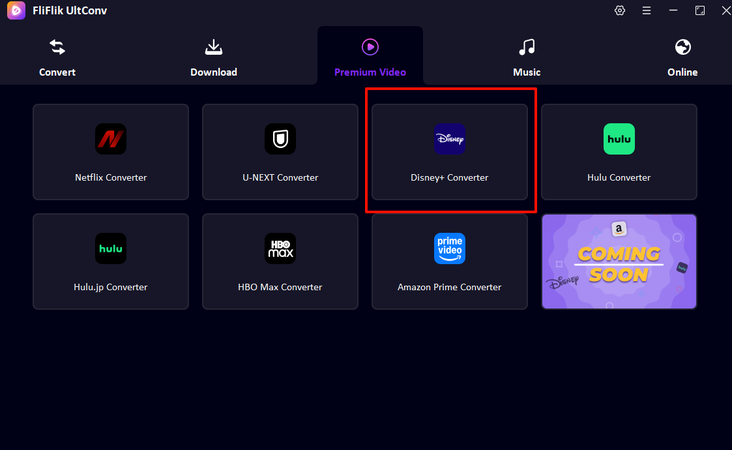
Open the program and go to the Premium Video section. Then select Disney+ Converter to load the Disney Plus interface inside UltConv.
-
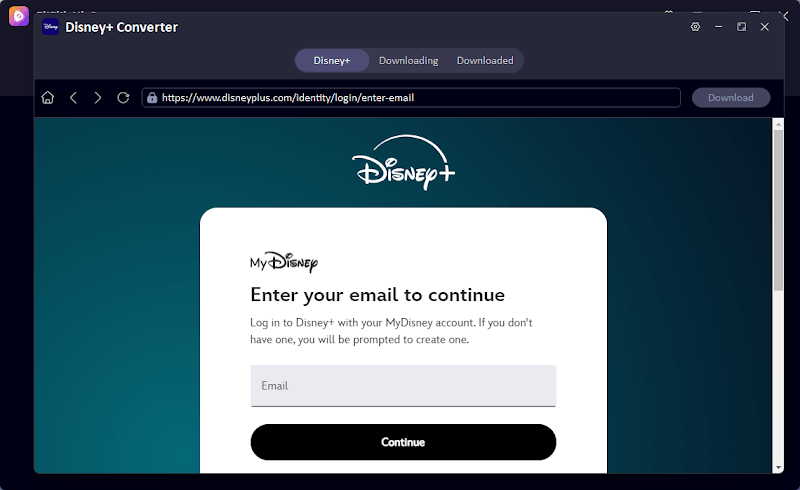
Sign in to your Disney Plus account. This allows you to access your movies, series, and playlists directly within the app without switching to a browser.
-
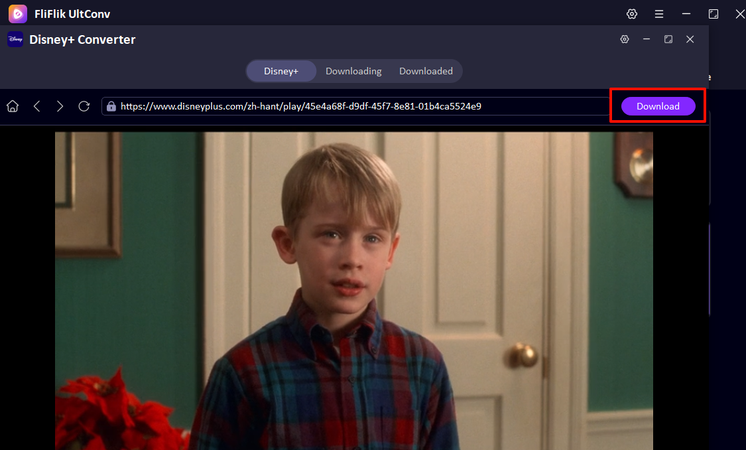
Browse or search for the movie or playlist you want to download. Click the Download button and choose your preferred resolution and format.
-
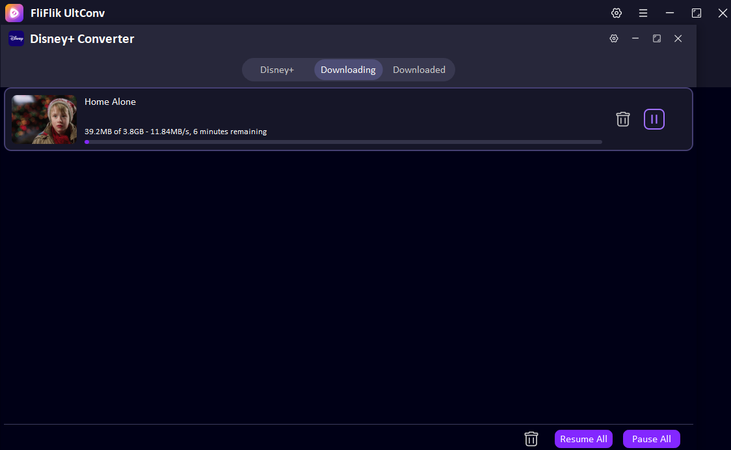
The download will start immediately. Once it’s done, go to the Download tab to find your saved videos. Now they’re ready to watch offline anytime.


Part 4. How to Record DRM-Protected Video in One Click?
Sometimes, streaming platforms block downloads, making it hard to save your favorite videos. In these cases, a screen recorder is a simple solution. FliFlik Online Screen Recorder lets you capture any video playing on your browser, making it an easy way to download DRM-protected videos from website content without installing heavy software. It’s free, safe, and produces clean HD recordings ready for offline viewing.
- Free to use with no sign-up required
- Capture screen, webcam, system audio, and microphone
- High-quality recordings in HD
- 100% safe and private, recordings never leave your device
- No watermarks on recorded videos
- Works in all major browsers: Chrome, Firefox, Edge, Safari, Opera
▼ Steps to Download DRM Protected Videos from a Website With FliFlik Online Screen Recorder?
-
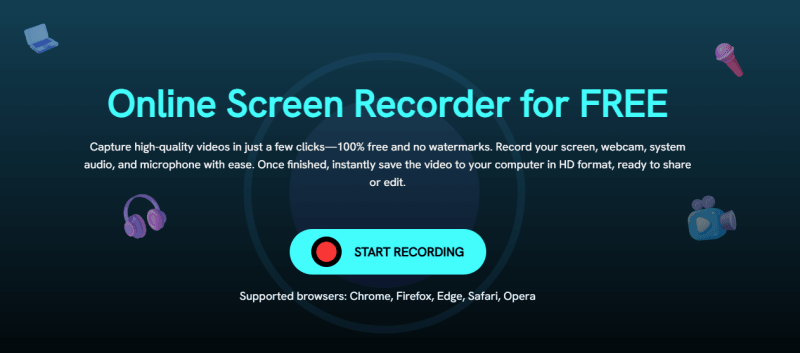
Step 1: Go to the FliFlik Online Screen Recorder website and click Start Recording.
-
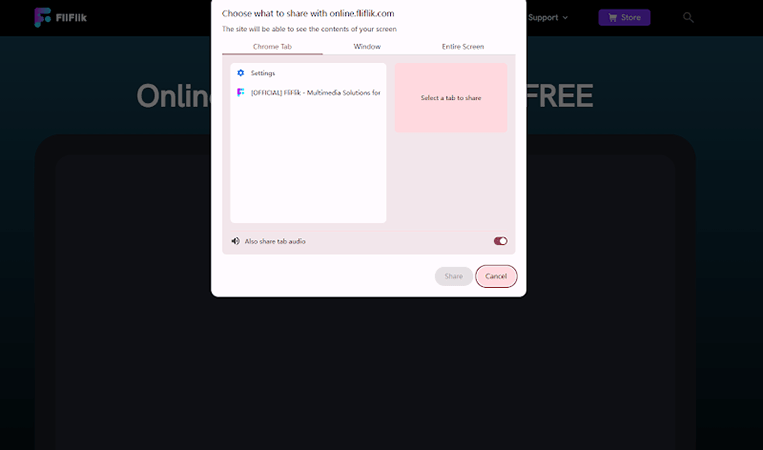
Step 2: Select the window or browser tab you want to capture. Choose audio and webcam options if needed, then click Record. A 3-second countdown will start.
-
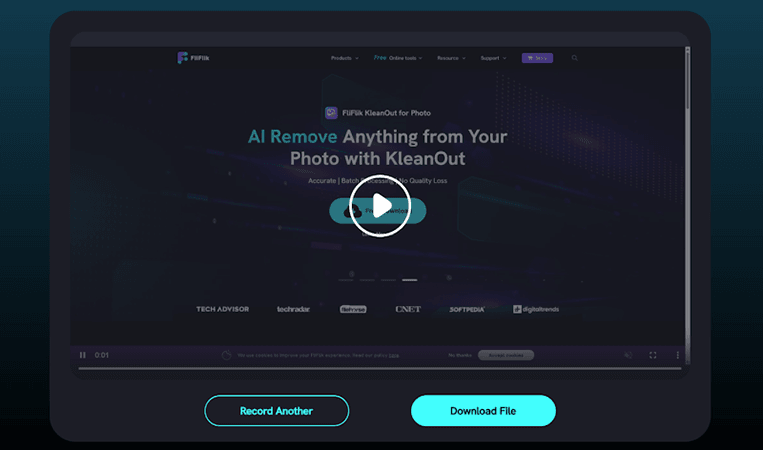
Step 3: When the video is done, click Stop. Preview your recording, then save it to your computer. You can also click Record Another to capture a new video.


This method is perfect if you need a simple, one-click way to download DRM-protected videos from website content quickly.
Final Words
DRM protection keeps videos locked, even if you’ve paid for or have access to them. That’s why many people look for a reliable way to how to download DRM protected videos. While direct downloads aren’t always possible, tools like FliFlik UltConv make it simple.
With FliFlik UltConv Video Downloader, you can save movies, shows, and premium content in HD or 4K, remove DRM restrictions automatically, and even download entire playlists in one go. It’s fast, secure, and works across multiple streaming platforms. For videos you can’t download directly, the FliFlik Online Screen Recorder lets you capture content in high quality without watermarks. If you want full control over your favorite content and the ability to watch offline anytime, get FliFlik UltConv Video Downloader today. It’s the easiest, most reliable way to access and save DRM-protected videos safely.
 Secure Download
Secure Download
Secure Download
Hey there! I am Maxwell Clark. I'm always looking for new tech tools that make a difference, from making visuals and audio better to making workflows better. I'm going to share tips and tricks for using AI tools for videos, audio, and images. I'm excited to help you navigate the digital world more efficiently and creatively!

