

 7 minutes read


Kick has quickly become a favorite for gamers, streamers, and viewers who want longer VODs, raw live content, and fewer platform limits. From full-length streams to short highlight clips, there’s plenty worth saving. However, Kick doesn’t offer a built-in way to download videos for offline viewing or reuse.
In this article, we’ll introduce the top 5 Kick VOD downloaders you can use on any device. We’ll also compare features, pros and cons, and answer common questions so you can pick the best solution for your needs.

Part 1. Best Kick VOD & Clip downloader – FliFlik UltConv (Desktop)
When it comes to saving VODs or clips from Kick, browser tools often fall short. They’re slow, limited in quality, and unreliable for long streams. FliFlik UltConv Video Downloader is a full desktop solution designed for high-quality video downloading, not just Kick, but over 10,000 websites.
Instead of juggling separate tools for downloading and converting, UltConv handles everything in one place. You can grab Kick VODs in up to 4K, convert videos to MP3, download playlists in bulk, and choose from 100+ output formats. Add in fast speeds, batch downloads, and a built-in browser, and you get a setup that’s built for real-world use, not quick hacks.

- Download Kick VODs and clips in 1080p, 2K, or 4K
- Supports MP4, MP3, WAV, AAC, FLAC, and 100+ formats
- Batch download multiple videos at the same time
- Built‑in browser for direct searching and downloading
- Up to 10× faster download speed
▼ Steps to Download Kick VODs with UltConv Video Downloader
First, install UltConv on your Windows or Mac computer and launch the program.
 Secure Download
Secure Download
Secure Download
-
Open UltConv and switch to the Download section. At the bottom of the window, click Download to and set your preferred output format.

-
Choose your desired format from the list (for example, MP4 for video or MP3 for audio).

-
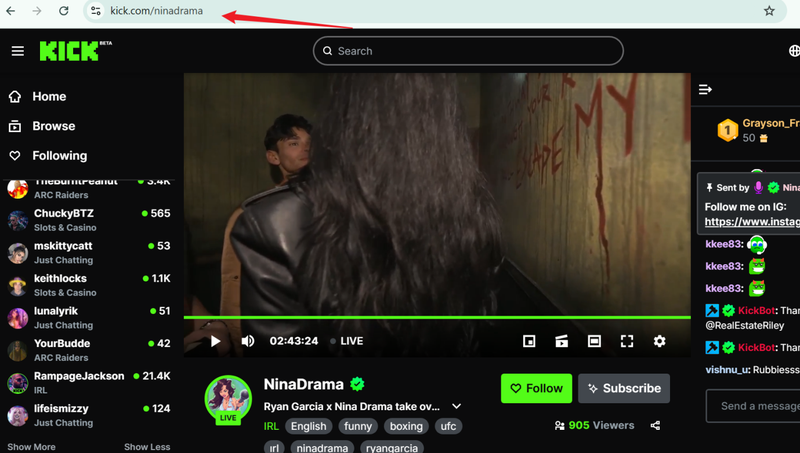
Visit Kick in your browser, find the VOD or clip you want, and copy its URL from the address bar.
-
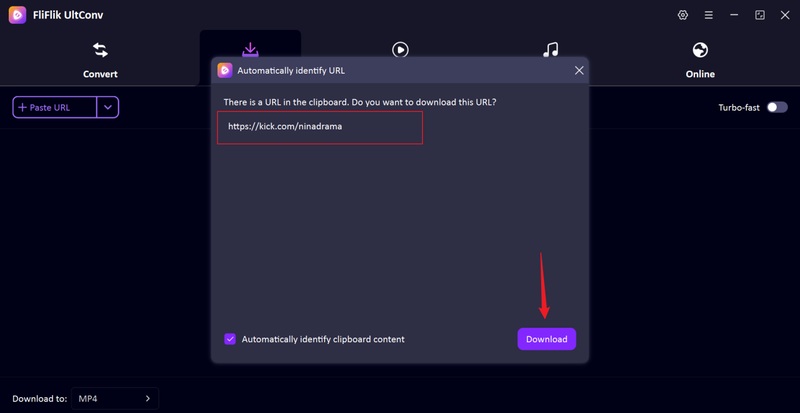
Go back to UltConv. In most cases, the software automatically detects the copied link. When it appears, click Download.
-
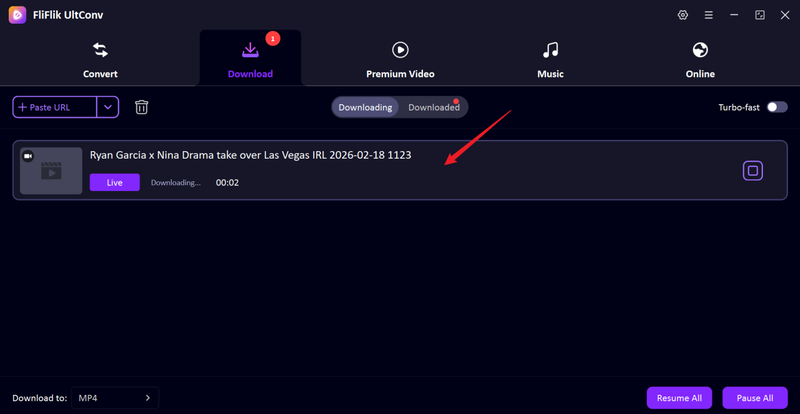
The download starts immediately. Once finished, your Kick VOD is saved on your device and ready to watch offline.


Part 2. Top 2 Kick VOD downloader Extensions (Chrome/Firefox)
Browser extensions are handy when you just want to grab a quick clip or VOD from Kick without installing desktop software. Here are two popular extension-based options.
1. Kick VOD Downloader on Chrome

Kick VOD Downloader for Chrome is built for simplicity. Once installed, it automatically detects playable videos on Kick pages and lets you download them with a single click. There’s no need to copy links or open extra websites. Just play the VOD, hit the extension icon, and choose your file. It’s a convenient choice for users who mainly save short clips or occasional streams and prefer staying inside their browser.
- One-click detection while videos play
- Supports basic video quality options
- Works directly inside Chrome
- No account required
- Very easy to use, beginner-friendly
- No external websites needed
- Quick setup
- Limited format and quality choices
- Not ideal for long VODs or batch downloads
2. Kick VOD Downloader on Firefox

The Kick VOD Downloader on Firefox version follows a similar idea but feels slightly lighter on system resources. It monitors active media streams and makes them downloadable from the toolbar. If you already use Firefox as your main browser, this extension fits naturally into your workflow. It’s useful for grabbing Kick clips or smaller VODs without switching tools, though advanced features are still off the table.
- Stream detection while watching Kick videos
- Simple toolbar download button
- Supports common video formats
- Runs fully inside Firefox
- Smooth integration with Firefox
- Fast for small downloads
- No software installation required
- No batch downloading
- Fewer quality and format options
Part 3. Top 2 Kick VOD downloader Online Free
If you don’t want browser extensions or desktop apps, online Kick downloaders are the fastest way to save VODs. Let’s look at two popular options.
1. Kick VoD & Clip Downloader

Kick VoD & Clip Downloader is a simple browser-based tool built specifically for downloading Kick streams and clips. The interface is clean and focused on doing one thing well: saving Kick videos fast. It supports standard MP4 output and works on both desktop and mobile browsers, which makes it handy when you’re away from your computer.
- Direct Kick VOD and clip downloads
- MP4 output support
- Works on desktop and mobile browsers
- No registration required
- Very easy to use
- No software or extensions needed
- Quick link processing
- Limited quality options
- No batch downloads
2. Streams Charts

Streams Charts is better known as a streaming analytics platform, but it also offers a handy Kick VOD download tool. Alongside streamer stats and rankings, you’ll find a simple downloader that lets you save Kick videos by pasting a link. It’s useful if you already use Streams Charts to track creators or view streaming data. The downloader itself is basic but reliable for short VODs and clips.
- Kick VOD link parsing
- Simple browser-based downloads
- Integrated with streaming analytics
- No account required for basic use
- Works directly online
- Useful if you already use Stream Charts
- Clean, clutter-free interface
- Very limited download options
- Not designed for large or multiple files
FAQs
Q1. How to download Kick VODs online?
The easiest way is to use a browser-based tool like Kick VoD & Clip Downloader. Just copy the VOD link from Kick, paste it into the downloader, and choose MP4. No installs needed. Online tools work best for short clips or occasional downloads.
Q2. What is the best Kick clip downloader?
If you care about speed, quality control, batch downloads, and avoiding ads or failed links, FliFlik UltConv Video Downloader is the stronger option. It handles full VODs and clips, supports high resolutions, and doesn’t depend on unstable web servers.
Conclusion
Browser extensions and online tools are fine for quick grabs, but they’re also the most likely to break, throttle speeds, or fail on longer streams. If you download Kick content regularly, FliFlik UltConv Video Downloader stands out as the most dependable option for saving videos from Kick. It skips the guesswork, avoids random site errors, and gives you a consistent workflow from start to finish. So FliFlik UltConv Video Downloader is the smarter long‑term choice.
Secure Download
Secure Download
Hello, I research and introduce useful solutions for AI videos, images, and audio tips in our daily life. If you learn these things, you can easily deal with the problems of the new era.

