

 7 minutes read


Trying to save a GIF from Pinterest can be surprisingly frustrating. You might find yourself clicking through menus only to realize the download button is missing, or worse, the GIF saves as a static image. If you’ve been wondering how to download Pinterest GIFs to your PC or mobile without the hassle, you’ve come to the right place.
In this guide, we’ll walk you through the most effective ways to save Pinterest GIFs across all your devices. Whether you prefer using powerful desktop software, a quick online downloader that requires no installation, or a simple mobile solution, we’ve got you covered.

Part 1. Why Do You Need to Download GIFs from Pinterest?
Pinterest is full of fun, creative, and informative GIFs. Sometimes, you may want to save them for later use, but there is no download button on Pinterest to save GIFs. Here are some reasons why you might want to download GIFs from Pinterest:
-
Offline Access : Once downloaded, you can view GIFs anytime, even without internet access. This is especially useful for presentations, social media posts, or personal collections.
-
Easy Sharing : GIFs saved to your device can be shared directly with friends, family, or on other social media platforms without sending a link.
-
Content Creation : Many people use GIFs from Pinterest in blogs, slideshows, or design projects. Having a local copy makes it easier to edit or include in your work.
-
Avoid Losing Favorites : Pinterest boards can change, or GIFs can be removed. Downloading ensures you keep your favorite GIFs safely on your device.
Part 2. Top 3 Pinterest GIF Downloader Online
Sometimes you may not want to install software to download GIFs from Pinterest. Online tools are a quick and convenient solution; they work directly in your browser and let you save GIFs in just a few steps. Here are three reliable options you can try.
1. SnapAny

SnapAny is a popular online Pinterest GIF downloader that offers a fast and straightforward way to save animations without installing any software. By simply copying the GIF link and pasting it into the browser-based tool, users can quickly download high-quality files to their Windows or Mac devices. Its no-fuss design and cross-platform compatibility make it an ideal choice for those who want a reliable, one-click solution for grabbing Pinterest GIFs.
- Works on both Windows and Mac without installation
- Supports high-quality GIF downloads
- Free to use
- Limited to smaller GIF files
- Occasional slow download speed
2. SaveThatPin

SaveThatPin is a streamlined online tool that allows users to download Pinterest GIFs and images without the need for registration or software installation. By focusing on a simple copy-paste workflow, it ensures high-quality results across all major browsers. Its beginner-friendly interface makes it an ideal, no-hassle choice for anyone looking to save Pinterest content quickly and reliably.
- No account or registration required
- Fast downloads with a simple interface
- Works on all major browsers
- Ads on the website can be distracting
- Some GIFs may not download if they are private
3. SavedFast

SavedFast is a versatile online downloader that allows users to quickly save Pinterest GIFs and videos directly through their browser. By simply pasting a Pinterest link, you can generate high-quality downloads without the need for any software installation. Its cross-platform design ensures a seamless experience on both desktop and mobile, making it an ideal choice for users who want to preserve original GIF quality while switching between devices.
- Free and easy to use
- High-quality GIF download support
- Works on mobile and desktop browsers
- Limited advanced features
- Sometimes requires multiple attempts for large GIFs
Part 3. How to Download GIFs from Pinterest on PC (Windows & Mac)
FliFlik UltConv Video Downloader is the premier desktop solution for downloading Pinterest GIFs with speed and reliability. Unlike web-based tools that often struggle with slow speeds or failed links, UltConv provides a stable, high-performance environment with support for over 10,000 websites.
The software ensures your GIFs remain crisp and smooth by supporting resolutions from HD up to 4K. With powerful features like batch downloading, a built-in browser, and ultra-fast processing, you can effortlessly curate a high-quality GIF collection without the typical technical hurdles. Whether you need to convert content to MP4 or preserve the original GIF format, UltConv offers a seamless, all-in-one experience for PC users.

- Supports 100+ formats, including MP4, MP3, MKV AVI etc.
- Works with 10,000+ websites, including Pinterest, Instagram, TikTok, Facebook, and YouTube
- High-quality downloads keep HD 1080p, 2K, and 4K resolution
- Batch download saves multiple GIFs or videos at once
- Fast download speeds save files quickly without waiting
▼ Download Pinterest Videos to MP4 Using FliFlik UltConv Video Downloader
-
Download and install FliFlik UltConv Video Downloader on your Windows and Mac.
FREE DOWNLOAD![secure download]() Secure Download
FREE DOWNLOAD
Secure Download
FREE DOWNLOAD![secure download]() Secure Download
Secure Download
-
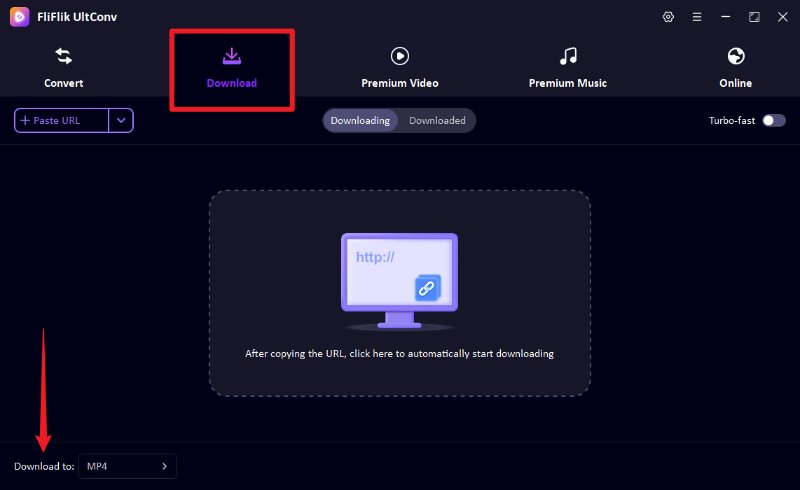
Open FliFlik UltConv and go to the Download section. Click the Download to button at the bottom to select your desired output format.
-
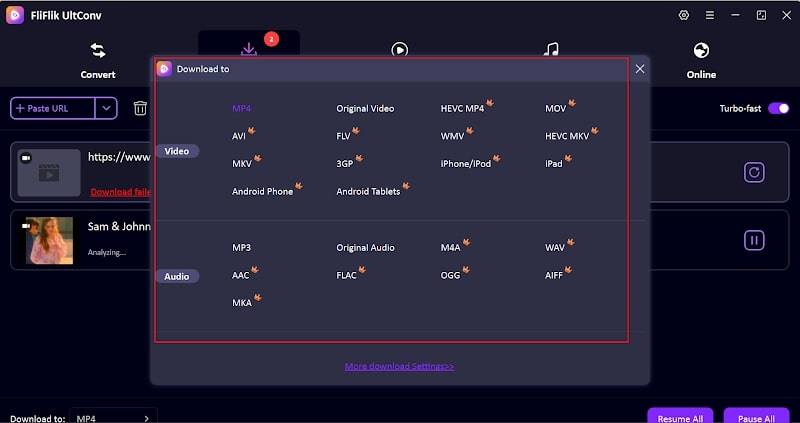
Choose MP4 from the format list. MP4 ensures the downloaded file works smoothly on most devices and media players.
-
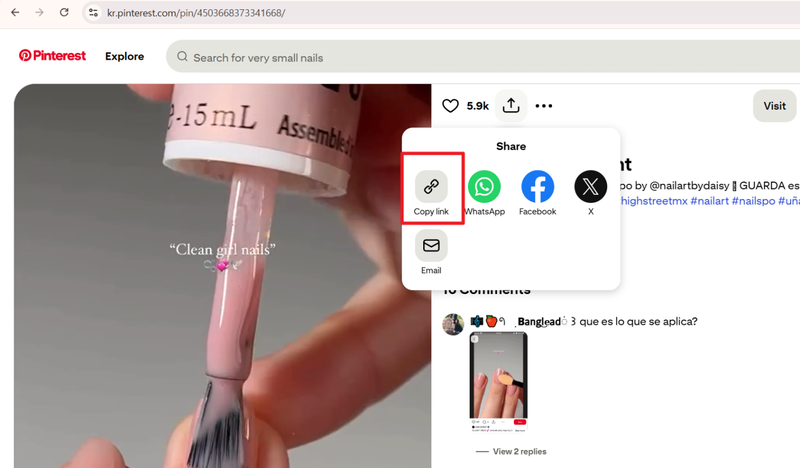
Open Pinterest in your browser, find the GIF or video you want, and copy its URL.
-
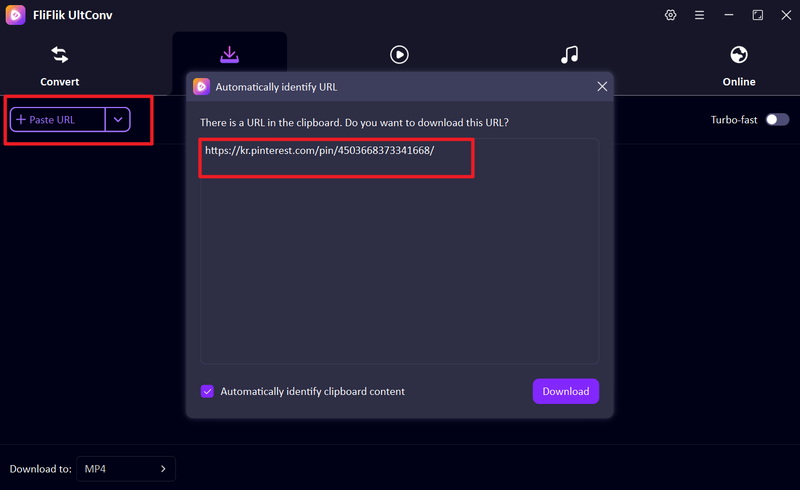
Go back to UltConv. If the software automatically detects the copied link, click Download to start saving the file. If the link isn’t detected automatically, paste the Pinterest URL into the input box manually and then click Download.
-
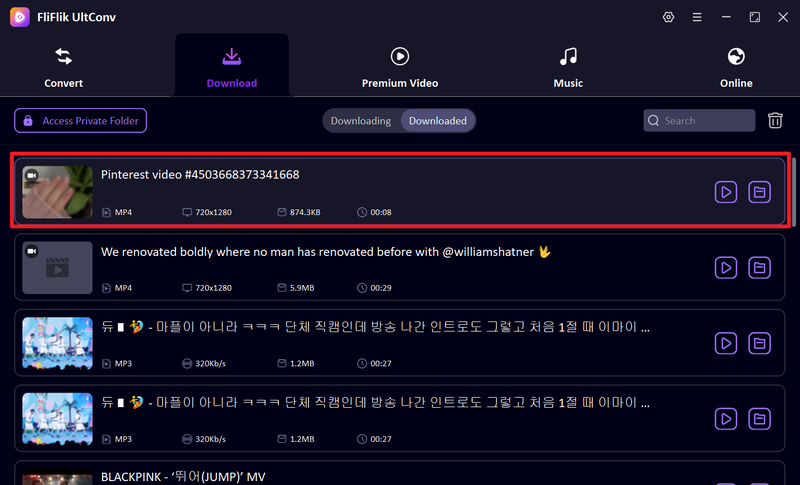
The download will start immediately. Once finished, your Pinterest video or GIF will be saved as an MP4 file on your computer, ready for offline viewing.


FAQs
Q1. Is there a Pinterest GIF downloader online free?
Yes, there are several free online tools to download GIFs from Pinterest. Websites like SnapAny, SaveThatPin, and SavedFast let you save GIFs directly to your device without installing any software. They are easy to use and work on most browsers.
Q2. How to download Pinterest videos on macOS?
You can download Pinterest videos on macOS using desktop software like FliFlik UltConv Video Downloader. It works on Mac, supports high-quality downloads, multiple formats including MP4, and even allows batch downloading for saving multiple videos or GIFs at once.
Conclusion
Choosing the right tool makes downloading Pinterest GIFs and videos effortless. While online options like SnapAny, SaveThatPin, and SavedFast are great for quick tasks, FliFlik UltConv Video Downloader is the superior choice for quality and speed. Supporting both Windows and Mac, it offers batch downloads and HD quality across 100+ formats, making Pinterest content saving fast, reliable, and easy.
 Secure Download
Secure Download
Secure Download
Hello, I research and introduce useful solutions for AI videos, images, and audio tips in our daily life. If you learn these things, you can easily deal with the problems of the new era.

