

 7 minutes read


If you have ever tried downloading videos from YouTube, you’ve likely heard of Snapany. It is a browser-based tool that claims to allow for quick downloads without installation, which is more than enough to attract users. But the problem is: convenience is not always synonymous with security.
In this guide, we will break down what Snapany is and the specific features it offers. Next, we will evaluate Snapany’s safety and provide a clear, step-by-step walkthrough for downloading videos with the tool. Finally, we will introduce a more powerful Snapany desktop alternative to help you choose the one that best meets your needs.

Part 1. What is Snapany? How to Use it?
Snapany is a browser-based video downloader that lets you save videos from platforms like YouTube without installing any software. You simply paste a link, choose a format, and download. That quick, no-signup workflow is why Snapany attracts casual users who just want fast access to offline videos.
- Web-based tool, no software installation required
- Supports YouTube and several other popular video sites
- Download videos in MP4 or extract audio as MP3
- No account or registration needed
- Works on Windows, macOS, Android, and iPhone via browser
- Simple copy-paste download process
- Free to use (ad-supported)
▼ Detailed Steps to Use Snapany YouTube Downloader
It’s built for quick, one-off downloads rather than advanced tasks like batch saving or subtitle handling. Here’s exactly how it works.
- Step 1: Open YouTube and find the video you want to save. Copy the URL from your browser’s address bar.
-
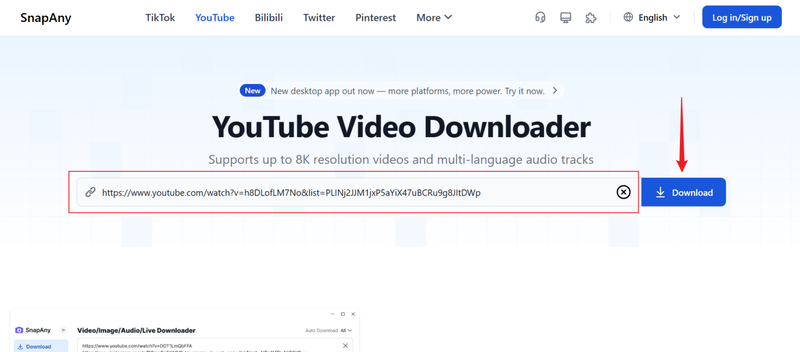
Step 2:
Go to the Snapany website. Paste the copied link into the input box on the homepage, then click the Download button.
-
Step 3:
After Snapany processes the link, you’ll see download options like MP4 (video) or MP3 (audio). Pick your preferred format and available resolution.
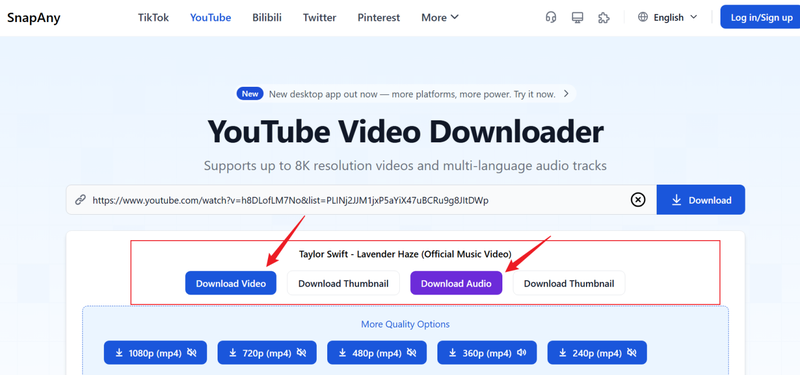
- Step 4: Click the final Download button. Your file should begin saving to your device (you may need to dismiss pop-ups or extra tabs first).


Part 2. Is Snapany Safe to Use?
Snapany doesn’t require installation or sign-ups, which sounds safer on the surface. But being web-based also means you’re exposed to ads, pop-ups, and redirects that you don’t fully control.
Different Snapany mirrors can behave differently, and downloading content from platforms like YouTube already lives in a legal gray area. At worst, you could run into privacy concerns, misleading buttons, or sketchy third-party pages. That’s why it’s worth looking closely before relying on it regularly.
Extra Tip. Best Snapany Downloader Alternative – FliFlik UltConv
Snapany occasionally downloads some simple files, but its various limitations—unstable speed, inability to support bulk downloads, and frequent ad jumps—make it unsuitable for everyday use. This is precisely where the FliFlik UltConv Video Downloader comes in.
FliFlik UltConv is a powerful desktop downloader that supports bulk video or audio scraping from over 10,000 websites, including YouTube. It offers the highest 4K picture quality, multiple formats (such as MP4, MP3, FLAC), and supports one-click download of entire channels or playlists, balancing efficient and lossless sound quality.

- Download videos from 10,000+ sites in resolutions up to 4K and 2K
- Batch download videos, playlists, channels, and albums in one click
- Convert video to audio (MP3, WAV, FLAC, AAC, more) with no quality loss
- Save live streams directly from platforms like Twitch and TikTok
- Built-in browser, private folder protection, and up to 10x faster download speeds
▼ How to Download YouTube Videos to MP4 with FliFlik UltConv Video Downloader?
After installing the program on your Windows or Mac computer, you can download videos in just a few clicks.
 Secure Download
Secure Download
Secure Download
-
First, open UltConv and switch to the Download section. At the bottom of the window, click Download to and select your preferred output format.

-
Next, choose MP4 from the available format options.

-
Now head over to YouTube, find the video you’d like to save, and copy its link from your browser.

-
Return to UltConv. In most cases, the software will detect the copied link automatically. When it appears, simply click Download to begin.

-
The download will start immediately. Once it’s finished, your video will be saved as an MP4 file on your device, ready for offline viewing without ads, buffering, or interruptions.



Although Snapany and FliFlik UltConv can both download videos, they differ fundamentally in terms of resolution, batch processing, format support, and crawl speed. One is designed for temporary downloads, while the other is tailored for users seeking high-quality visuals, deep control, and scalability. Here is an intuitive comparison of the two to help you make a quick choice:
FliFlik UltConv Video Downloader vs. Snapany
| Feature | FliFlik UltConv | Snapany |
|---|---|---|
| Max Resolution | Up to 4K (higher on supported sources) | Usually up to 1080p (varies by video) |
| Batch Download | Yes (videos, playlists, channels) | No (single video only) |
| Supported Websites | 10,000+ video & music platforms | Limited (mainly YouTube and a few others) |
| Formats Supported | MP4, MP3, WAV, FLAC, AAC, and 100+ more | MP4, MP3 |
| Download Speed | Fast desktop processing (up to 10x faster) | Depends on server load and ads |
| Playlist / Channel Download | Yes | No |
| Live Stream Download | Yes | No |
| DRM Removal (Music) | Yes | No |
| Ads / Pop-ups | None | Frequent |
| Platform | Windows & macOS desktop | Browser-based |
| Price | Paid (free trial available) | Free |
FAQs
Q1. Is Snapany free to use?
Yes. Snapany is free and doesn’t require registration. That said, it’s ad-supported, which means you’ll often run into pop-ups and redirects. You’re also limited to single downloads with basic formats and resolutions. So while it costs nothing upfront, you pay for it in convenience and control.
Q2. How can I use Snapany on my iPhone?
You can use Snapany on an Apple iPhone through Safari or any mobile browser. Just copy the video link from YouTube, paste it into Snapany, and follow the download prompts. Keep in mind that iOS has file restrictions, so saved videos usually end up in the Files app.
Conclusion
Snapany is free and requires no setup, but it comes with strings attached: intrusive ads, capped speeds, and no batch processing. If you only need a single, low-res clip once in a while, it gets the job done—but that’s about it.
FliFlik UltConv Video Downloader is for those who want real power and quality. It skips the browser chaos, giving you full control over 4K resolution, lossless formats, and entire playlist downloads in one click. If you download videos regularly and value your time, UltConv is the professional tool that actually does the job properly.
Secure Download
Secure Download
Hello, I research and introduce useful solutions for AI videos, images, and audio tips in our daily life. If you learn these things, you can easily deal with the problems of the new era.

