

 7 minutes read


Inspiring TED Talks never fail to spark creativity, whether offering practical career insights or profound life philosophies—and many users wish to save them for offline viewing, allowing them to revisit these talks anytime. However, how can one acquire these video resources quickly and in high definition?
This article outlines the most practical methods for downloading TED videos in 2026: ranging from direct saving via the official website and mobile apps to utilizing efficient third-party TED downloaders to convert videos into MP4 format.

Part 1. How to Download TED Videos to MP4 Officially
Before using any third-party tool, it’s worth knowing that TED itself provides official ways to save talks for offline viewing. You can download many talks directly from TED.com or save them inside the TED mobile app on iOS and Android.
▼ Download TED Videos from TED.com
- Step 1: Go to TED.com and open the TED Talk you want to download.
- Step 2: Scroll down below the video player until you find the Download option.
-
Step 3:
Click
Download video
and choose the available format or quality if options appear.
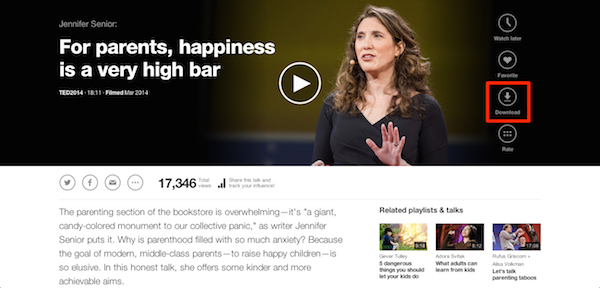
- Step 4: The video will begin downloading and will be saved to your computer as an MP4 file.
- Step 5: Once the download is complete, open the file from your downloads folder and watch it offline anytime.

▼ Download TED Videos from the iOS or Android App
- Step 1: Install the TED app from the App Store or Google Play.
- Step 2: Open the app and search for the TED Talk you want to watch.
- Step 3: Tap the talk to open its video page.
-
Step 4:
Tap the
Download
icon below the video player.

- Step 5: Step 5: Wait for the video to download. Once finished, you can watch it offline from the app’s Downloads section.

Pros and Cons of Official TED Downloads
- Safe and fully supported by TED
- No third-party software required
- Good video quality for offline viewing
- Not every TED video offers a direct download option
- App downloads stay inside the TED app and cannot be exported
- Limited format and quality options compared with dedicated downloaders
Part 2. Best TED Video Downloader on Windows & Mac
With FliFlik UltConv Video Downloader, you can download TED Talks as MP4 for video playback or convert them to MP3 if you only want the audio version. Instead of relying on limited download options from websites, this tool lets you download and convert videos from 10,000+ websites, including major platforms like YouTube, Vimeo, Facebook, TikTok, and many more.
The software also supports high-quality downloads up to 4K and even higher resolutions, so the video you save looks just as clear as the original stream. On top of that, it supports batch downloading, meaning you can download multiple videos, playlists, or channels at once instead of saving each video manually.

- Download videos from 10,000+ websites, including TED, YouTube, Vimeo, Facebook, TikTok, and more
- High-quality downloads with support for 720p, 1080p, 2K, and 4K resolutions
- Convert videos to multiple formats such as MP4, MP3, and over 100 other formats
- Batch downloading to save multiple videos, playlists, or channels at the same time
- 10× faster download speeds for quick and efficient video saving.
▼ How to Download TED Videos to MP4 with FliFlik UltConv Video Downloader
Downloading a TED Talk is simple with FliFlik UltConv Video Downloader. Once the software is installed on your computer, follow these steps to download TED videos in MP4 format for offline viewing.
 Secure Download
Secure Download
Secure Download
-
Open UltConv on your computer and go to the Download to option on the main interface.

-
Select MP4 as the output format so the TED video will be saved in a widely supported format.

-
Go to TED.com, find the TED Talk you want to download, and copy the video page URL from your browser’s address bar.
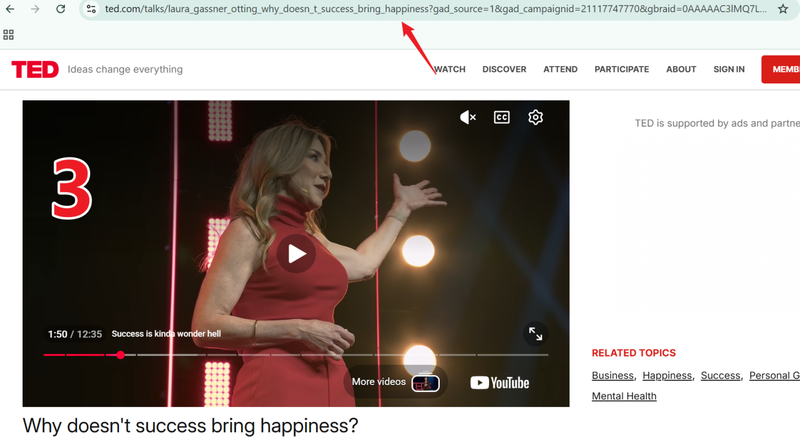
-
Once you copied the link, the tool will automatically detect it and will show you a popup window with a Download button. Just click the Download button.
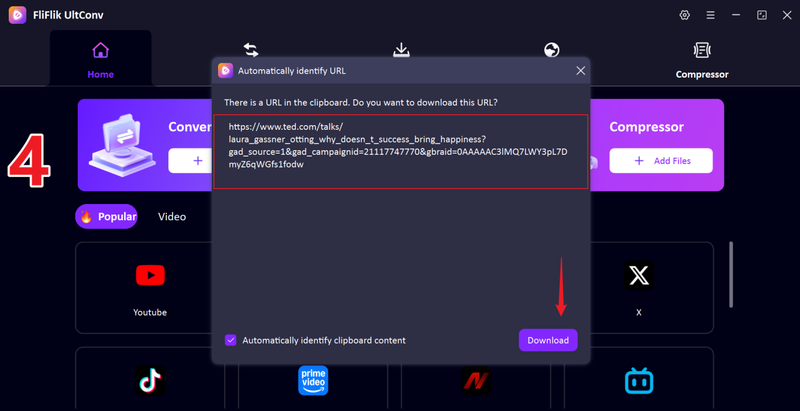
-
Click the Download button and wait for the process to complete. The TED video will be saved to your computer in MP4 format so you can watch it offline anytime.
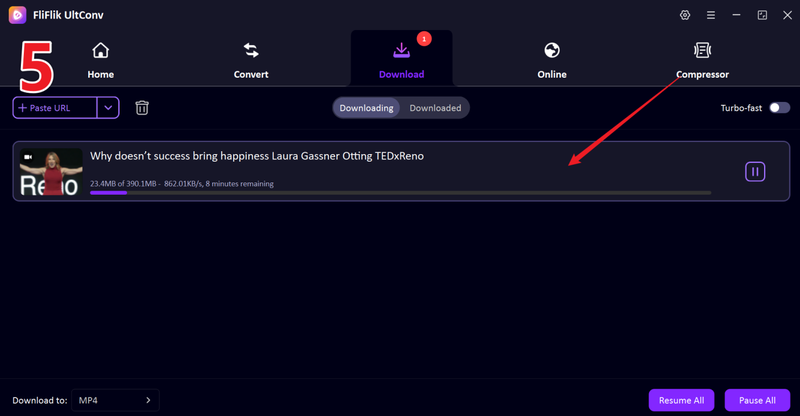


Part 3. How to Download TED Videos with Online Tools
If you don’t want to install software on your computer, online downloaders can also help you download TED videos quickly. These tools can run directly in your browser; you just need to paste the TED video link, and the website will automatically generate download options.
1. KeepOffline

KeepOffline is a simple web-based TED downloader that allows you to save TED Talks directly from your browser. You only need the video URL, and the site will process the link and provide download options. It supports multiple video resolutions and works on most modern browsers without installing additional software. This makes it a quick option if you only need to download a TED video occasionally.
2. Locoloader

Locoloader is another online tool designed specifically to download TED videos. It allows users to paste a TED Talk link and generate a downloadable version of the video. The service is straightforward and beginner-friendly, making it suitable for users who want a fast solution without complicated settings. While it may not offer as many features as desktop downloaders, it can still be useful for quick downloads of TED videos.
FAQs
Q1. Is it legal to download videos from TED?
Yes, many videos onTED.comcan be downloaded directly through the official website or mobile app. However, the videos should only be used for personal learning or offline viewing. Re-uploading or distributing the content without permission may violate copyright rules.
Q2. How can I download TED videos with subtitles?
You can download TED videos with subtitles by using the official download option on TED or a dedicated downloader like UltConv Video Downloader that supports subtitle extraction.
Q3. How to extract TED audio to MP4 for offline watching?
If you only need the audio from a TED Talk, you can use the FliFlik UltConv video downloader that supports format conversion. After downloading the video, the software can convert it to audio formats like MP3 so you can listen offline like a podcast.
Conclusion
In this guide, we covered several ways to download TED videos, including official downloads from TED, browser-based online tools, and dedicated desktop downloaders. Among these options, FliFlik UltConv Video Downloader stands out as the most powerful solution.
It supports downloads from thousands of websites, saves videos in high quality up to 4K, and allows you to convert TED videos to multiple formats like MP4 or MP3. If you want a fast, flexible, and reliable way to download TED videos for offline viewing, UltConv is one of the best tools you can try.
Secure Download
Secure Download
Hello, I research and introduce useful solutions for AI videos, images, and audio tips in our daily life. If you learn these things, you can easily deal with the problems of the new era.

