

 8 minutes read


Saving high-resolution profile pictures from Threads is surprisingly difficult. While users can view their photos, the app itself doesn’t offer a ‘download’ button. Whether you want to save a high-resolution image for reference or simply because you like the picture, the platform currently doesn’t provide an official download method.
Threads profile picture downloaders allow you to quickly access and save profile images in full quality. In this article, we’ll explore the 5 best free tools for downloading Threads profile pictures and highlight a reliable all-in-one solution for PC users.

Part 1. Top 5 Best Threads Profile Picture Downloaders for Free
Before getting into detailed descriptions, here’s a quick comparison of the top 5 free Threads profile picture downloaders. This table summarizes what each tool offers in terms of output quality, speed, login requirements, batch download support etc.
| Tool Name | Output Quality | Price | Login Required | Batch Download | Speed |
|---|---|---|---|---|---|
| Toolzin | High‑resolution images & media | Free | No | ✘ | Fast |
| Publer | High quality photos & media | Free | No | ✘ | Moderate |
| Threads Video & Photo Downloader | Original quality photos & images | Free | No | ✘ | Fast |
| Threads Image Downloader | High quality images | Free | No | ✘ | Fast |
| Threads Media Downloader | High quality images & media | Free | No | ✔ (multiple links at once) | Moderate |
Tool 1. Toolzin

Toolzin Threads Downloader is a browser-based tool designed to save media from Threads, including profile pictures, photos, and videos. By simply pasting a Threads URL and selecting your desired media type, you can download files directly to your device without the need for an account or extra software. Since Threads doesn’t provide a native option for high-resolution profile images, Toolzin fills this gap by retrieving the original files for offline use. The tool is compatible with both mobile and desktop browsers, offering a seamless way to access high-quality media from public posts.
- Works directly in the browser with no installation needed
- Supports profile pictures, photos, videos, and reels
- Free to use
- Quality and speed can vary by link
- May show ads or require human verification
Tool 2. Publer

Publer offers a free Threads downloader as part of its social media toolkit, allowing users to easily save images, photos, and videos. Accessible through any browser, the tool requires no software installation, sign-ins, or account creation to fetch high-definition profile photos. For those already utilizing Publer for content management, this feature provides a seamless way to download media while keeping their workflow in one place. It serves as an efficient solution for capturing high-resolution profile pictures and public content that the native Threads app doesn’t support.
- No registration or login required
- Works in browser on desktop and mobile
- No watermarks or ads
- Doesn’t offer batch downloads
- Focus is on photo download (video support may be limited)
Tool 3. Threads Video & Photo Downloader

Threads Video & Photo Downloader is a web-based utility designed to save high-quality media from Threads, including profile pictures, photos, and videos. By processing a public Threads link, the tool retrieves the original file directly from the platform, ensuring you get the full resolution rather than a lower-quality screenshot. It requires no installation and is fully compatible with PC, Android, and iPhone browsers.
- Supports images and videos from the same link
- Works across devices without installation
- High‑quality photo output
- No batch profile picture downloads
- Quality depends on the post’s original resolution
Tool 4. Threads Image Downloader

Threads Image Downloader specializes in extracting and saving images from Threads at the highest available resolution. While not exclusively branded for profile pictures, it is highly effective at saving profile photos shared in public posts. Its straightforward, browser-based process eliminates the need for complex menus, registrations, or signing into Threads, making it an ideal choice for users who value simplicity and speed.
- Quick extraction of high‑quality images
- No account or login required
- Works on any device
- Only handles images (no video or carousel support)
- One image per paste (no multi‑image batch)
Tool 5. Threads Media Downloader

Threads Media Downloader is a browser-based tool that extracts media files from public Threads posts, including photos and profile images. By entering a public Threads link, you can download all associated media in its original size, ensuring much higher quality than a standard screenshot. It is easy to use, works across all devices, and offers a practical way to save high-resolution profile photos and images without the need for additional apps or extensions.
- Supports multiple media types from the same link
- Easy paste‑and‑download interface
- Works on desktop and mobile
- May show ads or processing delays
- Doesn’t specifically target profile pictures
Part 2. All-in-One Threads Photo&Video Downloader on PC – FliFlik UltConv
FliFlik UltConv Video Downloader is a powerful desktop downloader that captures high-quality videos and images from Threads and thousands of other platforms, such as YouTube, Netflix, Hulu, Dailymotion etc. Compared to web-based tools, this Windows application offers faster, more stable performance, supporting resolutions up to 8K and audio conversion into over 100 formats like MP3 and FLAC.
In addition to individual downloads, it supports batch processing, playlists, and live streams without quality loss. With its built-in browser and private folder support, UltConv is a professional, all-in-one solution for anyone frequently saving media from social platforms.

- Download videos and photos from Threads and 10,000+ websites
- Save videos in 720p, 1080p, 2K, 4K, and 8K
- Download videos and music to MP4, MP3, and over 100+ formats
- Batch download multiple videos, playlists, or albums at once
- Convert video to audio without losing quality
- Remove DRM from Spotify and Apple Music while preserving metadata
- Built-in browser and private folder for secure downloads
▼ Download Threads Video to MP4 with FliFlik UltConv Video Downloader
-
Download and install FliFlik UltConv Video Downloader on your Windows and Mac.
FREE DOWNLOAD![secure download]() Secure Download
FREE DOWNLOAD
Secure Download
FREE DOWNLOAD![secure download]() Secure Download
Secure Download
-
Open UltConv Video Downloader and go to the ‘Download’ section. Then click the ‘ Download to’ button at the left bottom.

-
Select MP4 as the output format for the video.

-
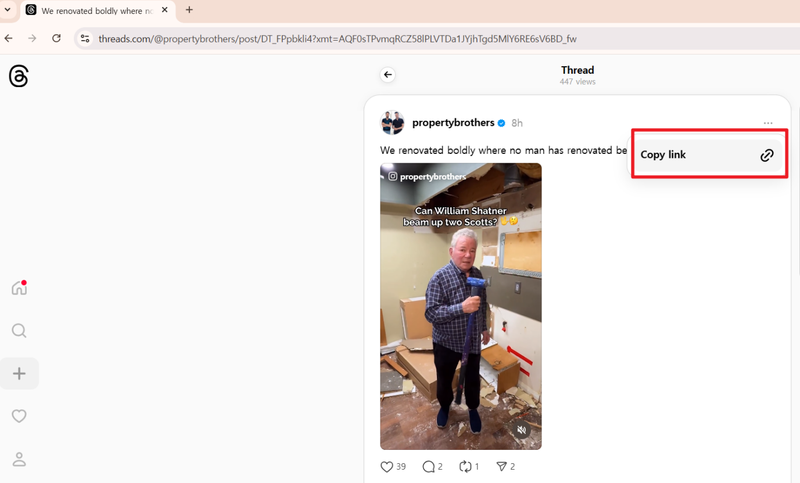
Open Threads in your browser, locate the video you want, and copy its URL.
-
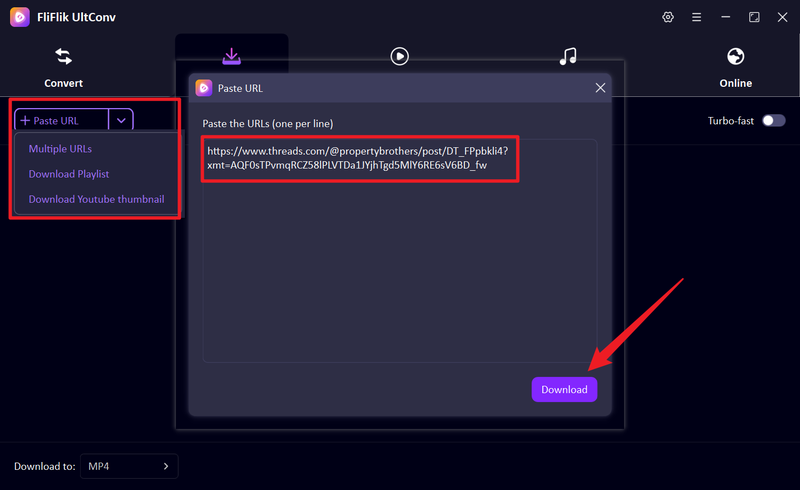
Now return to UltConv. If the link isn’t detected, paste the Threads video URL into the input box manually, then click Download. At last the download process will start immediately.
-
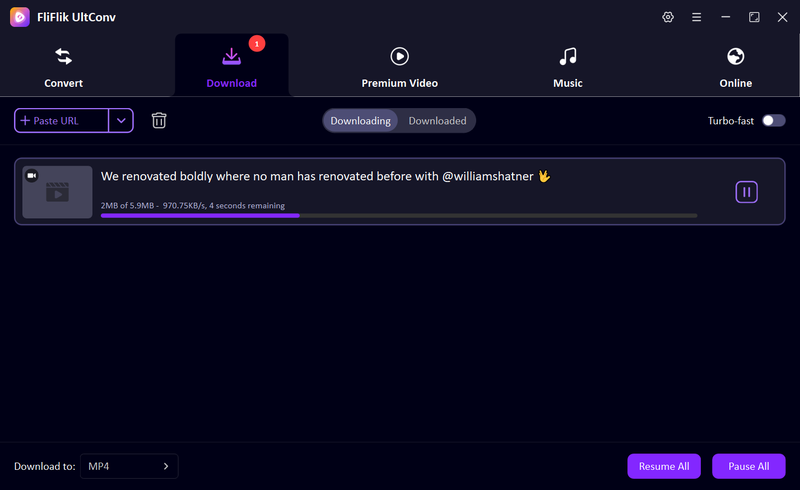
Once the download is complete, the Threads video will be saved as an MP4 file on the ‘downloaded’ section.


FAQs
Q1. How to download a photo or video from Threads?
To save photos or videos from Threads, you can use an online tool like Toolzin or Threads Image Downloader for single images, or a desktop solution like FliFlik UltConv Video Downloader for videos, playlists, or live streams. Simply copy the Threads post link into the tool, select the output format, and download.
Q2. What is the best Threads image downloader?
For high-resolution profile pictures or other images, FliFlik UltConv Video Downloader is the most reliable option. It works on PC, supports both photos and videos, allows batch downloads, and ensures files are saved in their original quality.
Conclusion
Saving media from Threads can be a challenge since the platform lacks a built-in download feature. While the online tools we’ve recommended are convenient for occasional use, desktop solutions provide superior speed, quality, and flexibility.
For those seeking a reliable, all-in-one solution – FliFlik UltConv Video Downloader is our top 1 recommendation. It allows you to download Threads videos, profile pictures, and other media with ease, ensuring high-quality results and a seamless experience whether you’re saving single images or entire playlists.
 Secure Download
Secure Download
Secure Download
Hello, I research and introduce useful solutions for AI videos, images, and audio tips in our daily life. If you learn these things, you can easily deal with the problems of the new era.

