

 8 minutes read


Threads is Meta’s APP of Twitter and Instagram, but as more creators post video content, the lack of a “save” button is becoming a real headache. Whether you want to watch offline or share a clip, Threads offers no built-in way to download videos on mobile or desktop. It’s a frustrating gap for such a popular app, leaving users stuck with no easy way to keep the content they love.
A good Threads video downloader lets you download Threads videos without complicated steps or unreliable workarounds. This article will share the best iPhone, Android, and PC tools available today. If you want to download the Threads video quickly and reliably, this article shows what actually works.

Part 1. Best Threads Video Downloader on Windows and Mac (Top Pick)
FliFlik UltConv Video Downloader is a full-featured desktop tool for downloading videos from Threads and more than 10,000+ other websites. In addition to Threads, it supports platforms like YouTube, Instagram, TikTok, Facebook, Twitter, Vimeo, and many streaming and media sites. For Threads specifically, it lets you download Threads videos as MP4 with original quality preserved, avoiding the compression and failures common with online tools.
UltConv supports over 100+ output formats, including MP4, MKV, MOV, MP3, AAC, WAV, and FLAC. Video downloads can reach up to 1080p, 4K, and even 8K, where available, making it suitable for both casual saving and high-quality archiving. Because it runs on Windows and Mac, downloads are faster, more stable, and not affected by browser limits or ads.

- Download Threads videos and content from 10,000+ websites
- Supports 100+ formats, including MP4, MP3, MKV, AAC, and FLAC
- Download videos in HD, 4K, and up to 8K quality
- Fast, stable desktop downloads on Windows and Mac
- Simple copy-and-paste workflow with no browser extensions
▼ Steps to Download Threads Video to MP4 with UltConv Video Downloader
-
Download and install FliFlik UltConv Video Downloader on Windows and Mac.
FREE DOWNLOAD![secure download]() Secure Download
FREE DOWNLOAD
Secure Download
FREE DOWNLOAD![secure download]() Secure Download
Secure Download
-
Open FliFlik UltConv Video Downloader and go to the Download section. Click the Download to button at the bottom to choose format.

-
Choose MP4 as the output format for the video.

-
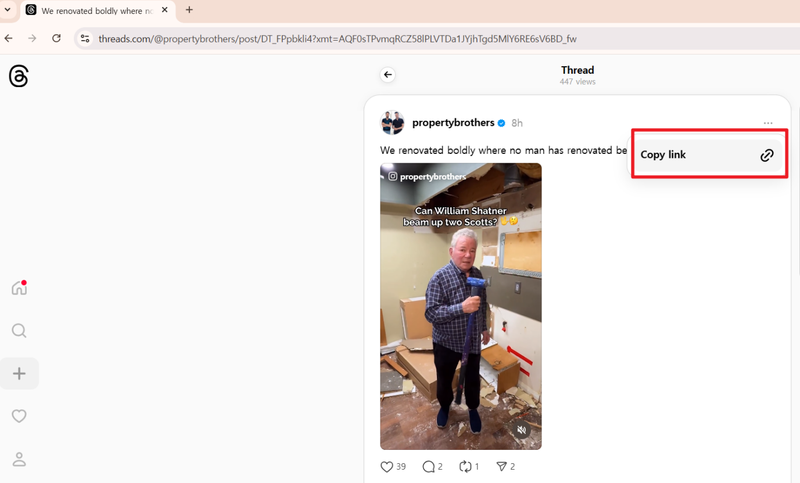
Open Threads in your browser, find the video you want, and copy the video link.
-
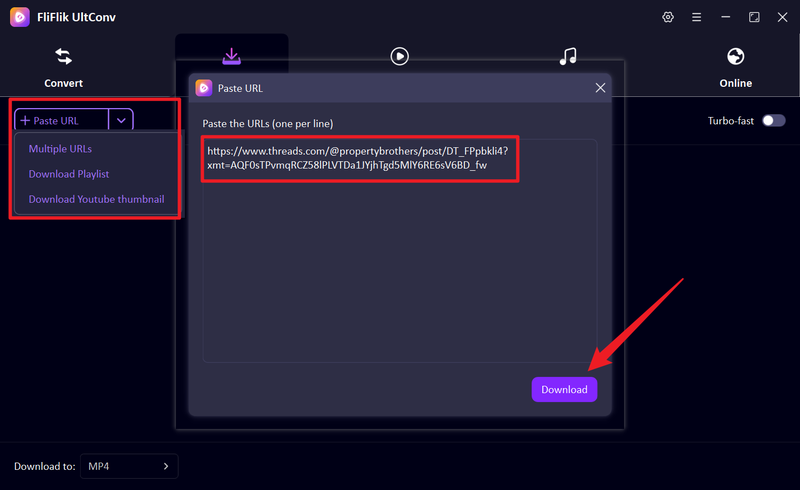
Return to UltConv. If the software automatically detects the copied Threads link, click Download to start saving the video.
-
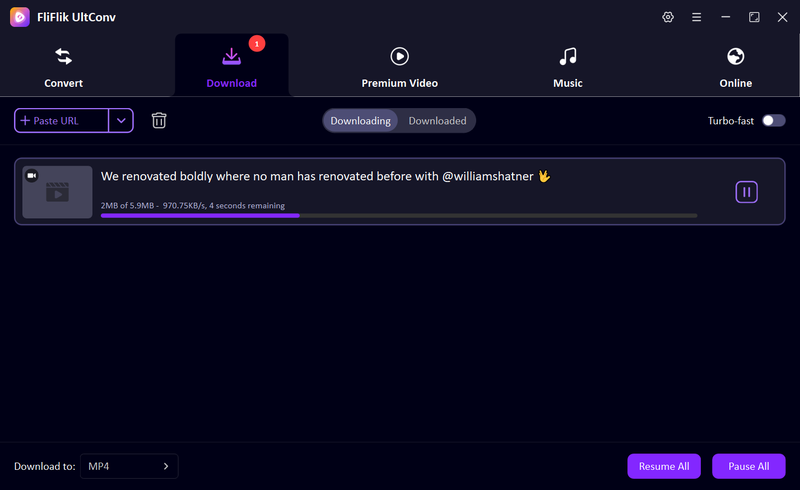
Once the download is complete, the Threads video will be saved as an MP4 file on your computer. You can watch it offline anytime without buffering or connection issues.


Part 2. Other Threads Video Downloader Online (No Installation)
If you don’t want to install software, online video downloaders offer a quick alternative. These tools work directly in your browser and usually only require pasting a Threads video link.
1. Threads Downloader

Threads Downloader is a browser-based tool designed specifically for downloading videos from Threads. It works by pasting a Threads post link into the site and generating a downloadable video file. Since it runs entirely online, there’s no need to install software or create an account. This makes it a convenient option for users who only need to download Threads videos occasionally and prefer a quick, lightweight solution.
- No installation or registration required
- Built specifically for Threads videos
- Simple copy-and-paste workflow
- Supports only single video downloads
- Video quality options are limited
2. Threadster

Threadster is another online Threads downloader that focuses on speed and ease of use. It allows users to download video content from public Threads posts by pasting the video URL into the tool. The interface is minimal, and downloads usually start quickly. Threadster is best suited for users who want a fast way to save individual Threads videos without dealing with desktop apps or complex settings.
- Clean and easy-to-use interface
- Fast processing for short videos
- Works directly in the browser
- No batch or playlist download support
- Limited control over output quality
3. Publer

Publer offers a Threads video downloader as part of its social media toolset. While Publer is mainly known for content scheduling and social media management, its Threads downloader works independently and doesn’t require an account. It supports downloading videos from public Threads posts and is accessible from any modern browser. This makes it a practical option for users who want a reliable online tool with a stable interface.
- No installation required
- Works across devices and browsers
- Stable and well-maintained platform
- Limited to public Threads content
- Fewer format and quality options compared to desktop tools
Part 3. How to Download Threads Videos on iPhone and Android
If you are a mobile user, then below 2 methods are best to download Threads videos on iPhone and Android.
1. iOS Built-in Screen Recording

On iPhone, the simplest way to save a Threads video is by using Apple’s built-in screen recording feature. Since iOS doesn’t allow direct video downloads from Threads, screen recording captures the video as it plays on your screen. This method doesn’t require any third-party apps and works on all modern iPhones, making it a practical option for occasional use.
- No additional apps required
- Works on all recent iOS versions
- Simple and reliable for short videos
- Video quality depends on screen resolution
- Notifications or interruptions may appear in recordings
2. Video Downloader for Thread (Android)

Video Downloader for Thread is an Android app designed specifically for saving videos from Threads. It allows users to copy a Threads post link and download the video directly to their device. Compared to screen recording, this method saves the original video file and avoids background noise or on-screen elements, making it more suitable for frequent downloads.
- Downloads actual video files instead of recordings
- Simple link-based workflow
- Videos are saved directly to the device
- Only available on Android
- May include ads in the free version
FAQs
Q1. Is it legal to download Threads videos?
Downloading Threads videos is generally legal for personal use, such as offline viewing. However, it can become a copyright issue if you repost, distribute, or monetize someone else content without permission. Always respect creators’ rights and only use downloaded videos for personal purposes or with explicit consent.
Q2. What is the best Threads video download online?
For online use without installing software, tools like Threads Downloader, Threadster, and Publer are the most reliable. They work directly in your browser and make it simple to download single Threads videos quickly. For consistent results and more features like format choice or higher quality, a desktop tool like FliFlik UltConv Video Downloader is recommended.
Conclusion
Downloading Threads videos can be a struggle, especially if you’re looking for consistent quality. While basic online tools work for the occasional clip, they often limit your resolution or fail with unstable links, leaving you with grainy, unreliable files.
For a more dependable solution, FliFlik UltConv Video Downloader stands out as the best way to save Threads videos. It offers fast, high-quality downloads without the usual technical headaches, making it the most practical choice for building a reliable video library on Windows or Mac.
 Secure Download
Secure Download
Secure Download
Hello, I research and introduce useful solutions for AI videos, images, and audio tips in our daily life. If you learn these things, you can easily deal with the problems of the new era.

