

 6 minutes read


Have you ever seen a funny clip on Twitter and thought, I wish I could save this as a GIF? The problem is that Twitter doesn’t give a direct button to convert a tweet to a GIF or download it easily.
This article will select several top Twitter video-to-GIF tools for 2026, covering both PC web and Android mobile devices. With just three simple steps, you can easily add your favorite Twitter posts to your collection!

Part 1. Top 3 Online Tweet to GIF Converters
1. ConvertICO.COM

ConvertICO Twitter GIF Downloader is designed for one main job: helping users download and convert Twitter clips quickly. You don’t need to install anything, and you don’t need an account. The interface is clean and easy to understand, which makes it beginner-friendly. Even if you’ve never used a tweet GIF downloader before, the steps are clear. It works directly in your browser on Windows, Mac, or mobile devices.
2. VEED

VEED is actually a full online video editing platform, but it also includes a tool that can convert Twitter videos into GIFs. This means you can do more than just download the clip. You can trim the video, crop it, or adjust the timing before turning it into a GIF. Because it includes editing features, it’s useful if you want to make a reaction GIF or a short meme from a tweet.
3. Picyard

If you want another straightforward online tool, Picyard Twitter GIF Downloader is worth trying. This platform focuses on downloading media from Twitter, including images, videos, and GIFs. The interface is simple, so users can quickly convert or save media without going through complicated steps. To use it, you copy the tweet link and paste it into the downloader box. The tool scans the tweet and extracts the media inside it.
Part 2. Top GIF Tweet Download for Android
1. Download Twitter Videos — GIF

If you often use Twitter on your phone, using a small app can make things much easier. Download Twitter Videos — GIF is an Android app designed to help users quickly download tweet GIF files and videos directly from Twitter.
When you see a tweet with a video or GIF, you tap the share button and choose this app from the list. The app then grabs the media from the tweet and lets you save it on your phone. For Android users who download Twitter media often, this app makes the process quick and convenient.
Pro Tip. How to Download Image & Video from Twitter Using FliFlik UltConv
Sometimes converting a tweet to GIF is useful, but there are many situations where you may want the original file instead. For example, maybe the tweet contains a short video you want to save in full quality, or an image you want to keep for later. FliFlik UltConv Video Downloader works as a powerful video downloader that allows users to save media from thousands of websites, including Twitter. The tool supports converting videos into 100+ formats like MP4, so the file can be played on almost any device.
Another useful feature is batch downloading. It also includes a built-in browser that lets you search for content and download it without switching between apps. This makes the whole process faster and much easier, especially if you often download media from social platforms.

- Download videos from 10,000+ websites, including Twitter, YouTube etc.
- Save videos in 720p, 1080p, 2K, 4K, and even 8K quality
- Convert videos to MP4, MP3, and 100+ formats
- Batch download multiple videos at once
- Built-in browser for easier searching and downloading
- Remove DRM from Spotify and Apple Music
▼ Steps to Download Twitter Video with FliFlik UltConv Video Downloader
First, download and install FliFlik UltConv Video Downloader from the official website. Once downloaded, follow the steps below.
 Secure Download
Secure Download
Secure Download
-
Launch FliFlik UltConv Video Downloader on your computer and switch to the Download section. Click ‘ Download To’ to choose where the file will be saved and select your preferred output format.

-
Select the format you want for the downloaded Twitter video. MP4 is usually the best option because it works smoothly on most devices and media players.

-
Open Twitter in your browser, find the tweet that contains the video you want to save, then copy the video link using the Share button or from the address bar.
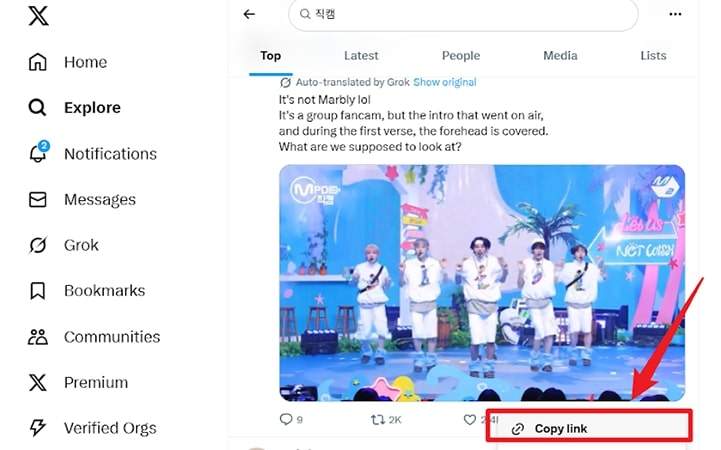
-
Go back to UltConv. If the software detects the Twitter video automatically, simply click Download to begin saving it.
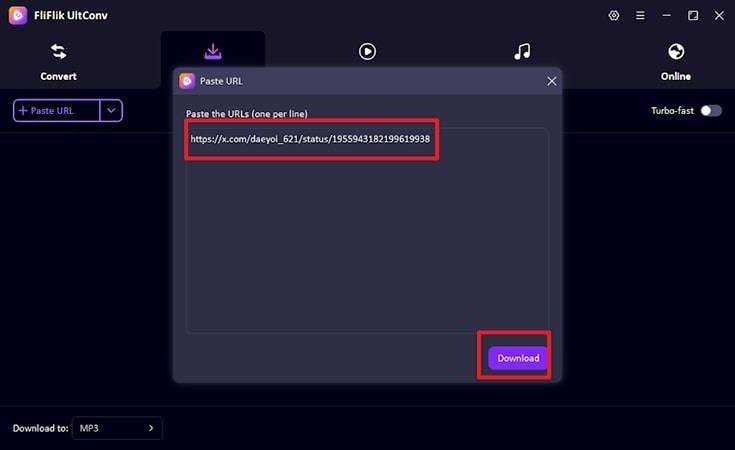
-
If the video does not appear automatically, paste the copied Twitter link into the search box inside the software and click Download to save it manually.



FAQs
Q1. Can I download tweets to GIF online?
Yes, tools like ConvertICO, VEED, or Picyard can do this in just a few seconds. The best part is that most of these tools work on any device, including Windows, Mac, and mobile , since they run online and don’t require installation.
Q2. How to Download a Twitter GIF on Mac?
You can use an online tweet GIF downloader by copying the tweet link and pasting it into the website. The tool will process the tweet and give you a GIF or video file that you can save on your Mac.
Q3. Is it legal to download Twitter videos to MP4?
Twitter content is usually protected by copyright. Problems may occur if you repost, distribute, or use the video for commercial purposes without permission from the original creator.
Conclusion
Converting a tweet to GIF is easier than many people think. With the right tools, you can quickly turn a Twitter video into a GIF or download it for offline use. If you want more control and higher-quality downloads, tools like FliFlik UltConv Video Downloader can also help you download Twitter videos and convert them into different formats. This way, you can keep your favorite clips, share them easily, and use them whenever you want.
Secure Download
Secure Download
Hello, I research and introduce useful solutions for AI videos, images, and audio tips in our daily life. If you learn these things, you can easily deal with the problems of the new era.

