

 8 minutes read


Stranger Things is a popular social series that can be found on Netflix. If you haven’t seen it yet, you might be wondering where to watch Stranger Things for free. Fortunately, there are ways to catch all the seasons without paying. Although most come with broken links and pop-up ads, you can watch for free. In this article, I’ll show you the easiest and safest way to download Stranger Things and take in the entire series without spending a dime, so that you may begin your Stranger Things marathon now.

Part 1. Retrospective to Stranger Things S1–S4
Before jumping into the final season, it’s worth looking back at what’s happened in Stranger Things. Season 1 introduced us to the small town of Hawkins and Will Byers’ mysterious disappearance. That’s when Eleven showed up, and everything got a little upside down. Season 2 brought the Upside Down closer to Hawkins, with new threats and more secrets about Eleven’s past. Season 3 kicked things up with the Mind Flayer taking over bodies and Hawkins Mall drama, while Season 4 split the story between Hawkins and Russia, giving us some shocking twists and big character moments.
Now Season 5 is coming. It finally wrap up the whole Hawkins storyline and clear up some of the big questions about the Upside Down. If you want to catch up before viewing the new season, you might be asking urgently, “Where can I watch Stranger Things free?” Luckily, there are ways to watch all the previous seasons without paying, and we will discuss some of the best options next.
🔥 Want to download all 5 seasons of Stranger Things at once for binge-watching? Try UltConv Netflix Downloader to keep favorite series forever!
FREE DOWNLOAD

Secure Download
FREE DOWNLOAD
Secure Download
Part 2. Where Can I Watch Stranger Things for Free [S1 – S5]
If you’re ready to watch Stranger Things for free, there are a few websites that make it easy to watch all the seasons. Each site has its own style and features, so you can choose the one that suits you best.
1. JustWatch

JustWatch isn’t a streaming site itself; it’s more like a search guide for streaming. You can see all the places Stranger Things is available, including free and paid platforms. It shows which seasons are online, what video quality to expect, and even which platforms allow downloads. The interface is clean and straightforward, so you won’t get lost hunting through multiple sites. While it doesn’t stream directly, it’s perfect if you want a clear view of your options before choosing where to watch Stranger Things free.
- Shows every platform streaming Stranger Things
- Lists available seasons and video quality
- Tells you which services allow offline downloads
- Clean layout that makes browsing easy
- Helps you find free and paid viewing options
2. Himovies
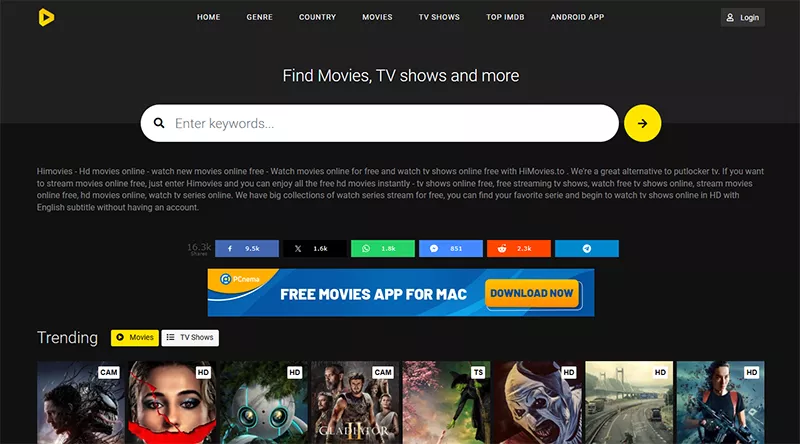
Himovies lets you watch full episodes directly in your browser. You can pick any season and jump straight into an episode without signing up. The video quality is usually decent, and streaming doesn’t lag much if you have a stable connection. Navigation is simple, with seasons and episodes listed clearly. The only thing to watch out for is occasional popups if you click the wrong part of the screen, but once you’re in the player, it’s smooth. For anyone wanting a straightforward way to watch Stranger Things free, Himovies works well.
- Streams all Stranger Things seasons for free
- No account needed
- Easy navigation between seasons and episodes
- Stable playback with decent video quality
- Occasional popups, but the player works fine once running
3. FMovies
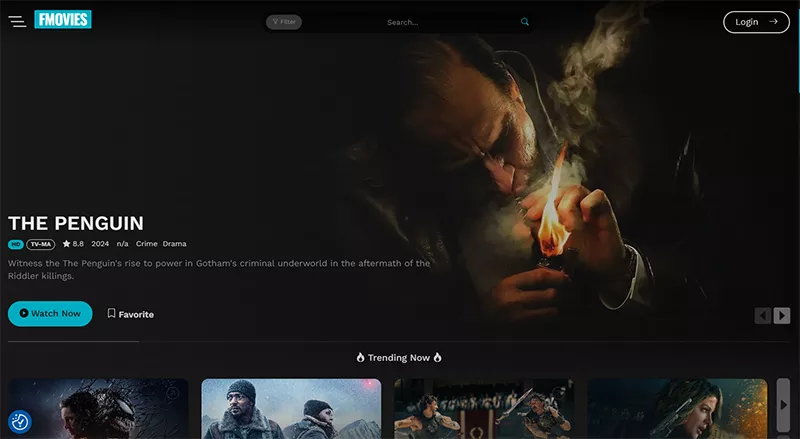
FMovies is a popular choice for free streaming. It hosts all the seasons of Stranger Things free and makes it easy to move from one episode to the next. Subtitles are available for most episodes, which is great if you want to catch all the details. The site loads quickly, and playback is generally smooth. The downside is that some pages may have redirects if you click outside the video area, so just stick to the player. Still, it’s a reliable option for anyone looking to watch Stranger Things free in their browser.
🔥Try UltConv Video Downloader to download Stranger Things full seasons to MP4 from ANY streaming sites.
FREE DOWNLOAD
Secure Download
FREE DOWNLOAD
Secure Download
- Full Stranger Things seasons available
- Subtitles for most episodes
- Fast loading and smooth playback
- Easy episode-to-episode navigation
- Occasional redirects outside the player
4. 123Movies
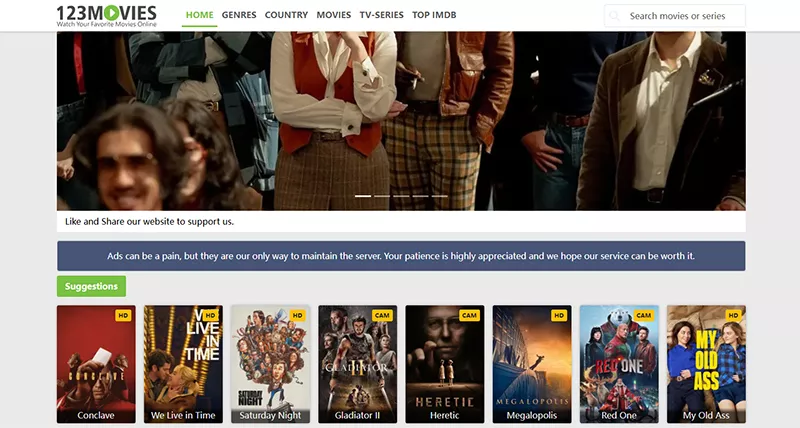
123Movies offers full episodes of Stranger Things and tends to update quickly when a new season is released. You don’t need to create an account, and all episodes are listed clearly in order. Video quality is generally good, and the site doesn’t usually throw too many ads in your way. That said, like other free sites, some pop-ups may appear if you explore beyond the video player. If you want to binge-watch the series without any signup hassle, 123Movies is a convenient choice for Stranger Things free.
- Streams all Stranger Things seasons
- No account required
- Clean layout with clear episode ordering
- Good video quality
- Light popups but nothing unmanageable
5. YesMovies

YesMovies streams Stranger Things directly in your browser, and it lets you choose the video quality depending on your connection. Seasons and episodes are organized neatly, and the player loads most of the time. As with other free platforms, there can be occasional pop-ups or redirects, so just be cautious when navigating around the site. Despite that, it’s easy to use, and you can get through entire seasons of Stranger Things free without any account or payment.
- Full Stranger Things seasons available
- Adjustable video quality
- Quick-loading player
- Easy browsing between seasons and episodes
- Some popups, but still very usable
Part 3. Common Limits to Watching Stranger Things on Online Streaming Sites
As we mentioned above, watching Stranger Things for free online can be great, but it’s not without its limits. Most free streaming sites have a few common issues you should know about before you start bingeing.
- Intrusive Ads: Many free sites rely on ads to stay online, and sometimes they can be really annoying. Pop-ups, banners, or auto-playing videos can interrupt your viewing.
- Malware Exposure: Some sites carry malware or unsafe links. Clicking the wrong button can trigger downloads you don’t want. It’s always wise to stick to the main video player and avoid suspicious pop-ups.
- Low Resolution: Not every free site offers HD streaming. Sometimes the video quality is blurry or pixelated, especially for older seasons. If you want the best viewing experience, check if the site allows adjusting the resolution.
- Inconsistent Performance: Streaming can be hit or miss, depending on your internet and the site’s server. You might experience buffering or sudden pauses. It can be frustrating when you’re trying to watch Stranger Things for free.
- Broken Links: Episodes might be missing, or links can stop working without notice. You may have to switch between different links or even different sites to watch the full season.
- Frequent Domain Changes: Many free sites change their web addresses often. You might bookmark a link one day, only to find it doesn’t work the next. It’s just part of the territory when watching Stranger Things for free online.
Part 4. How to Download Stranger Things Full Season for Seamless Viewing
Yes, streaming Stranger Things free can be a real pain. Between popups, slow buffering, and low-quality video, it’s easy to get frustrated before even finishing an episode. Sometimes links don’t work, ads keep interrupting, or the resolution is so low that you miss the details. If you’re planning to binge an entire season, these issues can really ruin the experience.
FliFlik UltConv Netflix Downloader solves these problems neatly. With this tool, you can download full seasons of Stranger Things directly from Netflix and watch them offline anytime you want. It automatically removes all ads from downloaded Netflix videos, so you can enjoy a great viewing experience without any ads interuption. UltConv keeps the original audio tracks and subtitles, including multiple languages, helping you not to miss any of the show’s details. You can also choose the video quality from standard 480p all the way up to 4K Ultra HD, so it looks great on any device. Another handy feature is batch downloading, which lets you save entire seasons at once instead of clicking episode by episode. On top of that, it supports bypassing Netflix DRM protection , meaning you can watch your downloads on any device without relying on the Netflix app.

- Download Netflix videos and convert them to MP4 or MKV
- Preserve original audio tracks, including multiple languages
- Save subtitles, with options for internal or external formats
- Batch download entire seasons of TV shows in one go
- Watch ad-free and offline on any device, including Mac , iPad, Switch, even Carplay
- Choose video quality from 480p up to 4K Ultra HD
- Fast download speeds, up to 10x faster than standard downloaders
▼ Steps to Download Netflix Series with UltConv Netflix Downloader
-
Go to the official FliFlik UltConv Netflix Downloader website, download the software, and run the installer. Follow the on-screen instructions to complete the setup.
FREE DOWNLOAD![secure download]() Secure Download
FREE DOWNLOAD
Secure Download
FREE DOWNLOAD![secure download]() Secure Download
Secure Download
-
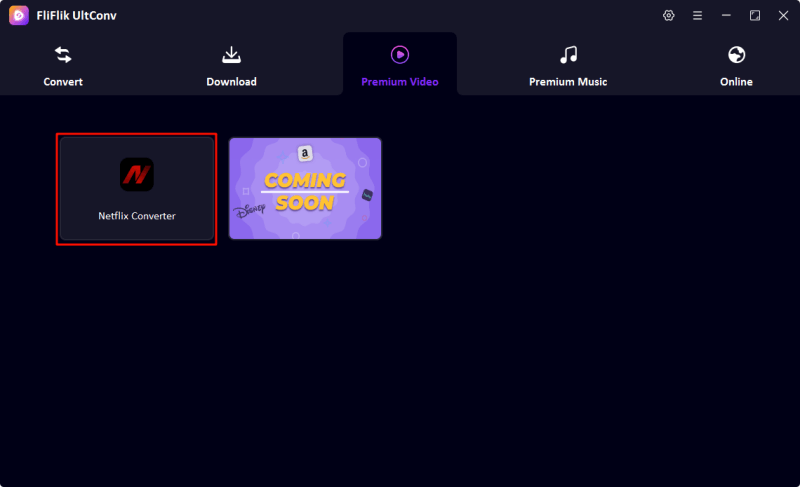
Open UltConv, navigate to the “Premium Video” section, and choose the Netflix Converter from the available options.
-
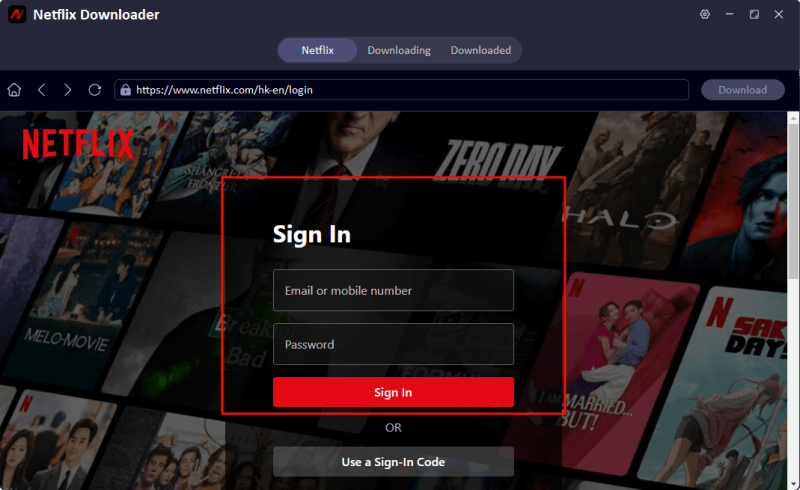
Sign in to your Netflix account within the UltConv built-in browser, so you can directly find the favorite videos you have collect longly.
-
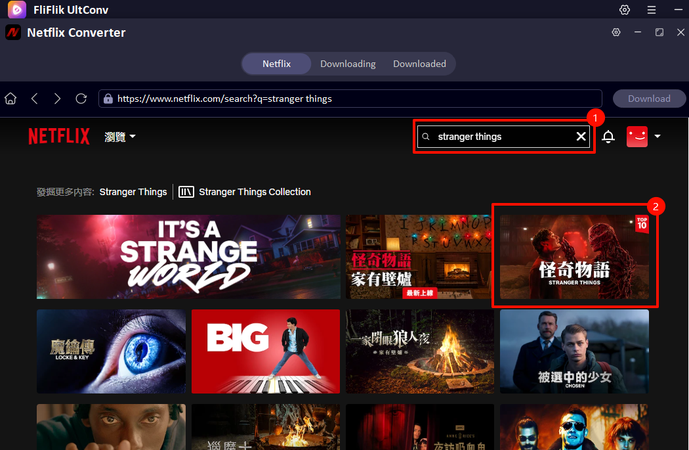
Use the built-in Netflix Converter to find Stranger Things. Select the season and episodes you want to download. Click it to proceed.
-
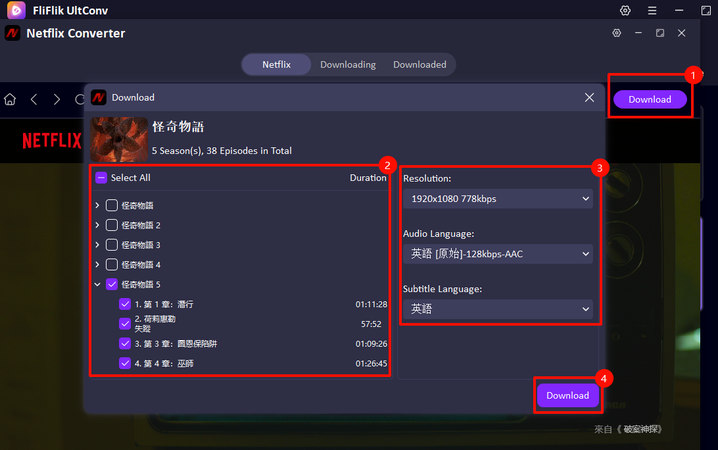
Play the video and hit the Download button in the upper-right corner to start saving your video. Choose video quality (up to 4K), select your preferred audio language and subtitle options.
-
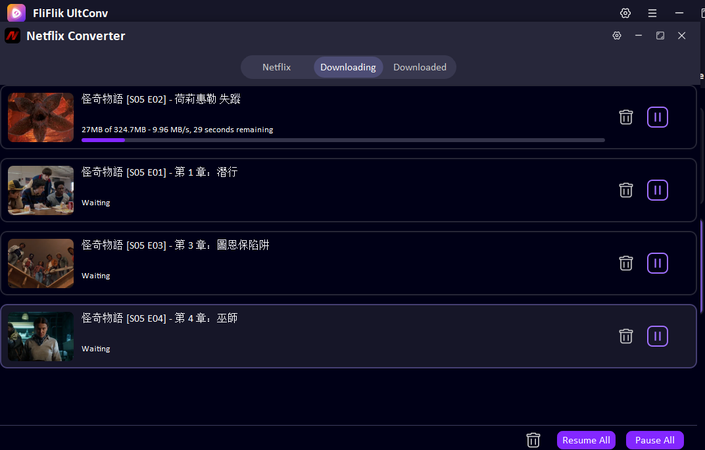
You can track the progress in the download queue. Once it’s done, your favorite Stranger Things series will be ready to watch offline or transfer to any device.


Final Words
Catching up on Stranger Things doesn’t have to be a headache. If you’re wondering where to watch Stranger Things for free, the streaming sites above let you enjoy all the seasons, though you might run into pop-ups, low quality, or broken links. For a smoother experience, downloading the entire season with FliFlik UltConv Netflix Downloader is a game-changer. You can save episodes in high quality, keep subtitles and multiple audio tracks, and watch offline anytime on any device. Whether you want to binge uninterrupted or take the show on the go, UltConv Netflix Downloader makes it simple. Don’t wait, grab your favorite episodes and start your Stranger Things marathon today.
Secure Download
Secure Download
Hey there! I am Maxwell Clark. I'm always looking for new tech tools that make a difference, from making visuals and audio better to making workflows better. I'm going to share tips and tricks for using AI tools for videos, audio, and images. I'm excited to help you navigate the digital world more efficiently and creatively!

