

 6 minutes read


Once you turn on airplane mode, your internet connection will be lost, and the YouTube video you are watching will immediately freeze. But can you really watch YouTube on airplane mode without Wi-Fi? The answer is yes. Whether you’re a frequent flyer or planning a road trip through areas with no signal, mastering offline viewing techniques is essential.
In this guide, we will compare the seamless offline experience of YouTube Premium, the batch processing capabilities of desktop MP4 converters, and the instant convenience of free online tools.

Part 1. How to Watch YouTube on Airplane Mode with YouTube Premium

YouTube Premium lets you download videos directly to your device for offline viewing. Once downloaded, you don’t need Wi-Fi or mobile data, perfect for flights or areas with no internet. Downloads stay accessible as long as your Premium subscription is active, and you can save videos in different resolutions, including HD.
▼ Steps to Watch YouTube Offline on Airplane Mode
- Step 1: Open the YouTube app on your mobile device and sign in to your Premium account.
- Step 2: Find the video or playlist you want to watch offline.
-
Step 3:
Tap the Download button below the video. Select your preferred quality (higher quality uses more storage).
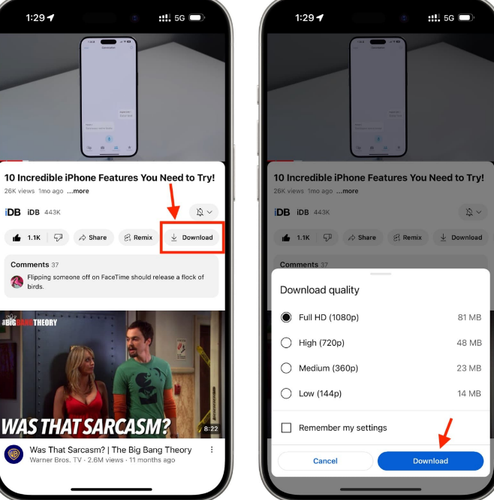
- Step 4: Wait for the download to complete. You can check progress in the Library > Downloads section.
- Step 5: Once the video is downloaded, switch your device to Airplane Mode. Open the Library > Downloads and play your video anytime, completely offline.

Part 2. How to Download YouTube on Airplane Mode Using FliFlik UltConv
When it comes to watching YouTube or other streaming videos offline, convenience and quality matter. FliFlik UltConv Video Downloader is designed to make offline viewing simple, fast, and versatile. Unlike basic downloaders, UltConv lets you save videos from over 10,000 websites, including YouTube, Instagram, TikTok, Netflix, and Spotify. You can grab videos in 4K, 2K, 1080p, or 720p, or extract high-quality audio in 320kbps MP3.
The tool also supports multiple formats, from MP4 for video to MP3, WAV, FLAC, and AAC for audio, keeping the original quality intact. Whether you want to save a trending YouTube clip, a full-length movie, or music for offline listening, UltConv handles it all with speed, batch processing, and built-in browsing.

- Download videos from 10,000+ websites, including streaming platforms and social media
- Save videos in 4K, 2K, 1080p, and 720p or audio in 320kbps MP3
- Convert files to 100+ formats, MP4, MP3, MKV etc
- Batch download multiple videos, playlists, or channels simultaneously
- Convert video to audio without losing quality, preserving metadata and album art
- Built-in browser for direct downloads and private folder to secure files
▼ Steps to Download YouTube Movies for Airplane Mode
-
Download and install FliFlik UltConv Video Downloader from the official website.
FREE DOWNLOAD![secure download]() Secure Download
FREE DOWNLOAD
Secure Download
FREE DOWNLOAD![secure download]() Secure Download
Secure Download
-
Open UltConv and navigate to the Download tab. Click Download to to select the output format.

-
Choose MP4 for video or MP3 for audio-only downloads.

-
Go to YouTube, copy the video URL you want to save, and return to UltConv.

-
UltConv usually detects the link automatically. When prompted, click Download to start saving your video.

-
Your video will start downloading. Once the download finishes, your YouTube video is ready to watch offline even in Airplane Mode.



Part 3. How to Download YouTube on Airplane Mode with Online Free Tool
Y2mate is a convenient free online tool to save YouTube videos or audio for offline viewing. It works entirely in your browser, no installation needed, and is compatible with PC, Mac, and mobile devices. You can download videos in MP4 or audio-only MP3 format, with multiple resolutions to choose from, including HD. Y2mate also supports fast conversions, letting you save full movies, music videos, or short clips in seconds. For travelers or anyone needing offline access, it’s a quick way to watch YouTube on a plane or in areas without internet.
▼ Steps to Download YouTube Videos for Airplane Mode Using Y2mate
- Step 1: Open your browser and go to the Y2mate website.
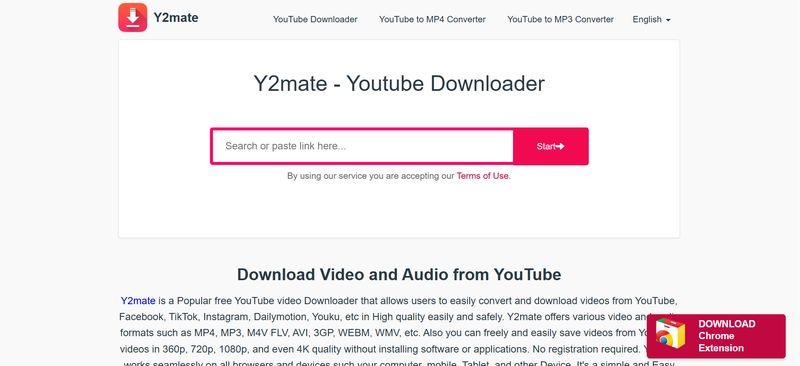
- Step 2: Go to YouTube, copy the URL of the video you want to save, and paste it into Y2mate’s search bar.
-
Step 3:
Click the Start or Download button to analyze the video.
-
Step 4:
Choose your desired format and resolution. Select MP4 for video or MP3 for audio-only.
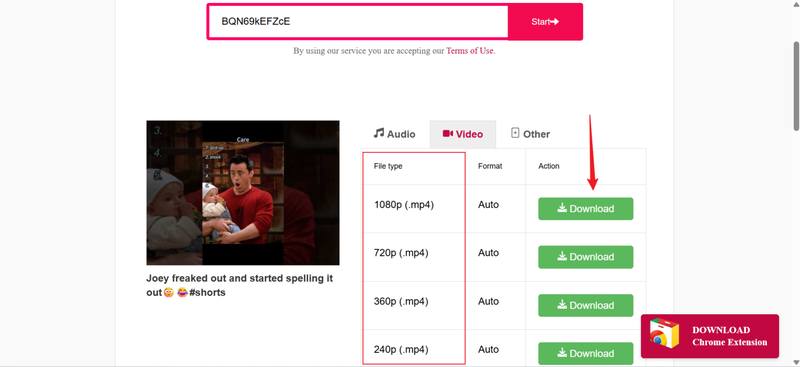
- Step 5: Click the Download button next to your selected format to save the file to your device.
- Step 6: Once the download is complete, switch your device to Airplane Mode. You can now watch the saved video or listen to the audio without internet access.


FAQs
Q1. Can I watch YouTube on a plane without Premium?
Yes, you can, but only if you download videos before your flight. You can also use tools like FliFlik UltConv Video Downloader to download videos and watch them without a subscription.
Q2. Does YouTube work in airplane mode?
Not directly. Airplane mode disables internet connectivity, so you can’t stream videos online. However, if the video is downloaded beforehand, you can play it without any connection.
Q3. Can you watch downloaded movies in airplane mode?
Absolutely. Once a video is saved to your device in MP4 or audio format, it can be played anytime offline, making it perfect for flights or areas with no internet.
Conclusion
As long as you prepare before takeoff, watching YouTube in airplane mode is a breeze. For the most powerful and comprehensive experience, FliFlik UltConv Video Downloader is your top choice, supporting high-speed batch downloads from thousands of websites. Simply save your desired content before heading to the airport, switch on airplane mode, and enjoy a smooth, uninterrupted journey.
 Secure Download
Secure Download
Secure Download
Hello, I research and introduce useful solutions for AI videos, images, and audio tips in our daily life. If you learn these things, you can easily deal with the problems of the new era.

