

 By
By  6 minutes read


With over 500,000 titles available, Spotify has become a go-to platform for audiobook lovers. Whether you’re commuting or relaxing at home, it’s incredibly convenient to download Spotify audiobooks for offline use . Many people grab their favorite titles in advance to save data, but there’s a catch: files downloaded through the app are DRM-protected. You can’t just move them to an MP3 player or a car stereo; they only work inside Spotify.
If you want more flexibility, you need to know how to actually save these stories as permanent files. This guide covers how to find audiobooks on the platform, the official steps for Free and Premium users, and the best way to get true MP3s that you can play on any device.
- Part 1. What Are Spotify Audiobooks and How to Find Them?
- Part 2. How to Download Spotify Audiobooks to MP3 with Premium
- Part 3. How to Download Audiobooks from Audible, Spotify, and More
- Part 4. Some Popular & Free Audiobooks on Spotify
- Part 5. FAQs for Downloading Spotify Audiobooks
- Conclusion
Content Table:
Part 1. What Are Spotify Audiobooks and How to Find Them?
Spotify launched its audiobook feature in 2022, beginning in the UK before rolling out to the US, Australia, and other markets. Today, Premium subscribers in eligible regions can tap into a catalog of 500,000+ titles, with 15 hours of free listening included each month. Free users can still access a selection of public domain audiobooks, though the library is more limited. Genres span fiction, self-help, business, history, children’s literature, and more — covering roughly 70% of current bestsellers.
Benefits of converting Spotify audiobooks to MP3:
- Universal Compatibility: Listen on any hardware, from legacy MP3 players and SanDisk clips to car stereos and smartwatches, without needing the Spotify app installed.
- Permanent Ownership: Unlike official downloads that “expire” if your subscription ends, an MP3 is yours to keep forever—even if you decide to cancel your Premium plan.
- Limitless Offline Freedom: Enjoy your books in deep-remote areas without the “30-day check-in” requirement. Your playback isn’t tethered to an internet connection or a specific account login.
- Share freely — something Spotify’s built-in download feature doesn’t allow
There’s one key restriction to understand: Spotify audiobooks are protected by DRM (Digital Rights Management). This means all files — even “downloaded” ones — are encrypted and can only be played inside the Spotify app.
How to Find and Search Audiobooks on Spotify
With over 375,000 titles now available, finding your next great listen on Spotify is as easy as finding a new song. Whether you’re looking for a specific bestseller or just want to browse what’s trending, there are three main ways to navigate the library.
▼ Use the Dedicated “Audiobooks” Hub
If you don’t have a specific title in mind, Spotify’s curated hub is the best place to start.
-
Step 1: Open Spotify on your desktop, mobile, or tablet, then click or tap the Search tab.
-
Step 2: Under the “Browse All” section, look for the Audiobooks tile.

▼ Search Directly for Titles or Authors
-
If you know exactly what you want, the search bar is your fastest route.
-
Step 1: Type the title, author, or narrator (e.g., “Sarah J. Maas”) into the search bar.
-
Step 2: To filter out music and podcasts, scroll down the results page to the “Audiobooks” section.

▼ How to Find “Free” and Public Domain Audiobooks
-
Classic Literature: Search for “Public Domain” or “Free Audiobooks” to find titles like Pride and Prejudice or Sherlock Holmes.
- The Podcast Loophole: Many classic books are uploaded as Podcasts. If a title isn’t in the official audiobook section, check the “Podcasts” tab — these often don’t count against your 15-hour Premium limit.
 Quick Tips for a Better Listening Experience
1. Preview Before You Listen: Tap any audiobook cover to see the narrator info, total runtime, and a free sample to ensure you like the voice before committing your hours.
2. Check Eligibility: Spotify audiobooks are currently available in the US, UK, Canada, Australia, and parts of Europe.
3. VPN Workaround: If audiobooks aren’t officially in your region yet, some users use a VPN to change their Spotify location to a supported country like the US or UK to unlock the “Audiobooks” tab.
Part 2. How to Download Spotify Audiobooks to MP3 with Premium
Spotify Premium users can save audiobooks for offline playback inside the app. The steps differ slightly depending on whether the title is included in your subscription or requires a separate purchase.
▼ For paid audiobooks (one-time purchase):
-
Step 1: Open the audiobook page and tap Buy.
-
Step 2: Spotify redirects you to a web page to complete payment via credit card or PayPal.
-
Step 3: After purchase, the title appears in Your Library and becomes available to download.

▼ For audiobooks included in your Premium plan:
-
Step 1: Open the audiobook and tap the Download button (downward arrow icon).
-
Step 2: The file will cache to your device for offline use.
-
Step 3: Access it anytime via Your Library > Audiobooks.

The Real Limitations of Spotify’s Offline Mode
Before relying on Spotify’s download feature, here are three critical limitations most guides skip over:
-
It’s not a real download. Spotify saves audiobooks as encrypted cache files — not audio files you own. They exist only inside the Spotify app and will vanish if you cancel your subscription, reinstall the app, or switch devices.
-
Premium still has a 15-hour monthly cap. Even paying subscribers only receive 15 hours of free audiobook listening per month from the subscriber catalog. Unused hours do not roll over to the next month. Hitting your limit means buying top-up hours or waiting for the next billing cycle.
-
Zero file portability or sharing. Downloaded files are locked to your account and device. You cannot transfer them to a friend, copy them to a USB drive, burn them to a CD, or play them on a player that doesn’t have Spotify installed.
These restrictions make Spotify’s “download” much less useful than it first appears — especially for heavy listeners. If you want a file you truly own, a different approach is needed.
Part 3. How to Download Audiobooks from Audible, Spotify, and More
These limitations make Spotify’s built-in download feature less practical than it first appears — especially for listeners who want more flexibility or files they can truly keep. In that case, a dedicated converter may be worth considering: one that can save Spotify audiobooks, music, podcasts, and playlists as standalone files you’re free to use however you like.
If you’d like to go further, Audible is also worth a look. As the world’s largest audiobook platform with 750,000+ titles, it shares a significant catalog overlap with Spotify — meaning many of the popular titles you’d find on Spotify are available there as well, making it a handy additional source for permanent, high-quality downloads.
UltConv Audible Converter is a versatile all-in-one media downloader that works across both platforms — with support for Spotify, Audible, YouTube, and 10,000+ other sites, it covers your audiobook and music needs in one place.
- Download full audiobooks from Audible’s entire library, plus music, podcasts and more from Spotify
- Convert audio files to MP3, WAV, AAC, FLAC, alongside over 100 additional formats
- Enjoy high-quality audio up to 320kbps
- Batch-download multiple files simultaneously with ease
- Built-in browser allows instant search and one-click downloads
- Get ultra-fast performance for all conversion and download tasks
▼ Steps to Convert Audible to MP3 Using UltConv Audible Converter
Download and install UltConv Audible Converter for Windows or Mac.
FREE DOWNLOAD![secure download]() Secure Download
FREE DOWNLOAD
Secure Download
FREE DOWNLOAD![secure download]() Secure Download
Secure Download
-
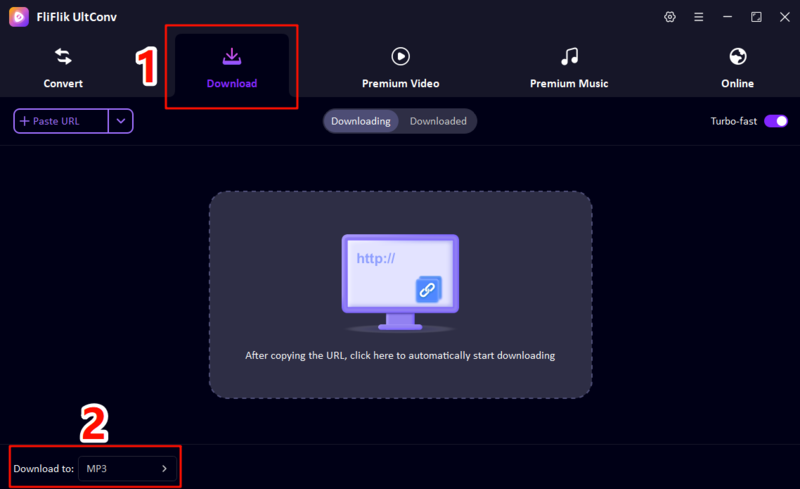
Launch the Download tab and click “Download to”, choose MP3 as the output format.
-
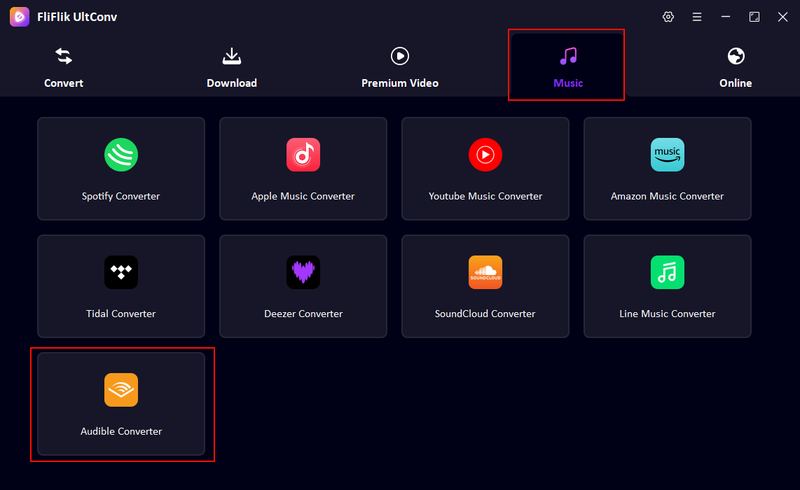
Navigate to the Music section in the program and open the Audible Converter tool.
-
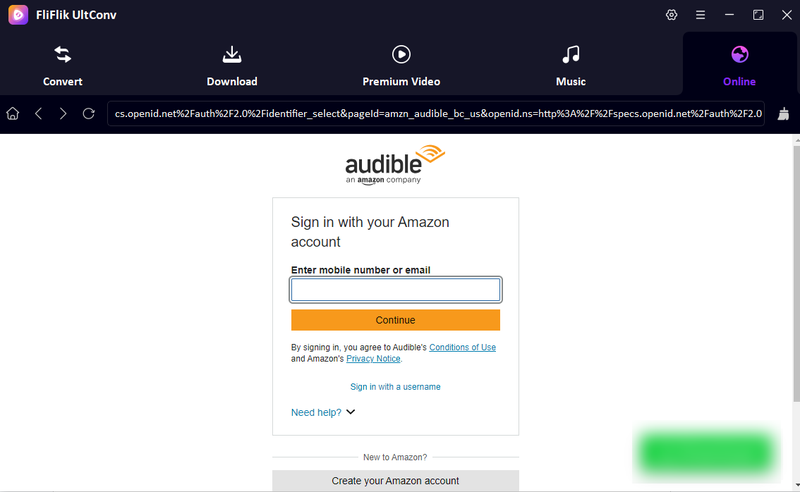
Use the built-in browser to sign in to your Audible account, then pull up the audiobook you want to save as an MP3 file.
-
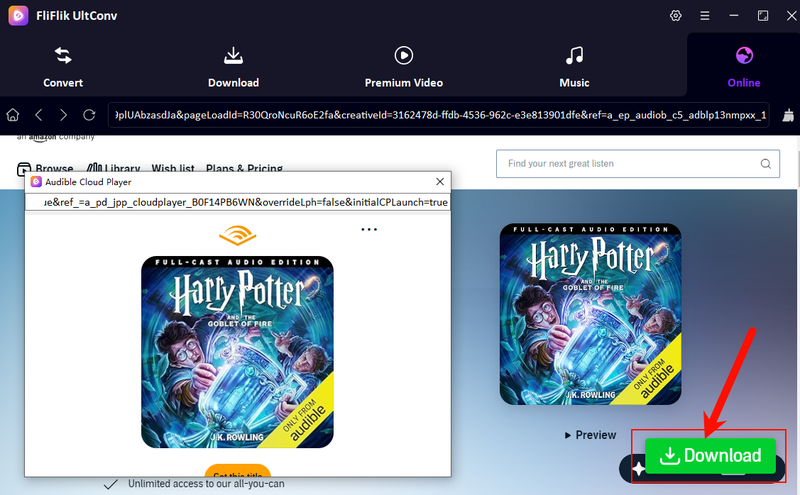
Start playing the audiobook, wait for the download icon to appear next to the playback window, then tap the green Download button.
-
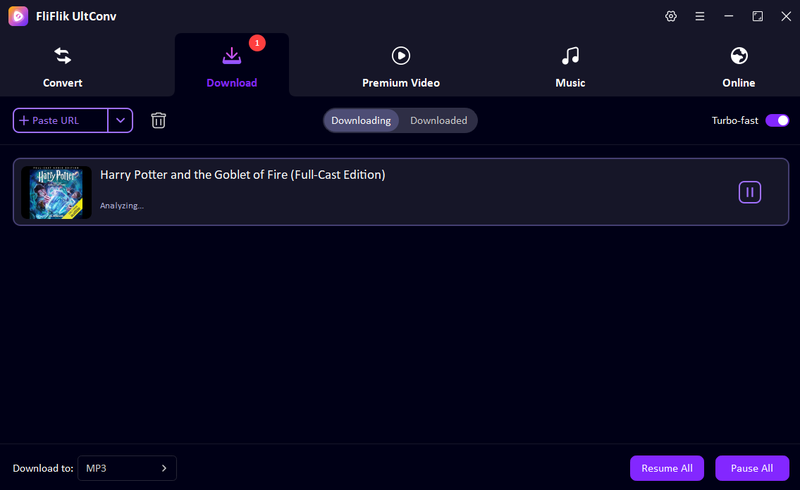
Let the download and conversion process run to completion. Once finished, head to the Downloaded tab to find your MP3 audiobook ready for offline playback.


This method lets you quickly convert and download Audible audiobooks to MP3 while preserving high audio quality and full metadata.
Part 4. Some Popular & Free Audiobooks on Spotify
Here are four standout titles currently available on Spotify worth adding to your listening list:
| # | Title | Author | Why It’s Worth Your Time |
|---|---|---|---|
| 1 | A Court of Thorns and Roses | Sarah J. Maas | Addictive fantasy romance — perfect for long commutes |
| 2 | The Fellowship of the Ring | J.R.R. Tolkien | The definitive Middle-earth adventure in audio form |
| 3 | Fourth Wing | Rebecca Yarros | A breakout fantasy hit with a compelling narrator |
| 4 | I’m Glad My Mom Died | Jennette McCurdy | A raw, emotional memoir by the former iCarly star |
All four are available on Spotify Premium. Availability may vary by region.
Part 5. FAQs for Downloading Audiobooks from Spotify
Q1: Does Spotify Premium listening time carry over to the next month?
Q2: Why won’t my Spotify audiobooks download for offline use?
Q3: Can I buy audiobooks with a Spotify Free account?
Q4: Can I transfer Spotify audiobooks to a USB drive?
Q5: Is it cheaper to buy audiobooks on Spotify or Audible?
Q6: What happens to my downloaded audiobooks if I cancel Premium?
Conclusion
Spotify has made audiobooks more accessible than ever, but its offline mode comes with real strings attached: DRM encryption, a 15-hour monthly cap, and no file portability whatsoever. For casual, in-app listening, Spotify’s native download feature is perfectly fine. But if you want audiobooks you truly own — files that play on any device, never expire, and don’t disappear if you cancel — using a dedicated tool like UltConv Audible Converter to download from Audible (which shares much of Spotify’s catalog) is the smarter long-term choice. Use Spotify to discover your next great listen, then download it properly. You’ll never be left mid-chapter again.
 Secure Download
Secure Download
Secure Download