

 8 minutes read


MySpace used to be the go-to spot for discovering new music. Artists would upload their latest tracks, and fans could dive into fresh sounds every day. But MySpace isn’t what it used to be, and now it’s tough for people to find or save the songs they love. Unlike Spotify or Apple Music, there’s no easy download button, so grabbing your favorite tracks for offline listening isn’t straightforward.
Here, we’ll walk you through how to download Myspace music via URL online free. We’ll cover the best online tools out there, plus a dependable PC downloader if you want to save a bunch of songs at once. Whether you’re after just one track or an entire playlist, you’ll find everything you need to keep your MySpace favorites with you, no matter where you listen.

Part 1. Top 3 Recommended Online Tools to Download Myspace Songs
Finding a reliable way to save MySpace tracks online can be tricky, but several free tools make it easier. Here are the top three online solutions for downloading MySpace music via URL without installing software.
1. Mp3Juice

Mp3Juice is a straightforward online music downloader that allows users to grab songs from multiple sources, including MySpace. Its simple interface makes it easy for beginners to download tracks quickly without any extra steps.
- Supports MP3 downloads in multiple bitrates
- Fast conversion and download process
- Works on any device with a browser
- Occasional pop-up ads
- Some tracks may fail if URLs are outdated
▼ Quick Steps to Download Myspace Songs with Mp3Juice:
- Step 1: Go to Mp3Juice.
- Step 2: Paste the MySpace song URL in the search box.
- Step 3: Click “Search,” then choose the desired format.
- Step 4: Hit “Download” to save the file to your device.
2. PasteDownload.com

PasteDownload.com is a versatile online downloader that supports music and video URLs from multiple platforms, including MySpace. Its minimalist design keeps the process clean and straightforward.
- Free and browser-based, no installation required
- Offers direct MP3 downloads quickly
- Compatible with both mobile and desktop devices
- Limited options for audio quality
- May not work with very old MySpace URLs
▼ Quick Steps to Download PasteDownload.com Songs with Mp3Juice:
- Step 1: Open PasteDownload.com.
- Step 2: Paste the MySpace music URL into the input box.
- Step 3: Select MP3 as the output format.
- Step 4: Click “Download” to save the track offline.
3. Grabthatfile.com

Grabthatfile.com is another solid online downloader for MySpace music. It’s designed to convert URLs directly to MP3, making it ideal for users who want a fast and simple solution.
- Supports multiple formats, including MP3 and M4A
- Works on both Windows and mobile browsers
- Simple, step-by-step interface
- Ads can appear during the process
- Batch downloads are limited
▼ Quick Steps to Download PasteDownload.com Songs with Grabthatfile:
- Step 1: Visit Grabthatfile.com.
- Step 2: Paste the MySpace song URL in the input box.
- Step 3: Choose the audio format and quality.
- Step 4: Click “Download” and wait for the file to save.
Part 2. How to Download Songs from MySpace Officially via Purchases
While many tracks on MySpace are free to stream, some songs are available for official purchase. Buying music ensures you get high-quality, legal copies while supporting the artists. Downloading purchased tracks is simple and secure, and it guarantees you won’t run into broken links or low-quality audio. This method works well for collectors or anyone who wants to preserve music from their favorite MySpace artists without relying on third-party tools.
▼ Quick Steps to Download Songs from MySpace Officially:
- Step 1: Open any browser and log in to your MySpace account.
- Step 2: Use the search bar at the top-left corner to type the song you want. You’ll see multiple results, which you can filter by categories like songs, artists, videos, or articles.
-
Step 3:
When you find the song, hover over the chain icon next to it. A small menu will appear with the
Buy Song
option.
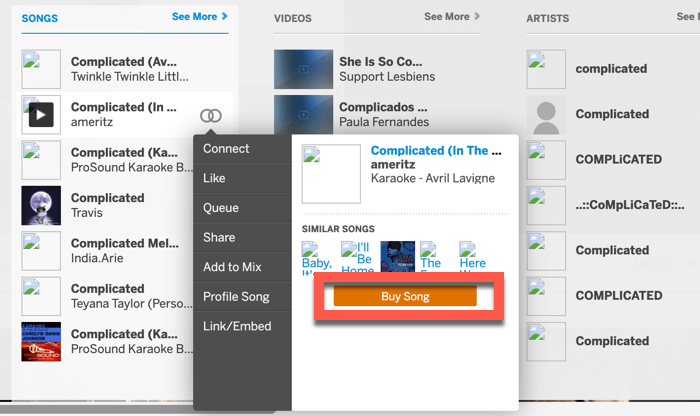
- Step 4: Click Buy Song, complete the payment process, and then your song will be available for download. You can now save it to your device in high quality and enjoy it offline.

Part 3. Best Myspace Music Downloader on PC You Should Try
If you want a reliable way to download songs from MySpace directly to your PC, FliFlik UltConv Video Downloader is a top choice. It’s not just limited to MySpace; it supports downloads from over 10,000 websites, including music platforms, video sites, and streaming services. With UltConv Video Downloader, you can save music in MP3 or other popular formats without losing quality.
It’s batch download capability makes it perfect if you want to grab multiple songs at once. The tool is fast, user-friendly, and keeps metadata intact, making it easy to organize your music library. Whether you’re a casual listener or a collector, UltConv Video Downloader ensures your favorite MySpace tracks are available offline whenever you need them.

- Download songs from MySpace and 10,000+ sites
- Convert music to MP3, WAV, AAC, FLAC, and 100+ formats
- Preserve metadata like artist, album, and cover art
- Batch download multiple songs, playlists, or albums at once
- High-speed downloads with original quality maintained
▼ How to Download Music from MySpace Using UltConv Video Downloader?
-
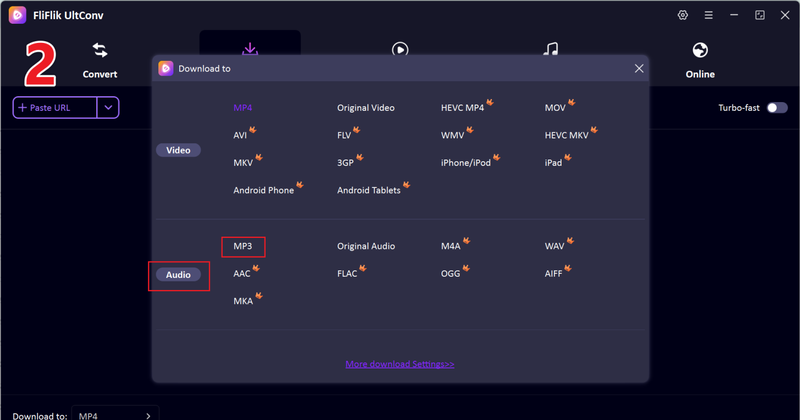
Download and install FliFlik UltConv Video Downloader on your PC. Once installed, open the program and go to the Download tab. Click the “Download to” button to set the destination folder for your songs.
FREE DOWNLOAD![secure download]() Secure Download
FREE DOWNLOAD
Secure Download
FREE DOWNLOAD![secure download]() Secure Download
Secure Download

-
Choose your preferred format for the music, such as MP3 or any other supported audio format.
-
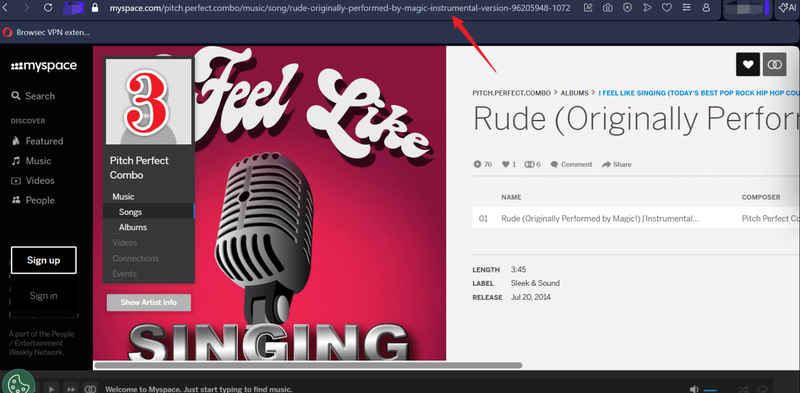
Go to MySpace and copy the URL of the song you want to download.
-
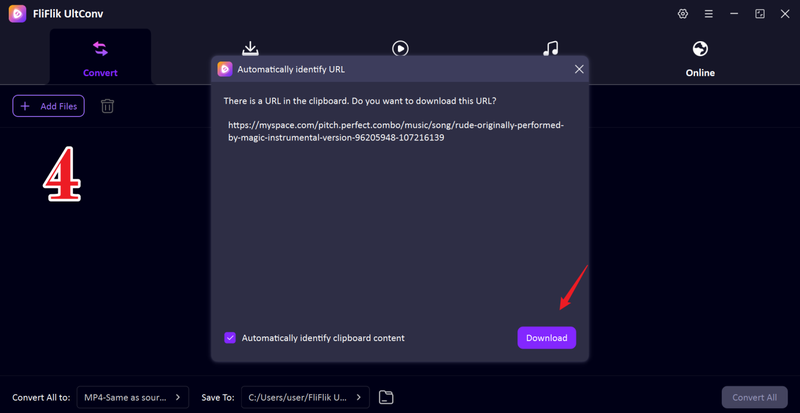
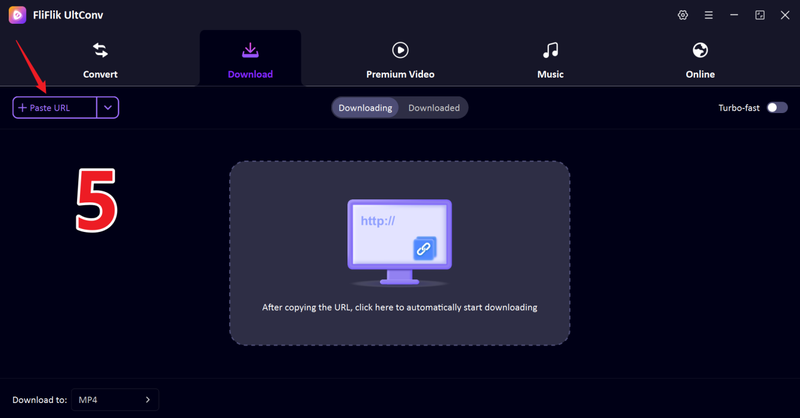
Return to UltConv. If the program detects the link automatically, a pop-up will appear click Download to start saving the song.
-
If the pop-up doesn’t appear, paste the MySpace song URL manually into the search box and click Download.
-
The download will begin. Once it finishes, your video is saved directly to your computer, ready to watch offline anytime.


FAQs
Q1. What is MySpace Website?
MySpace is a social networking platform that became especially popular for music sharing. Artists, bands, and content creators use it to upload tracks, share playlists, and connect with fans. While it’s no longer as dominant as in its heyday, it still hosts a rich library of music that can be accessed and enjoyed online.
Q2. How can I convert MySpace to MP3 for free?
You can convert MySpace songs to MP3 using free online tools like Mp3Juice, PasteDownload, or GrabThatFile. Simply copy the song URL, paste it into the downloader, choose MP3 as the format, and download. For more reliable and high-quality downloads, a desktop tool like FliFlik UltConv Video Downloader is recommended.
Conclusion
Download MySpace music is easier than it seems, whether you use free online tools or make official purchases. Free downloaders like Mp3Juice, PasteDownload, and GrabThatFile are convenient but can be limited by ads, slower speeds, or lower audio quality.
For a more reliable and seamless experience, FliFlik UltConv Video Downloader lets you quickly save MySpace songs in MP3 or other formats, supports batch downloads, and keeps the original audio quality intact. With UltConv, you can enjoy your favorite tracks offline anytime, on any device, without interruptions or DRM restrictions. It’s a simple, efficient way to ensure you never miss the music you love.
 Secure Download
Secure Download
Secure Download
Hello, I research and introduce useful solutions for AI videos, images, and audio tips in our daily life. If you learn these things, you can easily deal with the problems of the new era.

