

 By
By  7 minutes read


Scrolling through Pixiv can feel a bit addictive. You open it for a quick look, and suddenly you’re deep into illustrations, animations, and those oddly satisfying looping GIFs artists put so much effort into. It’s not just a gallery, it’s more like a space where creators share everything from rough sketches to polished digital art.
But if you find something you really like and then realize saving it isn’t always straightforward. Especially when it comes to animated works like Ugoira or short videos. In this article, we will share why you actually need a Pixiv downloader, how to download images, GIFs, Ugoira, and videos step by step, and which tools make the whole process easier.

Part 1. Why Do You Need a Pixiv Downloader?
Spending time on Pixiv is easy. Saving what you like is not always easy. You might find an illustration you really want to keep, or an animation you’d like to watch later, but the platform doesn’t always make downloading simple, especially for certain formats.
Instead of trying to figure out workarounds every time, a Pixiv downloader let you save content directly. Images, animations, sometimes even videos. It just makes things smoother. Now, here’s where it gets a bit confusing for many people.
What are Pixiv GIFs and Ugoira?
On Pixiv, not all animations are regular GIFs. A lot of them are actually called Ugoira. At first glance, they look like GIFs, short looping animations, often very detailed. But technically, they’re different. Ugoira files are made from a sequence of images combined with timing data. That’s why they often look sharper and smoother than typical GIFs. The catch is, you can’t just right-click and save them like a normal image. They need to be processed or converted first.
Part 2. How to Download Pixiv GIFs, Ugoira & Videos?
1. PasteDownload

If you’re looking for something quick and low effort, this is usually the first kind of tool people try. PasteDownload works entirely in your browser, so there’s nothing to install or set up. You just copy the Pixiv link, paste it into the site, and wait a few seconds while it processes the content. What makes it useful is how straightforward it feels. No extra buttons, no complicated settings. It can handle videos and some animated content, and for many users, that’s enough.
2. Pixiv Toolkit Next

Now, if you find yourself browsing Pixiv more often, switching back and forth between tabs can get annoying pretty fast. That’s where Pixiv Toolkit Next feels different. It integrates directly into the Pixiv website, which changes the whole experience. After installing the extension, download options appear right alongside the artwork or animation. No need to copy links or open another site. You just click and save. For Ugoira especially, this kind of tool saves a lot of time.
3. Downloader for Pixiv

Things get a bit different on mobile. Browsers and extensions don’t always translate well there, which is why a dedicated app like Downloader for Pixiv becomes useful. It’s built specifically for Android users who want to save images, GIF-like animations, and Ugoira files directly to their phones. The app gives you more control compared to simple web tools. You can manage downloads, choose formats, and keep everything organized on your device.
Part 3. All-in-one Pixiv Video Downloader for Windows and Mac
At some point, basic tools start to feel basic. They work for a quick download, sure. But the moment you want better quality, more formats, or just faster downloads, things get a little frustrating.
FliFlik UltConv Video Downloader is not just about downloading a single Pixiv video. It’s about how much control you actually get. The software supports 10,000+ websites, so you’re not limited to one platform. You can choose from 100+ formats, such as MP4 for video, MP3 for audio, or other formats depending on what you need.
The most underrated part is that it handles batch downloads. Instead of downloading one file at a time, you can queue multiple videos and let them process together. It saves time, especially if you’re collecting content regularly.

- Download from 10,000+ websites including video and streaming platforms
- Save files in 100+ formats like MP4, MP3, WAV, and more
- Batch download multiple videos or audio files at once
- Download videos in HD quality up to 4K
- Convert video to audio with no noticeable quality loss
▼ Steps to Download Pixiv Videos with FliFlik UltConv
-
Open FliFlik UltConv Video Downloader and go to the Download section. At the bottom, click the Download to button to select the format you want.
FREE DOWNLOAD![secure download]() Secure Download
FREE DOWNLOAD
Secure Download
FREE DOWNLOAD![secure download]() Secure Download
Secure Download

-
Choose your preferred output format before starting. Most people go with MP4 since it works smoothly on phones, laptops, and tablets.

-
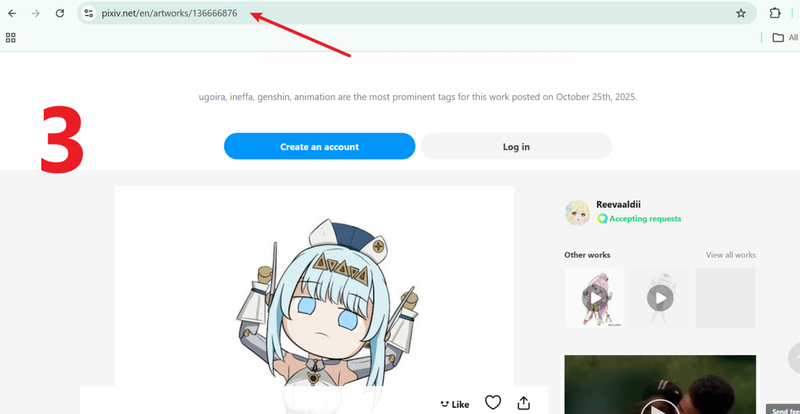
Open Pixiv, find the video or animation you want to download, and copy the link from the browser address bar.
-
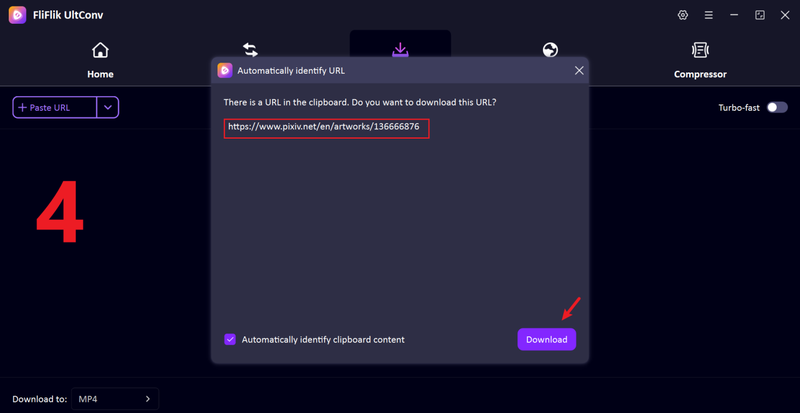
Go back to UltConv. If the link is detected automatically, just click Download. If not, paste the link into the search box and start the process manually.
-
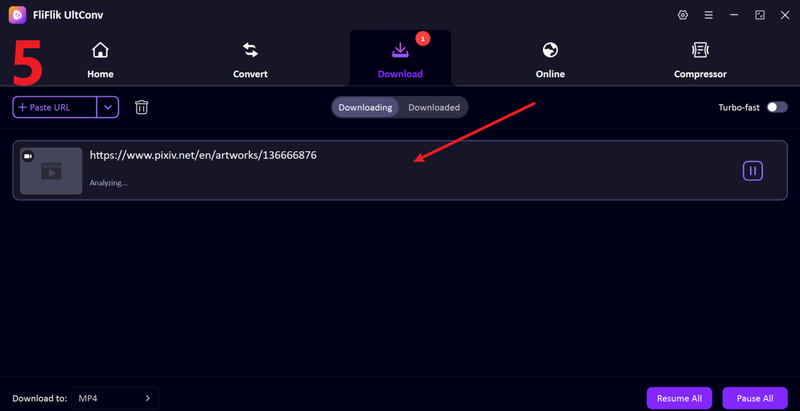
Once the download is complete, the Pixiv video will be saved on your device. You can open it anytime and watch it offline without any interruptions.


FAQs
Q1. Is it legal to use the Pixiv downloader?
On Pixiv, downloading for personal use is usually fine, like saving art for offline viewing. But reposting or using someone’s work without permission can break copyright rules. Keep it personal and you’re generally safe.
Q2. What image qualities and formats does Pixiv offer?
Pixiv mainly offers high-resolution images in formats like JPEG and PNG. It also has Ugoira, which is a frame-based animation that behaves like a GIF but often needs conversion to GIF or MP4 for easy playback.
Q3. What is the best Pixiv GIF downloader online?
If you want more control, better quality, and support for videos or multiple files, a desktop option like FliFlik UltConv Video Downloader usually does a better job.
Conclusion
When dealing with Pixiv’s unique Ugoira or video files, using a professional desktop tool like FliFlik UltConv Video Downloader is essential because it automates the complex process of stitching individual image frames into high-quality MP4 or GIF formats. Unlike basic browser extensions that often sacrifice resolution or stability, a dedicated downloader offers superior control over metadata, batch processing, and file organization, ensuring that you preserve the artist’s original vision with maximum clarity and efficiency.
 Secure Download
Secure Download
Secure Download
